1
STEPS User Manual
1 Introduction
The STEPS is a program for frequency response measurement using a heterodyned stepped-sine
technique. Compared to the Fourier analyzer, that uses a random noise excitation, this technique gives
a larger dynamic range (at least 30dB), but measurements are much slower. This program is also
useful for measuring harmonic distortions as it estimates the linear part of the system response and the
magnitude of distorted sine harmonics.
1.1 Requirements
Minimum requirements to use the STEPS are:
o
o
o
o
Operating systems: Windows XP / Vista / 7 / 8
Processor class Pentium, clock frequency 600 MHz or higher, memory 256M for Windows
2000/XP or 2MB for Vista/Windows 7
Full duplex soundcard with synchronous clock for AD and DA converters
WDM or ASIO soundcard driver (ASIO is trademark and software of Steinberg Media
Technologies GmbH).
The Installation of this software is easy; use ARTA installation program or just copy the
program "steps.exe" and the help file "steps.chm" in some folder and make a shortcut to it. All registry
data will be automatically saved at the first program execution.
Files with extension ".HSW" are registered to be opened with the program STEPS. They contain the
frequency response data. Results of measurements can also be saved as textual - ASCII formatted
files.
The STEPS does not output graphs to the printer, instead all graphs can be copied to the Windows
Clipboard and pasted to other Windows applications.
1.2 Measurement Hardware Setup
In this document, we refer to following measurement setups:
1. Dual channel measurement setup
2. Single channel measurement setup
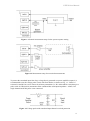
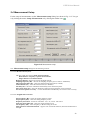
The general measurement setup for the system testing is shown in Fig. 1.1. The soundcard left lineoutput channel is used as a signal generator output. The left line-input is used to measure a D.U.T.
output voltage and the right line-input is used to measure a D.U.T. input voltage. In a single channel
setup, only a D.U.T. output voltage is recorded. The setup for acoustical measurements is shown in
Fig. 1.2.
3