1
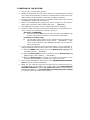
10. To avoid draining the vehicle’s battery unnecessarily when the DAB2000 is
idle, after 4 hours from the user’s last action, the DAB2000 will
automatically switch off. To switch the DAB2000 back on, press the Rotary
Knob to return DAB2000 back to the operating mode.
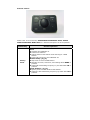
USING REMOTE CONTROL KEYS
To switch DAB2000 On or Off
The DAB2000 can be switched on or off by doing the following:
1.
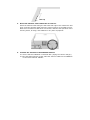
Press and hold the Rotary Knob, while the D AB2000 is operating, to
switch it off.
2.
Press the Rotary Knob, while the DAB2000 i s off, to return it to the
operating mode.
To listen to DAB stations
There are two options available for you to select and listen to a DAB station:
Quick Tune and Step Tune. Step Tune is used when you want to step
through the list of available DAB stations one by one and in alphabetical order.
Quick Tune allows you to move more quickly through the list of stations by
advancing to the fi rst station in the previous/next alphabet character of the
station list. Once you have reached the desired initial alphabet character, you
can then use Step Tune to refine your selection of the desired DAB station.
Step Tune
1.
Turn the Rotary Knob [◄] [►] to step through the stations, one by one,
until the screen shows the desired station: 《 station name 》.
2.
Press the Rotary Knob to confirm your selection. After 3 seconds, the
DAB2000 will tune to the station you selected if the rotary knob is not
pressed. The screen will show 《 TUNING 》. Once tuning is complete, the
screen will show 《 station name 》 where station name is the new DAB
station name selected.
Quick Tune
1.
Turn the Rotary Knob [◄] [►] quickly to tune to the first DAB station in
the previous/next letter of the alphabet. Repeat the action, until the
screen shows the DAB station with the desired initial letter of the
alphabet.
2.
Then use the Step Tune feature to step through the DAB stations, one by
one, until the screen shows the desired DAB station: 《 station name 》.
3.
Press the Rotary Knob to confirm your selection. After 3 seconds, the