1
MENU SETTINGS
To reset the FM transmitting frequency setting
This function allows you to reset the FM transmitting frequency to the default
setting of 87.6MHz.
1.
2.
Reset DAB2000’s FM transmitting frequency by either way described
below:
a.
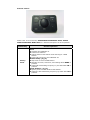
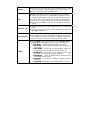
Press the MENU button, and the screen will display 《 87.6MHz 》
and then press the Rotary Knob to reset the FM transmitting
frequency to 87.6MHz
b.
Press and hold the Last Station button twice to reset the FM
transmitting frequency to 87.6MHz
Press the FM preset of your vehicles radio to the frequency 87.6MHz if you
have previously saved this frequency for DAB reception. Otherwise, tune
the vehicles radio to the FM frequency 87.6MHz manually.
To set FM transmitting frequency setting to preset F1
This function allows you to set the FM transmitting frequency to the frequency
saved in FM frequency pr eset 1 (F1). DAB2000 will change the transmitting
frequency immediately.
1.
Press and hold the Last Station button to set the FM transmitting
frequency to the frequency saved in FM preset 1 (F1).
2.
To return to the default FM transmitting frequency, within 30 seconds
after step 1, press and hold the Last Station button again to return to
87.6 MHz.
To scan for available DAB stations
This function searches for all available DAB stations in Band III from channel
frequency 5A to channel frequency 13F that are available in the area where
your vehicle is presently located. DAB stations found as a result of the search
are added to the station list in alphabetical order.
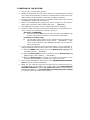
1.
To select full scan, and start scanning for available DAB stations
1.1 Press the MENU button and then turn the Rotary Knob [◄] [►]
until the screen shows: 《 FULLSCAN 》 then press the Rotary Knob
to begin scanning for DAB stations in the channel range.
1.2 Alternatively, you can press and hold the MODE button to do a full
scan of DAB stations.