1
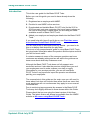
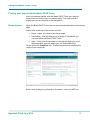
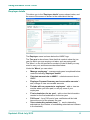
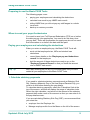
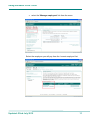
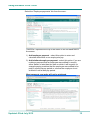
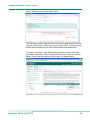
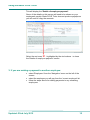
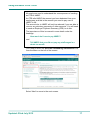
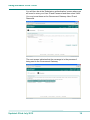
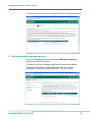
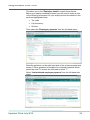
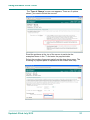
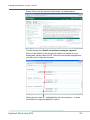
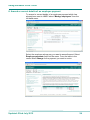
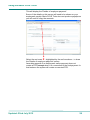
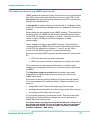
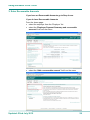
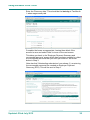
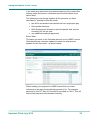
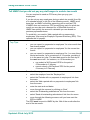
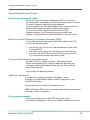
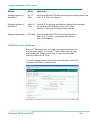
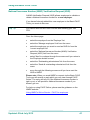
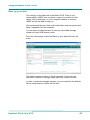
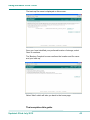
Using the Basic PAYE Tools Basic PAYE Tools User Guide All users: Using Basic PAYE Tools Includes how to correct submissions in the current tax year. You can use this guide from 6th April 2015 Updated: 22nd July 2015 1 Using the Basic PAYE Tools Contents Introduction…………………………………………………………………….…... 4 Finding your way round the Basic PAYE Tools ………………….………....…. 5 Home screen …………………………………………………………………. 5 Employer details ….……………………………………………..………..….. 6 Employee details …………………………………………………….……..…7 Preparing to use the Basic PAYE Tools……………………………..……….…. 9 When to send your payroll submission….…………………………………..……9 Paying your employees and calculating the deductions………………………..9 1. Calculate statutory payments …………………………...........................9 2. Add employee payment ………………………………………………….10 3. If you are making a payment to another employee ………….………. 15 4. Send the payroll information to HMRC………………………………….16 5. Add a mistimed employee payment.. …………………………………..19 6. Amend or correct employee payment.. …………………………..…... 24 Calculate how much to pay HMRC each month………………………..…..… 27 1. At the end of the tax month ………………………………………..…… 28 2. Calculate Recoverable Amounts for the tax month.……………..…....28 3. Enter Recoverable Amounts …………………………….………….….. 29 4. Calculate amount due to HMRC……………………………………..…. 31 5. View Employer Payment Record…………………………………….…. 33 6. Send the EPS to HMRC……………………………………………..….. 34 What happens if I send an EPS after the 19th of the month?....................... 35 Amending or Correcting Recoverable Amounts…….…………………….….. 36 Tell HMRC that you did not pay any staff wages in a whole tax month….….37 Annual reporting and tasks .. ...………………………………………….. ….….38 P60 End of Year Certificate.. ...………………………………………….. ….….39 National Insurance number (NINO) Verification Request (NVR)………….….41 Back-up your data…………………………………………………………….…...42 Updated: 22nd July 2015 2 Using the Basic PAYE Tools Although we have tried to remove jargon from this User Guide, all employers will need to know and understand the new expressions that go with real time information. Full Payment Summary (FPS) You report your payroll information by sending Full Payment Submissions. An FPS tells HM Revenue & Customs (HMRC) the amount of tax and National Insurance contributions (NICs) that you have deducted from your employees' pay. This is the amount HMRC will expect you to pay in full on the normal monthly due date. Employer Payment Summary (EPS) If no payments to employees are made within a pay period, or you want to recover statutory payments, Construction Industry Scheme (CIS) deductions suffered or claim Employment Allowance, you must send an EPS. NINO Verification Request (NVR) If you want to check that the National Insurance number (NINO) provided by your employee is correct, or find out what your employee's is, you can send an NVR. Earlier Year Update (EYU) You can change the details of an employees' pay and deductions for a tax year which has ended, where the pay and deductions were originally reported in real time. Updated: 22nd July 2015 3 Using the Basic PAYE Tools Introduction This is the user guide for the Basic PAYE Tools. Before you use this guide you need to have already done the following: 1. Registered as an employer with HMRC. 2. Enrolled to use HMRC online services. 3. Downloaded and installed Basic PAYE Tools (for the 2015 to 2016 tax year) onto your computer (the home page is shown on the front of this guide). Please check you are using the latest available version of Basic PAYE Tools. 4. Added your employer and employee details into the Basic PAYE Tools. If you need help with items 3 and 4 above, see First time users: download and install Basic PAYE Tools. You are now ready to add employees pay details - you need to do this on or before each date that you pay them. This is not a fully comprehensive guide to using Basic PAYE Tools, but gives basic information about the product and the topics we think you will find most useful. It contains answers to some of the common questions we know customers are already asking and we will add to the guide as we know more about what help customers need. Although the Basic PAYE Tools does not fully support auto enrolment and won’t calculate the pension contributions you and your employees need to make, assess your staff or supply information to your pension provider; you can still use Basic PAYE Tools to run payroll and report the pension contributions paid by your employees. The screenshots in this guide are the main ones you will need to know about, but does not include them all as there are some that most employers will not use because they apply to more unusual circumstances. Due to continuing improvements the screens in the Basic PAYE Tools may look slightly different to those shown within this Guide. Please check that you are using the latest version of this User Guide. The latest version will always be available from the HMRC website at All users: using Basic PAYE Tools . Updated: 22nd July 2015 4 Using the Basic PAYE Tools Finding your way round the Basic PAYE Tools Until you become familiar with the Basic PAYE Tools you may not know where to click to carry out certain tasks. The next couple of pages give you an overview of the navigation. Home screen Open the Basic PAYE Tools and you are automatically taken to the home page. Useful links at the top of the screen include: Home - takes you back to the Home page Calculators - this will take you to a range of calculators you can use within the Basic PAYE Tools Help - if this User Guide does not provide the help you need, there are other sources where you can find further help On the left is the 'Employer' list. This list includes a link showing the name of your employer. Select your employer by clicking on the name - here it is ABC Ltd. Updated: 22nd July 2015 5 Using the Basic PAYE Tools Employer details This takes you to the 'Employer details' screen shown below, and the name of the screen is shown in the white tab at the top. The Employer name is shown below the HMRC logo. The Tax year is also shown. Note that this needs to show the tax year for which you are carrying out tasks, such as paying staff. The 'Menu' on the left contains a number of links to tasks you may need to carry out, and these are described below. Under the 'Menu' you can select: 'Manage employees' - manage employees is explained below under the heading 'Employee details' 'Calculate amount due to HMRC’ - calculate amount due to HMRC 'Employer Payment Summary and recoverable amounts' add, change or view recoverable amounts 'Periods with no payments to employees' - add or view tax months where you have paid, or will pay none of your employees 'Final submission for tax year' - add or view the information needed on the final submission for the tax year 'P60 forms' - form P60 end-of-year certificates will be held here at the end of the relevant tax year 'View outstanding submissions ( )’ - send outstanding submissions (the number of outstanding submissions is shown in the brackets) Updated: 22nd July 2015 6 Using the Basic PAYE Tools 'View on hold submissions ( )’ – submissions that have been sent but a success or fail message has not yet been received from HMRC 'View successful submissions' - view successful submissions 'View failed submissions' - view failed submissions 'View expired submissions’ - submissions that have been sent but a success or fail message could not be obtained from HMRC 'PAYE scheme ceased' - add or view the date this PAYE scheme ceased 'Record of funding' - add or view any funding received from HMRC ‘Employer forms’ - forms that an employer may need to complete You can also change employer details by selecting 'Change employer details' from bottom right of the screen Employee details From the 'Employer details' screen select 'Manage employees' from the top left of the screen. This takes you to the 'Manage employees' screen shown below. The 'Menu' on the left contains links to tasks you may need to carry out. The table in the centre of the screen lists all of your current employees. Click on the employee name - Mr John Taylor. Updated: 22nd July 2015 7 Using the Basic PAYE Tools This takes you to the 'Employee details' screen shown below. The 'Menu' on the left contains a number of links to tasks you may need to carry out, and these are described below. Under the 'Menu' you can select: 'Employee payments' - add, change or view details of an employee's pay 'Statutory Sick Pay record (SSP2)' - add or view details of an employee's sickness and Statutory Sick Pay (SSP) 'Employee year to date summary' - view how much the employee has been paid to date along with the deductions 'Tax code change' - you can change/update your employee’s tax code 'Earlier Year Update' - you can change the details of an employees' pay and deductions for a tax year which has ended 'National Insurance Number Verification Request (NVR)' validate or trace a National Insurance number for an employee 'Leaver summary' enter leaving details for an employee or view details of an employee who has left 'Employee submission history' - view any submissions which have successfully been sent to HMRC 'Employee forms' - forms that an employer may need to complete which relate to this employee You can also change employee details by selecting 'Change employee details' from bottom right of the screen. Updated: 22nd July 2015 8 Using the Basic PAYE Tools Preparing to use the Basic PAYE Tools The following pages cover: paying your employees and calculating the deductions calculate how much to pay HMRC each month telling HMRC that you did not pay any staff wages in a whole tax month back-up or restore your data When to send your payroll submission You need to send your Full Payment Submission (FPS) on or before the date you pay your employees. You need to do this every time you pay staff. There will be penalties for employers who do not send their information on or before the date staff are paid. Paying your employees and calculating the deductions When you enter an employee's pay, the Basic PAYE Tools will: Top Tip work out that employee's tax, NICs and student loan deductions record these details on the 'Employee pay and deductions record' for that employee hold the amount of these deductions ready to go on the 'Employer Payment Record' so that you know the amount due to HMRC each month Don't start entering pay for any of your employees until you have added all your employees to the Basic PAYE Tools. 1. Calculate statutory payments If you need to calculate statutory payments such as Statutory Sick Pay, Statutory Maternity Pay or the new Shared Parental Pay, you must to do this before entering the pay details. To calculate statutory payments, select the 'Calculators' link at the top of the screen, and this will display the range of calculator tools. Select the right calculator, and work out the amount of the statutory payment then make a note of the amount so that you can enter it on the pay details screen. If you are calculating Statutory Sick Pay (SSP), we recommend that you select the: employer from the Employer list Manage employees link from the Menu on the left of the screen Updated: 22nd July 2015 9 Using the Basic PAYE Tools name of the employee from the table in the centre of the screen Statutory Sick Pay record (SSP2) link from the Menu on the left of the screen, and follow the instructions on screen Additionally you need to keep a separate note of the amounts of statutory payments you pay to employees as you will need this information at the end of the tax month so you can calculate how much of it you can recover. There are calculators that will help you too - see 'Calculate how much to pay HMRC each month'. 2. Add employee payment To enter an employee's pay you need to, from the homepage: select the employer from the Employer list Check that you have the correct tax year selected. For example if you are paying wages in the 2015 to 2016 tax year then make sure you select the 2015 to 2016 tax year - as shown on next page. Updated: 22nd July 2015 10 Using the Basic PAYE Tools select the 'Manage employees' link from the menu Select the employee you will pay from the 'current employee' list. Updated: 22nd July 2015 11 Using the Basic PAYE Tools Select the 'Employee payments' link from the menu. There are 2 options at the top of the menu on the left hand side of the screen. 1) Add employee payment - select this option to enter and calculate deductions on an employee’s pay. 2) Add mistimed employee payment - select this option if you are making a payment that an employee was entitled to receive either earlier or later than the date on which it will be paid, for example paying overtime that the employee was entitled to be paid in a previous pay period or a bonus the employee is not entitled to until a later pay period. Most payments you make will not be mistimed. Updated: 22nd July 2015 12 Using the Basic PAYE Tools To enter an employee’s pay select the ‘Add employee payment’ link from the menu. Read the guidance at the top of the screen and enter the pay details. Select 'Next' to move to the next screen. As part of completing your real time information return, you will need to input pension contribution amounts for the employee (where applicable) into Basic PAYE Tools. When you set up your pension scheme you will have agreed with your provider; the percentage of earnings that will be paid by the employer and employee which earnings will be used to calculate pension contributions (the ‘pensionable earnings’), for example ‘qualifying earnings’, ‘basic pay’, or ‘all pay’ when pension contributions are to be paid (the ‘due date’) You should ask your pension provider how much your contributions should be and when you should pay them. You can then input this information into the Basic PAYE Tools. You will need to know whether contributions should be paid from gross pay (commonly known as a ‘net pay arrangement’) or net pay (commonly known as ‘relief at source’ arrangement). Make sure you check this and input the corresponding gross or net pension contributions into the tool. At the bottom of the page there is an option to explain, if a submission is late, the reason why. If your submission is late it is your opportunity to explain the reason to HMRC. It will be considered before penalties are charged to your account if appropriate. Updated: 22nd July 2015 13 Using the Basic PAYE Tools Select 'Next' to move to the next screen. The following screen displays the amounts you have entered so that you can check them. If they are correct, select 'Next' to save the pay details and calculate the tax, NICs and student loan deductions. This takes you back to the 'Employee payments' screen which has now been updated to reflect the payment that you have just entered. Select 'View' from the centre of the screen - as shown below. Updated: 22nd July 2015 14 Using the Basic PAYE Tools This will display the 'Details of employee payment'. Some of the details on this screen will need to be shown on your employee's payslip. Basic PAYE Tools does not produce payslips so you will need to copy the amounts. Select the red cross 'X' - highlighted by the circle above - to close the 'Details of employee payment' screen. 3. If you are making a payment to another employee: select 'Employees' from the 'Navigation' menu on the left of the screen select the employee you will pay from the 'current employee' list follow the steps above for making payments to any remaining employees Updated: 22nd July 2015 15 Using the Basic PAYE Tools 4. Send the payroll information to HMRC Once the last employee has been paid, you are now ready to send your pay details to HMRC for this pay period. You must send this information to HMRC on or before the day you pay your employees. Click on the 'Outstanding submissions' link from the menu. You will see all the employees that you are paying in this pay period. These submissions are called Full Payment Submissions (FPS). You can see that the unsubmitted information here is the FPS. There are 3 other types of submissions: o Employer Payment Summary (EPS) o NINo Verification Request (NVR) o Earlier Year Update (EYU) Updated: 22nd July 2015 16 Using the Basic PAYE Tools All employers need to understand the consequences of sending an FPS to HMRC. An FPS tells HMRC the amount you have deducted from your employees, and this is the amount you need to pay over to HMRC in full. The amount due to HMRC will only be reduced if you are able to recover any statutory payments or other amounts. You will need to send an Employer Payment Summary (EPS) to do this. The importance of this is covered in more detail under the headings How much do I have to pay HMRC? and Tell HMRC that you did not pay any staff wages in a whole tax month You need to select the 'Send all outstanding submissions' link from the Menu on the left of the screen. Select 'Next' to move to the next screen. Updated: 22nd July 2015 17 Using the Basic PAYE Tools You will then be at the 'Submission authentication' screen where you will need to enter your User ID and Password and then select 'Next'. You may know these as the Government Gateway User ID and Password. The next screen indicates that the message is in the process of being sent to the Government Gateway. Updated: 22nd July 2015 18 Using the Basic PAYE Tools You should then receive the following submission success message. 5. Add a mistimed employee payment From the 'Employer details' screen select 'Manage employees' from the top left of the screen. This takes you to the 'Manage employees' screen shown below. The table in the centre of the screen lists all of your current employees. Click on the employee name - Mr John Taylor. Updated: 22nd July 2015 19 Using the Basic PAYE Tools This takes you to the 'Employee details' screen shown below. Before you make a mistimed payment you will need to make a note of the following information for your employee from the details in the sections highlighted below: Tax code Pay frequency NI letter Then select the 'Employee payments' from the left hand menu. Read the guidance on the right hand side of the employee payments screen. Further guidance is available for mistimed payments which should be read. To access the information select '?'. Select 'Add mistimed employee payment' from the left hand side menu. Updated: 22nd July 2015 20 Using the Basic PAYE Tools The 'Type of Change' screen now appears. There are 3 options shown, you need to select the second. Read the guidance at the top of the screen in particular the examples shown in the '?' and enter the payment date. Select the number of payment parts from the drop down menu. The meaning of payment parts is explained in the screen level help. Updated: 22nd July 2015 21 Using the Basic PAYE Tools Enter the details of the payment. Only select the tick boxes when you are getting money back from your employee for example an overpayment of wages/overtime. If so, tick both boxes. At the bottom of the page there is an option to explain, if a submission is late, the reason why. If your submission is late it is your opportunity to explain the reason to HMRC. It will be considered before penalties are charged to your account if appropriate. Select 'Next' to move to the next screen. The following screen displays the amounts you have entered so that you can check them. If they are correct, select 'Next' to save the pay details and calculate the tax, NICs and student loan deductions. This takes you back to the 'Employee payments' screen which has now been updated to reflect the payment that you have just entered. Updated: 22nd July 2015 22 Using the Basic PAYE Tools Select 'View' from the centre of the screen - as shown below. This will display the 'Details of mistimed employee payment'. Some of the details on this screen will need to be shown on your employee's payslip. Basic PAYE Tools does not produce payslips so you will need to copy the amounts. Select the red cross X - highlighted by the red box above - to close the 'Details of employee payment' screen. Updated: 22nd July 2015 23 Using the Basic PAYE Tools 6. Amend or correct details of an employee payment To amend or correct details of an employee payment which has already been sent to HMRC select 'Manage employees' from the left hand menu. Select the employee whose pay you want to amend/correct. Select Employee payments link from the menu. From the table in the centre select change for the payment you want to revise. Updated: 22nd July 2015 24 Using the Basic PAYE Tools The 'Type of change' screen now appears. There are 3 options shown and you need to select the first option. Select 'Next' to move to the next screen. Read the guidance at the top of the screen and enter the amended details. Select 'Next' to move to the next screen. The following screen displays the amounts you have entered so that you can check them. If they are correct, select 'Next' to save the pay details and calculate the tax, NICs and student loan deductions. This takes you back to the 'Employee payments' screen which has now been updated to reflect the payment that you have just entered. Identify the date of the payment you changed. Select 'View' from the centre of the screen - as shown below. Updated: 22nd July 2015 25 Using the Basic PAYE Tools This will display the 'Details of employee payment'. Some of the details on this screen will need to be shown on your employee's payslip. Basic PAYE Tools does not produce payslips so you will need to copy the amounts. Select the red cross X - highlighted by the red box above - to close the 'Details of employee payment' screen. Amending aspects of an employee’s earlier payment does not create an FPS except when it is a correction to the final payment. In that instance the system will create a corrected FPS. Updated: 22nd July 2015 26 Using the Basic PAYE Tools Calculate how much to pay HMRC each month HMRC expects an employer to pay the full amount of the deductions (tax, NICs and student loan deductions) shown on the FPS for the 'tax month' less any adjustments claimed on the EPS including any Employment Allowance due. A 'tax month' is a period that runs from the 6th of 1 calendar month to the 5th of the following calendar month, for example 6 February to 5 March. Most employers are required to pay HMRC monthly. This means the employer must pay HMRC the full amount of the deductions shown on the FPS, for example, for Month 1 (6 April - 5 May) by the 19th of month 2, that is 19 May (or the 22nd if payment is made electronically). Some employers qualify to pay HMRC quarterly. This means the employer must pay HMRC the full amount of the deductions shown on the FPS (for example) for Months 1, 2 and 3, by the 19th of month 4 (or the 22nd if payment is made electronically). Employers who pay HMRC quarterly are still required to either send an: FPS each time they pay their employees EPS if no payment made to employees in a whole tax month The requirement to report payroll data each on or before each payday does not change how often you need to pay the deductions to HMRC. The Employer payment record takes information from each employee's pay details and shows how much you need to pay HMRC each month. At the start of the tax year the Employer Payment Record is blank. You must complete it for each tax month. It does not matter if you were not: using Basic PAYE Tools at the beginning of the tax year sending payroll information in real time at the start of the tax year an employer at the start of the tax year You must still complete it for each tax month. This will ensure that the 'Employer Payment Record' shows the correct amount and HMRC have the same figures. You must create an entry for every tax month even if there is no pay during that period. So, for an employer with no employees being paid until month 3 of the tax year, you must create NIL entries for Months 1 and 2 first. Updated: 22nd July 2015 27 Using the Basic PAYE Tools 1. At the end of the tax month Tax month 1 covers the period from 6 April to 5 May. After you have paid the last staff wages for tax month 1, but before 19 May you need to follow the following steps. 2. Calculate Recoverable Amounts for the tax month What are Recoverable Amounts? You may be able to reduce the amount payable to HMRC in respect of: Statutory Maternity Pay (SMP) recovered, and there may be compensation due Statutory Adoption Pay (SAP) recovered, and there may be compensation due Ordinary Statutory Paternity Pay (OSPP) recovered, and there may be compensation due Additional Statutory Paternity Pay (ASPP) recovered, and there may be compensation due Shared Parental Pay (ShPP) recovered, and there may be compensation due Please note: For babies due or children matched or placed for adoption on or after 5 April 2015, a new entitlement of Shared Parental Pay and Leave (ShPP/SPL) will replace Additional Statutory Paternity Pay and Leave (ASPP/APL). Further guidance can be found at GOV.UK. Other Recoverable Amounts: Construction Industry Scheme (CIS) deductions taken from your payments as a subcontractor if your business is a limited company How much is recoverable? If you paid any SMP, SAP, OSPP, ASPP and/or ShPP to staff during the tax month, you must use the appropriate calculator(s) to work out how much of that statutory payment you can recover, and the amount of any compensation. Make a note of the amount(s). All the calculators in Basic PAYE Tools are accessed using the 'Calculators' link at the top of the screen. Updated: 22nd July 2015 28 Using the Basic PAYE Tools 3. Enter Recoverable Amounts If you have no Recoverable Amounts go to Step 4 now. If you do have Recoverable Amounts From the home page: select the employer from the 'Employer' list select the 'Employer Payment Summary and recoverable amounts' link from the menu select the 'Add a recoverable amount' link from the menu Updated: 22nd July 2015 29 Using the Basic PAYE Tools Enter the 'Recovery date'. This should be the last day in Tax Month 1 when wages were paid. Complete the boxes as appropriate, leaving them blank if the amount is zero and select 'Next' to move to the next screen. This takes you back to the 'Employer Payment Summary and recoverable amounts' screen which has now been updated to reflect the recoverable amounts that you have just entered - as shown below in Step 3. Note also that 'Outstanding submissions' now shows (1) as entering the recoverable amounts has created an Employer Payment Summary (EPS). This will be sent in Step 6. Updated: 22nd July 2015 30 Using the Basic PAYE Tools 4. Calculate amount due to HMRC All users must follow this step for every tax month. Select the 'Calculate amount due to HMRC' link from the menu. On the 'Calculate amount due to HMRC' screen the table in the centre of the screen shows all of the tax months. Select 'Calculate' in the row for tax Month 1. Updated: 22nd July 2015 31 Using the Basic PAYE Tools If you made any deductions from subcontractors in the construction industry enter that amount, otherwise leave the fields blank, then select 'Next'. The following screen brings together all the amounts you have calculated or entered for this tax month: tax, NICs and student loan deductions from employees pay Recoverable Amounts NICs Employment Allowance used this period, and amount remaining for this tax year any additional employer payments Select 'Next'. This takes you back to the 'Calculate amount due to HMRC' screen. Note that this has now been updated to show the total amount payable for this tax month - as shown below. When making your payment to HMRC ensure that you make reference to the year and month the payment is for. For example payment for the 19th May 2015 would be recorded as 16/01. This will ensure that payments are allocated correctly. Updated: 22nd July 2015 32 Using the Basic PAYE Tools 5. View Employer Payment Record Select the 'View Employer Payment Record' link from the menu. The 'Employer Payment Record' has been populated at Month 1 with the information gathered in the steps above. The amount you need to pay is shown in the far right hand column. Select the red cross X to close the 'Employer Payment Record'. Updated: 22nd July 2015 33 Using the Basic PAYE Tools 6. Send the EPS If an EPS was created during Step 3 it is important that you send it without delay. Until you send the EPS you will not have claimed any relief for the recoverable amounts, so HMRC will expect you to pay the full amount of the deductions (tax, NICs and student loan deductions) shown on the FPS. This EPS must be sent to HMRC by 19th of the month after the end of the tax month. Select the 'Outstanding submissions' link from the menu. You will see there is an EPS to be sent. Select the 'Send all outstanding submissions' link from the menu. On the following screen, select 'Next'. You will then be at the 'Submission authentication' screen where you will need to enter your User ID and Password and then select 'Next'. You may know these as the Government Gateway User ID and Password. Updated: 22nd July 2015 34 Using the Basic PAYE Tools The next screen indicates that the message is in the process of being sent to the Government Gateway. You should then receive the following submission success message. Top Tip You must repeat all of these steps every tax month – after you have paid the last staff wages for that tax month. Don’t wait until the 19th of the next month. What happens if I send an EPS after the 19th of the month? The EPS will not be taken into account for that period and you will have to pay the full amount due from your FPS. When the EPS is received it will be taken into account against the next period. Updated: 22nd July 2015 35 Using the Basic PAYE Tools Amending or Correcting Recoverable Amounts If you make a mistake, for example in Month 1 you enter the wrong Recoverable Amount, you can 'Change' the amount. From the home page: select the employer from the 'Employer' list select the 'Employer Payment Summary and recoverable amounts' link from the menu from the table in the centre of the screen, select 'Change' for the tax month where you made a mistake amend the amounts and select 'Next' to move to the next screen this takes you back to the 'Employer Payment Summary and recoverable amounts' screen which has now been updated to reflect the recoverable amounts that you have just entered select the 'Outstanding submissions' link from the menu select the 'Send all outstanding submissions' link from the menu move through the following screens until you have sent the EPS to HMRC The Employer Payment Record will be updated automatically. Updated: 22nd July 2015 36 Using the Basic PAYE Tools Tell HMRC that you did not pay any staff wages in a whole tax month You are required to send an FPS every time you pay your employees. If you do not pay any employees during a whole tax month (from 6th of a calendar month to the 5th of the following month), HMRC won't know that, so HMRC will still be expecting you to send an FPS. If HMRC does not receive an FPS covering any part of a whole tax month you may be sent a demand for a 'Specified Amount' as HMRC can specify the amount it estimates you owe based on previous payments/returns. To avoid this, you need to 'Add a period with no payments to employees', then send an Employer Payment Summary (EPS). This replaces the 'nil payslip'. Top Tips: you can report 'no payments to employees' for a tax month that has already ended you can report 'no payments to employees' for the current tax month you can report 'no payments to employees' for 1 or more future whole tax months, up to a maximum of 12 months, providing it is in the same tax year. The start date must be the first day of the next tax month - for instance, on 15 November you: can submit a 'Nil Payment' EPS for the period 6 December to 5 January cannot submit a 'Nil Payment' EPS for the period 6 January to 5 February From the Home page: select the employer from the 'Employer' list select the 'Periods with no payments to employees' link from the menu select the 'Add a period with no payments to employees' link from the menu enter the start and end dates move through the screens by clicking on 'Next' select the 'Outstanding submissions' link from the menu select 'Send all outstanding submissions' link from the menu move through the following screens until you have sent the EPS to HMRC The EPS must be sent to HMRC by the 19th of the month after the end of the tax month. Updated: 22nd July 2015 37 Using the Basic PAYE Tools Annual Reporting and Tasks Send your final payroll report Send your final Full Payment Submission (FPS) on or before your employees’ last payday of the tax year (which ends on 5 April). You may be asked some end-of-year questions. If you’re sending your FPS after 6 March 2015, you won’t have to answer these unless your payroll software tells you to. If you run more than 1 payroll under the same PAYE scheme reference (eg for employees you pay weekly and monthly), include the end-of-year information in your last report. When to send an Employer Payment Summary (EPS) You should send your final report in an EPS instead of an FPS if any of the following apply: you forgot to put ‘Yes’ in the ‘Final submission for year’ field in your last FPS you didn’t pay anyone in the final pay period of the tax year you sent your final FPS early and you didn’t pay anyone for 1 or more full tax months in the last tax year If you are late sending your final report Send an FPS if it’s 19 April or before. Otherwise send an Earlier Year Update (EYU). Give the difference between your last report and the final figures for the tax year. Don’t give the year-to-date figures. You’ll usually be charged a penalty. ‘Week 53’ payments If you pay your employees weekly, fortnightly or every 4 weeks, you might need to make a ‘week 53’ payment in your final FPS of the year. The tool will work out ‘week 53’ payments for you. HMRC will send a P800 form to any employees who has overpaid tax following a ‘week 53’ payment. If you make a mistake If you find a mistake in your final FPS of the year, what you need to do depends on the type of mistake and when you find it. Updated: 22nd July 2015 38 Using the Basic PAYE Tools Mistake When What to do Wrong payments or deductions By 19 April Send an additional FPS with corrected year-to-date figures, and enter ‘0’ in ‘Pay in this period’ Wrong payments or deductions After 19 April Send an EYU showing the difference between the amounts on the wrong FPS and the correct year-to-date amounts – don’t give the year-to-date amounts Wrong payment date By 5 April Send an additional FPS with the correct payment date – put ‘0’ in ‘Pay in this period’ and give the year-to-date figures P60 End of year certificate By the 31st May each year you need to give each employee who was still employed by you on the 5th April a P60 for the tax year that has passed. Please ensure that you are using the latest version of Basic PAYE Tools. To do this, change the tax year at the top of the page to '2014-15' and select 'P60 forms' from the menu. Updated: 22nd July 2015 39 Using the Basic PAYE Tools Select employee from the list and select 'open'. The P60 can then be viewed, printed or saved and emailed to your employee. Updated: 22nd July 2015 40 Using the Basic PAYE Tools National Insurance Number (NINO) Verification Request (NVR) A NINO Verification Request (NVR) allows employers to validate or obtain a National Insurance number for a new employee. If you haven't already added this new employee to the Basic PAYE Tools, you must do this now. Top Tip You cannot send an NVR until 2 weeks after sending your first FPS. From the Home page: select the employer from the 'Employer' list select the 'Manage employees' link from the menu select the employee you want to send an NVR for from the 'current employee' list select the 'National Insurance Number (NINO) Verification Request (NVR)' link from the menu select 'Next' to continue through the screens until you return to the 'Employee details' screen select the 'Outstanding submissions' link from the menu select the 'Send all outstanding submissions' link from the menu move through the following screens until you have sent the NVR to HMRC Please note: When you send HMRC a request via the Basic PAYE Tools you will receive a reply which you can view through PAYE Online. The reply will tell you if the National Insurance number is right or not, or will provide a National Insurance number if you haven't got one. For help on using PAYE Online, please see the guidance on the HMRC website. Using HMRC's Online Service - PAYE for employers Updated: 22nd July 2015 41 Using the Basic PAYE Tools Back up your data The security of the data held in the Basic PAYE Tools is your responsibility. HMRC does not have a copy of your data so if the data is lost or destroyed, or your computer crashes or is stolen HMRC will not be able to help you. We recommend that you back up the data after each pay period and keep it separate from the computer. You can back up data and save it onto any removable storage media such as a USB memory stick. From the Home page, select the 'Back up your data' link from the menu. The default storage location is 'My Documents'. If you have an alternative location or storage media select the 'Browse' button. In order to maximise storage capacity on your computer the data file will be compressed to reduce the file size. Updated: 22nd July 2015 42 Using the Basic PAYE Tools The back up file name is displayed on this screen. Once you have identified your preferred location of storage, select 'Next' to continue. The 'Backup Complete' screen confirms the location and file name and your back up. Select 'Next' which will take you back to the home page. That completes this guide. Updated: 22nd July 2015 43