1
RDS800C
800W Switching Module – Installation, Programming and Operating
Instructions.
General
Permissible loadings.
The Rako RDS800C switching module is designed for switching nondimmed loads so that they can be incorporated as part of a lighting
scene.
Rako RDS switching modules are designed to be installed in a lighting
circuit and are controlled from Rako scene-sender panels transmitting
Rakom encoded radio signals.
Modules are supplied with external aerials and are designed to be
remotely mounted.
Rako RDS800C switching module is designed to control loads of up to
800W. The units are fitted with robust relays designed to switch
fluorescent loads however, when determining the load on a circuit care
must be taken to take into account the necessary power factor and inrush currents. Particular caution must be taken when switching discharge
lighting.
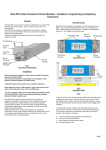
Clamping bar
Mounting Holes
Fixing Screws
Terminal
Cover
Protective
Insert
Supply/Load
Terminals
Dimmer
Housing
Fig 1.
Front View of Components
Connection
Terminal
Fig 2.
Termination Area
Set-up
Connector
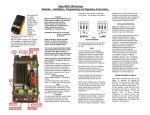
SUPPLY
E NL
Installation
Before commencing installation of a Rako switching module first read this
instruction manual carefully.
Rako Controls Ltd accepts no responsibility for any damage or injury
caused by incorrect installation of a Rako product.
Installation should only be carried out by a competent electrician.
SWITCHED LIVE
NEUTRAL
EARTH
Never attempt to connect a Rako switch module or remove the terminal
covers without first isolating the circuit at the fuse/MCB board.
Fig 3.
Connection Detail
The circuit supplying a Rako switch module should always be protected
by either a 5A fuse or 6A MCB. Under no circumstances should any
protection devices with higher ratings be used.
Although there is minimal heat generated from the switching module it is
recommended that they are mounted in areas that are adequately
ventilated, dry and outside of any enclosed metal casings. Wherever
possible the modules should be securely fixed using the mounting holes
provided. The mounting holes are blanked off when supplied but are
designed so that a woodscrew will easily cut through without the need for
drilling.
Whilst the Rako dimmer/switching modules are designed to be
completely maintenance free the units should be mounted in a position
where access can be gained should there be a fault or re-addressing of
the unit be necessary (see ‘Set-up and Addressing’).
LOAD
Note:
To ensure that the cable clamping operates satisfactorily the cabling both
supplying the switching module and to the load should be a minimum of
0.5mm with double safety insulation and the wires should be stripped to
ensure that the cable bar within the terminal cover clamps firmly on both
sets of insulation.
2
To install a Rako switching module isolate the supply then remove the
Terminal Covers (see Fig.1) giving access to the supply/load terminals.
The necessary connections are indicated on the label on the dimmer
housing. The notation is as follows:
L – Live wire from the supply (normally coloured Brown)
N – Neutral (normally coloured Blue)
- Earth (normally coloured Green/Yellow)
SL - Switched supply to load
Page 1
Installation (continued)
Once the supply and load cables are connected, ensure that the terminal
covers are replaced and securely fastened, clamping the cable correctly as
detailed above, before powering the unit.
Rako switching modules are not designed for loop in/loop out
connections. Should it be necessary to loop the supply on to further
fittings then a junction box should be connected in circuit to facilitate
this.
With the supply and load connected and prior to switching on the supply
ensure that the terminal covers are fitted and that they are securely
clamping the cables. It is important to ensure that the protective inserts
(see Fig.1) are fitted and located securely, both in the terminal cover and
over the supply and load cables. The protective inserts provide important
protection against the risk of electric shock from conductive objects
forced down the side of the cables.
When power is connected the Rako unit will switch to on. In this way it is
possible to leave a conventional lighting switch in circuit to set the
module to the on state without the use of a Rako control panel. Such a
lighting switch can also be used as an override in the event that the
batteries in a Rako control panel are not replaced when the low-battery
warning signals indicate that this should be done.
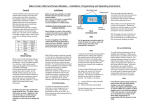
Channel 2
House 144
Room 6
Channel 1
Channel 2
House 144
Room 5
Channel 1
144
Fig 5.
Addressing Example
Set-up and Addressing
Before any lighting scenes can be programmed (see the wall panel or
handheld instruction manual) the receivers need to be addressed.
To avoid interference between rooms or neighbouring installations a Rako
system should be set to an address other than the factory default of
House 1 Room 4. The preferred addressing method is to select a logical
House address number for the project, separate Room addresses for each
room within the house and then sequential Channel numbers for each
receiver within each room (see Fig.5) i.e. Channel 1 for the 1 receiver,
Channel 2 for the 2 etc. The House and Room addresses are set using
the DIP switches on the back of a Rako controller (see Fig.4) and the
Channel address is set by ‘stepping’ through the channel numbers with a
panel in programming mode (see Step 3 overleaf) and then sending this
number (along with the House and Room address) to a receiver (Step 5).
st
nd
Setting the address switches.
Each Rako transmitter has two, 8 way banks of switches for setting its
address. The two sets of switches allow the user to choose from 256
house addresses and 256 room addresses. To set the address, unclip the
rear cover whereupon the banks of switches will be now become visible.
To set an address, use a small terminal screwdriver or similar device and
carefully move some of the switches into the ‘ON’ position. Addressing
uses binary encoding and the value of the switches is shown below.
Notes on addressing.
A module will not receive an address of House 0 (All switches set to off)
A switch will respond to, but not receive an address of Room 0 (All
switches set to off). This Room 0 address is used for ‘Master House’
control
A switch cannot be set to channel 0.
To program a lighting scene see Wall panel or Hand held manual.
Care and maintenance
A Rako receiver module contains no user serviceable parts. Should for any
reason you need to contact us please contact us via our website
www.rakocontrols.com or by phoning our customer help line on 01634
226666.
House address
= 128+16=144
ROOM
128
64
32
16
8
4
2
1
ON
BINARY VALUE
HOUSE
128
64
32
16
8
4
2
1
ON
BINARY VALUE
Note: Any control panels set with the same address will act as two or
multi way controls.
Room address
= 32+4=36.
Fig 4.
Addressing Switches
Page 2
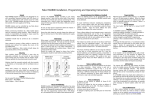
Initial Addressing of a Rako Receiver Module
Note:
In the following procedure both the controllers (wallpanels and hand held remotes) and the receiver s have an automatic time out after approximately 3 minutes when
in programming or set-up mode. This feature avoids the possibility of either being left permanentl y in programming or set-up mode. This may cause confusion if
either the controller or receiver times out before the procedure is complete. It is worth becoming familiar with the procedures before starting the addressing procedure.
If at any time it is necessary to start again the controllers can be returned to normal mode by pressi ng the ‘Off’ button and the receivers by resetting the electrical supply.
Step 1
Step 2
Set address
switches on
controller
Put controller into
programming mode
by pressing and holding
a scene button and both
raise and lower buttons
together. After 5 seconds
the red LED on the panel
starts to flash. The panel
is now in programming
mode. Release the buttons
Pick an House address from 1-255
(keep same address for all panels in house)
Select Room addresses from 1-255 for each
room (Room 0 is master house control)
Button
1
2
3
4
Off
TIP
Press the
scene button first
Note:
A Rako panel will always enter programming mode at Channel 0.
It is not possible to give a receiver an address of Channel 0 but
this gives a consistent starting point.
TABLE1
Action
Step up one channel and ident
Step down one channel and ident
Ident
Store
Exit programming
NO
Note:
When in programming mode the buttons have functions as
detailed in table 1.
Is the
controller
still in programming
mode (red LED
flashing)
YES
Note
Step 3
Press button 1 once to step up one channel.
If this is the desired channel i.e. Channel 1(for the 1st receiver)
then go to Step 4. If not, press button 1 again to step up to
channel 2 (for the 2nd receiver), again to step to channel 3 etc,
until the desired channel number is reached (maximum = 15).
It is this channel number (along with the House and Room address)
that is sent to the receiver in Step 5. If at any point it is necessary to
step down a channel, press button 2 once.
If some receivers are already addressed to a the wall panel then they
will ‘flash’ their connected lamps as their channel number is reached during
the stepping procedure, this allows the user to ‘identify’ which channel numbers
are already taken. To add a new receiver to an existing installation step up through
the channels until a channel number is reached where no receiver flashes a load, this is
then an available channel. If at any point there is uncertainty as to whether a receiver
actually flashed its load then button 3 will flash the load but without stepping up or
down a channel. If all of the loads flash then this indicates that the current address is
Channel 0.
Note: If it is not possible to see the connected lamps flashing when stepping through
the channels it is possible to tell from the LEDs in the receivers which will momentarily
go solid when their channel address is reached.
YES
Go to the receiver to be addressed
Is there
another receiver in
the room to be
addressed
Step 4
Hold the
magnet against casing at point indicated
on the label until LED illuminates and keep the
magnet held with the LED on until it starts to
flash. Then remove magnet. Module is now in
set-up mode.
Note: If a receiver is already addressed to a
controller (for example a receiver is addressed to
the controller but with the wrong channel number)
then the LED will be flashing as soon as the panel
is put into programming mode. It will, however,
still be possible to re-address this receiver using
the magnet as normal.
NO
Step 5
Press button 3
to send the ident
of the channel
selected in step 3.
Receiver automatically
returns to normal mode
(blue LED goes out)
while controller remains
in programming mode
(red LED keeps flashing)
Step 6
Press Off button
to exit controller
from programming
mode
Page 3