1
36
Normalize color to Document color space or output intent
When normalizing, the color spaces of individual PDF objects that do not
correspond to the document color space are converted to the document
color space (usually CMYK). Your PDF objects that dewithte from the
document color space or output intent are converted correctly. After
conversion, the final, normalized file consists only of the color space of the
output intent and any spot colors that may be present.
If PDF objects are in the RGB color space, the embedded profile converts
them to the document color space with the rendering intent defined in
the PDF. If a relative colorimetric intent is embedded in PDF RGB objects,
the Auto Setup queue automatically activates black point compensation to
ensure clean reproduction of details in the shadows.
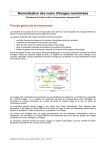
The following color conversions apply when normalizing:
• Conversion of DeviceRGB and
ICCbasedRGB to the document color
space (usually CMYK)
• Spot colors are left unchanged. If
necessary you may decide to convert
spot colors to the target color space
• Conversion of ICCbasedCMYK to
the document color space, preserving
pure colors and the separation
characteristics (when using the
AutoLink function)
• Mapping of ICCbasedGray onto the
black channel of the document color
space