1
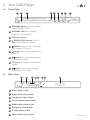
2 Your DVD Player
2.4
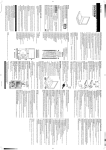
Remote Control
01
STANDBY button.
02
Numeric buttons.
01
SETUP button. Press to enter the
system setup options.
02
03
04
05
07
PLAY button. Press to begin
playback.
10
19
20
21
GO TO
ENTER button. Press to select an
option.
TITLE button. Title menu button.
09
18
DISPLAY
Navigation buttons.
06
08
OPEN/CLOSE
STOP button. Press to stop
playback.
button. Press to skip to previous
DVD chapters /CD tracks.
N/P (NTSC/PAL) button. Press the
cycle between NTSC, PAL & AUTO
modes.
11
button. Press to fast rewind.
12
SLOW button. Press to initiate slow
motion playback.
13
STEP button. Press to advance one
frame at a time.
14
RESET button. Press to reset all
settings.
15
A-B repeat button. A to B repeat
mode.
16
MUTE button. Press to silence
audio output.
17
RESUME button. Resume from the
last point.
18
OPEN/CLOSE button. Press to
eject/ close the disc drawer.
19
DISPLAY button. Displays
information about the current disc.
20
AUDIO track select button. Press
to select alternate audio tracks.
22
23
03
24
04
05
06
25
26
07
08
27
09
28
10
29
11
13
15
12
32
14
RESUME
16
17
30
31
33
A/R
34
35
GDVD3607HDMI