1
Contents
Datacolor 110™ .................................................................................................... 1
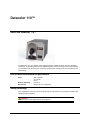
About the Datacolor 110™ ...........................................................................................1
Electrical/Environmental Requirements ........................................................................1
Safety Warnings ...........................................................................................................1
Light Source ..........................................................................................................2
Power ....................................................................................................................2
Feature Summary .........................................................................................................2
Accessories ..................................................................................................................2
Calibration Tiles ....................................................................................................3
Aperture Plates .....................................................................................................3
Cable Installation ................................................................................................. 5
Cables ..........................................................................................................................5
Power Cable ..........................................................................................................6
Communications Cable .........................................................................................6
USB Driver Installation .................................................................................................7
Installing the Driver................................................................................................7
Viewing/Changing System Port Assignment .......................................................11
Changing the COM Port Assignment in Datacolor Programs ..............................15
Instrument Calibration Data.................................................................................15
Controls and Indicators ..................................................................................... 17
Status Panel ...............................................................................................................17
Powering Up ...............................................................................................................18
Instrument Calibration ....................................................................................... 19
Overview ....................................................................................................................19
Installing Calibration Data ...................................................................................19
Installing Data for Paintmaker Program...............................................................19
Installing Data for Other Datacolor Programs ......................................................21
Reflectance Calibration .......................................................................................22
Calibration Procedure ..................................................................................23
Sample Presentation/Measurement ................................................................. 25
About Sample Presentation/Measurement .................................................................25
Sample Viewing Port ...........................................................................................26
Maintenance ....................................................................................................... 29
About Instrument Maintenance...................................................................................29
Sphere Cleaning .........................................................................................................29
Tile Handling and Cleaning ........................................................................................29
Handling Tiles .....................................................................................................29
Cleaning Tiles .....................................................................................................29
Storage................................................................................................................30
Cleaning the Black Trap ......................................................................................30
Appendix ............................................................................................................. 31
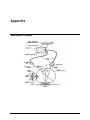
Optical Block Diagram ................................................................................................31
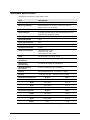
Instrument Specifications ...........................................................................................32
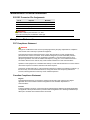
Miscellaneous Technical Information .........................................................................33
RS-232C Connector Pin Assignments ................................................................33
Compliance Statements .............................................................................................33
FCC Compliance Statement ................................................................................33
Canadian Compliance Statement ........................................................................33
Index .................................................................................................................... 35
Datacolor 110 User's Guide
Contents • i