1
Fitting the Primary Hard Drive & Optical Drive
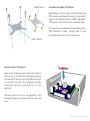
Before fitting the slot loading drive, affix a self adhesive rubber pad (included in the accessory bag) to the
drives eject button. Mount the slot loading drive using 4 screws, 2 either side. Do not fully tighten the
screws as the position of the drive will need to be adjusted to ensure correct operation of the eject button.
With left side eject buttons, 2 pads may be required (one on top of the other to increase the thickness).
The primary 2.5" hard drive is mounted behind the optical drive using 4 screws as shown in the diagram.
M2 x 3
M3 x 5
Self Adhesive
Rubber Pad
P12 - FITTING THE OPTICAL & HARD DRIVES