1
IOX
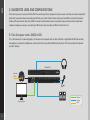
3. SUGGESTED USES AND CONFIGURATIONS
There are many ways to use your DiGiGrid IOX. Your existing (or future) equipment, how you work, and what you need to accomplish
are factors to consider when incorporating an IOX into your studio. Project studios with one or two DAWs can share I/O resources.
Studios with several rooms and many DAWs can stream audio between rooms and quickly swap out devices. But no matter how
simple or complex your setup is, connecting an IOX involves only one cable, an Ethernet Cat 5e or Cat 6.
3.1 One Computer with a DiGiGrid IOX
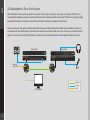
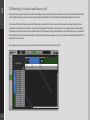
This is the most basic studio configuration. It includes a host computer with a native DAW and a single DiGiGrid IOX that connects
microphones, instruments, headphones, and monitors to the SoundGrid ASIO/Core Audio driver. This driver controls the network
and all its devices.
DiGiGrid IOX
External
Clock
Host Computer
9
Ethernet
Analog
Clock