1
Quick Start Guide
English
Remote Control
MUTE
Mutes audio.
STANDBY
Switches between operation and standby modes.
SOURCE
Controls the output of TV SCART.
mhp
Displays MHP application information.
V-FORMAT
Sets the resolution of video.
WIDE
Sets the display format.
NUMERIC
Buttons
Enters a TV/radio channel number.
TEXT
Enters the digital text service.
MENU
Displays the main menu.
COLOUR
Buttons
Colour keys for interactive applications
LIST
Displays the channel list.
GUIDE
Displays the programme guide.
ARROW
Buttons
Moves the cursor up, down, left or right.
OK
Selects a menu or confirms.
EXIT
Exits all On-Screen Display (OSD) screens.
BACK
Returns to the previous screen.
VOLUME
Adjusts the audio volume.
i(Information)
Displays the channel and programme information.
OPT+
Displays the channel attributes.
P+/P-
Changes the channel or page.
MyEPG
Displays the MyEPG screen.
AUDIO
Displays the audio list.
SUBTITLE
Displays the subtitle language list.
TV/RADIO
Switches between TV and radio modes.
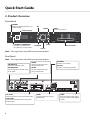
Note: The image shown may differ from the actual product.
Inserting Batteries
Battery
1. Press the hook upward and lift the battery cover off.
2. Insert the batteries (supplied) matching the plus(+) and minus(-) at
each end.
3. Close the cover.
3