1
im Vertrieb von
CAMBOARD Electronics
Menu
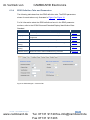
Item
Description
Command
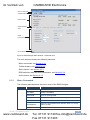
Set Device Mode
As if pressing the SELECT button, sets the device mode to
Output, Default or User
Load EDID from
Loads the EDID to the EDID Designer from Output, Default
,User or Input
Download EDID to Loads the EDID from the EDID Designer to the In Port or
User memory
View
Help
6.3.2
Security Mode
With HDCP passes HDCP encoding, Without HDCP turns
off HDCP encoding for 60 seconds only to allow the signal
that is not encoded to pass
Reset
Resets the device
Extended View
Expands the window to show the EDID definition tabs
Limited View
Shrinks the window to hide the EDID definition tabs
Edit EDID
Select read only/modify
Byte Viewer
Displays the Byte Viewer window
About
Displays the version of the EDID Designer
Toolbar Buttons
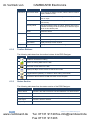
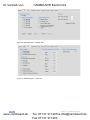
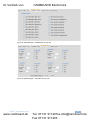
The following table describes the toolbar buttons of the EDID Designer.
Button
Description
Creates a new EDID for editing
Opens an existing EDID from the disk
Saves the current EDID to the disk
Displays the Byte Viewer window to edit the hex codes
Toggles Read-only/Modify, to disallow or allow editing of the EDID
Connects or disconnects the USB connection to the computer
6.3.3
Status Section
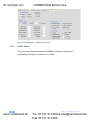
The following table describes the status section of the EDID Designer.
Field
Description
Device Status
Indicates if the USB connection has been detected or is disconnected
Input EDID Source
Indicates the EDID source
Security Mode
Indicates if HDCP is active or blocked (for 60 seconds)
Input Signal
Indicates if active or inactive
Output Signal
Indicates if active or inactive
18
www.camboard.de
VA-2H - The EDID Designer
Tel. 07131 [email protected]
Fax 07131 911203