1
im Vertrieb von
4
CAMBOARD Electronics
Connecting the VA-2H
i
Always switch off the power to each device before connecting it to your
VA-2H. After connecting your VA-2H, connect its power and then
switch on the power to each device.
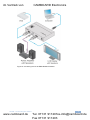
To connect the VA-2H as illustrated in the example in Figure 2:
1. Connect an input source (for example, a DVD player) to the HDMI IN
connector.
2. Connect the HDMI OUT connector to the acceptor (for example, an LCD
display).
3. If needed, connect the S/PDIF RCA connector to a digital audio acceptor (for
example, a power amplifier with speakers).
4. If making changes to the EDID parameters, connect the USB connector to a
computer.
5. Connect the power adapter to the 12V DC connector, plug the adapter into
the mains and power on all external devices.
6
www.camboard.de
VA-2H - Connecting the VA-2H
Tel. 07131 [email protected]
Fax 07131 911203