1
Table Of Contents
Overview ............................................................................................................................. 2
What's New in Print Audit Rapid Assessment Key v2 ......................................................... 3
Technical Overview of the Discovery Process .................................................................... 4
Protocols Used ................................................................................................................ 4
General Process .............................................................................................................. 4
Is Network Traffic a Problem? ......................................................................................... 5
How Do I Reduce Network Traffic If I Am Concerned?.................................................... 5
Requirements...................................................................................................................... 6
Licensing ............................................................................................................................. 7
Activating the license via the Internet .............................................................................. 7
Activating the license via a file......................................................................................... 8
Getting Started .................................................................................................................... 9
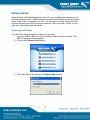
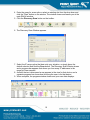
Creating your First Scan .................................................................................................. 9
Sites .................................................................................................................................. 11
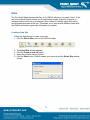
Creating a New Site....................................................................................................... 11
Selecting an Existing Site .............................................................................................. 12
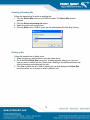
Deleting a Site ............................................................................................................... 12
Locking and Unlocking Sites.......................................................................................... 13
Scan Information ............................................................................................................... 15
Gathering Device Information ........................................................................................ 15
Discovery Scan.............................................................................................................. 16
Refresh Scan ................................................................................................................. 18
IP Report ....................................................................................................................... 18
Device Walking.............................................................................................................. 20
Assigning Costs and Toner Ratings to Devices............................................................. 21
Viewing Scan Information.................................................................................................. 22
Selecting a Scan............................................................................................................ 22
Customizing the View .................................................................................................... 23
Available View Columns ................................................................................................ 26
Working with Reports ........................................................................................................ 27
Creating a Report .......................................................................................................... 27
Printing a Report............................................................................................................ 28
Exporting a Report to PDF............................................................................................. 28
Removing a Report........................................................................................................ 29
Importing and Exporting Scan Information ........................................................................ 30
Importing Scan Information............................................................................................ 30
Exporting Scan Information ........................................................................................... 31
Available Scan Export Formats ..................................................................................... 32
Updating the Software....................................................................................................... 33
Automatic Updates ........................................................................................................ 33
Manual Updates............................................................................................................. 33
Frequently Asked Questions ............................................................................................. 34