1
*Q5841-90316*
*Q5841-90316*
Make a test copy
Q5841-90316
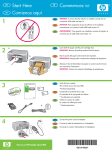
Now that you have finished setup, it is time to use your HP All-in-One. Make a copy of a favorite photo and
see the new copy preview feature.
1
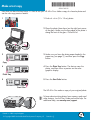
1 Find a 4 x 6 in (10 x 15 cm) photo.
2
2 Place the photo (face down) on the right front corner
of the glass. Make sure the long edge of the photo is
along the front of the glass. Close the lid.
3
3 Make sure you have the photo paper loaded in the
paper tray (see page 2), and then press the Copy
button.
Copy
4
4 Press the Photo Tray button. The device scans the
photo, and then shows a preview on the color
graphics display.
Photo Tray
5
5 Press the Start Color button.
Start Color
The HP All-in-One makes a copy of your original photo.
To learn about printing photos from memory cards and
other features, see the User Guide and online help. For
additional help, see www.hp.com/support.
Printed on 100% recycled paper.
© Copyright 2005 Hewlett-Packard Development Company, L.P.
Printed in [].