1
4
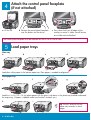
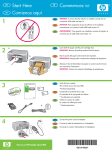
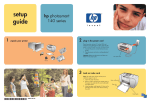
Attach the control panel faceplate
(if not attached)
a Lift the lid.
b Position the control panel faceplate
over the buttons on the device.
c Press down firmly on all edges of the
overlay to secure it. Make sure all buttons
are visible and not blocked.
The control panel faceplate must be attached for the HP All-in-One to work!
5
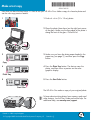
Load paper trays
Main tray:
a
c
b
d
Load plain white paper in the bottom paper tray. Plain paper is needed for alignment.
Photo paper tray:
e
f
g
Load the 4 x 6 in (10 x 15 cm) photo paper with the glossy side down in the photo tray located underneath
the output tray. (If paper is tabbed, make sure the tab is towards you.)
h
i
Tip: Pull out, and then flip the
paper tray extender to catch
pages.
2 • HP All-in-One