1
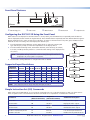
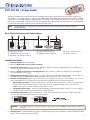
Front Panel Features
2
1
3
4
5
MENU
ADJUST
NEXT
CONFIG
Extron
DVC 501 SD
DIGITAL VIDEO CONVERTER
a
USB Config port
b
LCD screen c
d
Menu button
Next button e
Adjust knobs
Configuring the DVC 501 SD Using the Front Panel
Menu selections are displayed on the LCD screen. To use any menu, press the Menu button repeatedly until the desired
menu is displayed (see the menu flow diagram below). Press the Next button repeatedly until the desired submenu appears.
Rotate an Adjust knob to select an item from a submenu. To return to the main menu at any time, press the Menu button.
After 30 seconds of inactivity, the screen displays the default cycle.
1.
From the Output Config submenus, use the Adjust knobs to select the output signal
type and the sync polarity to match the requirements of the display device.
2.
From the Advanced Config menu, Test Pattern submenu, select the Crop, Crosshatch,
Colorbars, and Grayscale test patterns to confirm that the settings of the display device
are correct.
NOTE:
Default
Cycle
Menu
OUTPUT
CONFIG
Test pattern timings are based on the incoming SDI signals and are not
displayed if an active signal is not present.
30 sec.
Menu
3.
Use the Audio Config submenus to configure the audio as desired.
AUDIO
CONFIG
Supported Input Resolutions
Supported
Resolutions
Menu
Menu
23.98 Hz 24 Hz 25 Hz 29.97 Hz 30 Hz
720p
X
X
X
1080i
1080p
X
X
X
X
X
50 Hz 59.94 Hz 60 Hz
X
X
X
X
X
X
X
X
X
NTSC
X
PAL
NOTE:
30 sec.
ADVANCED
CONFIG
30 sec.
Menu
EXIT MENU
PRESS NEXT
30 sec.
Next
X
The output resolution always matches the input resolution.
Simple Instruction Set (SIS) Commands
When setting up the DVC 501 SD, you can issue SIS commands from your computer via RS-232 or USB as an alternative to
the front panel controls. See the DVC 501 SD Series User Guide for a complete list of available SIS commands.
2
Command
ASCII command
(Host to Converter)
Response
(Converter to Host)
Additional Description
Mute video
1B
Vmt1]
Mute the video output.
Unmute video
0B
Vmt0 ]
Display the video output.
Mute audio
1Z
Amt1 ]
Mute the audio output.
Unmute audio
0Z
Amt0 ]
Unmute the audio output.
Enable lock (executive) mode
1X
Exe1]
Lock all front panel functions.
Disable lock mode
0X
Exe0 ]
Enable all front panel functions.
© 2011 Extron Electronics All rights reserved. www.extron.com
68-1518-50 Rev. C
09 11