1
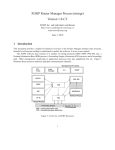
Figure 77. Configuring LLDP
Viewing the LLDP Configuration
To view the LLDP configuration, use the following command.
•
Display the LLDP configuration.
CONFIGURATION or INTERFACE mode
show config
Examples of Viewing LLDP Configurations
Dell(conf)#protocol lldp
Dell(conf-lldp)#show config
!
protocol lldp
advertise dot1-tlv port-protocol-vlan-id port-vlan-id
advertise dot3-tlv max-frame-size
advertise management-tlv system-capabilities system-description
hello 10
no disable
Dell(conf-lldp)#
Dell(conf-lldp)#exit
Dell(conf)#interface gigabitethernet 1/31
Dell(conf-if-gi-1/31)#show config
!
interface GigabitEthernet 1/31
no ip address
switchport
no shutdown
Dell(conf-if-gi-1/31)#protocol lldp
Dell(conf-if-gi-1/31-lldp)#show config
!
protocol lldp
Dell(conf-if-gi-1/31-lldp)#
Link Layer Discovery Protocol (LLDP)
569