1
Chapter 1: Introducing Excel Tables
The key thing to be aware of is that you want to pick a filtering operation
that, in conjunction with your filtering criteria, enables you to identify
the records that you want to appear in your filtered list. Note that Excel
initially fills in the filtering option that matches the command you
selected on the Text Filter submenu, but you can change this initial filtering selection to something else.
In practice, you won’t want to use precise filtering criteria. Why? Well,
because your list data will probably be pretty dirty. For example, the
names of stores might not match perfectly because of misspellings. For
this reason, you’ll find filtering operations based on Begins With or
Contains and filtering criteria that use fragments of field names or
ranges of values most valuable.
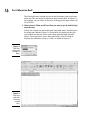
4. Describe the AutoFilter filtering criteria.
After you pick the filtering option, you describe the filtering criteria by
using the right-hand drop-down list. For example, if you want to filter
records that equal Sams Grocery or, more practically, that begin with the
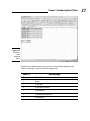
word Sams, you enter Sams into the right-hand box. Figure 1-14 shows
this custom AutoFilter criterion.
You can use more than one AutoFilter criterion. If you want to use two
custom AutoFilter criteria, you need to indicate whether the criteria are
both applied together or are applied independently. You select either the
And or Or radio button to make this specification.
Figure 1-14:
Setting up a
custom
AutoFilter.
5. Click OK.
Excel then filters your table according to your custom AutoFilter.
Filtering a filtered table
You can filter a filtered table. What this often means is that if you want to
build a highly filtered table, you will find your work easiest if you just apply
several sets of filters.
25