1
I
O
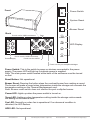
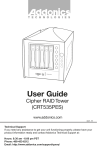
Front
Power Switch
POWER
System Reset
RESET
Buzzer Reset
Back
Buzzer
Punch out for USIB connectors
Fans
POWER
LED Display
FAN
I
O
I
O
TEMP
Punch out for USIB connectors
Power Supply
HDD
Punch out for eSATA
Punch out for port multipliers/bridges
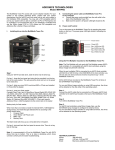
Power Switch: This is the switch to power on devices connected to the power
supply. The power LED will light up to indicate power is supplied.
Note: The main power switch located at the back of the enclosure must be turned
on first.
Reset Button: Not operational.
Buzzer Reset: Pressing the button stops the overheat buzzer from making a sound.
The buzzer will make a sound when temperature inside the storage rack exceeds the
temperature setting on the Thermal Management card.
Note: Buzzer reset switch does not silence the port multiplier buzzer.
Power LED: Lights up when the power switch is turned on.
Temp LED: Lights up when temperature setting inside the storage rack exceeds
the setting on the thermal card.
Fan LED: Normally on when fan is operational. If an abnormal condition is
detected, the LED flashes.
HDD LED: Not operational.
www.addonics.com
Technical Support (M-F 8:30am - 6:00pm PST)
Phone: 408-453-6212
Email: www.addonics.com/support/query/