1
INSTALLING OR REPLACING A TAPE DRIVE
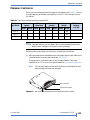
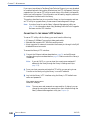
f. Remove the internal cooling plate —This step is necessary if you are
installing one full height or two half height tape drives. If you are
installing only one half-height drive, go to the next step.
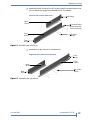
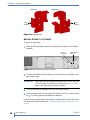
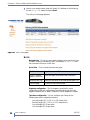
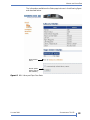
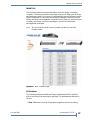
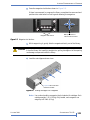
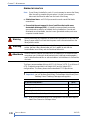
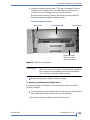
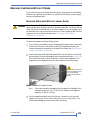
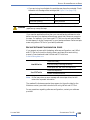
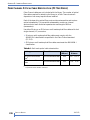
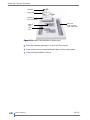
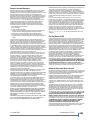
Remove the two screws (A) holding the tape drive cooling plate (B).
Remove the plate, and discard it and the screws.
Looking inside back of library
Screws (A)
Retaining tab
Cooling plate (B)
Single half height
tape drive (cables
removed for clarity)
Figure 7-9 Tape drive cooling plate
!
Important
Remove the internal cooling plate if you are installing a total of
two HH drives or one FH drive, but leave the empty tape drive
bay covered if you are installing a single HH drive (bottom
slot). The plate is required for proper cooling.
g. Disconnect the power cables to the power supply.
2. Removing an existing drive (if applicable) —
Complete the steps in this section if you are replacing a tape drive that is
currently installed.
a. Pull the tape drive a short distance out of the library, then disconnect the
serial cables from the tape drive(s) that you are replacing.
b. Disconnect the power cables on the back of the drive.
OCTOBER 2009
STORAGELIBRARY T24 LTO
175