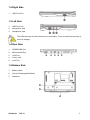
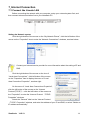
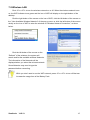
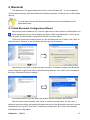
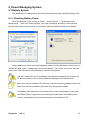
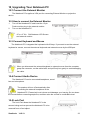
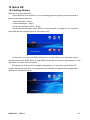
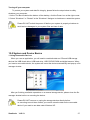
1
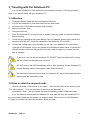
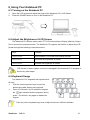
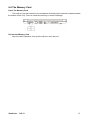
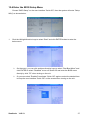
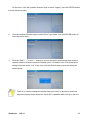
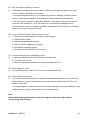
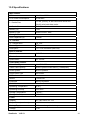
ViewSonic ® VNB101 NetBook - User Guide - Guide de l’utilisateur - Bedienungsanleitung - Guía del usuario - Pyководство пользователя - Οδηγός χρηστών - 使用手冊(繁中) - 使用手冊 (簡中) Model No. : VS12638 Compliance Information CE Conformity for European Countries The device complies with the EMC Directive 2004/108/EC and Low Voltage Directive 2006/95/EC. Following information is only for EU-member states: The mark shown to the right is in compliance with the Waste Electrical and Electronic Equipment Directive 2002/96/EC (WEEE). The mark indicates the requirement NOT to dispose the equipment as unsorted municipal waste, but use the return and collection systems according to local law. If the batteries, accumulators and button cells included with this equipment, display the chemical symbol Hg, Cd, or Pb, then it means that the battery has a heavy metal content of more than 0.0005% Mercury or more than, 0.002% Cadmium, or more than 0.004% Lead. R&TTE Compliance Statement This wireless module device complies with the Essential Requirements of the R&TTE Directive of the European Union (1999/5/EC). This equipment meets the following conformance standards: ETSI EN 300 328 EN 301 489-01 EN 301 489-17 EN 62311 Notified Countries: Germany, UK, Netherlands, Belgium, Sweden, Denmark, Finland, France, Italy, Spain, Austria, Ireland, Portugal, Greece, Luxembourg, Estonia, Latvia, Lithuania, Czech Republic, Slovakia, Slovenia, Hungary, Poland and Malta. ViewSonic VNB101 Important Safety Instructions 1. DO NOT press or touch the LCD Screen. DO NOT place the Notebook PC with small items, they may scratch LCD Screen or enter the Notebook PC. 2. DO NOT expose the Notebook PC to dirty or dusty environment. Keep the environment clean and dry. 3. DO NOT place the Notebook PC on uneven or unstable work surface. 4. DO NOT place or drop objects on the top of the Notebook PC. DO NOT shove any foreign objects into the Notebook PC. DO NOT cover the LCD Screen strongly. 5. DO NOT expose the Notebook PC to strong magnetic or electrical fields; DO NOT place the floppy disk near or on the Notebook PC, that may loss the data of the floppy disk. 6. DO NOT leave the Notebook PC facing the sun as it can damage the LCD Screen, especially in the car. 7. SAFE TEMP: This Notebook PC should only be used in environments with ambient temperatures between 5°C (41°F) and 35°C(95°F). 8. DO NOT expose the Notebook PC to or use near liquids, rain, or moisture. 9. Caution: risk of explosion if battery is replaced by an incorrect type. Dispose of used batteries according to the instructions. 10.DO NOT throw the Notebook PC in municipal waste. Check local regulations for disposal of electronic products. Please recycle the Battery Pack, and check with your Local Authority or retailer for recycling advice. 11.The Notebook PC and the Adapter may occur some heat during operating or charging. DO NOT leave the Notebook PC on your lap or any part of the body in order to prevent discomfort or injury from heat exposure. 12.INPUT RATING: Refer to the rating label on the Notebook PC and be sure that the Power Adapter complies with the rating. Only use attachments or accessories specified by the manufacturer. 13.Checking the connections between the main unit and attachments before turning on the Notebook PC. 14.DO NOT use the Notebook PC during eating food avoid dirtying the Notebook PC. 15.DO NOT insert anything into the Notebook PC that may result in short circuit or damage the circuit. 16.Powering off the Notebook PC, if you want install or remove some external devices, which are not support hot-plug. ViewSonic VNB101 ii 17.Disconnect the Notebook PC from the electrical outlet and remove any installed batteries before cleaning. And Keep it away from children. 18.DO NOT disassemble the Notebook PC, only a certified service technician should perform repairs on your computer. Otherwise, problem may result and the manufacturer should not hold responsibility for the damage. 19.Only use Battery Packs approved by the manufacturer or else damage may occur. 20.The Notebook PC has some little metal flake to disperse heat. DO NOT place the Notebook PC on soft objects (e.g.: bed, sofa, your lap), or else the Notebook PC may become hot and halt the system operating. ViewSonic VNB101 iii Declaration of RoHS Compliance This product has been designed and manufactured in compliance with Directive 2002/95/ EC of the European Parliament and the Council on restriction of the use of certain hazardous substances in electrical and electronic equipment (RoHS Directive) and is deemed to comply with the maximum concentration values issued by the European Technical Adaptation Committee (TAC) as shown below: Substance Proposed Maximum Concentration Actual Concentration Lead (Pb) 0,1% < 0,1% Mercury (Hg) 0,1% < 0,1% Cadmium (Cd) 0,01% < 0,01% Hexavalent Chromium (Cr6+) 0,1% < 0,1% Polybrominated biphenyls (PBB) 0,1% < 0,1% Polybrominated diphenyl ethers (PBDE) 0,1% < 0,1% Certain components of products as stated above are exempted under the Annex of the RoHS Directives as noted below: Examples of exempted components are: 1. Mercury in compact fluorescent lamps not exceeding 5 mg per lamp and in other lamps not specifically mentioned in the Annex of RoHS Directive. 2. Lead in glass of cathode ray tubes, electronic components, fluorescent tubes, and electronic ceramic parts (e.g. piezoelectronic devices). 3. Lead in high temperature type solders (i.e. lead-based alloys containing 85% by weight or more lead). 4. Lead as an allotting element in steel containing up to 0.35% lead by weight, aluminium containing up to 0.4% lead by weight and as a cooper alloy containing up to 4% lead by weight. ViewSonic VNB101 iv Copyright Information Copyright © ViewSonic® Corporation, 2009. All rights reserved. Microsoft®, Windows®, Windows NT®, and the Windows® logo are registered trademarks of Microsoft® Corporation in the United States and other countries. ViewSonic®, the three birds logo, OnView®, ViewMatch™, and ViewMeter® are registered trademarks of ViewSonic® Corporation. Intel®, Pentium®, and Atom™ are registered trademarks of Intel Corporation. Disclaimer: ViewSonic® Corporation shall not be liable for technical or editorial errors or omissions contained herein; nor for incidental or consequential damages resulting from furnishing this material, or the performance or use of this product. In the interest of continuing product improvement, ViewSonic® Corporation reserves the right to change product specifications without notice. Information in this document may change without notice. No part of this document may be copied, reproduced, or transmitted by any means, for any purpose without prior written permission from ViewSonic® Corporation. Product Registration To meet your future needs, and to receive any additional product information as it becomes available, please register your product on the Internet at: www.viewsonic.com. The ViewSonic® Wizard CD-ROM also provides an opportunity for you to print the registration form, which you may mail or fax to ViewSonic®. For Your Records Product Name: Model Number: Document Number: Serial Number: Purchase Date: VNB101 ViewSonic 10" NetBook VS12638 VNB101-1_UG_ENG Rev. 1B 07-22-09 Product disposal at end of product life The lamp in this product contains mercury. Please dispose of in accordance with local, state or federal laws. ViewSonic® is concerned about the preservation of our environment. Please dispose of this product properly at the end of its useful life. For the recycling information, please refer to our website: 1. USA: www.viewsonic.com/pdf/RecyclePlus.pdf 2. Europe: www.viewsoniceurope.com 3. Taiwan: recycle.epa.gov.tw ViewSonic VNB101 Directions Meanings of icons: Forbidding: forbid improper operations to avoid damaging the Notebook PC. Caution: cautions for operators to avoid potential damages. Please note and remember. Importance: important information, common notes, definitions, general knowledge and references, etc. ViewSonic VNB101 vi Content 1. Knowing Your Notebook PC ............................................................................. 1 1-1 Top Side......................................................................................................... 1 1-2 Right Side....................................................................................................... 2 1-3 Left Side ......................................................................................................... 2 1-4 Rear Side ....................................................................................................... 2 1-5 Bottom Side.................................................................................................... 2 2. Caring the Notebook PC.................................................................................... 3 2-1 LCD Screen.................................................................................................... 3 2-2 Hard Disk Drive (HDD) ................................................................................... 3 2-3 Battery Pack................................................................................................... 4 2-4 Keyboard........................................................................................................ 4 2-5 Touch Pad...................................................................................................... 4 2-6 Other accessories .......................................................................................... 4 2-7 If the water comes into the Notebook PC ....................................................... 5 2-8 Other Notes.................................................................................................... 5 3. Traveling with the Notebook PC ....................................................................... 6 3-1 Attention ......................................................................................................... 6 3-2 How to enter the suspend mode .................................................................... 6 4. Keep the data for future possible use.............................................................. 7 4-1 HDD Partition ................................................................................................. 7 4-2 Class the data in the HDD.............................................................................. 7 5. Getting Started ................................................................................................... 8 5-1 Install the Rechargeable Battery .................................................................... 8 5-2 Remove the Battery Pack............................................................................... 8 5-3 Connecting the Power Adapter ...................................................................... 9 6. Using Your Notebook PC ................................................................................ 10 6-1 Turning on the Notebook PC........................................................................ 10 6-2 Adjust the Brightness of LCD Screen........................................................... 10 6-3 Keyboard Usage .......................................................................................... 10 6-4 Touch Pad(Optional, Under Windows XP) .............................................. 11 6-5 Card Reader Usage ..................................................................................... 12 6-6 The Memory Card ........................................................................................ 13 7. Internet Connection ......................................................................................... 14 7-1 Connect the Lineate LAN ............................................................................. 14 7-2 Wireless LAN ............................................................................................... 15 8. Bluetooth .......................................................................................................... 16 8-1 Initial Bluetooth Configuration Wizard .......................................................... 16 8-2 Add a Bluetooth Device................................................................................ 17 ViewSonic VNB101 8-3 Establish a connection ................................................................................. 17 8-4 Bluetooth Service Selection ......................................................................... 18 8-5 Terminate a connection................................................................................ 18 9. Power Managing System................................................................................. 19 9-1 Battery System............................................................................................. 19 9-1-1 Checking Battery Power .................................................................... 19 9-1-2 Charging the Battery Pack ................................................................. 20 9-1-3 Low Power Warning........................................................................... 20 9-1-4 Battery Power .................................................................................... 20 9-1-5 Store the Battery Pack ....................................................................... 20 9-1-6 Prolonging the Battery’s Life .............................................................. 21 9-2 Power Management Modes ......................................................................... 21 9-2-1 Standby mode of the System............................................................. 21 9-2-2 Hibernate ........................................................................................... 21 9-2-3 Log Off ............................................................................................... 22 9-2-4 Restart the System ............................................................................ 22 9-3 Power Saving ............................................................................................... 22 9-3-1 Connect the Adapter without using Battery Pack............................... 22 9-3-2 Adjust the brightness of LCD Screen ................................................. 22 10. Upgrading Your Notebook PC ...................................................................... 23 10-1 Connect the External Monitor..................................................................... 23 10-2 How to connect the External Monitor .................................................. 23 10-3 Connect Keyboard and Mouse............................................................ 23 10-4 Connect Audio Device......................................................................... 23 10-5 Lock Port............................................................................................. 23 11 System Recovery Management ..................................................................... 24 11-1 One Key for System Recovery ................................................................... 24 11-2 System Recovery CD ................................................................................. 25 12 Quick OS.......................................................................................................... 26 12-1 Getting Started ........................................................................................... 26 12-2 System and Device Basics......................................................................... 27 12-3 Using the Tool Bar and Settings................................................................. 28 12-4 Getting on the Internet ............................................................................... 33 12-5 Quick System Recovery ............................................................................. 34 12-3 Enter the BIOS Setup Menu....................................................................... 37 13. Appendix......................................................................................................... 39 13-1 Troubleshooting ......................................................................................... 39 13-2 Specifications ............................................................................................. 41 ViewSonic VNB101 1. Knowing Your Notebook PC 1-1 Top Side 1. 2. Built-in Camera 7. Click Fn+F1 to turn on or off the 8. WiFi Indicator camera function. 9. LCD Screen 10. Keyboard Bluetooth Indicator Power button 3. Microphone 11. Right-key 4. HDD Status Indicator 12. Left-key 5. 6. Light is green when the HDD is in 13. Touch Pad active mode. 14. Numeric Keypad Indicator Charge Indicator Light is orange during being charged Click Fn+NumLk to turn on the light and is green when the battery is fully and the numeric keypad is unlocked. charged or discharged; light flashes Cap Lock Indicator Light is green when the cap keypad is when the battery is weak. 15. Power Indicator unlocked. ViewSonic VNB101 1 1-2 Right Side 1. USB Port (2.0) 1-3 Left Side 1. USB Port (2.0) 2. Microphone Jack 3. Headphone Jack The USB card can only be inserted in one orientation. Force to insert the card may in result of damage. 1-4 Rear Side 1. SD/MMC/MS Port 2. Ethernet/LAN Port 3. VGA Port 4. Power Jack 5. Lock Port 1-5 Bottom Side 1. Battery Latch 2. Lithium Rechargeable Battery 3. Speakers ViewSonic VNB101 2 2. Caring the Notebook PC The Notebook PC is a precision device; the error operation may damage the device. 2-1 LCD Screen LCD Screen is the most delicate component of the Notebook PC and comprised of thin glass. It may be broken up by external abrupt force. DO NOT scratch the cover of the Notebook PC, or the scrape on the cover cannot remove. DO NOT cover the LCD Screen strongly, or else damage may occur. DO NOT place objects on the keyboard to avoid damaging the screen and keyboard when you cover the LCD Screen. Place the Notebook PC in carrying case to protect it from dirt, water, shock and scratches before traveling. DO NOT drop or place heavy objects on the LCD Screen. DO NOT scratch the LCD Screen with your fingernails or any hard objects. Use a soft and lint-free cloth to wipe your Notebook PC and wipe it gently in order to avoid damaging the LCD Screen. Shut down the LCD Screen, if the Notebook PC will not be used for a long time. DO NOT clean the LCD Screen with chemical cleaners. The LCD Screen DOES NOT come into contact with hard objects (E.g.: cloth button, watchband). Use a soft and lint-free dry cloth to wipe the LCD Screen smoothly. DO NOT use your hand to wipe the LCD Screen directly. DO NOT spill liquid into the Notebook PC as it can damage the components of the Notebook PC. Cover the LCD Screen smoothly in order to avoid moving the hinges and flashing the LCD Screen. DO NOT clean the Touch Pad with acidic cleaner or spray cleaning solution directly on the Notebook PC. 2-2 Hard Disk Drive (HDD) Place the operating Notebook PC in steady and even table. Poor handling of the Notebook PC may damage the HDD. The HDD is the most delicate component in turning on and powering off the system. The HDD operates at unsteady fast speeds during turning on the Notebook PC; the vibrancy may damage the track of HDD. If the axes of the HDD have not stop completely at the powering off the Notebook PC, the vibrancy may damage the HDD. ViewSonic VNB101 3 2-3 Battery Pack Please recycle the Battery Pack, and check with your Local Authority or retailer for recycling advice. DO NOT put the Battery Pack near or into the fire, or else it may cause fire or explode. The Battery Pack will short circuit if the Battery Pack is punctured or reassembled The ideal temperature range that the Battery Pack be used is between 20℃-30℃. Any temperatures above or below this range will shorten the life of the Battery Pack. 2-4 Keyboard Keyboard is the most often used component by finger directly. Use a little brush to clean or a can of compressed air to remove dust from between the keys on the keyboard. Moisten a soft, lint-free cloth with water or cleaner and wipe the surface of the keys smoothly. If the water seeps into the keyboard, the circuit will not be damaged directly because of the no-power supply keyboard. But the deteriorate of the Printed circuit board will occur and will result in malfunction of the keyboard. Contact your dealer for advises at this moment. 2-5 Touch Pad Keep your hand clean when using the Touch Pad, or else the cursor is out of control. If the Touch Pad is dirty, moisten a soft, lint-free cloth with water and wipe the Touch Pad smoothly. The Touch Pad is pressure sensitive, DO NOT scratch the Touch Pad with hard objects, or rest heavy objects on it. 2-6 Other accessories Following the below steps before cleaning your Notebook PC and the accessories. 1. Turn off the Notebook PC. Disconnect your Notebook PC and all external devices from their electrical outlets and remove the installed battery. 2. 3. Use the little dust collector to pump the dust from the slot of plug or keyboard. Moisten a soft, lint-free cloth with water and wipe the surface of the Notebook PC smoothly. DO NOT seep liquid into the Notebook PC in order to avoid shorting of circuit and the damage of the Notebook PC. 4. Turn on the Notebook PC after drying it. ViewSonic VNB101 4 2-7 If the water comes into the Notebook PC DO NOT turn on the Notebook PC immediately. Disconnect the outlet cable and detach the Battery Pack in order to turn off the Notebook PC, instead of pressing the POWER button to turn off it. Disconnect all external devices. Spill out the water from the Notebook PC. Use a soft and waterish paper or cloth to wipe the surface of the Notebook PC lightly. Use the fanner to dry the Notebook PC and the accessories, and then send it to the service center for advice. DO NOT use hair drier to dry the Notebook PC, or the high temperature may distort it. DO NOT place the Notebook PC into the dirty carrying case again. 2-8 Other Notes DO NOT expose the Notebook PC in hot environment for a long time, especially in the car. Or the parts of the Notebook PC will be metamorphic. Keep the data for future possible use termly. Renew the hardware or software termly in order to keep the Notebook PC compatible and steady. ViewSonic VNB101 5 3. Traveling with the Notebook PC Turn off the Notebook PC and disconnect all lines before moving it. Following the below steps, if you want to travel with your Notebook PC. 3-1 Attention 1. Charge the Battery Pack and the spare Battery Pack fully. 2. Turn off the Notebook PC and disconnect from the wall outlets. 3. Shut down the LCD Screen completely and smoothly. 4. Disconnect the AC lines. 5. Disconnect all lines. 6. Place the Notebook PC in carrying case to protect it from dirt, water, shock and scratches before traveling. 7. Check that you have taken the spare Battery Pack, AC Adapter, power lines, manual and warranty card. DO NOT forget the passwords of the Notebook PC and HDD. 8. Find out the voltage type in the countries you will visit. Your Notebook PC comes with a universal AC-DC adapter, so you only need to buy the different power cords to connect the different outlets or the hotel may provide universal outlets to support your power cord as well as voltages. If you drive your car with the Notebook PC, DO NOT leave the Notebook PC facing the sun. Place it in the shady and cool area. DO NOT remove the HDD immediately while or after operating. Set the Notebook PC into the Standby mode or Hibernation mode, before moving it. The connection between Internet and your Notebook PC will be interrupted when the system enter the hibernation mode. 3-2 How to enter the suspend mode Click the left button of the mouse on the “Start”→ Click the left button of the mouse on the “Turn Off Computer”,Click the left button of the mouse on “Stand By” or ”Hibernation” items,then the system will enter the standby mode or Hibernate mode. If you will attend a meeting with the Notebook PC and want still keep the Notebook PC in the current state, please set the system into suspend mode. When you turn on the Notebook PC again, the system will return the last state, which you want. ViewSonic VNB101 6 4. Keep the data for future possible use Your computer has been fully tested and complies with the system specifications before shipping. However, incorrect operations, mishandling or any other reasons may loss your data, e.g.: Delete or cover the data by error, Damage the HDD by vibration, Damaged by Network virus, Disaster, Loss the data because of being stolen. 4-1 HDD Partition The damage of the HDD or the operating system may be result in the loss of the data in the HDD. So you need to save your data to another memory card to avoid losing the data. In order to improve the performance of your Notebook PC, the HDD of your Notebook PC can be formatted with some partitions, C, D and so on. Save files to the any partitions except C partition. Then you can retrieval or reinstall the operating system without damaging your data. Select the available software to part the HDD, as you like. 4-2 Class the data in the HDD 1) Files: Office files,Pictures,Music and so on. 2) E-mail: Sent mail, Address List and so on. 3) Information of Website: The favorite of Explorer,Bookmarks of Net-scape and so on. Save these data to the same file, or else you may forget copying some files to the spare HDD or the other memory card. Please save your data for future possible use termly. ViewSonic VNB101 7 5. Getting Started 5-1 Install the Rechargeable Battery Power the Notebook PC before using it. There are two ways to power the Notebook PC: Use the AC Adapter to power it or use the removable Battery Pack. The Notebook PC is designed to work with a removable Battery Pack. Your Notebook PC may or may not have its Battery Pack installed. If your Notebook PC does not have its Battery Pack installed, using the following procedures to install the Battery Pack: Place the Battery Pack into the card-slots of the Notebook PC toward the arrow ①and then press it toward the arrow ② to Battery Pack. 5-2 Remove the Battery Pack 1. Turn off the Notebook PC,and disconnect all lines. 2. Shut down and turn over the computer to access its base in flat and clean work surface. 3. Slide the Battery Latch toward the arrow ① and slide the Battery Latch toward the arrow ②. 4. Pull the Battery Pack out from the Notebook PC toward ③. WARNING! For safety reasons, DO NOT disassemble the Battery Pack, DO NOT short the circuit, DO NOT throw the Battery Pack into fire and keep it away from children. When the Notebook PC with Battery Pack (disconnect the adapter) turns on, the Power Indicator will turn on. And the light will turn off when in standby mode or system halting. DO NOT attempt to remove the Battery Pack while the Notebook PC turns on, as this may result in the loss of working data. Damage may occur if you use a different adapter to power the Notebook PC or use the Notebook PC’s adapter to power other electrical devices. ViewSonic VNB101 8 Not Recommended to use two or more USB ports for connecting the high-consume removable devices(e.g: USB hard drive) at the same time when using the Battery Pack to power the unit. 5-3 Connecting the Power Adapter The Notebook PC comes with a universal AC-DC adapter and the allowable input voltage of adapter is from 100V to 240V. Following the below steps to connect the adapter: 1. Take the adapter and the power cord, and then connect the adapter with the power cord. 2. Plug the DC end of adapter into the power jack of the Notebook PC. 3. Insert the AC end to the wall outlet 4. Check the connections above correctly before turning on the Notebook PC. DO NOT remove the Notebook PC if the HDD is being read or written, that may result in the loss of the data and the damage of the disk. Follow the system steps to turn off the Notebook PC. Your Notebook PC and the accessories may differ from the pictures shown. ViewSonic VNB101 9 6. Using Your Notebook PC 6-1 Turning on the Notebook PC 1. Open the LCD screen and adjust the angle of the Notebook PC’s LCD Screen 2. Press the POWER button to turn on the Notebook PC. 6-2 Adjust the Brightness of LCD Screen The Notebook PC uses an active matrix TFT LCD and provides a Display (Monitor) Output Port to connect the external monitor. The Notebook PC supports the function to adjust the LCD Screen through the following composite buttons. Click Function <Fn>+<F10> Shift between LCD Screen and external monitor <Fn>+<F11> Decrease the brightness of screen <Fn>+<F12> Increase the brightness of screen LCD Screen is made of glass and may be damaged if the Notebook PC is dropped or shoves any hard object. 6-3 Keyboard Usage The Notebook PC’s integrated the keyboard with 82 keys. Click the numeric/symbol keys to input the desired keys after starting the keyboard. Press <Fn+NumLk> key to enable the keypad, light indicates that the keypad is active; the press < Fn+NumLk> key again to disable the keypad. Each key on the keyboard may have multiple functions in different software. ViewSonic VNB101 10 Function Keys These function keys with the color word or icon sign means that their function only can be activated when clicking the function key and the <Fn> key at the same time. <Fn>+<F1>:Turn on or turn off the camera window. <Fn>+<F2>:Turn on or turn off the WiFi. <Fn>+<F3>:Turn on or turn off the mute. <Fn>+<F4>:Turn down the volume. <Fn>+<F5>:Turn up the volume. <Fn>+<F10>:Shift between LCD Screen and external monitor. <Fn>+<F11>:Decrease brightness of LCD Screen. <Fn>+<F12>:Increase brightness of LCD Screen. 6-4 Touch Pad(Optional, Under Windows XP) The Notebook PC preinstall the software “Finger-sensing Pad”,which is a pointing device used in electronic devices, when the cursor control is in demand. To move the cursor, the user can just lightly slide on the surface of the smooth sense area. Please refer to the following detailed operation: ClickLock Function Move the cursor to the icon at the right-bottom corner of the desktop and right click the mouse, then select “Settings” to enter the menu “Mouse Properties” as shown right: On the menu, click to tick the panel in front of “Turn on ClickLock” and then click “Setting” to enter the label “Setting for ClickLock” that you can click to adjust the respond time to lock as shown right. ViewSonic VNB101 11 Click “OK” to return to menu “Mouse Properties” after adjustment, then click “Apply”—“OK” to activate the clicklock function. Since the function is activated, the mouse would be locked in the desired time and the folder would remove as the cursor; click the right button of the mouse again to place it on the new desired position, that enables you to highlight or drag without holding down the mouse button, as shown right. Multi-Finger Gesture The software “Finger-sensing Pad” provides intuitive multi-finger gestures, which can be applied to customized functions, like Zoom In/Out, Scrolling, etc. See as below: Illustration Gesture Function Zoom Out Expand Object Zoom In Narrow Scroll Down Object Next Page Scroll Up Previous Page Illustration Gesture Function Flick Right Forward Flick Left Backward Rotate Clockwise Object Anticlockwise Rotate Object 6-5 Card Reader Usage The Notebook PC has a single built-in memory card reader that can read the following flash memory cards: Secure Digital, Multi-Media Card, Memory Stick. See the manual of the relevant card for more information. ViewSonic VNB101 12 6-6 The Memory Card Insert The Memory Card The card only can be inserted in one orientation (with the card’s electrical contacts towards the bottom of the unit). Force to insert the card may in result of damage. Pull out the Memory Card Stop the card’s operation, then pull the card out from the port. ViewSonic VNB101 13 7. Internet Connection 7-1 Connect the Lineate LAN Before connecting the network with your computer, setup your network system first, and then connect telecommunication line to your Notebook PC. Setting the Network system Click the right button of the mouse on the “My Network Places”, click the left button of the mouse on the “Properties” item to enter the “Network Connections” windows, as show below: Contact your Internet service provider for more information about the setting of IP and DNS. Click the right button of the mouse on the icon of “Local Area Connections”, click left button of the mouse on the “Properties” item to display the menu of “Local Area Connection Properties”, as show right: On the menu of “Local Area Connections Properties”, click the left button of the mouse on the “Internet Protocol(TCP/IP)”→ click the left button of the mouse on the “Properties” to enter the “Internet Protocol(TCP/IP) Properties” windows. Select the “General” label on the “Internet Protocol (TCP/IP)Properties” windows, and enter the address of your IP and DNS, or select “Obtain an IP address automatically”. ViewSonic VNB101 14 7-2 Wireless LAN Click <Fn>+<F2> to turn the wireless network on or off. When the wireless network turns on, the WIFI Indicator turns green and the icon of WIFI will display on the right-bottom of the desktop. Click the right button of the mouse on the icon of WIFI, click the left button of the mouse on the “View Available Wireless Networks” of the pop-up menu or click the left button of the mouse doubly on the icon of WIFI to enter the windows of “Wireless Network Connection”, as show below: Click the left button of the mouse on the “Refresh” of the windows, the system will search and list the available wireless Networks. The information of the Networks will be displayed when you select the relevant network. Some Networks may need to type the password before connecting. While you don’t need to use the WIFI network, press <Fn>+<F2> to turn off that can increase the usage time of the Battery Pack. ViewSonic VNB101 15 8. Bluetooth The Notebook PC supports Bluetooth function under Windows XP. You are enabled to communicate wirelessly with other Bluetooth enabled computers, mobile phones or the related devices. You can also purchase the Bluetooth software from the local distributor or its authorized center. 8-1 Initial Bluetooth Configuration Wizard After turning on the Notebook PC, click the right button of the mouse on the Bluetooth icon at the right-bottom corner of the desktop and select “Start using Bluetooth” on the pop-up menu to enter “Initial Bluetooth Configuration Wizard” as shown below, Then click to select the location where you like the Bluetooth icon to place; click “Next” to enter the menu “General” to set the name and the type of the computer. After setting, click “Next” to enter the menu as below; if needs to configure the Bluetooth services that this computer will offer to other Bluetooth devices, click “Next” and it would enter the menu “Bluetooth Service Selection”. On the above menu, you can select the desired service offered by the computer. After the service item selected, click “Next” to enter the wizard menu. On the menu, if desires to start connecting with another Bluetooth device (ex: the Bluetooth computers, phones, handsets and so on) now, click “Next”; if desires to connect later, click “Skip” and complete Initial Bluetooth configuration. ViewSonic VNB101 16 8-2 Add a Bluetooth Device Before this step, please active your Bluetooth device (mobile phone, Bluetooth earphone and ect). You can also click “Next” as in the above menu ”to start connecting with another Bluetooth device now” to add a Bluetooth device. After initialization, click the right button of the mouse on the Bluetooth icon and select “Add a Bluetooth Device” as shown below: On the above menu, click “Next” to start searching, the found Bluetooth devices will be listed on the window. 8-3 Establish a connection On the above window, select one Bluetooth device and click “Next” to enter the menu, as below (ex: for 5300 mobile): The system would auto create one passkey when you use the Bluetooth for the first time, or you can enter one passkey as you like and please remember it; then input the same one in your Bluetooth device as the instruction to finish the pairing. ViewSonic VNB101 17 8-4 Bluetooth Service Selection Proceed, the “Bluetooth Service Selection” window would appear, which shows the Bluetooth Service that your bluetooth device can supply as shown below: On the menu, tick one panel in front of the service function item and click “Next” to set. After that, you can enjoy the Bluetooth wireless transmission function. 8-5 Terminate a connection Click the right button of the mouse on the icon ViewSonic VNB101 and select “Stop the Bluetooth Device”. 18 9. Power Managing System 9-1 Battery System The Notebook PC is designed to work with a removable and high capability Battery Pack. 9-1-1 Checking Battery Power Click the left button of the mouse on “Start”→“Control Panel” →“Performance and Maintenance “ , then click “Power Options”, the menu will display as below. On the window, click the left button of the mouse on “Power Meter” label to check the power of the battery. Set the shortcut to check the remaining battery power: click the left button of the mouse on “Advanced” label, select “ Always show icon on the taskbar”. Then move your cursor over the power icon in the left-bottom of the desktop to see the battery power. DO NOT attempt to remove the Battery Pack while the Notebook PC is turned on, as this may result in loss of working data and damage of the Notebook PC. When you use your Notebook PC first time, check the remaining battery power, and make sure that the new Battery Pack has been completely charged. The Battery Pack has limit on the number times it can be recharged. In any case, the Battery Pack’s usage time will eventually decrease and a new Battery Pack must be purchased from an authorized dealer for this Notebook PC. ViewSonic VNB101 19 9-1-2 Charging the Battery Pack When you use your Notebook PC first time, check the remaining battery power, and make sure that the new Battery Pack has been completely charged before the Notebook PC is disconnected from external power. The Battery Pack begins to charge as soon as the Notebook PC is connected to the external power, and the Charge Indicator light will turn on. When the Battery Pack charges completely, the Charge Indicator light will turn off. Save your working data or connect the adapter when the battery power is low. And the battery will stop charging if the battery is fully charged. 9-1-3 Low Power Warning The system will display the warning windows and advise you to connect the adapter, when battery power is low. Save your working data if you don’t have the adapter at this moment. The warning function can be set in the “Power Options” menu. 9-1-4 Battery Power The Battery Pack’s actual figure varies will depend on how you use the power saving features, your general work habits, the CPU, system memory size, and the size of LCD Screen. Please turn on the manage power function and connect the adapter to save electric power. 9-1-5 Store the Battery Pack DO NOT leave the Battery Pack discharged; the Battery Pack will discharge over time. But in any case, the Battery Pack’s usage time will eventually decrease and a new Battery Pack must be purchased. It is ideal that the battery be stored in a temperature range between 10℃ and 35℃. Any temperatures above or below this range will shorten the life of the battery. If the temperature is too high, it may cause fire or explode. DO NOT throw the Notebook PC in municipal waste. Check local regulations for disposal of electronic products. ViewSonic VNB101 20 9-1-6 Prolonging the Battery’s Life Use the AC adapter wherever the AC wall outlet is available. Charge the battery completely for using in your traveling. The ideal working temperature is from 20℃ to 30℃. Any temperatures above or below this range will shorten the actual usage time of the Battery Pack. After charging the Battery Pack completely, keep the Battery Pack in the Notebook PC. It will stop charging if the Battery Pack is fully charged and not be damaged. DO NOT leave the Battery Pack discharged over three month, the Battery Pack will be damaged, it must continue to be charge every three months, as well as the spare Battery Pack. Purchase an additional Battery Pack. DO NOT often plug or pull the Adapter from the electric outlets, it is the best way to prolong the Battery Pack’s life. The life expectancy of the Battery Pack is approximately 300 recharges. Store the Battery Pack in cool and dry place, the ideal temperature is from 10℃ to 30℃. The Battery Pack will discharge quickly in hot environment and the life of the Battery Pack will be shortened. DO NOT throw the Notebook PC in municipal waste. Check local regulations for disposal of electronic products. DO NOT put the Battery Pack near or in the fire, or else it may cause fire or explode. The Battery Pack will short circuit if the Battery Pack puncture or reassemble. 9-2 Power Management Modes 9-2-1 Standby mode of the System The function of Standby mode: Store your current data and status in RAM, turn off the external device, but the Power Indicator Light still turns on. If you press the POWER button, the system will operate again. 9-2-2 Hibernate In “Hibernate” mode: The current data and status are stored on HDD and the Notebook PC turns off (the Power Indicator Light will turn off). Press the POWER button to restarting the system. Activate the “Hibernate” function: Click the left button of the mouse on the “Hibernate” label of the“Power Options Properties”windows, select the “Enable Hibernate”, then “System Hibernate” will display in“Power Options Properties” windows. ViewSonic VNB101 21 9-2-3 Log Off Click the left button of the mouse on “Start” → click the left button of the mouse on “Turn Off Computer” → select “Standby” or “Hibernate” → Enter the standby mode or the hibernate mode. If the system is force to turn off because of using up the power in the standby mode. Your current data and status will be stored on the HDD. The system will operate again after changing a power-full battery or connecting the wall outlets. When the power is used up, the Notebook PC will exit the standby mode and turn off. Store your working data, before using up the power of the Battery Pack. 9-2-4 Restart the System Press POWER button to exit the suspend mode and enter the current status. And the “restart” function will reactivate all the operating programs. Press and hold the POWER button for over 4 seconds to turn off the Notebook PC if the system halts. Press and hold the POWER button for over 2 seconds to turn off in normal mode. 9-3 Power Saving When you use a battery as the source power for your Notebook PC, you can take advantage of power management settings to conserve battery life. 9-3-1 Connect the Adapter without using Battery Pack The Battery Pack has a limit on the number times it can be recharged. DO NOT use the Battery Pack if you have the adapter. 9-3-2 Adjust the brightness of LCD Screen If necessary, adjust the brightness of the LCD Screen in order to save the electric power. Close the LCD Screen if you don’t need to use your computer for a brief period. ViewSonic VNB101 22 10. Upgrading Your Notebook PC 10-1 Connect the External Monitor The Notebook PC supplies a VGA port for connecting External Monitor or projective device. 10-2 How to connect the External Monitor 1. Turn off the Notebook PC and insert the 15-pin D-sub monitor plug to the external monitor. 2. Turn on the Notebook PC. <Fn>+<F10>:Shift between LCD Screen and external monitor. 10-3 Connect Keyboard and Mouse The Notebook PC’s integrated the keyboard with 82 keys. If you want to use the external keyboard or mouse, connect the external keyboard and external mouse by the USB port. When you disconnect the external keyboard or external mouse from the computer, grasp the connector, not the cable itself, and pull firmly but gently to avoid damaging the cable. 10-4 Connect Audio Device The Notebook PC can be connected headphone, sound box and microphone. The speaker will turn off automatically after connecting the external headphone to the Notebook PC. Excessively loud volume could damage your hearing. So turn down the volume before connecting earphone, and then raise the volume to comfortable level. 10-5 Lock Port The Lock Port allows the Notebook PC to be secured using and can prevent the Notebook PC to be removed from a fixed object. ViewSonic VNB101 23 11 System Recovery Management 11-1 One Key for System Recovery If the system becomes corrupted or is erased, you needs to reinstall the operating system and software and etc. Use the system recovery to restore the hard disc of your computer when you purchased. Please refer to operate as following step: 1. Turn on the Notebook PC, then press F3 button when the screen shows “To Start Windows Recovery,Press【F3】 Function Key …”. 2. Read “Notes” on the dialogue box that popped up afterwards, then click “OK” to enter “System Recovery” and click “Recover”. 3. “Recover completed, Click ‘OK’ to restart computer.” would appear in several minutes, then click “OK” and restart the computer to recover the system to the factory status. Be sure to copy the data to other storage device before recovery. Don’t adjust HDD partition manually, or it would lead to the recovery disabled. Suggest connecting the power adapter to prevent the system destroy during recover. If pressed F3 by mistake, but there is no necessary to recover system. You can select “Cancel” on the dialogue box that popped up at the second step and exit from the recovery, then restart the computer to avoid the data loss. ViewSonic VNB101 24 11-2 System Recovery CD You must connect an optional optical disc drive to use the System Recovery CD and operate as the prompt indication on the menu to finish the recovery. This CD restores your computer to its original state, so user data and applications will be lost. The System Recovery CD contains a backup copy of the system and drive originally installed on your hard disk drive. The System Recovery utility will perform a Full Restore with Format. It formats the hard disk drive, then restores all the original state. Full Restore with Format removes all the information on the hard disk drive. You will lose any software you have installed and any other files you have created since you started to use your computer. This means you will have to reinstall any applications that were not with the computer when you purchased it. ViewSonic VNB101 25 12 Quick OS 12-1 Getting Started Welcome to Linpus Quick OS! Linpus QuickOS is an instant-on Linux operating system that gives you quick access to most popular internet services: * Internet Browser - Firefox * Instant Messenger - Pidgin * Voice over Internet Protocol - Skype The first screen will appear within about five seconds after you power on, you will see a quite different user interface which is very easy to use. In this screen you may click “Enter Windows” to continue boot to your Windows system normally and choose “BIOS Setup” to enter BIOS setup page to do some configurations, or click “Shutdown” to power off the computer. And when you click any of the available applications, you will enter Linpus Quick OS system. Several seconds later, a new graphics user interface will appear and the application window you clicked will pop up. ViewSonic VNB101 26 Turning off your computer To protect your system and data file integrity, please follow the steps below to safely shutdown your computer. 1. At the Tool Bar located at the bottom of the desktop, click the Power icon at the right corner. 2. Select “Shutdown” or “Restart” at the “Shutdown” dialogue to shutdown or restart the system. Please DO NOT switch the power off before your system is properly shutdown to avoid serious damages to your system files and loss of data. 12-2 System and Device Basics 1. Using Removable Devices When you use an application, you will need to read/write data on CDs and USB storage devices like USB thumb drive, USB hard drive, USB CD/DVD ROM and digital camera. When you insert a removable device, the system will mount the device automatically and pop up a file manager window. After you finishing read/write operations on a removal storage device, please close the file manager window before un-mounting the device. Please DO NOT remove or unplug the storage devices directly before un-mounting to avoid loss of data; you need to store the data on the removable device if you want to use data under Windows XP. ViewSonic VNB101 27 2. Keyboard Usage To use the Function Keys, please hold down the <Fn> key then press the Functions Key to take affect and refer to the detailed description on “Function Keys”. 12-3 Using the Tool Bar and Settings Tools and Status Bar From left to right, we have a home, file manager, active applications bar, keyboard Layout, Input Method/languages select, Connection Manager, Skype status(Need Skype execute), Pidgin status(Need pidgin execute), USB storage status(need USB Storage plugged), Volume control, Date/Time control , and Power soft-switch. Home This icon of home will lead user to minimize all application and show desktop of the system. Then you can select the other applications to launch. File Manager By clicking the file manager icon, it will lead you to a fast and easy file manager. You can browse the system files and the removable storage. Active Application bar This shows the active running applications and you can quickly go back to the application main screen. ViewSonic VNB101 28 Keyboard Layout This shows the active using keyboard layout. The default keyboard layout is correspond to your selected language, if you want to change it, you can right click its icon, then you can click the “Keyboard Layout Settings” to open the setting application and choose your prefer keyboard layout. The system need to restart to apply your selection. Input method The input method application (SCIM) can be run by default, once your system language is Chinese. You can use the hotkey “Ctrl+Space” to switch input method. You can also right click the SCIM icon to select your prefer input method. ViewSonic VNB101 29 Connection Manager 1) Connecting with the network via Wired LAN You can go online automatically that the Notebook PC can auto search an IP address to wired network connection with a DHCP server; otherwise, you can also take the following operation: Click the left button of the mouse on the icon in the right-bottom corner of the desktop and select “Connection Manager” on the popup menu and select “New” to enter the menu as shown right: 1. On the above menu, click the mouse to tick “LAN” and click the front panel of the item “use DHCP as TCP/IP default and ignore TCP/IP page” to cancel the tick, then click “Next” to enter the window of “TCP/IP Settings” as shown right: On the menu, you need to input the IP addresses, subnet masks, default gateway, DNS and etc, then click “Next” to enter the window of “Summary” to tick the item “Connect after finish”, then the system will start connecting the network. After several seconds, click the icon to check if the connecting is successful or not. Contact your Internet service provider for more information about the setting of IP and DNS. ViewSonic VNB101 30 2) Wireless LAN Your Notebook PC comes with a built-in Wifi wireless card that you can click <Fn>+<F2> to turn the wireless network on or off. When the wireless network turns on, the WIFI Indicator turns on and the icon of WIFI will display on the right-bottom corner of the desktop. While you don’t need to use the WIFI network, press <Fn>+<F2> to turn off and it can increase the usage time of the Battery Pack. If you are using wireless network with DHCP- configure, click the left button of the mouse and the system will auto search the list with the available network name. on the icon Some networks may need you to confirm by inputting the password that you should operate according to the prompt information from the system. If you need to set a new wireless network connection, please refer to the below operation: 1. Click the left button of the mouse on the icon in the right-bottom corner of the desktop and select “Connection Manager” on the popup menu and select “New” to enter the menu then remove the mouse to tick “WLAN”; then click the front panel of the item “use DHCP as TCP/IP default and ignore TCP/IP page” to cancel the tick, then click “Next” to enter the window of “TCP/IP Settings”. 2. On the menu, input the name of connected network or select the item in (searched network) on the “SSID”; then select right encryted way in “Encryption type”, and select “Security type”, input “Security key/passphrase” and ect, as shown below. Finished the setting and click “Next” to enter window of “TCP/IP” (see the detailed on P26”) Some Methods of WiFi Encrypted in common: ViewSonic 1. WEP 40/128-bit Hexadecimal 3. WPA & WPA2 Personal 2. WEP 40/128-bit ASCII. 4. WPA & WPA2 Enterprise VNB101 31 PPPoE 1. Click the left button of the mouse on the icon in the right-bottom corner of the desktop and select “Connection Manager” on the popup menu and select “New” to enter the menu then remove the mouse to tick “PPPoE” to enter the menu as show right: On the above menu, input the related Username and the Password firstly; then click “Next” to enter the window of “Summary”, click to tick the item “connect after finish” on the menu and click “Next” to start the connection. The setting in “MAC address” is defaulted by the system without necessary to fill in. Volume Control Control of the playback sound volume, which supports left and right sound channel control and Mic input control. The change value will automatic validate by pull up and down the volume bar. Date and Time By click the date and time, you may change the year, month and date. ViewSonic VNB101 32 12-4 Getting on the Internet 1. Internet[firefox] Among all, the most familiar Internet application to all of us is the web browser. The System is equipped with the popular Firefox Internet browser to bring you the best Internet surfing experience. In the following sections, you will learn the simple basics for using Firefox user interface. Tabbed Browsing Tabbed Browsing is a page management feature for enhancing your browsing experience. When you are browsing several web pages at the same time, you can load these pages into “tabs” under the same browser. You can quickly open more web pages in one browser and fast switch between these pages. You may go to “File -> New Tab” to add extra tab or alternatively use the shortcut key [Ctrl] + [t]. Other than Google, Firefox also has many other popular search engine interfaces built-in like Yahoo, Amazon, eBay, Dictionary.com etc. You can select your favorite search engine from the textbox located at the top right-hand corner of Firefox browser. Input your search keyword then hit Return/Enter to start searching. Page Size Adjustment You may adjust the web page size by using the “Zoom In” and “Zoom Out” options under the “View -> Zoom” setting in Firefox. Bookmark Management Click on “Bookmarks -> Book This Page” to bookmark the page you are browsing. You may also edit and modify the bookmark label when you add the bookmark. Using an Internet Search Engine The Firefox Internet browser includes Google as shown in Picture on “Tabbed Browsing”. To use this feature, simply input the search keyword into box and press the Return/Enter key to start searching. ViewSonic VNB101 33 2. Messenger[Pidgin] Linpus Quick OS includes “Pidgin” as the instant messaging software for popular instant messaging services like MSN, ICQ, Yahoo, AIM etc. Click the “Add” icon to add you accounts from various instant messaging services as illustrated in the picture below. 3. Skype Linpus QuickOS offers the popular Skype Internet phone application. You can access the Skype phone on the Internet tab. When you start to execute Skype for the first time, you will be prompted to accept the Skype End User License Agreement. Skype will start up immediately after you click on the “Accept” button 12-5 Quick System Recovery Linpus QuickOS offers a way to quickly restore your system to its factory state. You may use the bundled Linpus QuickOS System Recovery disk to restore your system in just a little time. Please make sure you have carefully read through the following steps before you start conducting system recovery. ViewSonic VNB101 34 Using the Bundled System Recovery Disk You can choose to restore your system through the bundled system recovery disk in a fast fashion. Please follow the steps listed below: 1. Prior to starting system recovery, please insert the System Recovery Disk into the optical driver and please make sure your system has been configured to boot up from that drive; 2. As shown in the following illustration: the default language is English when you first enter the main recovery application screen. Press ENTER key to continue. A welcome screen will display and click Forward button if you wish to proceed with the recovery process. 3. The system recovery application can support three install methods. 1> Install to the whole partition This method will format the whole disk and allocate a partition which size is 5G to restore system there. Please make sure all date in your disk will be broken if you install to the whole disk. ViewSonic VNB101 35 2> Install to the specified partition This method will format the specified partition and restore system there. Please make sure all date in your specified partition will be broken if you install to the whole partition. If the specified partition size less than 3 GB, the system recovery application can restore the system 3> Install to the left space This method will format the left space and allocate a partition which size is 5G to restore system there. If the Left space's size less than 3 GB, the system recovery application can restore the system; The system recovery application can only show the partitions which file system is ext3/ext2. After the install method selected, you may just click the Forward button to accept the default settings. The recovery program copy over original data files as well as make necessary system configurations. 4. When the system recovery is complete, you will be prompted by a dialog box indicating your system has been recovered successfully. Please press the Exit button to exit the recovery program and the system will reboot afterwards. ViewSonic VNB101 36 12-6 Enter the BIOS Setup Menu Choose “BIOS Setup” on the user interface “Quick OS”, then the system will enter “Setup Utility” as shown below: 1. Click the left/right direction keys to select “Boot” and click ENTER button to enter the below menu: ¾ On the menu, you can click up/down direction keys to select “Fast Boot Menu” and click ENTER to select “Disabled” to turn off Quick OS and enter the BIOS menu directly by click “F2” when turning on the unit. ¾ Or you can select “Enabled” to activate “Quick OS” again or select the desired time to keep the user interface “Quick OS” on the screen when turning on the unit. ViewSonic VNB101 37 On the menu, click the up/down direction keys to select “Legacy” and click ENTER button to enter the below menu: 2. Click the up/down direction keys to select “Boot Type Order” and click ENTER button to enter the below menu: 3. Click the “Shift” + ”+”or click ”-“ directly to remove the option position and then click the up/down direction button to select the startup option. Proceed to click F10 to popup the dialogue box and select “Yes” firstly, then click the Enter button to save the setting as shown below: There is no need to change the startup order and click F12 directly to select the temporary startup option when the “Quick OS” is disabled after turning on the unit. ViewSonic VNB101 38 13. Appendix 13-1 Troubleshooting Q1: How to turn off the Notebook PC when the halted system cannot warm boot? A: Press the POWER button and hold 4 or 6 seconds to turn off the Notebook PC. Q2: How to check the Notebook PC if the Notebook PC cannot be turned off? A: 1.If the power is low, connect to the electric outlets. 2.Check that the video display system is not in the external monitor mode. 3.Make sure the indicator of the adapter turns on and the adapter works well. 4. Remove the U disk, SD card and any other external device. Q3: If the water come into the Notebook PC A: 1. DO NOT turn on the Notebook PC. 2. Disconnect the outlet cable and detach the Battery Pack in order to turn off the Notebook PC, instead of pressing the POWER button to turn off it. Disconnect all external devices. 3. Spill out the water from the Notebook PC. Use a soft and waterish paper or cloth to wipe the surface of the Notebook PC lightly. 4. Use the fanner to dry the Notebook PC and the accessories, and then send to the service center for advice. 5. DO NOT place the Notebook PC into the dirty carrying case to again. Q4: After entering the standby mode, why the system cannot reactivate and how to check this problem? A: Definition: Standby Mode: Store your current data and status in RAM, turn off the external device, but the Power Indicator Light still turns on. Press POWER button to operate the system again. Suspend Mode: The computer saves the current state of the system in RAM and switches off power to the CPU. The power indicator light flashes in this mode. Press the POWER button to restart the system. ViewSonic VNB101 39 Q5: Why the system cannot be recover? A: 1.Damage from External memory or built-in memory: If the data are saved to an error memory address, the data cannot restore. 2. Incompatible external device: The system may enter the standby mode and cannot resume, when the incompatible external device is connected to the Notebook PC. 3. Error from drive program or application program: The system may refuse to operate some files (file formats: .dll, .sys, .exe and so on.) and enter the standby mode or hibernate mode. If the incompatible application program will be refused by the operating system, the system may fail to recover. Q6: How to check the system which cannot recover? A: 1. Remove the external devices and their device program. 2. Refresh BIOS system 3. Refresh the appropriate program. 4. Remove the error application program. 5. Reinstall the operating system. 6. Send back the Notebook PC for checking. Q7: How to prolong the life of the Battery Pack? A: 1. Adjust the brightness of the LCD Screen to proper level. 2. Turn down the volume. 3. Make the appropriate setting in the Power Management menu. Q8: If the image isn’t clear A: Check that the lens is clear or not, if not, clean with the soft cloth. Q9: If the mobile moves slowly A: The camera needs some light when gathering the data and the speed will be slow if the light condition isn’t good. Please adjust the screen position of the Notebook PC or the position of the user. The image display also shall be slower by the heavy loading for the system when the many applications are running. Please close the unused procedure. Note: Q8 and Q9 are the questions when you are using the camera for video capture, conferencing, and chatting. ViewSonic VNB101 40 13-2 Specifications Main Feature CPU Intel Atom N280 CPU Power Consumption 2.5W MAX L1 Cache Size On-die, primary 32-kB instructions cache and 24-kB, write-back data cache L2 Cache Size 512-kB on-die second level cache Memory (#) 1GB Memory Type DDRII 533/667 MHz Storage HDD Capacities (#) 160GB TFT Screen TFT Screen Size 10” inch Screen Type TFT Description TFT LCD 1024X600 (WSVGA) Built-in Camera Resolution 0.3M Pixels Bluetooth Specification V2.1+EDR Video/Audio Feature Video Card Type Intel GMA 950 Video Card Capacity Share Dynamic EMS Memory 128MB(Max) Audio System Built-in speaker Sound Card Type HD Codec I/O Device Mouse Touch Pad Keyboard 82-key keyboard Condition Operating Temperature 5-35℃ Operating Humidity 35%-85% Storage Temperature -20-55℃ Storage Humidity 20%-93% Power Adapter AC 100~240V; DC 12V Output Power (maximum) ≤36W Battery (Type) Lithium rechargeable battery Voltage 7.4V ViewSonic VNB101 41 Port Standard LAN Type: 10/100Base-T LAN Wireless Card: 802.11 b/g Headphone Port, Speaker, Built-in Microphone, Audio Port Microphone Port USB Port USB-A Port(x2),USB2.0 SD Card Port Support SD/MMC/MS Card VGA Port D-15 Output Physical Features Weight No battery About 0.9Kg With battery About 1.1Kg Dimension 266*182*27mm Design and specifications are subject to change without notice. The # symbol means that the item is optional. ViewSonic VNB101 42 CustomerSupport For techncal support or product servce, see the table below or contact your reseller. NOTE: You wll need the product seral number. Country/Region Website T=Telephone F=FAX Email Australa/New Zealand www.vewsonc.com.au AUS= 1800 880 818 NZ= 0800 008 822 [email protected] Canada www.vewsonc.com T (Toll-Free)= 1-866-463-4775 T (Toll)= 1-424-233-2533 F= 1-909-468-1202 [email protected] Europe www.vewsonceurope.com Contact your reseller Hong Kong www.hk.vewsonc.com T= 852 3102 2900 [email protected] Inda www.n.vewsonc.com T= 1800 11 9999 [email protected] Korea www.kr.vewsonc.com T= 080 333 2131 [email protected] Latn Amerca (Argentna) www.vewsonc.com/la/ T= 0800 666 0194 [email protected] Latn Amerca (Brazl) www.vewsonc.com/la/ T= 0800 891 6984 [email protected] Latn Amerca (Chle) www.vewsonc.com/la/ T= 800 440 303 [email protected] Latn Amerca (Columba) www.vewsonc.com/la/ T= 01 800 915 6588 [email protected] Latn Amerca (Mexco) www.vewsonc.com/la/ T= 001 800 514 6518 [email protected] Renta y Datos, 29 SUR 721, COL. LA PAZ, 72160 PUEBLA, PUE. Tel: 01.222.891.55.77 CON 10 LINEAS Electroser, Av Reforma No. 403Gx39 y 41, 97000 Mérda, Yucatán. Tel: 01.999.925.19.16 Other places please refer to http://www.vewsonc.com/la/soporte/ndex.htm#Mexco Latn Amerca (Peru) www.vewsonc.com/la/ T= 0800 53458 [email protected] Macau www.hk.vewsonc.com T= 853 700 303 [email protected] Puerto Rco & Vrgn Islands www.vewsonc.com T= 1-800-688-6688 (Englsh) T= 1-866-379-1304 (Spansh) F= 1-909-468-1202 [email protected] [email protected] Sngapore/Malaysa/Thaland www.ap.vewsonc.com T= 65 6461 6044 [email protected] South Afrca www.vewsonceurope.com www.vewsonceurope.com/uk/Support/Calldesk.htm Unted States www.vewsonc.com T (Toll-Free)= 888-572-9237 T (Toll)= 909-444-8801 ViewSonic VNB101 [email protected] 43 Limited Warranty VIEWSONIC® NETBOOK What the warranty covers: ViewSonic warrants its products to be free from defects in material and workmanship during the warranty period. If a product proves to be defective in material or workmanship during the warranty period, ViewSonic will, at its sole option, repair or replace the product with a similar product. Replacement Product or parts may include remanufactured or refurbished parts or components. The replacement unit will be covered by the balance of the time remaining on the customer’s original limited warranty. ViewSonic provides no warranty for the third-party software included with the product or installed by the customer. How long the warranty is effective: ViewSonic NetBook products are warranted for (1) year from the first consumer purchase for parts and labor. User is responsible for the back up of any data before returning the unit for service. ViewSonic is not responsible for any data lost. Who the warranty protects: This warranty is valid only for the first consumer purchaser. What the warranty does not cover: 1. Any product on which the serial number has been defaced, modified or removed. 2. Damage, deterioration or malfunction resulting from: a.Accident, misuse, neglect, fire, water, lightning, or other acts of nature, unauthorized product modification, or failure to follow instructions supplied with the product. b. Any damage of the product due to shipment. c. Removal or installation of the product. d. Causes external to the product, such as electrical power fluctuations or failure. e. Use of supplies or parts not meeting ViewSonic’s specifications. f. Normal wear and tear. g. Any other cause which does not relate to a product defect. 3. Any product exhibiting a condition commonly known as “image burn-in” which results when a static image is displayed on the product for an extended period of time. 4. Removal, installation, one way transportation, insurance, and set-up service charges. How to get service: 1. For information about receiving service under warranty, contact ViewSonic Customer Support (Please refer to Customer Support page). You will need to provide your product’s serial number. 2. To obtain warranty service, you will be required to provide (a) the original dated sales slip, (b) your name, (c) your address, (d) a description of the problem, and (e) the serial number of the product. 3. Take or ship the product freight prepaid in the original container to an authorized ViewSonic service center or ViewSonic. 4. For additional information or the name of the nearest ViewSonic service center, contact ViewSonic. 4.3: ViewSonic NetBook Warranty ViewSonic VNB101 Page 1 of 2 NB_LW01 Rev. 1a 02-11-09 44 Limitation of implied warranties: There are no warranties, express or implied, which extend beyond the description contained herein including the implied warranty of merchantability and fitness for a particular purpose. Exclusion of damages: ViewSonic’s liability is limited to the cost of repair or replacement of the product. ViewSonic shall not be liable for: 1. Damage to other property caused by any defects in the product, damages based upon inconvenience, loss of use of the product, loss of time, loss of profits, loss of business opportunity, loss of goodwill, interference with business relationships, or other commercial loss, even if advised of the possibility of such damages. 2. Any other damages, whether incidental, consequential or otherwise. 3. Any claim against the customer by any other party. 4. Repair or attempted repair by anyone not authorized by ViewSonic. Effect of state law: This warranty gives you specific legal rights, and you may also have other rights which vary from state to state. Some states do not allow limitations on implied warranties and/or do not allow the exclusion of incidental or consequential damages, so the above limitations and exclusions may not apply to you. Sales outside the U.S.A. and Canada: For warranty information and service on ViewSonic products sold outside of the U.S.A. and Canada, contact ViewSonic or your local ViewSonic dealer. The warranty period for this product in mainland China (Hong Kong, Macao and Taiwan Excluded) is subject to the terms and conditions of the Maintenance Guarantee Card. For users in Europe and Russia, full details of warranty provided can be found in www. viewsoniceurope.com under Support/Warranty Information. 4.3: ViewSonic NetBook Warranty ViewSonic VNB101 Page 2 of 2 NB_LW01 Rev. 1a 02-11-09 45