1
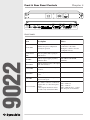
Compressor/Limiter Screen
The compressor/limiter implements a single- or dual-band gain reduction processor.
If the Master button has been pressed in the Device Configuration Screen block diagram, the
sidechains (gain reduction signal) of the two compressors operate using a signal representing the
sum of the two inputs.
If you want both compressors (A and B) to have the same settings, yet be independently settable,
start with the Master button pressed on the Device Configuration Screen. Make your initial settings
on the Master device, then return to the Device Configuration Screen and unclick the Master button
for the compressors.
Usage
Note s
ONLINE
Allows you to work online (realtime)
if there is a 9022 connected.
OFFLINE
Allows you to work on a
configuration without an active
connection to a 9022.
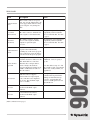
COMP/LIM BYPASS
Bypasses the compressor block.
BAND SPLIT
FREQUENCY SLIDER
Sets the frequency division between
the two bands of the
compressor/limiter when using the
split-band mode.
FULL RANGE
Selects full range mode. This is a
traditional compressor/limiter device
only. Only the controls on the righthand side of the screen are active in
this mode.
SPLIT BAND
Selects split-band mode. In this mode,
a crossover (highpass and lowpass
Split-band mode can be very
filters with inputs paralleled) drives
effective in preventing audible
separate compressor/limiter
compression artifacts.
processors, whose outputs are then
mixed back into a single signal.
GAIN SLIDER
Adjusts output makeup gain.
GRAPH AREA
Displays input/output graph
illustrating current knee, threshold,
and ratio settings.
You can drag and drop the green
dot in the input/output graph to set
the threshold. Then you can drag
the green dot at the right-end of the
graph line to set the ratio.
KNEE BUTTONS
Selects knee characteristic: soft,
medium, hard.
The knee describes the shape of the
compression curve as the signal
level transits through the threshold
level.
9022
Fe ature
(Table continued on next page.)
15