1
Precor Installation Checklist
This document will help you prepare your facility's infrastructure for the Precor Experience
Series™ Products and "Future Possibilities“. As the marketplace for fitness equipment
evolves, entertainment and
interactive features are moving from being mere
enhancements to the workout experience to becoming integral parts of it. To keep pace as
these features grow and expand, fitness facilities should plan a technical infrastructure to
support them.
When you plan a new design or update an existing workout facility, in order to offer a great
workout and entertainment experience, and to prepare your facility and equipment to be
both "networked" and Preva™ ready, consider the following points:
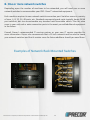
1. Summary of connections required for each cardio machine
Ideally each machine should have its own individual connection permanently built into the
facility infrastructure. In the event you have an existing facility where all of these
connections cannot be built into the facility, consult with your Precor representative about
options we may be able to offer.
Equipment being powered and providing personal viewing entertainment require:
Electrical power outlet
• Precor Cardio Machines with a P80 Console – We recommend one electrical wall outlet
per each machine. Treadmills require an individual wall outlet and individual branch
circuit. (Daisy-chaining power on P80 non-treadmill products is possible but not
preferred.)
• Precor Cardio Machines with P30/P20 Consoles with PVS* – Treadmills require a
individual branch circuit as well as a separate receptacle on the wall outlet for the PVS*.
Non-treadmills require one electrical connection per machine. (Daisy-chaining power to
PVS screens is possible but not preferred to wall outlets.)
Audio Visual outlet - Coax Connection
• For Precor Cardio Machines with P80 Consoles or with P30/P20 Consoles with PVS –
We recommend - one coax wall outlet per machine.
• The coax cable carrying the A/V signal can be "Daisy Chained“ or “split” across multiple
units. Although not preferred, up to 17 units can receive signal from a single cable,
provided the system achieves the appropriate AV signal strength to each machine. (see
following section for details on signal strength)
Data Networking your equipment now or if you plan to in the future.
Every networked P80 console requires a dedicated Ethernet Connection Jack and
dedicated Cat 6 or Cat 5e line.
©2011 Precor Incorporated, Unauthorized Reproduction and Distribution Prohibited by Law
2