1
BAD BOY™ SPOT LUMINAIRE USER MANUAL
Troubleshooting
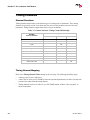
Troubleshooting Guide
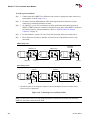
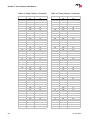
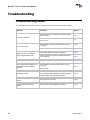
The following table provides a list of common start-up problems and possible solutions.
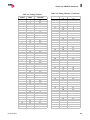
Symptom
Solution(s)
Refer to...
Ensure power cable is properly connected to Neutrik
input connector.
page 10
Ensure power is switched on at source (mains, disconnect box, etc.)
n/a
Ensure DMX512 or Ethernet data cable is properly
connected.
page 19
Ensure DMX512 address setting is correct.
page 23
Ensure data cables are correctly configured.
page 19
Ensure termination connector is installed at last luminaire in data link.
page 12
Lamp does not strike at power-up.
Configure lamp to start at power-up.
page 34
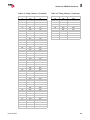
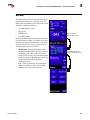
Comm LED is red indicating that no
valid DMX or Ethernet signal is
detected.
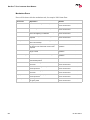
Ensure DMX512 or Ethernet data cable is properly
connected.
page 19
No power to luminaire.
No console control.
DMX512 control not working correctly throughout daisy-chain.
48
Check console.
No Ethernet control.
Ensure that luminaire is not also receiving a DMX signal. If both valid DMX and Ethernet control are being
received, DMX control will take precedence.
page 22
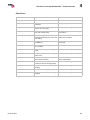
Beam obstructed by gobo in open
position.
Set new gobo zero position.
page 46
Luminaire won’t take software
update.
Remove active control (DMX512 or Art-Net).
page 57
02.9812.0001C