1
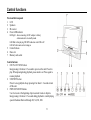
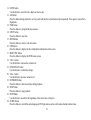
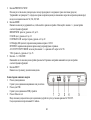
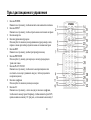
11. GOTO button
Use this button to select the title, chapter or time to play.
12. A-B button
Press this button during playback to set two points and play the section between them repeatedly. Press again to cancel the AB playback.
13. PGM button
Press this button to program the play sequence.
14. EJECT button
Press this button to eject disc.
15. MUTE button
Press this button to enter or exit mute status.
16. OSD button
Press this button to display the disc and playback information on the screen.
17. MENU PBC button
Press this button to display the DVD's menu screen.
18. VOL + button
Use this button to increase the volume level.
19. ENTER PLAY button
Use this button to confirm the settings.
20. VOL button
Use this button to decrease volume level.
21. FORWARD button
Press this button to fast forward play during playback.
22. STOP button
Press this button to stop playback.
23. NEXT button
Use this button to search for the beginnings of the next tracks or chapters.
24. AUDIO button
Press this button to switch the audio language in DVD play status, and to switch audio channel in other status.
15