1
Programmer's Guide
m
PcOS Series 80PLUS
Epson Commands
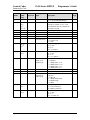
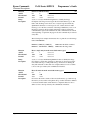
Command Descriptions
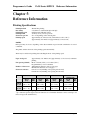
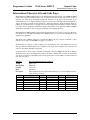
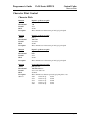
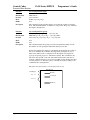
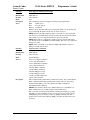
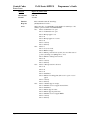
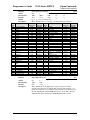
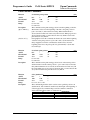
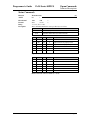
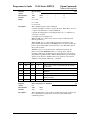
Bar Code System
Number of Characters
Remarks
1
0
UPC A
11 ≤ k ≤ 12
48 ≤ d ≤ 57
1
1
UPC E
11 ≤ k ≤ 12
48 ≤ d ≤ 57
1
2
JAN-13 (EAN-13)
12 ≤ k ≤ 13
48 ≤ d ≤ 57
1
3
JAN-8 (EAN-8)
7≤k≤8
48 ≤ d ≤ 57
1
4
Code 39
1≤k
48 ≤ d ≤ 57, 65 ≤ d ≤ 90
1
5
ITF
1 ≤ k (even number)
48 ≤ d ≤ 57
1
6
Codabar
1≤k
48 ≤ d ≤ 57, 65 ≤ d ≤ 68
d = 32, 36, 37, 43, 45, 46, 47
d = 32, 36, 37, 43, 45, 46, 47,
58
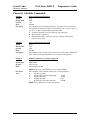
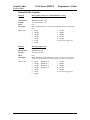
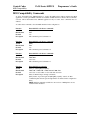
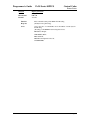
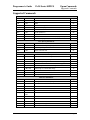
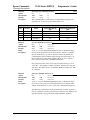
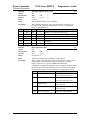
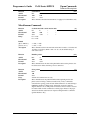
2
65
UPC A
11 ≤ k ≤ 12
48 ≤ d ≤ 57
2
66
UPC E
11 ≤ k ≤ 12
48 ≤ d ≤ 57
2
67
JAN-13 (EAN-13)
12 ≤ k ≤ 13
48 ≤ d ≤ 57
2
68
JAN-8 (EAN-8)
7≤k≤8
48 ≤ d ≤ 57
2
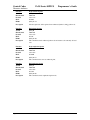
69
Code 39
1 ≤ n ≤ 255
48 ≤ d ≤ 57, 65 ≤ d ≤ 90
d = 32, 36, 37, 43, 45, 46, 47
2
70
ITF
1 ≤ n ≤ 255
48 ≤ d ≤ 57
(even number)
2
71
Codabar
1 ≤ n ≤ 255
48 ≤ d ≤ 57, 65 ≤ d ≤ 68
d = 32, 36, 37, 43, 45, 46, 47,
58
2
72
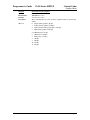
Code 93
1 ≤ n ≤ 255
0 ≤ d ≤ 127
2
73
Code 128
2 ≤ n ≤ 255
0 ≤ d ≤ 127
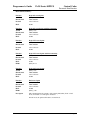
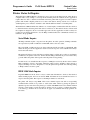
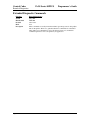
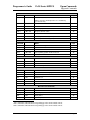
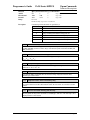
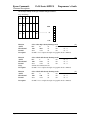
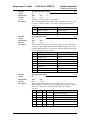
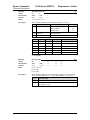
[Description for 1]
[Description for 2]
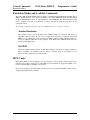
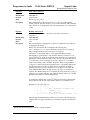
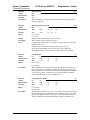
d indicates the character code to be printed.
A null (00 Hex) character ends the bar code definition.
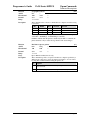
n indicates the number of bytes of bar code data to be processed immediately
following n.
d indicates the character code to be printed.
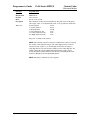
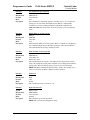
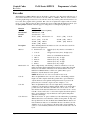
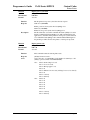
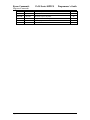
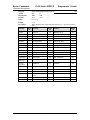
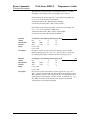
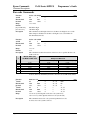
The following apply to both GS k m d1...dk NUL and GS k m n d1...dn:
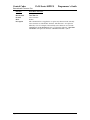
1) If the horizontal width exceeds the printing area, the printer only feeds the
paper.
2) These commands feed as much paper as necessary to print the bar code
according to the GS h command.
3) These commands are enabled only when no data exists in the print buffer.
When data does exist in the print buffer, the printer processes the data following
m as normal data.
4) After printing a bar code, the print position is set at the beginning of the line.
5) These commands are not effected by print modes (emphasized, underline,
character size...), except for upside-down mode.
Rev F
Page 93