1
80 Avocent® HMX Manager Installer/User Guide
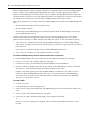
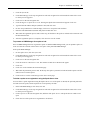
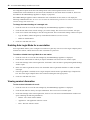
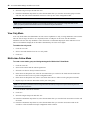
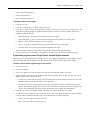
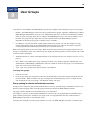
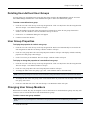
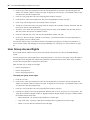
Table 8.1: User Status Icons
Icon
Authentication
Method
Status
Face
All
Enabled - The user can log in and use the HMX Manager software.
Face with a
red X
Internal
Disabled - The user cannot log in to the HMX Manager software. See User
account restrictions and expiration settings on page 84.
Padlock
Internal
Locked - The user account has been locked; the user cannot log in to the HMX
Manager because the maximum number of log in failures has been exceeded.
See Authentication Services on page 57 and Unlocking User Accounts on page
82.
Question
mark
External
Suspicious - The user account exists, but the external authentication server no
longer contains the account.
Face with a
clock
All
Expired - The user account is configured with an expiration date, which has
passed. Expired user accounts remain in the system until deleted. See User
account restrictions and expiration settings on page 84.
The following fields may be displayed in the User Accounts window. Use the Customize link to add or remove
fields in the display.
•
Full Name - Another name for a user. For example, a user may have a username of Sunrise1 and a full name
defined as Mary Jones. See Username on page 83.
•
Status - User account status: Enabled, Disabled, Locked, Suspicious or Expired. One of the user status icons
in Table 8.1 will appear to the left of the username.
•
When a User Accounts window contains this column, values are not displayed for external users (users
validated with external authentication services).
•
Authentication Server - Name of the internal or external authentication server. See Authentication Services
on page 57.
•
Business Address - Business address defined in the user’s properties. See Address on page 85.
•
Business Mobile - Business mobile phone number defined in the user’s properties. See Phone contact on
page 85.
•
Business Phone - Business phone number defined in the user’s properties. See Phone contact on page 85.
•
Default E-Mail - Default email account defined in the user’s properties. See Email contact on page 86.
•
E-Mail 1-E-Mail 5 - Up to five additional email accounts defined in the user’s properties. See Email contact
on page 86.
•
Custom Field 1- Custom Field 6 - Custom fields for the user. If you have specified text for a custom field,
that text will display when you display the field. See Custom field properties on page 86.
•
When a User Accounts window contains this column, values are not displayed for external users (users
validated with external authentication services).
•
Home Address - Home address defined in the user’s properties. See Address on page 85.
•
Home Phone - Home phone number defined in the user’s properties. See Phone contact on page 85.
•
Mobile Phone - Mobile phone number defined in the user’s properties. See Phone contact on page 85.
•
Pager - Pager number defined in the user’s properties. See Phone contact on page 85.
Adding User Accounts
The following information is configured when a user account is created: