1
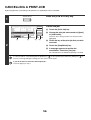
CANCELLING A PRINT JOB
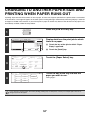
A job being printed, a job waiting to be printed, or a spooled job can be cancelled.
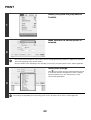
Press the [JOB STATUS] key.
JOB STATUS
1
Job Queue
Sets / Progress
Spool
Status
Copy
020 / 001
Copying
Copy
020 / 000
Waiting
1/1
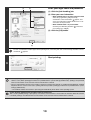
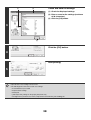
Cancel the job.
Job Queue
Complete
(1) Touch the [Print Job] key.
Detail
Computer01
020 / 000
Waiting
Priority
0312345678
002 / 000
Waiting
Stop/Delete
Print Job
(1)
2
Scan to
Fax Job
(3)
(2) Change the print job status mode to [Spool]
or [Job Queue].
Touch this key to change modes. The selected mode is
highlighted.
Internet Fax
(2)
(4)
(3) Touch the key of the print job that you wish
to cancel.
(4) Touch the [Stop/Delete] key.
(5) A message appears to confirm the
cancellation. Touch the [Yes] key.
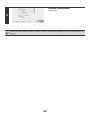
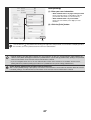
The selected job key is deleted and printing is cancelled.
It is also possible to cancel printing with the [STOP] key (
) on the operation panel. When the [STOP] key (
pressed, a message will appear asking you if you want to cancel the job.
If you do not want to cancel the selected print job...
Touch the [No] key in step 5.
56
) is