1
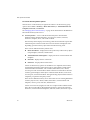
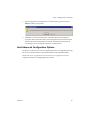
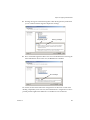
Basic System Administration support this configuration produces a warning, but the migration can proceed. When the virtual machine is powered on again, the swapfile is located with the virtual machine. See the VI Client online Help for more information on configuring swapfile policies. Migrations with VMotion are not allowed unless the destination swapfile location is the same as the source swapfile location. In practice, this means that virtual machine swapfiles must be located with the virtual machine configuration file. Migrating Virtual Machines with Snapshots Some additional restrictions apply when migrating virtual machines with snapshots. Migrating a virtual machine with snapshots is permitted, regardless of the virtual machine power state, as long as the virtual machine is being migrated to a new host without moving its configuration file or disks. (In other words, the virtual machine must reside on shared storage accessible to both hosts.) If the migration involves moving the configuration file or virtual disks, then the following additional restrictions apply: The starting and destination hosts must be running ESX Server 3 version 3.5 or ESX Server 3i version 3.5 or later. All of the virtual machine files and disks must reside in a single directory, and the migrate operation must move all the virtual machine files and disks to a single destination directory. VMotion Compatibility VMotion compatibility requires that both source and destination hosts match in certain criteria. Possible destination hosts include hosts and fully automated DRS clusters. A nonautomated cluster can also be selected as a destination. When you select a host, the Compatibility panel at the bottom of the Migration wizard displays information about the compatibility of the selected host or cluster with the virtual machine’s configuration. If the virtual machine is compatible, the panel displays the message, “Validation succeeded.” If the virtual machine is not compatible with either the host’s or cluster’s configured networks or datastores, the compatibility window can display both warnings and errors: 238 VMware, Inc.