1
mx2301_ex_qck.book
24 ページ
2009年8月7日 金曜日 午後4時6分
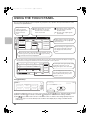
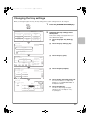
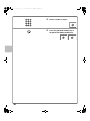
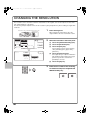
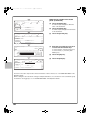
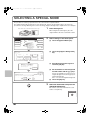
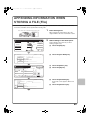
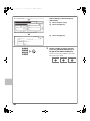
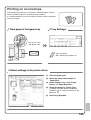
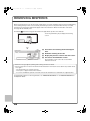
Select settings in the touch panel.
(Continued)
Copy Mode
Type
Bypass Tray Type/Size Setting
Type
Plain
Auto-Inch
Auto-AB
(5)
OK
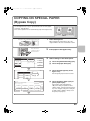
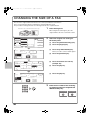
(5) Touch the [Auto-AB] key.
(6)
Size
12x18,11x17,81/2x14
1
8 /2x11,81/2x11R,51/2x81/2R
71/4x101/2R,A3,A4,B4,B5
A3W,A3,A4,A4R,A5R,B4
B5,B5R,216x330(81/2x13)
11x17,81/2x11
8K
(6) Touch the [OK] key.
X420 Y297
Custom Size
2/3
Paper Select
(8)
Plain
A4
2. A4R
Plain
heavy paper
Pre-Printed
3. B4
Plain
4. A3
Plain
1. A4
(7) Touch the bypass tray key.
OK
(8) Touch the [OK] key.
(7)
4
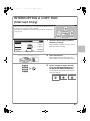
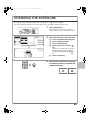
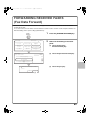
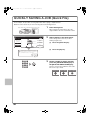
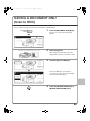
Set the number of copies and then
press the [COLOUR START] key or
the [BLACK & WHITE START] key.
Correct sets
Cancel scanning
Cancel copying
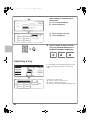
Selecting a tray
Ready to scan for copy.
0
Full colour
Colour mode
Original
A4
Output
Job Detail
settings
Auto
Exposure
Plain
A4
1.
2.
3.
100%
Copy Ratio
4.
A4
A4R
B4
A3
File
(B)
24
1. A4
Plain
2. A4R
Plain
3. B4
Plain
4. A3
Plain
Special Modes
Quick File
Paper Select
(A)
2-sided Copy
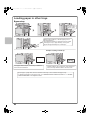
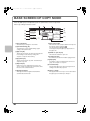
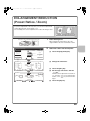
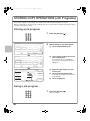
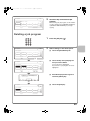
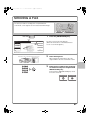
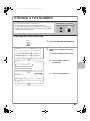
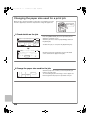
To select paper, touch the [Paper Select] key or the
image of the machine in the base screen of copy
mode.
OK
A4
Plain
5.A4
Plain
(C)
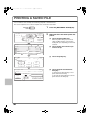
Touch a key to select a tray.
(A) Touch to select one of trays 1 to 4.
(B) Touch to select the bypass tray.
(C) Touch to set the type of paper in the bypass tray.