1
4
Operation
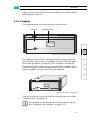
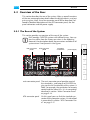
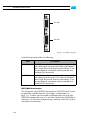
This chapter describes how to operate the CLIPSTER hardware, i.e. it is
explained how to start the system and how to shut it down. For both
procedures you have to use the power switch of the operation items on
the front of the system.
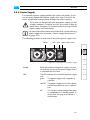
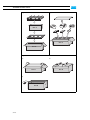
power switch
power switch
1
2
3
4U chassis
4
5U chassis
Figure 4-1: The power switch
All other items necessary for a correct operation of the CLIPSTER hardware, such as the LEDs or the reset button, are described in chapter “Overview” on page 2-1.
4.1 Starting the System
After a proper installation of the system (see chapter “Installation” on
page 3-1) you may start CLIPSTER at any time.
To start the system perform the following:
y Press the power switch briefly to turn on the system.
The system will be started and the DVS logo in the middle of the faceplate lights up. As with any standard computer after initial booting, the
system begins to load the installed operating system. When the operating system has finished its loading, you can begin to work with CLIPSTER right away.
4-1
5
A
I