1
CHAPTER 4. APPLICATION DESIGN
61
Program Control
Triggers
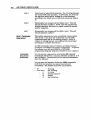
You can use the Wait for Trigger (TR) conunand to specify a
configuration of trigger conditions to be matched before
executing a sequence of buffered commands. The trigger
inputs are lRIG 1. lRIG 2. and lRIG 3. The three pOSSible
conditions you can specify are as follows:
•
•
•
1 =Wait for the trigger input to be high (no current flows)
0 = Wait for the trigger input to be low (current flows)
X =Ignore the trigger input
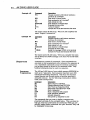
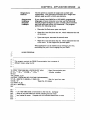
Command
MN
A2
V5
025600
TR01X
G
pescription
Sets u nit to Preset mode
Sets acceleration to 2 revs/sec 2
Sets velocity to 5 rps
Sets distance to 25,600 steps
Waits for Trigger Input 1 to turn on and Trigger
Input 2 to turn off (ignores Trigger Input 3)
Executes 4,OOO-step move (Go)
The move will not be executed until current flows on the TRIG 1 input
and no current flows on the TRIG 2 input.
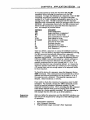
The TS command is useful for checking the status of the
trigger inputs when it appears as though execution is being
halted by the TR command and all conditions for matching
the trigger input configuration defined by the TR command
appear to be met. It may also be used to initiate external
actions by monitoring the trigger inputs manually with a
computer controlling the AX.
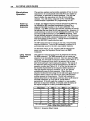
Delays
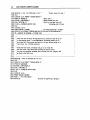
You can use the Time Delay (T) command to halt the operation
of the indexer function for a preset time. If you are in the
Continuous Mode (MC)' you may use the Continous Time
(CTM) conunand to run the motor at continuous velOCity for a
set time. then change to a different velocity.
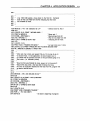
In the Preset mode (MN). the motor finishes the move before
the indexer executes the time delay.
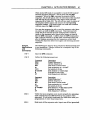
Command
PS
A7
V6
025600
G
T5.0
H
G
C
pescription
Waits for the AX to receive a Continue (C)
command before executing next command
Sets acceleration to 7 revs/sec 2
Sets velocity to 6 rps
Sets distance to 25,600 steps
Moves motor 25,600 steps
Waits 5 seconds after the move ends
Changes motor direction
Moves motor 25,600 steps in the OPPOSite
direction
Cancels Pause and executes the move