1
MR-2100/2200 Programming Manual
1.0 Operation and Programming Concepts
1.1 Introduction
This chapter provides an overview of the MR-2100/2200’s (hereafter called the MR-2200) features
and supported devices.
1.2 General Information
Warnings: Before Programming
1. All applicable codes and standards should be considered when programming the Control
Unit.
2. The Control Unit continues to monitor input circuits and devices and acts according to the
current program settings if an alarm is received while it is being programmed.
3. Loading a new database erases the current database before loading the new database. If
the new database is not loaded after the erasure, the panel will not operate.
4. The database internal revision number included must match the number required by the
MR2 program, otherwise a Database Mismatch trouble condition is generated. This
condition disables the panel until a correct MR2 program is loaded.
5. The database must be completely loaded for it to be considered valid. The program keeps
track if the last database load was valid/complete or not. An invalid database load disables
the panel until a valid database load is done.
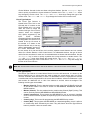
Downloadable Database
The panel uses a downloaded database for input circuit programming. This database includes the
addressable devices on-line, and the Zone LEDs, Bells, Functions Relays and Control Modules
activated by addressable devices. This database is created and downloaded from an IBM
compatible computer using the Modul-R Human Interface (MHI) program. Refer to the Modul-R
Human Interface User Guide for instructions on downloading the database.
Note: All communications are stopped during the database load. This causes a trouble to be recorded by those
units that are normally communicating with the panel.
1.3 Networks
General
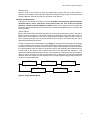
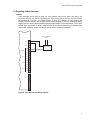
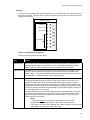
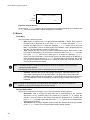
The MR-2200 can be incorporated into a network including other MR-2900 panels and MR-2944
annunciators. Though up to 254 panels and annunciators can be supported by the network, such a
network would probably be too large to properly maintain. The network can be setup for single
building or multiple building operation.
MR-2200
ID #1
Com2
MR-2944
ID #3
MR-2900
ID #2
Com1
Com2
MR-2200
ID #5
Com1
Com2
Com2
Com1
Com1
MR-2944
ID #4
Com1
Com2
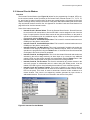
Figure 1: Typical Network Layout
1