1
MultiVOIP Quick Start Guide
Introduction
Welcome to Multi-Tech's new standalone Voice/IP Gateways,
which allow analog voice and fax communication over an IP
network. The MultiVOIP model number MVP800 has eight
voice/fax channels. Multi-Tech’s new voice/fax over IP
gateway technology allows voice and fax communication to
ride, with no additional expense, over your existing IP network,
which has traditionally been data-only. To access this free
voice and fax communication, all you have to do is connect
your MultiVOIP to your telephone equipment, and then to your
existing Ethernet LAN. Once configured, the MultiVOIP then
allows voice and fax to travel down the same path as your
traditional data communications.
The MVP800 is designed with eight voice/fax channels, 10M bps
Ethernet LAN interface, and command port.
System management is provided through the command port
using bundled Windows® software, which provides easy-touse configuration menus and online Help.
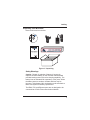
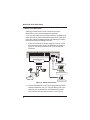
Figure 1. MultiVOIP
Related Documentation
The MultiVOIP manuals are intended to be used by a qualified
VOIP Administrator (one that has both telephony and
networking experience). This Quick Start Guide provides the
necessary information for a qualified administrator to unpack,
cable, load software, and configure the host and client units for
proper operation.
A detailed MultiVOIP User Guide is also provided on the
4