1
MultiVOIP Quick Start Guide
Remote Site Administrator
3. Unpack your MultiVOIP.
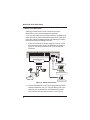
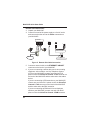
4. Connect one end of the power supply to a live AC outlet
and connect the other end to the Power connection on
your MultiVOIP.
Voice/Fax Channel
Connections
10BASET
E&M FXO FXS
E&M
ETHERNET
POWER
FXS
FXO
Power Connection
PSTN
Ethernet Connection
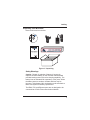
Figure 5. Remote Site Cable Connection
5. Connect a network cable to the ETHERNET 10BASET
connector on the back of your MultiVOIP.
6. If you are connecting a station device such as an analog
telephone, a fax machine, or a Key Telephone System
(KTS) to your MultiVOIP, connect one end of an RJ11
phone cord to the Voice/Fax Channel 1 FXS connector on
the back of the MultiVOIP and the other end to the station
device.
If you are connecting a PBX extension to your MultiVOIP,
connect one end of an RJ11 phone cord to the Voice/Fax
Channel 1 FXO connector on the back of the MultiVOIP
and the other end to the PBX extension.
If you are connecting an E&M trunk from a telephone
switch to your MultiVOIP, connect one end of an RJ45
phone cord to the Voice/Fax Channel 1 E&M connector
38