1
ALPHA Serial Clock Manual
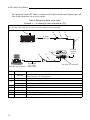
In a network with a PC that is connected to Alpha clocks and Alpha signs, all
the clocks must be set to slave mode.
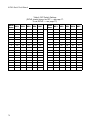
Table 3: Networking Alpha serial clocks
(Example 3 — A network of clocks attached to a PC)
Unlike the previous all-clock network, in this example, a PC is connected to the network. All the clocks on the network
must be set to slave mode. Also, the last clock on the network must be terminated.
A
B
C
D
To either
phone jack
E
Alpha® serial clocks
F
H
PC running
AlphaNET plus™ software
Item
A
B
C
12
To RS485
connector
block
G
To one of the
PC’s COM
(RS232) ports
Set switch to Terminated.
Part #
Description
1088-9107
End-of-line (EOL) terminator. (An EOL must be plugged into the left—as you face the
back of the clock—RJ11 phone jack.)
—
Ferrite (ferrite end towards sign)
1088-8624
8 foot, 4-conductor RS485 cable
1088-8636
1 foot, 4-conductor RS485 cable
D
4331-0602
Modular Network Adapter
E
1088-8000
RS485 cable
F
1088-1111
Converter Box III
G
1088-8634
10 foot, 9 pin-to-9 pin, type “A9” RS232 cable
H
—
serial port DB25-to-DB9 RS232 adapter (may be required by your computer)