1
ALPHA Serial Clock Manual
Introduction
The Alpha serial clock displays the time in either 12-hour or 24-hour mode
using a 4-inch LED display. The clock can be used all by itself or it can be
networked with other Alpha clocks or Alpha signs. In a network, one clock
(or a PC attached to the network) is used to synchronize all the other clocks
to the same time.
Used by itself, the Alpha serial clock should be set to master mode. In a
network composed of all Alpha serial clocks, one clock should be set to
master mode and the other clocks set to slave mode. In a network with a PC
that is connected to Alpha clocks and Alpha signs, all the clocks should be
set to slave mode.
Power supply (AC adapter)
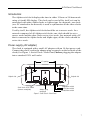
The clock is equipped with a small AC adapter with an 18-foot power cord.
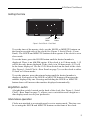
Connect the power cord to the adapter plug receptacle on the backside of the
clock (See Figure 1: Serial Clock—Rear Panel) before plugging the adapter
into a standard 120V wall outlet.
6” spacing
Keyhole slot
Keyhole slot
Serial Jacks & DIP switch
(remove screw/plate)
Adapter plug
receptacle
Bright/Dim switch
12/24 Hour switch
Master/Slave switch
Figure 1: Serial Clock—Rear Panel
7