1
Models: PS27112, PS20112
Features
First-Time
Operation
Detailed Operating
4
5-7
8
9
10
ll
12
13
14
Optional
27
28-29
29-30
Alarm
Labeling Channels
Parental Control
Programming Channel Memory
Setting up VCR Channels
Changing Antenna Input
Setting up Cable Box Channel
Programming Remote to Control VCRs
Programming Remote to Control Audio
_'_
_ _.
_
_,,._
O
"z
_*"
O'_
Accessories
_O
Panel and Connections
Monitor Panel
Home Antenna Connections
Cable-TV Connections
Programming Remote to Control Cable Box
Cable-TV Information and Channel Chart
Reference
46-47
47
48
48
49
50-51
15
16
17
18-19
20
21
22
23-24
25-26
Optional Stand
Accessory Cables
Accessory Order Form
Monitor
31
32
33-34
35
36
Instructions
Front Panel Controls
Remote Control (TV Functions)
Video Menu
Audio Menu
Stereo and SAP Broadcasts
Expanded Stereo
Setup Menu
Closed Captioning
Sleep Timer
Section
Trouble Checks
Warranty
Design Specifications
Cleaning and Care
Index (Inside Back Cover)
Quick-Reference Guide (Inside Back Cover)
37-40
41-42
43
44
44-45
VCR Connections
Camcorder Connections
Amplifier or Cassette Tape Deck
Laser Disc Players, Computer, etc.
External or Surround Speakers
Important
Information
WARNING
To prevent fire or shock
hazard, do not expose this
TV to rain or moisture.
RISK OF ELECTRIC
TO REDUCE THE RISK OF ELECTRIC SHOCK, DO
NOT REMOVE COVER (OR BACK). NO USER
SERVICEABLE PARTS INSIDE. REFER SERVICING
• TO QUALIFIED SERVICE PERSONNEL.
SHOCK
DO NOT OPEN
This symbol indicates
This symbol indicates
"dangerous voltage" inside
the product that presents a
risk of electric shock or
personal
accompanying
important
instructions
the
product.
injury.
To prevent electric shock, match wide blade of plug to wide
slot, fully insert.
Pour _viter les chocs _lectriques, introduire la lame la plus
large de la fiche dans la borne correspondante
de la prise et
pousser jusqfi au fond.
Do not defeat the safety feature of the plug. The wide blade fits into the
wall socket only one way. If you need an extension cord, make sure it
matches the plug of the TV.
Cautions
Operate
TV only on 120 volts, 60 Hz AC power (normal
house power).
For safety reasons, make sure any equipment or accessories connected to
this product bears the UL listing mark or, if purchased and used in
Canada, the CSA certification mark. If in doubt, contact qualified service
personnel.
FCC Regulations
Note To Cable
TV Installer
Product
Registration
state that unauthorized
changes
or modifications
to this
This reminder is provided to call your attention to Article 820-40 of the
National Electrical Code (Section 54 of the Canadian Electrical Code,
Part 1) which provides guidelines for proper grounding and, in particula'*r,
specifies that the cable ground shall be connected to the grounding system
of the building as close to the point of cable entry as practical.
Please fill out the product registration card and return it immediately.
Returning this card allows us to contact you if needed.
Keep your sales receipt to obtain warranty parts and service and for proof
of purchase.
Attach it here and record the serial and model numbers in
case you ever need them. The numbers are located on the back of the TV.
Model No.
Serial No.
Purchase
Date:
Dealer / Address / Phone:
SETUP MENU
3 Follow instructions
Repeatedly press MENUto
select SETUP
MENUand then
press + to display the
functions in the SETUP
•Mt,ae • .
Vi_o ldehti:
Audio Men_ _
_..._,,_,,,
MENU,
I
I
Press + to display the ALARMfunctions.
Turn ALARMON and OFFby pressing +.
Enter ON TIME and OFFTIMEby pressing - to
set the hour and + to set the minutes. Enter
CHANNELyou want TV to tune by pressing
CHANNEL
up or down and then pressing +.
Details are on page 20.
:;€IP._,CtrI: Normal
!
The CAPTIONINGfeature lets you display a program's sound as
words on the TV screen. Four types of closed captioning are
available. Select CAPTIONS1 for full translation of the primary
language in your area. Select CAPTIONS2 or secondary language
translation, simplified English, or nothing at all. Both TEXT1 and
TEXT2 display on-screen boxes containing general information not
related to closed captioning. Details are on page 19.
To set the SLEEPTIMER,repeatedly press + or - to select the length
of time you want the TV to stay on. To cancel, press + or - to
change the setting to 0:00.
Details are on page 19.
2 Select function
by repeatedly
pressing MENU
to move down
the screen.
MENU
below for desired function.
Mere:Stored.,
_
Narr_On
On Time: 6:_0AI_
Off Tmle:
1t .'OOPM
imlmlllZ_m@
To label channels press +. Four blank letter blocks will appear.
Press and hold VOLUMEup or down button on remote until the
letter you want in the first block appears. Then press + to move to
the next block. Repeat until name is complete. Details are on
page 22.
To turn on PARENTALCTRL,press +. When this function is set to ON,
all channels that have been LOCKEDout with the next function called
CHANCTRLwill not be viewable. To lock out channels, select the
CHANCTRLfunction. Then press CHANNELup or down to select the
channel and press + to change the setting from NORMALto LOCKED.
Details are on page 23.
To start autoprogramming, press +. The TV will automatically
cycle through all channels and place active channels in memory.
Details are on page 24.
To add or erase individual channels from memory, select the channel
with the number buttons and then press + to add or- to erase.
Details are on page 25.
To switch antenna inputs, press + or -. You will probably not use
this function unless you have something connected to both the
ANTENNAA and ANTENNABinputs on the back of the 'IV. Details,_
are on page 21.
,°
To change the CABLE/AIR
setting, press +. If you have cable-TV,
this function should be set to CABLE.If you have a home antenna,
this function should be set to AIR.
"ClOck Set -HR
+MIN
To set the VCR1 CHANNEL
first enter the channel number by
pressing two number buttons on the remote and then press +. The
channel you enter here is the channel to which the TV will
automatically tune when you later press the VCR_button on the
remote. Details are on page 26.
To set the VCR2 CHANNELfirst enter the channel number by
pressing two number buttons on the remote and then press +. The
channel you enter here is the channel to which the TV will
automatically tune when you later press the VCR2button on the
remote. Details are on page 26.
To set the CABLECHANNEL
first enter the channel number by
pressing two number buttons on the remote and then press +.
The channel you enter here is the channel to which the TV will
automatically tune when you later press the CABLEbutton on the
remote. Details are on page 27.
°
°
To set the clock, press and hold - to set the hour. Then press and
hold + to set the minutes.
Adjustingfor a Color Picturethat Pleases You
1 Decrease color to minimum. This will leave a
black-and-white image on the screen.
1 Repeatedly press MENUto
select VIDEO
MENUand then
press + to display the
functions in the VIDEO
MENU.
2
rhr0f:lJ
Audio Menu
Setup Menu
2 Adjust contrast until the picture pleases you.
,
2 Select function
by repeatedly
pressing MENUto
move down the
screen,
i
3 Adjust brightness
picture appear black. You may need to wait until
the picture shows something you're sure is black.
Be careful not to lose the details in darkly shaded
Press + to increase
setting or press - to
decrease setting.
Brigm
Contra.4t
Sharp"
The PICTURE RESET
function will return
video functions to
PictureReset
factory settings.
"_rll
until the black parts of the
areas,
4 Increase color until you reach a pleasing level of
intensity.
5 Adjust tint until flesh tones or othercolor objects
appear natural
6 Adjust sharpness for a pleasing level of picture
sharpness. (For weak signals, the picture may be
more pleasing with sharpness decreased.)
Audio Menu
Repeatedly press MENUtO
select AUDIOMENUand then
3 Follow instructions
below for desired
function.
press + to display the
functions in the AUDIO
MENU.
Mu_.
,:
V{deoMefiu.
To adjust TREBLE,BASS, or BALANCE
functions, press + to increase or
press - to decrease the setting.
2 Select fur_etio_.....
° ......
- bY repeatedly
pressing MENUto
move down the
screen.
:i
To prepare the 'IV to receive stereo, press + to set function to STEREO.
Your 'IV will automatically reproduce stereo when received.
If you want the TV to automatically expand stereo signals when
received, press + to set the EXPANDSTEREOfunction to ON. The
STEREO/SAPfunction above must also be set to STEREO.
To turn off TV's speakers, press + to change setting to OFF. You will
iwant to leave the TV's speakers turned ON unless you connect an
, amplifier to tile TV that has its own set of speakers.
So
Advanced.
Yet
So
Simple.
Your ProScan television is more than state-of-the-art
technology. It's technology tailored to you. Features
designed to deliver viewing and listening enjoyment
beyond expectations.
Innovation and simplicity of
operation become one-ProScan.
Improving Your Image
• A Cleaner Picture: Digital Comb Filter extends resolution and
minimizes color interference patterns for greater detail.
• A Cleaner Picture Tube: The Ami-Static Faceplate helps prevent
dust build-up.
• No Glare T" Picture: Anti-Glare Lithium Silicate Faceplate
virtually eliminates glare while enhancing contrast.
• Ix_creased Clarity: Up to 560 lines of horizontal resolution*,
surpassing the capabilities of all available signal sources.
• through S-VIDEOconnector.
Sound Thinking
• Broadcast Stereo with SAP (Second Audio Program)
For details, see page 10.
• 5 Watts Per Channel *
• Expanded Stereo For details, see page 11.
• dbx** Noise Reduction
• RMS rating, into 8 ohms, 50 to 20,000 Hz ±3db, with less than
1% THD.
• *dbx is a registered trademark of Carillon Electronics Corp.
Creative Entertainment
• Channel Labeling lets you label channel numbers with names up
to four letters (e.g. NBC, VH-I, ESPN). For details,
see page 16.
• 181 Channel capability in U.S.A. - Cable Compatible* For
details,
see page 36.
• Closed Captioning For details, see page 13.
• Commercial Skip For details, see page Z
• Sleep Timer For details, seepage 14.
• Alarm Timer For details, seepage 15.
• Parental Control For details, seepage 1Z
• Previous Channel Control For details, seepage Z
*Check your cable company's compatibility requirements.
Channels 95, 96, and 97 are not applicable in Canada, so the total
channel count for Canada is 178.
One Minute Manual
• On-Screen Menus for simple operation of picture, sound, and
set-up functions by remote control. For details, seepages 8, 9,
and 12.
• AutoProgramming
automatically searches for and stores all active
channels. Eliminates the need for manual set-up. For details, see
page 18.
• Frequency Synthesis Tuning automatically and accurately tunes
each channel.
• Automatic VCR Setup with the push of a button, your TV is
ready for VCR play: both TV and VCR turn on and TV tunes to
correct channel/input. For details, seepage20.
• Automatic Cable Box Setup offers convenience when cable
company requires you to use cable box. For details, seepage 22.
• On.Screen Clock/Channel Display For details, see page 4.
• Picture Reset For details, see page 8.
Networking
Gold Plated Phono Jacks for Superior Performance:
• Two Sets of Audio/Video Inputs for VCR, Laser Disc player,
Camcorder etc. For details, seepages 37-44.
• One Set of Audio/Video Outputs for video dubbing.
For details, see page 39.
• One Set of Volume-Controlled Audio Outputs to retain remote
volume when connected to an external amplifier.
For details, see page 44.
Other Connections to Expand Your System:
• S-Video input connector for direct ¥/C input to get the most from
your S-VHS VCR, Camcorder, etc.
For details, see pages 40 and 41.
• Two Speaker Jacks to allow hook up of optional external or
surround sound speakers. For details, see pages 44-45.
• Dual RF Inputs to allow direct connection of up to two basic
cable, cable box, or other RF sources.
For details, see pages 33-34.
• Front-Mounted Stereo Headphone Jack for private listening
with optional headphones. For details, see page 4.
At Your Command
• The I_oScAN Universal Remote is preprogrammed so there's no
need to teach additional or new codes. Operation is as easy as
entering a channel. It operates all major TV and VCR functions.
Operates the basic functions of 60 different VCR brands and 28
brands of cable boxes, eliminating the need for additional remotes.
Remote can also control some brands of audio equipment.
At YourService
Our Human Touch policy offers all these valuable
benefits:
• 1-800-PRoScAN Call at any time our 24-hour-a-day,
7-day-a-week information service.
• Nationwide Service Centers
• ProScan Limited Warranty for U.S.A. In-homeserviceof all
parts and labor for one year, picture tube for two years.
For details, see page 47. A separate warranty for Canada
is enclosed with all sets sold in Canada.
First-Time
Operation
The steps below will help you get your TV connected and
working quickly. The page numbers on which you can find
detailed instructions for each of these steps are also listed
for your convenience.
Number Buttons---VOLUME
Buttons
1 UnpackTVand accessories.
The accessories that came packed with your TV include a
remote control, four AAA batteries, power cord, and
antenna adapter.
Iili
5 Turn on TV, adjustthe volume, and select a channel.
To turn on the TV, press the TVbutton on the master
remote or press the POWERbutton on the simple remote.
When using the remote, remember to point it at the
front of the TV.
2 Press the VOLUME
up or down button to adjust the
volume to a desired level.
Press the CHANNEL
up or down button to select the next
channel in memory. You can also press two number
buttons to select a channel. Channels 2-13 and 91 were
Connectantenna or cable-TV system.
Most antenna or cable-TV systems can be connected as
shown here.
Back of "IV
CABLE/AHTENNA
ANTA
Incoming Cable
from Antenna or
ANT B
Cabls-W
@
System
@
CONVERTER
• Details for connecting a home antenna to your TV are on
page 32.
• Details for connecting a cable-TV system to your TV are
on page 33-34.
• Details for connecting a VCR to your TV are on
pages 37-40.
programmed into the channel memory at the factory, so
pressing CHANNEL
up or down stops at these channels
only. When you start the autoprogramming feature
(described next), your set will automatically scan
through all channels and place the active channels for
your area into its channel memory.
6 AutoProgramthe TV's channel memory.
To start the TV autoprogramming itself, press the MENU
button repeatedly to select the SETUPMENU and then
press the + button to display the setup functions. Press
MENUagain to select the AUTOPROGRAM
function, then
press +. Details are on page 18.
Attach power cord.
First attach the flat end of the power cord completely into
the connector on the back of your TV, and then plug the
other end into a wall outlet.
Be sure to insert the plug completely.
DoThis
Not This
4 Install batteries in remote control.
Details are on page 5.
L_
Af,
Jdlo.Men_.
Ik'_m_vam.
I I
Patelhtal,.Ctrl;:Off
Ctian:Ctrl:Normalv
You can also add and delete channels from memory as
desired. Press MENUrepeatedly to select the SETUP
MENU,then press + to display the setup functions. Press
MENUrepeatedly to select the CHANMEMfunction, then
select the desired channel number and press + to add or
- to erase the channel. Details are on page 19.
Set the clock.
1 Repeatedly press the MENUbutton to select the SETUP
MENUand then press +. Press MENUrepeatedly again to
select the CLOCK
SETdisplay.
To see the setup menu,
repeatedly press MENUto
select SETUPMENUand
then press +. Repeatedly
press MENUtO select
desired function and then
press + or - to adjust it.
Details begin on page 12.
"
oe
o
e
•
Sleep Timer 0:00
Set Alarm
Chart Label
Parental Ctrl: Off
Chan Ctrl: Normal
° Autoprogram
ChartMere: Stored
Antenna: A
Cable/Air:Cable
VCR 1 chan: Off
Press and hold the - button to select the correct hour.
Then press and hold the + button to select the correct
minute.
The correct time will now appear on the screen
whenever you change channels or press the DISPLAY
button.
Note: If power is interrupted
to reset the clock.
for an extended
time, you will need
_
,':_.,,::"
VCR 2 Chan: Off
Cable Chaff: Off
ClockSet -Hr +Min
Label channels if desired.
The labeling feature lets you add names (or labels) to
channels as desired.
To label a channel, repeatedly press MENUto select the
SETUPMENUand then press +. Repeatedly press MENU
to select the CHANLABEL
display, and then press + to
enter the function.
8 Review menus.
To see the video
menu, repeatedly
press MENUbutton to
select VIDEOMENUand
then press +.
Repeatedly press
MENUto select
desired function and
then press + or - to
adjust it. Details are
on page 8.
vIdeqM_u,
MENU
©
--
+
©©
Select the channel number you want to label.
Repeatedly press roE up or down on the remote control
to select the desired character, and then pres_,+ to move
to the next character block. When the first name is
finished, you can select another channel to label.
Details are on page 16.
"_
To see the audio menu repeatedly press MENUto select
the AUDIO
MENUand then press +. Repeatedly press
MENUto select desired function and then press + or - to
adjust it. Details begin on page 9.
J
TIMEANDCHANNEL
NUMBERDISPLAYS
show the current time
(once set) and channel number whenever you turn on the TV,
change channels, or press the remote's OZSPLA¥
button. These
dtisplays also appear whenever you change volume with the
',,OLUME
buttons on the front of the TV.
REMOTE
CONTROL
SENSOR
receives commands from the remote
control. When using the remote control, point it toward this
sensor.
//POWER
INDICATORlights whenever
the TV is turned on.
VOLUME
BUTTONS
Press VOLUME
up to increase volume, or press VOLUME
down to
decrease volume. The volume display will automatically
appear on the screen when you press the VOLUME
buttons.
--
POWERBU'I-f0N
Press once to turn on TV. Press again to turn off TV.
CHANNEL
BUTTONS
/
/
/
Press CHANNEL
up to see the next higher channel in memory,
or press CHANNEL
down to see the next lower channel in
memory. Your TV will automatically program channels into
the channel memory for you when you start the AUTOPROGFtAM
feature described on page 18. You can also add or erase
individual channels as desired as described on paje 19.
STEREO
HEADPHONE
JACKlets you connect an optional
headphone to enjoy private listening without disturbing
others. If the plug on your headphones does not fit this jack,
a,iapters are available from your local electronics supply
slore.
Plugging in headphones will not automatically mute the sound
fiom the TV. This special feature enables someone with a
hearing impairment to attach a set of headphones with
separate volume control and enjoy a program with others in
the same room listening at a lower volume. You can also
enjoy private listening if desired. Here's how to completely
mute the sound except for what's coming through the
headphones.
1 Change the SPEAKEFtS:
ON/OFFfunction to the OFFsetting as
described on page 9.
2 If an optional amplifier is connected to the TV, turn off the
amplifier to prevent sound from coming through it.
MENUBU'FrON
Press MENUrepeatedly until the menu you want to display is
selected, then press + or -. Next press MENUrepeatedly to
select the function you want to adjust and then press + or - to
adjust the setting. Details about using each function begin on
page 8.
--
- AND + BUTTONS
Use these buttons after you have pressed
enter or adjust functions.
the MENUbutton
to
OperatingRemote Control
Effective Rangeof RemoteControls
Before attempting to operate the remote control, install its
batteries as shown below.
Aim either remote control at your TV's remote control
sensor. The remote controls produce an invisible (infrared)
beam that travels in a straight line much as the beam of a
flashlight. For this reason, when operating either one of the
remote controls, you must point it directly at the front of the
TV without objects between that can block the infrared light
beam.
Installing]ReplacingBatteries
I Turn remote control face down.
2
Press down on the ridged area of the battery cover and
slide it off.
A_mremote
at yourTV's
remotecontrol
sensor
Simplilied
Remote
3
Install four "AAA" batteries as shown.
Optional
4 Replace the cover and turn remote over (face up).
Notes: Replace the batteries when the TV fails to respond to the remote
control.
If you programmed your master remote to control other components, you
may have to reprogram the code numbers when you change batteries.
"Fry not to press any buttons while changing batteries.
Never place anything heavy on top of the remote control or lay it upsideclown. This may accidentally depress the buttons for a long time and
discharge the batteries.
Simplified Remote
This optional remote can also be used to operate the basic
functions of your TV. Order form is on page 29.=
BUTTON
Turns TV on and off.
CHANNEL
BUTI'ONS
Press CHANNEL up to select next higher
channel in memory or press CHANNEL
down
to select next lower channel. You can add
and erase channels in memory as desired.
Details are on pages 18-19.
VOLUMEBUTI'0NS(ALSO+AND- BUTI'ONS)
Press + to increase volume and press - to
decrease volume.
Also use these buttons after you have
pressed the MENUbutton to enter or adjust
functions. Details begin on page 8.
MENUBUTTON
Press MENUrepeatedly until the menu you
want to display is selected, then press + or-.
Next press MENUrepeatedly to select the
function you want to adjust and then press +
or - to adjust the setting. Details begin on
page 8.
Remote
,C o n t r_ol s_.:_._TN;i,FU.ncti 0 n s, continued
Basic Operation Theory
Step 1
Step 2
Then press the OFF/ON button to
turn on or off that component.
Note: The TV and some other
components will automatically
turn on
when you press the button in Step 1.
Step 3
FunctionButtons
These function buttons can now be used to
control the basic functions of the component
you selected in Step 1. To control a different
component, first press its component button
(VCR1, VCR2,CABLE,
AUDIO,or rv), and then press
the desired function button.
ComponentButtons
First press one of these five component buttons to
tell the remote control which component you want
to control. You can program the VCR1,VCR2,CABLE,
or AUD=O
buttons to control most brands of
equipment.*
* The rv button automatically controls your
TV-no additional programming is required.
• Details for programming the VCR1and VCB2
buttons to control VCRs are on page 23-24.
• Details for programming the AUDIO
button to
control audio equipment are on page 25-26.
• Details for programming the CABLE
button to
control cable boxes are on page 35.
Note: Not all components have functions that can be
controlled by these buttons, but you can experiment with
your particular component to discover exactly which
buttons will control it.
The buttons shown below can be used to operate
your TV. The rest of the buttons are used to control
VCRs, audio equipment, or cable boxes and are
explained on pages 23, 25, and 35.
_
_
OFF/ONBUTTON
_TV
BUII'ON
(_
CHANNELBUTTONS
(_
VOLUMEBUTTONS
NUMBER BUTTONS
(_
_OMMERCIAL SKIPBUTTON
_
NPUT BUII'0N
+ AND - BUTI'ONS
PREVIOUSCHANNELBUTI'ON
_MENU
(_
_'_
CLEARBUTTON
BUTTON
ANTENNA BUTI'ON
MUTE BUTTON
_
DISPLAYBUTTON
_R e mote
@
_Co ntro
I_F"_ ii_t
i:_
s_
the channel numbers are yellow, you are watching
whatever is connected to Ihe ANTB input on the back of
the "IV. Details are on page 21.
0FF/ON BUTTONturns off the TV.
NUMBERBUTTONSlet you select channels directly instead
of using the CHANNEL
buttons. Always press two number
buttons (first one, then the other) to select a channel. For
example, press 0 then 6 for channel 6.
®
To select a 3-digit cable channel (like 127), press and
hold number button 1 until "1 - -" appears on the screen.
Then press the other two numbers. Your TV will tune up
to cable channel number 128 when the CABLE/AIR
function
is set to CABLE.Check with your cable company to
determine which channels are available in your area.
COMMERCIAL
SKIPBUTTON
Use this button when you want to scan other channels
during a commercial break. When a program break
occurs, press cs once before changing channels. The TV
will count down 30 seconds on the screen and then
automatically switch back to the original channel you
were watching.
Important Note: Most butto as on the remote control will not
control the TV unless the rem3te is in the "TV Mode". If another
component button (such as vc R1, VCR2, or AUDIO) is pressed, the
remote will no longer be in th: "TV Mode."
To get back into the
"TV Mode," simply press the button labeled Iv. The remote will
go back into the "TV Mode" and will control the TV again.
®
INPUT BUTTONlets you quickly view signals from the
INPUTjacks. Pressing this button switches the TV from
its current channel directly to channel 90, then channel
91, then channel 92. Channel 90 lets you see the signals
coming from a device that is connected to the s-vloEo
connector.
Channel 91 accesses the INPUT1 jacks and
channel 92 accesses the INPUT2 jacks.
@+
@
AND - BU'I]'ONS
Use these buttons after you have pressed
to enter or adjust functions.
Your TV will automatically program active channels for
your area into memory v,hen you start the AutoProgram
feature described on page 18. If desired, you can also
add or erase individual channels as described on
page 19.
ANTENNA BU'R'0N
Because your TV has two different antenna inputs on the
back (labeled ANTA and ANTB) yOU can connect more
than one antenna or signal source. Press the ANTENNA
button to switch from one input to the other.
Press VOLUME up to increase volume, or press VOLUME
down to decrease volume. The volume display will
automatically appear on the screen when you press the
VOLUME
buttons.
@ PREVIOUSCHANNELBUTTON
Pressing the PC button causes the TV to change back to
the last-tuned channel.
This is useful should you want to
monitor two channels.
To operate, select the first channel you want to watch.
Then select the other channel by pressing two number
buttons. The TV will now change back and forth
between the two channets each time you press the
PC button.
@ MUTEBUTTON
Press MUTE to quickly reduce sound to its minimum
level without affecting ttzepicture. This is very useful
during telephone calls or other interruptions. When
sound is muted, the word MUTEwill appear on the
screen. To restore sound, press MOTE again, or press
VOLUME
@
The color of the channel number on the screen indicates
which antenna input you are watching. The channel
numbers are blue for ANTA and yellow for ANTB. If the
channel numbers are blue, you are watching whatever is
connected to the ANTAinput on the back of the TV. If
®
O
,O
@ VOLUMEBUTTONS
the MENUbutton
MENtl BUTTON
Press MENUrepeatedly until the menu you want to display
is selected, then press + or-. Next press MENU
repeatedly to select the function you want to adjust and
then press + or - to adjust the setting. Details about
using each function begin on page 8.
CHANNELBU'FrONS
Press CHANNELup to see taP next higher channel in
memory, or press CHANNELdown to see the next lower
channel in memory.
Channels 2 through 13 and 91 were
programmed
into the channel memory for you at the
factory.
Press cs twice if you want the TV to count down 60
seconds. Each additional press will add another 30
seconds to the count-down time (up to five minutes) and
then each additional press will add another 60 seconds to
the countdown time (up to 60 minutes).
To cancel, press CLEAR.The countdown clock will
disappear from the screen, and the TV will stay tuned to
the channel it was on when you pressed CLEAR.
TVBUli'ONturns on TV and puts remote in "TV Mode"
so that the other remote battons will control the TV.
Also displays time (if clock has been set) and channel
number on the TV screen.
up.
CLEAR
BUTTON
Pressing CLEAR
quickly clears the screen of all on-screen
display messages (except mute and parental control). It
is also used to cancel th: Commercial Skip count-down
clock and to erase channel labels.
DISPLAY
BUTTONdisplays time (if clock has been set)
and channel number on the TV screen. Also quickly
removes menus and displays from the screen.
__37
Into
COLOR
adjusts
1. Repeatedly
press MENU to
L Thenpress+ or- to
displaythevideomenu.
select VIDEO
MENU.
the amount of color Lnthe picture. Press + to
increase color or press - to decrease color.
Tim"adjusts the color of flesh tones.
Press + to add more red tint
; ";;S,_......
or press - to add more green tint.
CONTRAST
adjusts the overall brightness
MENU
3. Repeatedlypress
MENU to select a
and contrast of the picture.
Press + to increase contrast or press - to decrease contrast.
II
• _wIe] [el
J_
function,then press+
or - to adjust it.
BRIGHTNESS
adjusts the brightness
picture.
of the dark portions of the
Press + to increase brightness
or press - to decrease
brightness.
SHARPNESS adjusts
picture sharpness.
Press + to increase sharpness
Pressing MENUmoves down the screen (one item per press).
or press - to decrease sharpness.
The video menu will automatically disappear from the
screen if you do not press + or - within a few seconds.
PICTURE
RESET
lets you quickly change all the video functions
x,qa remote control, your TV will "remember" which
function you displayed last, even after the menu has
disappeared from the screen. So, if you want to adjust the
same function again, simply press the + or - button on the
remote control. The last function you adjusted will
reappear on the TV screen.
shown above back to the factory settings.
Press either + or - to
reset the video functions.
Adjustingfor a Color Picturethat PleasesYou
Decrease color to minimum. This will leave a black-and-white
image on the screen.
CustomPicture Memory for Input Channels
"['he channel numbers you select to see signals from
components (like a VCR) that are connected to the inPUT
jacks on the back of the TV are called input channels.
Selecting channel 90 lets you see the signal coming from
whatever component is attached to the S-WDEO
connector,
c]hannel 91 lets yo, see the signal from the iNPUT1 jacks,
and channel 92 lets you see the signal from the iNPUT2
j_tcks. Your TV is equipped with a custom picture memory
for these input channels. When the TV is tuned to one of
these channels (90, 91,92), you can change the picture
settings for that component's signal as desired without
changing the settings of any other channel. This is very
useful because you will be able to adjust for the best
picture from each of your components and the TV will
remember those settings automatically the next time you
tune that input channel.
2 Adjust contrast until the picture pleases you.
3 Adjust brightness until the black parts of the picture appear
black. You may need to wait until the picture shows
something you're sure is black. Be careful not to lose the
details in darkly shaded areas.
4 Increase color until you reach a pleasing level of intensity.
5 Adjust tint until flesh tones or other color objects appear
natural.
6 Adjust sharpness for a pleasing level of picture sharpness.
(For weak signals, the picture may be more pleasing with
sharpness decreased.)
Caution: When using TV games, computers, and similar products with
your TV, keep the brightness and contrast functions at low settings. If a
fixed (non-moving) pattern is left on the screen for long periods of time
at a high brightness or contrast setting, the image can be permanently
imprinted onto the screen. These type'; of imprints are not covered by
your warranty because they are the result of misuse.
A.dio_Menu:
Basic!
Functt_0:.s
TREBLEadjusts the high frequency
audio.
Press + to increase
treble, or press - to decrease treble.
I. Repeatedly
pressMENUte ;¢._: _,,." : ._.
selectAUDI0 __Vl_d_:f!'_': :
MENU._
2. Thenpress+ or- to
displaythe audiomenu. BASS adjusts the low frequency
-Ir.',t,z,n,=_,,[=,..
audio.
Press + to increase bass, or
press - to decrease bass.
BALANCE adjusts the left/right balance of sound from the speakers.
When adjusting the balance, sit in your normal viewing
3. Repeatedlypress
MENU to select a
f'_l_J e] [
I '
function,then press +
seat while
pressing the + or - button until the sound seems to originate
from
a point halfway between the speakers.
or - to adjust it.
STEREO/SAPlets you choose either monaural or stereo audio, or
SAP audio (when it is available) by pressing
the + or - button.
Normally, you can leave this function set to STEREO,and your TV
will automatically
whichever
Pressing MENUmoves down the screen (one item per press).
produce either monaural or stereo audio
is broadcast.
Details about stereo and SAP are on
page 10.
The audio menu will automatically disappear from the
screen if you do not press + or - within a few seconds.
EXPANDEDSTEREOcan be turned 3N or OFFby pressing + or -.
Via remote control, your TV will "remember" which
function you displayed last, even after the menu has
disappeared from the screen. So, if you want to adjust the
same function again, simply press the + or - button on the
remote control. The last function you adjusted will
reappear on the TV screen.
This feature adds greater depth and dimension
broadcasts.
to stereo
You will probably want to leave this function turned
ON so your TV will automatically
expand the stereo signals
whenever a stereo broadcast is received (or whenever a stereo tape
is played though a stereo VCR connected
to the TV's audio/video
jacks labeled INPUT). Details about expanded
stereo are on
page 11.
SPEAKERS0N/0FF lets you turn of[ the TV's speakers by pressing
+ or -. You will probably want to leave the TV's speakers turned
on unless you connect an amplifier (with its own set of speakers)
to the appropriate
jacks on the ba(k of the TV as described
on
page 43. Turning this function of[, turns off not only the TV's
internal speakers but also any external or surround
connected to the TV's speaker temainals.
come through the speakers connected
speakers
Sound will then only
to the amplifier, since the
TV's speakers are turned off.
9
:__:_iAudio
Menu:-Basic,Functions
,continued
Receiving SAP Broadcasts
Receiving Stereo Broadcasts
Your TV is fully capable of reproducing stereo sound from
TV stations transmitting stereo sound in your area. All you
have to do to enjoy stereo sound is to make sure the TV's
STEREO/SAP
function is set to STEREOSOthe TV can receive
stereo broadcasts.
Normally this function can be left in the STEREOmode.
Your TV will then automatically reproduce either stereo or
monaural sound, whichever is broadcast.
In some fringe viewing areas, however, the stereo signal
may not be strong enough for quality reception. The signal
may drift, or the reproduction may become noisy. Should
that occur, change the STEREO/SAP function to the MONO
mode to receive clearer, cleaner sound.
Helpful Hint: Some television stations transmit a "pilot" signal that
makes your TV think it's receiving stereo, even though the broadcast
signal is monaural. The "pilot" signal will make the stereo indicator
appear on the screen next to the channel number, however, you will not
be able to hear stereo sound. If the stereo indicator appears but you can
not hear stereo sound, check with the television station to inquire
whether the program being broadcast is in stereo or monaural audio.
Resettingthe Audio Functionto Receive Stereo
with or without remote
1 Press the MENUbutton repeatedly
Some TV stations that
another audio program
Audio Program and is
second audio track for
broadcast stereo also broadcast
called SAP. SAP stands for Second
sometimes used to broadcast a
a bilingual movie.
Because SAP is only available with stereo broadcasts, the
TV's STEREO/SAP
function must be in the STEREO
mode to see
if SAP audio is available. Alter you have set the
STEREO/SAP
function to the STEREOmode, your TV will
display the word STEREO
next to the channel number when
stereo audio is being received. If SAP audio is also
available, your TV will display an asterisk (*) after the
word STEREO (STEREO*).
You can then listen to the SAP audio by changing the
STEREO/SAP
function tO its SAPsetting as explained below.
Although SAP audio is transmitted with the stereo signal,
it is not broadcast in stereo. That means the SAP audio
will be monaural sound.
Your TV will reproduce
channels.
SAP audio until you change
Turningon SAP Channel
with or without remote control
to select the AUDIOMENU
1 Press the MENUbutton repeatedly
and then press + to display the audio menu.
to select the AUDIOMENU
and then press + to display the audio menu.
Mute'
krtdeo MemJ
Ltlloll*lLfk[:]
"v
Mute
Video Menu -,
III
,Setup Menu
fA!
I 1*1 Jill
Lf/[_]
J,,.
[
SetupMenu
2 Press the MENUbutton repeatedly
to select the
STEREO]SAP
Repeatedly
function.
press
the MENU b,atton
until
STEREO/SAP is
selected.
1,2
m_ ",
: _.-
Treble
Bass
Balance -
-. .......I...... .+
...... 1....... +
-. .......I........+
Expand _ereo: On
Treble
. Bass
cBaIata_
-12
',',,_
7:
. _ "-,_,_;,l ...... +
' ?_;..;LJ ...... +
"_.,3,, ...... I.,:.....÷
Expand_on
.....
o:2o,
sAP
Treble
-...;....L ..... +
Bass
_,,,.-;L ..... .+
Balance
-, ..... I...... +
[,.-1Fa_::.Tm.f±l-_-1 (:_(:x,
ExpandStereo: On "
07
Treble
-. .......t........+
Bass
-. .......L.......+
Balance
-,........1........÷
[,.-1
(:]_[:_.7*._r:I
"_" f-'1
Expand Stereo: On
Press either + or - repeatedly until the word STEREOappears at
the right.
Repeatedly
Note: Each time you press the + or - button, the on-screen display
will change from STEREOto MONO. (The word SAP may also appear if
SAP audio is present). SAP is explained at the right.
Stereo
12
Note: When the STEREO/SAP
function is set to the STEREOmode, your
TV will let you know when a channel is being broadcast and received
in stereo by dzsplaying the word STEREOnext to the channel number
on the screen. (Press the TVor DISPLAYbutton to see the channel
number).
10
press either + or -- until the word SAP appears at
the right.
Notes: Each time you press the + or - button, the function will
change from STEREOto SAP tO MONO(if SAP is available).
If SAP is
not available, the function will change from STEREOto MONO.
The word SAPwill appear next to the channel number when you are
listening to SAP audio. (Press the TVor DISPLAYbutton to see this
display).
Resettingthe Audio Functiont,_Hear ExpandedStereo
with or without remote
Expanded Stereo
_bur
TV'includes
an Expanded
Stereo
feature
which
adds
greater depth and dimension
to stereo broadcasts.
Your TV
electronically
increases the audio separation
perception
of
tile speakers so you perceive an "expanded"
more spacious
sl ereo sound effect.
1
Stereo expansion enhances the ambience of music and
program material. Dramatic effects of spatial enhancement
can be experienced with music. Talk shows with
background crowd noise also benefit from expansion by
engulfing the listener in a wider sound field than would be
experienced without expanded stereo. The effect will vary
with program material.
"['he perception of greater stereo separation is created by
cancelling the cross-coupled sound from the right speaker
that arrives at the left ear (and the left speaker that arrives
at the right ear). Like stereo headphones, stereo expansion
isolates the left and right signals that arrive at the ears. As
a result, the speakers seem to be farther away from the TV.
Notes: The Expanded Stereo feature will have no effect unless the
p rogram is broadcast in stereo.
When the Expanded Stereo feature is turned on, some sound will be
heard from each speaker regardless of the BALANCEcontrol setting.
to select the AUDIOMENU
and then press + to display th(: audio menu.
.AJthough you can easily turn the expanded stereo feature
on and off as desired, you may prefer to leave it turned on.
"['hat way your TV will automatically process and expand
the stereo signals whenever a stereo broadcast is received
(or whenever a stereo tape is played through a stereo VCR
connected to the TV's audio/video jacks labeled iNPUT).
Because this feature expands stereo sound, it processes
only stereo signals. If a TV program is broadcast in mono
instead of stereo, your TV will automatically reproduce
monaural audio. You will not be able to hear Expanded
Stereo because expansion has no effect on monaural audio.
Press the MENUbutton repeatedly
I I
;Tllilr¢l _n:u.
2
I
Press the MENUbutton repeatedly
to select the
EXPAND
STEREO
display.
_:,.
'Treble
" "_'_
....... " '
'
"
:,/::.
X_e.
" ' ""- .......1........+
Balance
,"-, .......I....... +
Stereo/SAP:' Stereo
Balance ,
_,,L;.L,;;;d,+ "
Stereo/SAP:Steieo, "
I/= i I[I I_"11 _1I_,II II L|];
Press either + or-
to turn on Expanded
you press the + or-button,
Stere(). Each time
tl_e on-screen display will change
from ON to OFF, etc.
To Hear ExpandedStereo
1 The STEREO/SAP
function must be set to
STEREO.
You will not
hear expanded stereo if this
function is set to MONOor
SAP. Details are on page 10.
The EXPANDSTEREOfunction
must be set to ON. You will
not hear expanded
this function
stereo if
is set to OFF.
A stereo signal must be
present. You will not hear
expanded
stereo on TV
programs if the TV station
is broadcasting
audio.
monaural
You can, however, hear expanded stereo if you play a
stereo tape on a stereo VCR that is connected to the TV's
audio/video
Normally,
jacks labeled INPUT.
you can leave the STEREO/SAPfunction set to
STEREOand the EXPANDSTEREOfunction set to ON. Your TV
will then automatically
produce either expanded stereo or
monaural sound, whichever
is broadcast.
11
PARENTALCONTROL feature lets you lock out any channels that
you don't want your children to watch. Pressing + or - switches
this function from OFF to ON. When this function is set to ON,
channels that have been locked out with the CHANCrRL function
cannot be viewed. When this function is set to o_v, all channels
can be viewed. Details are on page 17.
The
1. Repeatedly
pressMENUto
selectSETUP
..:+-_../ ,+.
... _- -" 2. Thenpress+ or- to
,_',,,_ ..... ,_ , "
"
displaythesetupmenu.
M e,;++:
Q_:Meq_
..::"!-,'+:
.;-
The CHANNEL
CONTROL
function works hand-in-hand
CONTROL function.
It 1€ts you
want to lock out. First select the channel
lock out and then press + or - to change
NORMAL to LOCKED. When the PAqENTAL
to ON, the channels you locked w_th this
viewed. Details are on page 17.
PARENTAL
3. Repeatedly
press
MENUtoselecta
function,thenpress+
or-to adjustit.
, ,
',
[e_m,z.],.,z.m.]i
[ ]
•
,, ,.+,._,_ +4+P',++._,
": ,
Chart_I,
,. ,, _+_
"_:+,-++
+,
•ParentarC1tl+Off++_.'_;+_+_+
....
> ,_
,
,
with the
select the channels you
number you want to
this function from
CONTROL function is set
function cannot be
MENU
I
AUTOPROGRAM
commands the TV to automatically cycle through
all channels and place only active channels for your area in its
channel memory. Pressing the Cl-IANNELup or down buttons will
then only stop on active channels Details are onpage 18.
,+
is the list of channels the TV will stop on when
you press the CHANNELup or down button. This display lets you
add or erase channels as desired. Details are on page 19.
CHANNEL MEMORY
VCR+ C_ 0_, ": +,+
,++
' _,--,
•VGR2Chan:Off, :'-,"
' '
•cam+c_:O_,+. ".
.
ClockSet _H_,'
_'Mir_,'_:.,
_+_
" ::
Pressing MENUmoves down the screen (one item per press).
q-he setup menu will automatically disappear from the
screen if you do not press + or - within a few seconds.
Via remote control, your TV will "remember" which
function you displayed last, even after the menu has
disappeared from the screen. So, if you want to adjust the
same function again, simply press the + or - button on the
remote control. The last function you adjusted will
reappear on the TV screen.
CLOSED
CAPTIONING
lets
you display the audio portion of a program
a,; text on the TV screen. Details are on page 13.
SLEEP
TIMERlets you program your TV to turn itself off after a
certain period of time. This is useful whenever you want to
watch TV for an hour or so before going to sleep. Press the +
or - button to select the length of time you want the TV to stay
on. Details are on page 14.
The ALARM function lets you program your TV to turn on and/or
off at the time you choose. Details are on page 15.
lets you program names (or labels) for the
channel numbers. The names you select will then appear on the
screen whenever the channel number is displayed. Details are on
page 16.
CHANNEL LABEUNG
I'9
Because your TV has two separate antenna inputs
on the back labeled ANTA and ANr B, you can connect two
different signal sources, if desirecL. By pressing + to change this
display, you can switch back and forth between the two signal
sources. Each time you press +, the antenna input will change.
Details are on page 21.
ANTENNA A/B -
The CABLE/AIR
function tells your TV whether you have a cableTV system or a home antenna connected to the TV. Your TV is
so automatic that you will probably never need to change this
function. When your TV autoprograms, it automatically adjusts
the CABLE/AIRsetting for you. If you should ever need to override
the automatic setting, press + or - to change it.
The VCR1 CHANNEL function lets you program to which channel the
TV will automatically tune when you press the VCR1button on,,
the remote. Details are on page 20.
The VCR2 CHANNEL function lets you program to which channel the
TV will automatically tune when you press the VCR2button on
the remote. Details are on page ;!0.
The CABLE
CHANNEL
function lets you program to which channel the
TV will automatically tune when you press the CABLEbutton on
the remote. Details are on page 22.
CLOCK SET allows
you to set the clo:k so you'll be able to see the
on-screen time display whenever you change channels or press
the "rv or DISPLAY button on the remote control. To set the clock,
first press and hold the - button until the correct hour appears.
Then press and hold the + button until the correct minute
appears.
Using Closed Captioning
Setting Closed Captioning
with or without remote
The CAPTIONING
feature lets you display the audio portion of
a program as text on the TV screen. This is useful to the
hearing impaired or anyone who wants to watch a program
without the sound.
Four types of closed
CAPTIONS
captioning
are available:
2, TEXT 1 AND TEXT 2. Select
text of the primary
CAPTIONS
1 Repeatedly
press the MENUbutton to select SETUP MENU and
then press + to display the setup functions.
highlighted
CAPTIONING
is
since it is the first function in the setup menu.
CAPTIONS1,
complete
1 for
language in your area; select CAPTIONS2
Mute
:5
VideoMe m3
AudToM_
for secondary
language translation
or simplified
English,
depending
on which type is available
in your area.
Both TEXT modes, TEXT 1 AND TEXT 2, display on-screen boxes
containing general information not related to the audio
portion of the program.
2 Press the + or - button to ,;elect the captioning mode: Off,
Captions 1, Captions 2, Text 1 or Text 2.
Notes: Closed Captioning (CC) is not available on all channels at all times. When
Closed Capttoning is available for a specific program, the word "Captioning" appears on
the SCreen when you change channels or press the "IV or DISPLAY buttons on the
remote.
N
The Text modes are also not available at all limes on all channels.
_2272mT2_2--_2
"7-"
]
t_
_4
Chan Label
,.. _L Paren_ Ct_l: Oft_ :/"
o
€1
When finished, the display automatically
disappears
from t
screen in a few seconds. Press the CLEARbutton to make the
display disappear more quickly.
3
The screen begins to display the TV program's
audio as text
written on the screen.
Turning Off Closed Captioning
To turn the captions off, enler the CAPTIONINGfunction and
press the + or - button until the screen shows "Off."
13
:;_:s:elto,p,i,_Men,u:, ,Basic
Functions
continued_,
Setting the Sleep Timer
"With the Sleep Timer, you can program your TV to turn
_itselfoff after a period of up to four hours. This is useful
when you want to watch TV for an hour or so before going
_:osleep.
The Sleep Timer will begin to count down to zero. The word
SLEEPwill appear on the screen whenever
you change
channels or press the -rv button to let you know the Sleep
Timer is activated.
'_,_,;"
Sleep" ">
Setting Sleep ]imer
with or without remote
'1 Repeatedly
press the MENUbutton to select SETUPMENUand
then press + to display the setup functions.
The amount of time remaining
will appear in the
SLEEP
before the TV shuts itself off
TIMERmenu whenever you press the
MENUbutton to select the SETUPMENUand then press +.
The SLEEPTIMERshould be selected.
If not, repeatedly press
the MENUbutton to select it.
• " *,,_
.
,
'o,. "
.
_
C_anLabel
Pa_ntalCtrl:Off
_l--
lhourand
28 minutes
remaining
When the Sleep Timer counts down to 0:00, the
SLEEP
TIMER
display will appear on the screen for a few seconds. Then the
TV will turn itself off.
If you want the TV to stay on when
Press the + or- button to select the length of time (up to four
this display appears, press the TVbutton on the universal
hours) you want the TV to stay on. Each press of the button
remote.
increases the time 30 minutes (up to four hours).
time to the Sleep Timer whet
Then the
The Sleep Timer will be cancelled.
To add more
this display appears, press the +
button on either remote.
time display will start over with 0:00.
Clearing Sleep ]imer
1 hourand
30nlinutes
The display will automatically
disappear
few seconds.
more quickly if the DISPLAYor
It will disappear
CLEARbutton is pressed.
14
from the screen in a
To cancel the sleep timer,
enler the Sleep Timer function and
then press the + or - button until the screen shows 0:00.
3
Setting the Alarm
13ysetting the alarm, you can program the TV to turn on
and/or off by itself. After the ONTIMEis set and the ALARM
ON/OFFfunction is set to ON,the TV will automatically turn
on each day at the time you selected and remain on until
the OFFTIMEis reached. If no OFFTIMEhas been
programmed, the TV will remain on until you turn it off.
When the first
is selected,
functioa
ALARM
pressing + or- will
switch the setting between ON
and OFF. Set this function to
'_.'_l
ON
if you want to activate the
alarm.
OFF TIME.
When the alarm time is reached, the set will turn on at
whatever volume you left it when you last turned it off. So
if you want the TV to come on loudly at the ONTIME,be
sure the TV is playing loudly when you turn off the TV for
lhe last time.
LlPJI
When this function is
set to OFF, the alarm is deactivated
The ALARM
ON/OFF function lets you easily deactivate or
reactivate the alarm without having to reset the ONTIMEand
ir lill
On Time: Disabled
Off Tim_ Disabled
Channel: 12
and the TV will not turn on
or off by itself.
Note: If SETCLOCK
is displayed next to ALARM,
you will need to set
the clock time before you will bc able to turn on the alarm function.
Details for setting the clock are on page 3.
Press MENUto select the next
function called ON TIME.
".'t_'_PNs: ......
:'""
_a"
If you
want the TV to turn on by itself,
enter the desired time by
"Whenthe ALARM
ON/OFF function displays SETCLOCK_
yOU
will need to set the clock time before you will be able to
turn on the alarm function. Details for setting the clock are
on page 3.
:Off-TIr_¢Disabl_d. "
Channel;32
pressing - to select the hour
(including
AM and PM) and
then pressing + to select the minutes.
If you only want the
TV to turn off by itself and nat turn on, you can disable the
Note: During extended power failures the alarm function will be
disabled. The alarm ON TIME and OFF TIME will stay set but the ALARM
ON/OFF function will reset to OFF and will display SET CLOCKto inform
you that the clock must be reset to the correct time. Once the clock has
been reset, you can reactivate the ALARMfunction by changing the ALARM
JFunction to ON.
ON TIME by pressing
-
until the
word
DISABLED
Note: Remember to check the AM/PM setting.
12:00 AM and noon is 12:00 Plvl.
Press MENUto select the next
appears.
Midnight is
I_IpM
12
function called OFFTIME. If _OU
Setting the Alarm
1 Repeatedly
press the
want the TV to turn off by itself,
MENU
button to select SETUPMENUand
then press + to display the setup functions.
enter the desired time by
pressing - to select the hour
(including
||ilILUT'_
nil llltl'dtl
• lll!i|!*!!=imlolU_,
AM and PM) and
then pressing
+ to select the minutes.
If you only want the TV
to turn on by itself and not turn off, you can disable the o_:
TIME
by pressing - until the word
DISABLED
appears.
6 Press MENUto select the next
Repeatedly
function.
press the MENUbutton to select the SETALARM
function called CHANNEL This
Then press + or - to display the alarm settings.
function lets you program which
channel the TV will tune when
_Z_._,_
_:'.._o
it turns on at the ON TIME. Press
._Of_'l_ffl_'$_lOOlaM_'_
:.....
,IO_ Iglll
CHANNEL
up or down to select
lit.1 Mll _
".', _'"'. _'. .... ' _'_"o" _ '
the channel, and then press + or - to enter it into the
CHANNEL
function.
Note: The TV will change to the channel that you select. This will
help you to confirm that it is indeed the channel you want the TV to
turn on to.
15
S eta
........13,_.Men,u
_ .. :-+.
,:,B,_a
..... s i c;;.F+uon
+on s_con#i_n
d
Labeling Channels
The labeling feature lets you program names (or labels) for
the channel numbers. The name you programmed will then
appear on the screen below the channel number whenever the
channel number is displayed. Each name can contain up to
four characters, and you'll be able to assign up to 64 names•
Select the channel
number you want to label by pres:
CHANNEL
up or dov, n button (or by pressing two number
buttons).
Listed below are the letters and characters from which you'll
be able to choose when programming the channel labels:
ABCDEFGHIJKLM
NOPORSTUVWXYZ
(blank space)
! "# $ % &' ( ) _i +, - /
Press and hold the VOLUMEup or down button on the remote
0123456789
control until the letter or character you want appears on the
:;<=>?@
screen.
Pressing
in alphabetical
Repeatedly
press the
order.
up sequences
through the characte
Pressing VOLUMEdown sequences the
letters in reverse order.
Labeling Channels
with or without remote
1
VDLUME
MENU
button to select SETUPMENUand
then press + to display the setup functions.
+<;,,+,_,,_,+
.....
,, +++,
Pamrd_O_: OFF._
.:
Mute." .+'+.'..__-,
.
Then press + to move to the next letter frame.
AudioMe_e'.+,.":;_
:- ..
moves you back to the previous
Press
letter frame.
€1¢J(!11] IL1Jl-'lt..
10:56
"
+ 07
+ HBU/I
+_
P+
2 Repeatedly
press the MENU button to select CHAN
LABEL.
+
• _ v +
+
:_Ot_ _,'_ ,o
P.a_. ,C_:.+o_._..,:
_,+:+..
,+
mm,p._++_ ,.
Repeat steps 5 and 6 until the name is complete.
SetAla_,iri-":__.;-" '
I_,_,,,_m
II II I I
label another channel,
if desired, by selecting
You can nt
the channel
Oazen_.O_.: +O#
number and repea_ing steps 5 and 6.
3 Press + to enter the
CHAN
LABELfunction.
Four blank letter
frames will appear under the channel number.
When finished, the display will automatically
the screen in a few seconds.
disappear fron
Your labels will remain in
memory until you erase them.
ea_u_t_++-+.,+ +.
.......
_ziet ,++_lal'l_ ",,'%
":
+
_d
lln,,m,p.+_.++_.ij.[a._+.
IIr
ParentalCtd;Off
16
Erasing Channel Labels
To erase a channel
label, first follow steps 1-4 and then press
CLEARon the remote control.
Parental Control
The
PARENTAL
CTRL
any channels
children.
and
CHAN
you choose
CTRL
functions let you lock out
so they cannot
be viewed
by your
3 To lock out channels, press the MENUbutton to select the CHt
CTRLfunction.
Channels that have been locked out can be viewed only
when the PARENTAL
CTRLfunction is set to OFF. This can
only be done with the remote control-it can not be changed
with the buttons on the front of the TV. Therefore, after
you turn on PARENTAL
CTRL,yOUsimply hide the remote
control so that your children can not watch the locked-out
channels.
The locked-out
channels will remain unviewable
even if
the TV is unplugged or the channels are autoprogrammed
again. The only way to view locked-out channels is to use
the remote control to set the PARENTAL
CTRLfunction to OFF.
Chanl.abef .v_ ;_
|_,mm_Bie,T,j,,,d]
Select a channel you want Io lock out by pressing CHANNELup
or down.
Then press + or --. The
CHAN CTRL
setting will
change from NORMALto LO:KEDwhen that channel is lockedout.
Note: Channelsabove99 cannotbe locked.
Activating Parental Control
with remote only
The PARENTAL
CTRLand the CHANCTRLfunctions work handin-hand. The instructions below will first tell you how to
turn parental control on or off with the PARENTAL
CTRL
function and then how to lock out desired channels with
the CHANCTRLfunction.
1 Repeatedly
press the MENUbutton to select SETUPMENUand
then press + to display the setup functions.
Repeat step 3 for each channel you want to lock out.
If the PARENTALCTRLfunctian is set to ON while you are
locking out channels, each channel will go blank as you lock
it out.
When the PARENTALCTRLftLnction is set to ON and a channel
which has been locked out is tuned, the TV will display the
words
PARENTAL
CONTROL
to let your kids know you have
locked it out.
Mtl_ ;" ,' _"
Video Menu
AudioMen_
2
Repeatedly
press MENUto select the PARENTALCTRLfunction.
Pressing + or - changes
this function between ON and OFF.
Note: You may want to lock cut the same channels in both ANTENNA
A
and ANTENNA
B modes. This prevents someone from moving the cable
to the AN're input tO watch charmels locked out in the ANTENNA
A mode.
_ihg._Off
s_ ,_m_,
• When this function is set to ON, PARENTAL
CTRLis activated
and any channels you locked out with the CHANCTRL
function will not be viewable.
• When this function
deactivated
is set to OFF, PARENTALCTRLis
and all channels are viewable.
17
Programming Channel Memory
The TV first programs
The quickest way to program the Channel Memory is
to use the AUTOPROGRAM
function. Your TV
then all channels for ANTB input (even with one antenna
automatically cycles through and places active
channels into Channel Memory.
_Jl channels
for ANTA input and
input connected).
in
li][i_S]
m
il0EI,1
Follow the instructions below to autoprogram channels,
then add or erase individual channels as desired.
AutoProgrammingChannelsinto ChannelMemory
with or without remote
1 Connect home antenna(s) or cable-TV to your set.
When the TV finishes cycling, you can check the channels
2 Repeatedly press the MENUbutton to select SETUPMENU
and press + to display the setup functions.
are in memory by pressing the CHANNELup or down
button.
Your set will stop on each of the channels
in
memory.
Your TV will remember which channels
are in memory
until you erase them or until you autoprogram
again. Extended power failures
channel memory.
3 Repeatedly
press the MENUbutton until the
AUTOPROGRAM
menu is selected.
Set _,_,,,,_
"Chanl.nbel
_ "_"o
,,
_ '
"tmanCld:.N6m_i._l_ (l]l]|eIell_l
I
Press either + or - to begin programming.
cycle thru avail_ple channels
channels
Ko]L_,,
15
into memory.
ill=
The TV will
in your area and place active
channels
have no effect on the
Erasing/AddingChannelsin Channel Memory
with or without remote
1 Repeatedly
press the
MENU
button to select
Adding Video Input Channels to Channel Memory
with or without remote
SETUP MENU
and
As an added convenience,
you can also add video input
channels (90, 91, and 92) to nctemory. If you have a video
then press + to display the setup functions.
device such as a VCR, camco Mer, laser disc player, etc.)
connected
to the S-VIDEOor INPUTjacks on the back of the TV,
you can view its signal either by directly selecting
(for S-VIDEOconnector),
Mutet-':_';o'_.
Channel 91 (for INPUT0, or Channel
92 (for INPUT2) with the number buttons or by adding those
."Aodio':
Me_'_
•!_"_ IITill tM,_it,
Repeatedly
Channel 90
channels to the Channel Memory.
press the MENUbutton until CHANMEM is selected.
Adding Channels
90, 91, and 92 to the Channel Memory
allows access to the video inputs at the TV by pressing
the CHANNEL
up or down buttons as well as by using the
remote control.
•:;..:.,
I_ ll{.I
ll
ill ['.] I|il
I_11{I]
,"__",":_'-..
_:.:'_,
|Ill
....................
3 To erase a channel,
first press the
,,
CHANNEL
up or down button
until the channel number you want to erase appears on the
screen.
Then press-.
To add a channel, first enter two number buttons for the
channel you want to add. For example, press "0" then "6" for
Channel 6. (If the remote is not handy, you can press the
CHANNEL.
up or down button on the TV to select the channel
you want to add). Then press +.
4
Repeat step 3 for each channel you want to erase or add.
Note: The menu will automatically disappear from the screen a few
seconds after you have finished erasing or adding channels. You can
make it disappear more quickly by pressing the CLEAR
button on the
remote control.
19
,-Setu p M e n u-:<°d3a sz_c]_F,un c,ts 0 n s,-con
tinued,
VCR Channel Setup
Enter the channel number }ou
The VCR1CHANfunction lets you program to which channel
the TV will automatically tune when you press the vcR1
button on the remote. This is handy if you connect a VCR
to your TV. You will no longer have to remember to which
input jacks the VCR is connected because the TV will
remember for you.
want to program by pressing two
For example, if you connect a VCR's AUDIO/VIDEO OUTjacks
to the TV's INPUT1jacks (as shown on page 37), you will
no longer have to remember to select channel 91 on the TV
to see what the VCR is playing. By entering channel 91
next to the vca _CHANfunction, the TV will automatically
tune to channel 91 each time you press the vcaa button on
the remote.
number buttons on the remote
control.
(The channel number
you enter is the channel to which
the TV will tune automatically
when you later press the VCR_button on the remote.)
See the
notes below if you are unst re about which channel number to
enter.
Press the + button to program
the channel number you
selected into the TV's memory.
This function is especially convenient if you have a
compatible VCR that can be operated by the VCR_button on
the remote. Pressing vcal will then not only turn on the
VCR but also automatically tune the TV to the proper
channel for viewing the picture from the VCR. You can
program most brands of remote-controllable
VCRs to
respond to the VCRabutton as described on page 24.
Note: Pressing the - button here
will turn off this feature and
display VCR_ eHAN:OFFagain.
The VCR2CHANfunction works the same way. It lets you
program to which channel the TV will automatically tune
when you press the vca2 button on the remote. You can
program most brands of remote-controllable
VCRs to
respond to the VCR2button as described on page 24.
Pressing the VCR2button will then not only turn on the
VCR but also automatically tune the TV to the proper
channel for viewing the picture from the VCR.
function.
If you have another VCR
connected
to the TV, press
MENUto select the VCRz CHAN
Enter the channel number you
want to program by pressirg
two number buttons on the
remote control.
Setting Up VCR Channels
with or without remote
1 Repeatedly
press the
MENU
(This is the
channel number to which the
TV will tune automatically
button to select
SETUP
MENUand
button on the remote).
when you later press the VCR2
See the notes below if you are unsure
about which channel number to enter.
then press + _ display the setup functions.
Press the + button to program
the channel number you selected
into the VCR2 CHANfunction
Mute
Vkleo Menu
udio MerdJ
memory.
Note: Pressing the - button h_re
will turn off this feature and display
VCR 2 CHAN:
Repeatedly
OFF
again.
press MENUto select the VCR1CHANfunction.
7:57 PM
_3
Notes about Entering Channel Number:
• Enter channel 91 if your VCR i_connected to the TV's audio and video
INPUT
Autoprogram
ChartMere:Stored,"
Antenna:A
CabW_J_¢__le '
iV_O] _=ile_
n_._ilO]_
l i III
I
1
jacks.
• Enter channel 92 if your VCR i,.connected to the TV's audio and vide("
INPUT 2 jacks•
• Enter channel 90 if you have a Super-VHS VCR that is connected to
the TV's S-VIDEOconnector and iNPUTI audio jacks (labeled Land
R/MONO),
• Enter channel 03 (or 04) if you did not use any audio/video cables and
connected the VCR to the TV's round antenna connector labeled
CABLE/ANTENNA.
Enter the sam,',channel number (03 or 04) as the
position of the VCR's CH3/CH4.,.witch. This is the channel to which
you must tune your TV for view ing signals from your VCR.
20
ChangingAntenna Input
without remote
Changing Antenna Input
Your TV has two separate
antenna
inputs
on the back
(labeled ANTA and ANT B) that allow you to connect two
different signal sources if desired.
For example, you can
connect
antenna
a cable-TV system
to the other input.
1 Repeatedly
press the
MENU
button to select
SETUP MENU
and
then press + to display the setup functions.
to one input and a home
By pressing the ANTENNAbutton on the remote
can switch
back and forth between
control, you
the two signal sources.
Listed below are some other common uses of the two
antenna inputs:
1 Connecting a cable-TV system (or antenna) to one input and a
VCR to the other.
Connecting
2 Repeatedly
press the
button to select
ANTENNA:
NB.
a cable-TV system (or antenna) to one input and a
video game to the other.
3 Connecting
MENU
a double-trunk
blue for ANT A
cable system to both inputs.
4 Connecting a cable-TV converter/decoder
box that scrambles
only premium channels and cannot be controlled by remote
control. Connection details are on pages 33-34.
The Channel Memory is the list of channel numbers your
TV will stop on when you press the CHANNEL
up or down
buttons. Your TV provides two separate channel memories
(one for ANTA input and one for ANTB input). This allows
you to add or delete channels into each channel memory as
desired.
Press the + or- button to change the setting. The screen
display will change from A to e to let you know you are now
watching whatever
signal is connected
to the ANTB
connector on the back of the TV.
g
_i¸ _
When you use the AUTOPROGRAM
function, the TV
automatically checks both inputs and sets up a separate
channel memory for each.
ChangingAntenna Input
with remote
1
Press the
ANTENNA
yellow for ANT B
Press the + or - button again to switch back to ANTA. The
button on the remote control to switch
screen display will change to ANTENNA:A to let you know you
from ANT A input to ANT B input. The color of the channel
are now watching whatever signal source is connected
numbers will change from blue to yellow to let you know you
ANTA connector
are now watching whatever signal is connected
conn_tor
to the
on the back of the TV.
to the ANTB
on the back of the TV.
blue for ANTA
blue for
ANT
A
yellow for ANT B
Press the ANTENNAbutton again to switch back to ANTA. The
color of the channel numbers will change back to blue to let
you know you are now watching whatever
connected
signal source is
to the ANTA connector.
21
;setup
Menu_:io;_lZa!_iilC_,!F.u_qlctions,
continued
Cable Box Channel Setup
The CABLE
CHANfunction lets you program to which channel
the TV will automatically tune when you press the CABLE
button on the remote. This is handy if you have to connect
a cable box to your TV. You will no longer have to
remember the output channel of the cable box because the
TV will remember for you.
For example, if you connect a cable box to the TV's
connector (as shown on page 33), you will
no longer have to remember to select channel 2, 3, or 4 on
the TV to see what's coming from the cable box. By
entering the cable box's output channel (usually 02, 03, or
04) next to the CABLE
CHANfunction, the TV will
automatically tune to that channel each time you press the
CABLE
button on the remote.
Setting Up Cable Box Channel
with or without remote
1 Repeatedly press the MENUbutton to select
SETUP
MENU
and
then press + to display the _,etupfunctions.
Mute
, v_,
CABLE/ANTENNA
This function is especially convenient if you have a
remote-controllable
cable box that can be operated by the
CABLEbutton on the remote as described on page 35.
Pressing the CABLE
button will then not only switch the
remote to cable mode but will also automatically tune the
TV to the proper channel for viewing the picture from the
cable box.
Audio ._Mequ_
I[,,"P:liplI__t_m
2 Repeatedly
press MENUto select the
a_TPM:
CABLE
CHANfunction.
,-la
VCR 1 _;_
VGR2 01_,'_2"o,
I[e_,-IF.ieJlm
=iwE
Enter the channel number you want to program by pressing
two digit buttons on the reraote control. (The channel
number you enter is the channel to which the TV will tune
automatically when you later press the CABLE
button on the
remote). The TV will change to the channel you select. Thi:
will help you to confirm that it is indeed the channel you
want the TV to automatically tune. Most cable boxes output
their signals on either channel 02, 03, or 04.
vOS1Char _ ;
VCR 2vCha_'t_;92
'.': ....
I,J_-I_F., litton|
tqPli
Press the + button to program the channel number you
selected into the CABLECHhN function memory.
..
,_.
, 03
Note: Pressing the - button hzre will turn off this feature and
display CABLECHAN: OFF agai a.
22
',_CoJnt,r_o|_l-z
n g _::P..r..o
S:€;:a;n.,_V._,C
_s ._w_,it h_,R e m p te
The advanced ProScan universal remote controls your TV
and up to two compatible
button
can also control
ProScan brand VCRs. The VCR2
a compatible
ProScan
laserdisc
player.
To control a compatible ProScan VCR, first press the VCR1
or VCR2button to put the remote in the "VCR mode". The
buttons shown below will then control the VCR.
Selected models of VCRs have a switch that lets you determine which
VCR will be controlled by the VCR1button, and which VCR by the VCR2
Remote
Buttons
That
button. Other models have an on-screen menu that lets you determine if
it will be controlled by VCR1or VC_2. Some older VCRs have a
NORMflJNIFIED
switch that can also respond to either the VCRaor VCR2
button on the remote. Place this switch in the ONtFtEDposition for the
VCR to respond to the vcal button or in the NORMposition for the VCR2
button. In the NORMposition, you must program the vca2 button to
respond to code number 05.
The buttons shown below do not operate all functions on all
VCRs. You may only be able to control your VCR's basic
functions.
Control
ProScan
VCRs
VCR1 AND VCR2 BuTroNs
Press to turn
on
VCR and put remote in "VCR Mode" so
other buttons will control the VCR. Press
0FF/0N
the rv button to put remote back into "TV
Mode".
BUTTONPress to turn off VCR.
°_: (,I
;HANNE_.
UPORDOWNBOTTONS
Press to select "_,=:_,_
next higher or lower channel in VCR s
NUMBER
channel memory.
BUT]'ONS
Press two numbers to select --
"_;_,
VCR channel. Press a "0" before a singledigit channel number.
--
--
PROGRAM
BUTTON
is used when setting the
clock and programming the timer.
IDBUII'ONis used when programming
remote to control other brands of VCRs.
CLEARBUTTON is
used when setting the
VCR's clock and programming
its timer.
BtrrroN Press to display VCR's onscreen messages.
Press to change TVNCR
switch on VCR to other position.
ANTENNA BUII'ON
,t
RECORD
mode.
Press to pause PLAYor
Press again to release
pause.
PLAY
BUII'ONPress to start tape playing.
BUII'ONPress to stop whatever VCR
is doing: playing, recording,
or fast forwarding.
REWIND
BUII'ONPress while VCR is
to rewind tape. Press while VCR is playing
to search backward.
rewinding,
rrroN Press to record.. It is not
necessary to press PLAYand RECORD.
IIIWARD
BUTTON
Press while VCR is
stopped to fast forward tape. Press while
VCR i,; playing to search forward.
23
To program the remote to control another brand of
just press veal (or VCR2),then ID,then the two-digit
,number for your brand of VCR. Depending on the
brand, model, and type of VCR, some models may
able to respond to the remote control.
1 PRESSVCR1
(ORVCR2).
4 PRESSOFFJON
ANDTHEN VCR1
(ORVCR2ITO
TEST.
3 PRESSTWO
NUMBER
BUT[ONS.
VCR,
code
age,
not be
:VCR B rand_ :
15
Akai
03, 22, 23
Audio Dynamics
Brooksonic
Canon
2 PRESSID.
14, 16
l0
08
Capehart
Citizen
01
09
Craig
Curtis Mathes
--
Code(s)
AIWA
12
00, 08, 15
DBX
Dimensia
14, 16
00
Emerson
10, 20, 34
Fisher
Funai
12, 18, 19
15
GE
Goldstar
00, 07, 08, 32
09
Hitachi
05, 35, 36
Instant Replay
08
JCPenney
JVC
02, 05, 08, 14, 16, 30
02, 14, 16, 30
Kenwood
02, 14, 16, 30
Magnavox
Programming Remote To Control Other Brands of VCRs
Refer to the chart at the right to find the code number that
corresponds to the brand name of your VCR. Keep this
number in mind. If more than one number is listed, you
may need to try each one separately until you find the one
that works.
1 Press vcm or yen2 button on remote (depending on which
button you want to program for that VCR). You can
program each button to control a different VCR.
2
02, 14, 16, 29, 30
09
Memorex
08, 12
MGA
Minolta
04, 27
05
Mitsubishi
Montgomery
Multitech
04, 27
Ward
NEC
Panasonic
06
07, 15, 32
02, 14, 16, 30
08
Pentax
Press io button on remote.
Press two number buttons (first one, then the other) to
enter the code number for your brand of VCR. You must
press the two number buttons within three seconds of
pressing it).
Point the remote at the VCR and press the OFF/ONbutton to
test the code number. If nothing happens, try pressing VCR1
or VCR2(whichever button you are programming).
If the
right number was entered, the VCR should turn on. If the
VCR does not react to the remote, repeat steps 1 thru 4
with ar_other code number.
Note: Some older VCRs do not have an OFF/ONswitch on their
remote controls and cannot be turned on and off remotely. If you
have this type of VCR, you can test the code number by pressing the
CHANNELbutton instead of the OFF/ONbutton. Make sure the VCR is
already turned on when you test the code number.
Operating
Notes: After the remote is programmed, it will turn on the
VCR whenever you press VCRI(or VCR2)and then OFF/ON. Some VCRs
turn on automatically when you press VCR1or VCR2. You'll be able to
control the VCR whenever the remote is in the "VCR mode". To put the
remote in the "VCR mode", press the VCRI or VCR2button (depending on
which button you programmed).
The other VCR buttons (such as PLAY,
PAUSE, STOP, REWIND,FF, and RECORD) will control the VCR when the
remote is in the "VCR mode". To turn off the VCR, press VeR* (or
VCR2), then OFF/ON. To change channels on the VCR, press VCR1(or
VCR2), then CHANNELup or down. This remote will control the basic
functions of compatible VCRs. It will not be able to control the
advanced functions of all brands of VCRs. You may have to reprogram
your remote if you change its batteries.
Notes About Controlling
Two VCRs
This remote can control two VCRs independently as long as each VCR
operates on a different remote transmitting code.
24
Marantz
Marta
05
Philco
08, 29
Philips
Pioneer
08, 29
05
ProScan
00
Quasar
RCA
08
00, 05, 07, 28, 35, 37
Realistic
02, 06, 08, 12, 15
Samsung
07, 32
Sanyo
Scott
02, 12
04, 13
Sears
02, 05, 18, 19
Sharp
Shintom
06, 24
31
Sony
17, 26, 38
Sylvania
08, 15, 29
Symphonic
Tashiko
Tatung
Teac
Technics
15
09
30
15, 30
08
Teknika
21
Toshiba
05, 13
Vector Research
14, 16
Video Concepts
Wards
14, 16
06, 25
Yamaha
Zenith
02, 14, 16, 30
11, 17
Note: Refer to the information sheet packed with your remote control
for the latest list of brand names and code numbers. Because this list is
constantly growing, the information sheet packed with your remote
control may be a later version of this list and contain additional brands
and!or code numbers.
Programming
Remote
to oControlAudio
Equipment,
Refer to the chart below to find the code number that
The digital remote control that came packed with your TV
is also capable of controlling a compatible audio
component.
To program the remote just press the AUDIObutton, then
press the _Dbutton, then enter the two-digit code number
for your brand of audio equipment from the chart below.
corresponds to the brand narae of your audio equipment.
If more than one number is listed, you may need to try
each one separately to find the one that works.
2 Press the AUDIObutton on reraote.
3 Press IDbutton on remote.
4 Press two number buttons (first one, then the other) to
enter the code number for your brand of audio
equipment.
Note: You must press the two number buttons within
of pressing the ID button.
Point the remote at the audie equipment
OFF/ONbutton to test the code number.
three seconds
and press the
• If the right number was entered, the audio equipment
will turn on.
• If the audio equipment does not react to the remote,
repeat steps 1 thru 5 with another code number.
Operating
Notes:
After the AUDIO button
is programmed,
the buttons
described
on the
next page will operate the basic functions of most audio equipment.
Depending on the age, brand, model, and type of audio equipment,
some models may not be able to res_9ond to all the function buttons
listed. You will want to experiment
with each button to determine
the exact function
':)_
AMP
Kyocera
Marantz
Mitsubishi
Nakamichi
Panasonic
Pioneer
RCA
Sansui
Sherwood
Sony
Teac
Technics
Yamaha
of Audi_tEquipment and Co_e(s) ,_
CD
TAPE
O3
29
07
25
06
26,27
30,35
32
33,34
38
42
03
36
39
07,43,44
45
40,41
06
05
49
46
48,53
47
52
50
51
AM/FM
PHONO
,, _:_:,°_:/,:
'''_
!
AUX
01
02,08
Ads
AKAI
Oimensia
Dynamic
Fisher
JVC
Kenwood
for your component.
Bass
23
16
17
09
22
15
20
12
14
24
11,13
21
10
05
28
04
31
37
04,54
18,19
Note: Refer to the information sheet packed with your remote control
for the latest list of brand names and code numbers. Because this list of
brand names is continually growing, the information sheet packed with
your remote control may be a later version of this list and contain
additional brands and/or code numbers.
25
Remote
Buttons
that
Control
Audio
Equipment
After the AUDIObutton is programmed, the buttons
described below will operate the basic functions of most
_udio equipment. Depending on the age, brand, model,
_nd type of audio equipment, some models may not be
_ble to respond to all the function buttons listed. You will
want to experiment with each button to determine the
exact function for your component.
Remote
OFF/ON:Press to turn on
component. Press again to
turn off. Some components
will turn on automatically
when you press the AUDIO
button.
NumberButtons:Press two
numbers to directly select a
channel.
Buttons
That
Control
Audio
Equipment
AUDIO:Press this button to turn on
the audio component and put
remote in "Audio Mode" so other
buttons will control the audio
component. Press the "rvbutton to
put remote back into "TV mode".
CHANNEL:
Press to select the next
higher or lower channel in the
component's channel memory.
VOLUME:Press to change volume
level
ANTENNA:Performs various functions depending on the
type of equipment.
Experiment with this button.
PAUSE:Press to pause play or
record. To release pause, press
again.
PLAY:Press to start
STOP:Press to stop whatever the
component is doing: playing,
recording, rewinding, etc.
component playing.
REWIND:Press while
component is stopped to
rewind tape.
26
RECORD:
Press to start recording.
FF(FastForward):Press while
component is stopped to fast
forward tape.
/Optional
Stand
An optional stand is also available to enhance the appearance
of your system*. The BA2707 stand is designed to match
your TV and is available from your local ProScan dealer.
This item is not available by mail order. To locate your
nearest PROSCA_dealer, call this toil-free number:
]_-800-PRoSCAN.
The stand also includes a built-in shield which prevents
interference from components placed on the shelves below
the TV. This allows you to place a VCR on the shelf directly
tmder your TV without worrying about interference from the
VCR.
Matching
Stand (Model BA2707)
* a.ppearance and design of optional stand may vary in Canada.
27
,Accessory
Cables
General Cable Information
Antenna (or cable-TV) connections are made with either
coaxial antenna cable or twin-lead cable. Coaxial cables
are shielded so they are less susceptible
interference from adjacent cables.
to hum or
The following accessories are available from most ProScan
dealers and electronics supply stores in case you want tr
position your compone ats farther apart or need additk
cables.
Antenna Cables
-_
E__
Screw-on Cable attaches to
the round antenna connectors
Slip-on End
Screw-on End
Round75-ohm coaxial cable
AH037 (3-ft)
(called 75-ohm F-type) on
the back of your VCR or TV.
The ends screw onto the
connectors for a secure
connection.
Push-on Cable attaches to
the round antenna connectors
Flat300-ohm twin-lead cable
Most audio/video connections between components can be
made with shielded audio and video cables that have RCAtype phono connectors.
Gold-'lipped Cables
AH065G (6-ft)
AH066G (t0-k)
(called 75-ohm F-type) on
the back of your VCR or TV.
Ends push on for a quick
connection.
StandardAudio/Video Cablewtth
RCA-typephonoplugs
{suchas No. AH069G)
Audio/VideoCables
Audio/Video Cable
Shielded cable for
Color-CodedJacks
The jacks on the TV's monitor panel are color-coded for
ease of use. The VIDEO
jacks are yellow, the right AUDIO
jacks are red, and the left AUDIO
jacks are white. When
connecting components to each other, be sure that you
always connect left outputs to left inputs and right outputs
to right inputs. If a component has only one output
(mono), connect it to the a/MONOINPUTjack.
To connect S-VHS (Super-VHS)
video cabl_ is required.
components,
connecting AUDIOand VIDEO
jacks. Has an RCA-type
phono plug on each end.
Gold-lipped Cables
AH069G !3-ft)
AH070G 1540
Monaural VCR Dubbing
Cable
Double cable that lets you
connect the VtDEOand AUDIO
an S-VHS
jacks of two VHS VCRs to
duplicate tapes. Can also be
used to connect a VCR to
S-VHSCable(suchas No 186008or VAA020)
Gold-'tipped Cables
AH075G (6-ftl
your TV. Cable is colorcoded and shielded. Has
RCA-type phono plugs on
each end.
Gold-Plated Jacks and Gold-TippedCables
Your ProScan monitor panel is equipped with gold-plated
jacks. The gold plating helps prevent oxidation of contacts
which provides much less loss than conventional contacts.
A complete line of gold-tipped cables is available to help
you obtain optimum performance from your equipment.
Stereo VCR Dubbing Cable
Triple cable that lets you
connect the VIDEO
and AUDIO
jacks of stereo components.
Gold -_pped Cable
AH077G (64t)
_Ac_cessory
Order
Form
Accessory Order Fotan for ProScan TV Models
Audio]Video Cablescontinued
Stereo Audio Cable
Double gold-tipped cable
generally used for connecting
stereo audio components.
Description
Screw-on
Total
Antenna Cable (3-fl)
Signal Splitter
Gold-'lippedCable
AHO72G{3-ft)
AH047
$ 3.99
Gold-Tipped
Antenna Cable (6-fl)
AH065G
$ 6,99
Gold-Tipped
Antenna Cable (10-fl)
AH066G
$ 8.99
Gold-Tipped
Audio/Video
Cable (3-fl)
AH069G
$ 5.99
Gold-Tipped
Audio/Video
Cable (5-fl)
AH070G
$ 7.99
Gold-Tipped
Stereo Audio Cable (3-fl)
AH072G
$ 8.99
Gold-Tipped
Dubbing Cable (6-ft)
AH075G
$ i0.99 i
Gold-Tipped
Dubbing Cable (6-ft)
AH077G
$14.99
AVH500
$ 32.95
PSWH100
$199.95
S-VHS Video Cable (8-fl)
VAA020
$ 29.95
S-VHS Video Cable (3-ft)
186008
$27.55
Remote Control (CRK60A)
206799
$ 28.05
Remote Control (CRK62F)
210826
$ 67.90
Antenna Mixer (page 33)
193984
$ I0 73
Antenna
197551
$10 95
S-VHS Video Cable has
S-VHSV,deo Cable
186008(3-ft)
VAA020 {8-ft)
multipin connectors on each
end for connecting S-VHS
components to your TV. When
connecting an S-VHS
component to the S-VIDEO
jack
on your TV, remember to also
connect the left and right audio
cables to the INPUT1jacks
because the S-VHS cable
VCR Connection
Wireless
carries only the picture, not the
sound.
Wireless Headphone System
PSWHI00
Uses RF transmission
technology freeing the user
from the limits of competitive
"line-of-sight" systems.
Rechargeable NiCad batteries
provide up to four hours of
continuous operation and the
convenient stand stores and
PSWH100
Kit (page 36)
Headphone
System
Mixer (page 33)
Prices are subject to change wtthoat
recharges the headset. Volume
may be controlled from the
headset and the RF tuning
frequency may be adjusted for
optimum sound performance.
Line level audio inputs are
compatible with any fixed
audio source. The ProScan
Total
Merchandise
($10
Sales
Tax ................................
notice
Miniraum
Order)
$
$
......
We ate reqmred by law to collect the appropriate
sales tax for each indiv,dual state, county, and
locality to which the merchand,se is being sent.
Shipping,
Total
Handling,
Amount
and Insurmce
Enclosed
$
..........
5.00
$
...................
Use "_ISA or MasterCard prefe-ably.
Money order or check must be n U.S. currency
No COD or CASH
only.
PSWH100 defines the leading
edge in wireless transmission
technology.
All accessories are subject to a_ ailabdny.
Where apphcable, we will ship a superseding
Remote Controls
This is the remote that came
packed with your TV and an
optional simplified remote that
controls basic functions.
Replacements or spares can be
ordered as needed.
z10e28
model.
:=
Please complete
other side also
29
A c c e s o r y_ 0 r d e:x._,_j
To order accessories, contact your local ProScan Dealer.
If a dealer is not nearby, you can also follow lhe instructions
below to order by telephone.
Charge your order on your VISA
or MasterCard by
filling in below
United States and Canadian
USE YOUR CREDIT CARD
IMPORTANT:
To place your order by phone, have your Visa or MasterCard
ready and call the toll-free number listed below between 8AM
and 8PM Eastern Standard Time. Use this number only to
place an order for accessory items listed on this order form.
Copy complete account number
from your VISA card
l---l--Y-_l I I I[-[--N [-T--T-q
1 - 800 - 338 - 0376
My
card
expires:
7-N 7T-q
IMPORTANT:
Most times your order will be shipped UPS within 72 hours of
receipt. If ever it is not possib).e to ship within 30 days, we will
notify you with an update on your order and an option to cancel.
Copy complete account number
from your MasterCard
FT-I---_ I IIIII
IIII
Copy Number
above your
name on
MasterCard
To place your order by mail, detach and mail the completed
order form with credit card inf,3rmation, money order, or check
in U.S. currency (made payable to Thomson Consumer
Electronics, Inc.) to the following address.
IIIIlllll
My
carFTI 7T-1
ProScan Video Accessories
P.O. Box 8419
Ronks, PA 17573
expires:
For more information on these accessories
prices), write to the following address:
AUTHORIZED SIGNATURE
Print or type your name and
address clearly. This will be your
mailing label.
International
A complete and correct order will
save you days of waiting.
Name:
International Customer Service
Thomson Consumer Electronics, Inc.
Distributor & Special Products
2000 Clements Bridge Rd
Deptford, NJ USA 08096-2088
•
-t
Apt:
City:
Zip:
_.1
e-
Please make sure that both sides of this form have
been filled out completely.
3O
Orders
This offer is valid only in the 50 United States and Canada. For
international orders, please send your request for quotation (not
an order) to:
Street:
State:
(or current
Video Accessories Customer Service
Thomson Consumer Electronics, Inc.
Distributor & Special Products
2000 Clements Bridge Rd
Deptford, NJ 08096-2088
Prices are subject to change without notice.
PLEASE
Orders
l
I
,_Mo n,ito r:_P a n e I
HI-FI OUTJACKS
SELECTOUTAUDIO JACKS
INPUT 1 AUDIO JACKS
SPEAKERTERMINALS
SPEAKERSWITCH
SELECTOUTVIDEOJACK
/
(_
/
/
/
/
S-VIDEOCONNECTOR
,
_
\_\
\
INPUT2VIDEOJACK
_
INPUT1VIDEOJACK
CABLE]ANTENNA
CONNECTORS
HI-FI OUTJACKS feed volume-controlled stereo audio out from
whatever is displayed on the TV screen. Allow connection of
audio amplifier so you can adjust sound level with TV's
remote. Connection details are on page 43.
® SPEAKERSWITCH
When you connect additional speakers to the SPEAKER TERMINALS on
the TV, this switch lets you optir_ize the sound for the speaker
location you choose. If you plao._ the speakers on each side of the
TV, put switch in EXTposition. _.Theinternal audio from the TV's
speakers will be muted.
SELECTOUTJACKS provide fixed level audio and video output
from whatever is displayed on the TV screen (except signal
from S-VIDEOconnector). Provide standard audio and video
signals suitable for recording. Can be used for several
applications suclmas:
• VCR editing with two or three VCRs (page 39).
• Recording TV programs onto a camcorder (page 41-42).
• Recording cable-TV programs onto a VCR that is not cable
compatible (page 33)•
• Recording audio onto an audio cassette tape recorder
(page 43).
Notes: Remember that the signal coming out of these jacks is whatever
you see (and/or hear) on the TV screen So, whatever you want to
record must be displayed on the TV screen during recording. Any
menus (video, audio, or setup) or displays such as clock and channel
that are on the screen can not be recorded.
To record from an S-VHS component connected to the s-woEo
connector, you must also connect a video cable to the WOEO
iNPUT
1jack
and then select channel 91 on the TV screen•
INPUT 1 JACKSprovide for direct connection of video devices
(like VCRs, camcorders, and laser disc players) or compatible
home computers and TV games with video/audio outputs. To
see the signals from a device connected to the INPUT1 jacks,
select TV channel 91.
®
SPEAKERTERMINALSpermit direct connection of auxiliary
speakers. Connection details are on pages 44-45.
If you place the speakers behind the viewer (at the back of the
room), put switch in aNT,'EXT
SURF position. This maintains normal
volume level of the TV's internal speakers and a surround signal to
rear speakers.
Details about connecting speakers to the TV are on pages 44-45.
Important: Always place switch in INT/EXT
SURRposition if no external
speakers are used (or if external speakers are ever disconnected).
@@ INPUT 2 JACKSprovide for direct connection
of video devices
(like VCRs, camcorders, and laser disc players) or compatible
home computers and TV games with video/audio outputs. To see
the signals from a device connected to the WNPUT
2jacks, select TV
channel 92.
@
€
E
g:
CABLE]ANTENNA CONNECTORS are used when attaching either a
home antenna and/or a cable-TV
system to your TV. Connection
details
are on pages
32-34.
® S-VIDEOCONNECTORprovides
ff_r direct S-VHS video connection
from S-VHS VCR or camcorder. Remember to also connect the
S-VHS VCRs or camcorder's audio jack(s) to the TV's INPUT1 LEFT
and/or _MONO audio jacks. This is necessary because S-Video
cables only carry the super video (picture), not the audio signal.
Connection details are on pages 40-41.
To see the signals from a device connected to the S-WDEOjacks,
select TV channel 90.
31
m\e,_A,n,t e n na_C_o n:ne c t i o n s
Follow one of the steps below to connect an indoor or outdoor antenna to your TV if you do not ha vea cable-TV system.
A.
if your home antenna cable is a 75-ohm, round, coaxial cable that carries only VHF (channels 2-13),
only UHF (channels 14-69), or VHF and UHF channels, connect it to your set like this:
Back of"IV
CABLE/ ANTENNA
ANT A
-J
Incoming
from HomeCable
Antenna
___
ANT B
3,
CONVERTER
B. If your home antenna
cable is a 300-ohm, flat, twin-lead cable that carries only VHF (channels 2-13),
only UHF (channels 14-69), or VHF and UHF channels, connect it to your set like this:
Back of "IV
CABLE/ANTENNA
Push on
ANT A
Incoming Cable
from Home
Antenna
ANT B
3,
.3
Adapter (supplied)
(such as 1939831
C°
CONVERTER
if your home antenna cable(s) are a 75-ohm, round, coaxial cable that carries VHF (channels 2-13) and a 300-ohm, fiat, twinlead cable for UHF (channels 14-69), connect it to your set like this:
Back of 'IV
Incoming
Cables from
Home
Antenna(sl
UHF
_
_
_
ANTA
and
ANT B
I
VHF
_
_
(such as #1975511*
3'
CONVERTER
D°
if the antenna
cables coming
from your home antenna(s)
are two 300-ohm,
flat, twin-lead
cables
as shown
here, connect
them to your set like this:
Back of "IV.
Incoming
Cables from
Home
Antenna(s)
UHF
Pushon
"--
and
VHF
ANTA
ANT B
_i
_
_
.3,
_--_
CABLE/ANTENNA
3:
Antenna
Mixer
CONVERTER
(such as #193984)*
*Optional accessory available from your dealer or electronics
Mail order form is on page 29.
32
supply store.
Note: Be sure to connect the UHF antenna cable to the
UHF screws on the Antenna Mixer and the VHF antenna
cable to the screws marked VHF.
Follow one of these steps to connect a cable-TV system to your TV instead of a home antenna
vary, you may wish to consult your local cable-TV company for additional information.
A.
Follow this diagram if your cable company does not require a converter/decoder
Since cable-WV systems
box (no scr_ mbled channels):
Back ofTV
CABLEIANTENNA
ANT A
Incoming
Cable
___
--_
ANT B
CONVERTER
Bo
Follow this diagram if your cable company requires a converter/decoder box that can be controlled by remote control.
Most brands of remote-controllable boxes can be controlled by the remote that came packed with your TV.
Details for programming your TV's remote to also control the converter/decoder box are on t_age 34.
See diagram D if you want to connect a VCR.
Back of TV
Incoming
Cable
[__
_
_
CABLE/ANTENNA
_
ANT A
ANTB
Remember to tune your TV to the output
channel of the converter box (usually 2, 3,
or 4) when selecting channels via the
converter box.
CONVERTER
CONVERTER/ DECODERBOX
Co
Follow this diagram if your cable company requires a converter/decoder
Scrambled
Cable-TV
box that cannot be controlled by remote control:
Channels
Some cable-TV decoders require that you manually switch from regular to scrambled channels on the decoder
whenever you wish to view the premium pay channels. By connecting the decoder to the ANTAinput and CONVERTER
output on your TV and leaving the decoder box set to the scrambled channel, you can svtitch between the scrambled
and unscrambled channels by using the TV's remote control.
Simply pre_ the
between
ANTENNA
the scrambled
button on the remote control to switch
and nonscrambled
CONYIERTER/ OECOI)ER BOX
channels.
Antenna Cables
(such as AHO37*)
Eac_ time you press the ANTENNAbutton, the channel numbers
\
will change color on the screen to show which antenna signal
you' re watching.
Nonscrambled
Back of'IV
cable channels will come through the ANTBinput
CABLE/ ANTENNA
whenever the channel numbers are yellow.
Incoming
Cable
The scrambled
channel from the decoder box will come through
the ANTA input whenever
the channel numbers are blue.
to leave the decoder box set to the scrambled
remember
channel,
Be sure
and
ANTA
ANT B
-._)
CONVERTER
to tune your TV to the output channel of the converter
box (usually 2, 3, or 4).
*Optional accessory available from your dealer or electronics
supply store. Mail order form is on page 29.
33
• Cah,le-T.V
D.
Conn_ctionls,
ioconltinued
'
Follow this diagram if your cable company requires a converter/decoder
connect a VCR.
box for premium channels and you also want to
Back of TV
Coaxial Antenna Cables*
(suchas AH037or AH065G)
CABLE/ANTENNA
ANTA
O,
ANT B
Incoming
Cable
CONVERTER
2-way Signal Splitter*_
(suchas AH047)
Remember to tune the TV to the output
channel of the VCR (usually 3 or 4)-the
same channel as the position of the VCR's
CH3/CH4switch.
Conveaer/DecoderBox
Remember to tune the VCR to
the output channel of the
converter box (usually 2, 3, or 4).
Most cable companies that require use of a converter/decoder
box only require the box for scrambled premium channels
like HBO or Showtime. All the other cable-TV channels can
usually be viewed without the converter box. Therefore, by
using a signal splitter, you can send the incoming cable-TV
signals directly to the TV and also thru the converter/decoder
box and VCR as shown above.
You can easily switch between the signals coming into the
ANT A jack and the ANT Bjack by pressing the ANTENNAbutton
on the remote control. The channel numbers will change
colors to let you know which antenna signals you are
watching.
When the numbers are blue, you are seeing the
ANTA signals. When the numbers are yellow, you are seeing
the ANT B signals.
The cable-TV channels that are not scrambled can then be
seen whenever the TV is receiving the ANTA signals. The
cable-TV channel_ that are scrambled can then be seen thru
the converter box and then thru the VCR whenever the TV is
receiving the ANTB signals. Most VCRs will feed the signal
thru their _ntenna jacks even when the VCR is turned off.
This allows you to watch scrambled channels from the
converter box without having to turn on the VCR.
This connection can be useful because it will let you record a
scrambled channel on the VCR at the same time you are
watching a non-scrambled channel thru the ANTAjack on the
TV.
For stereo playback, be sure to also connect the audio/video
cables from the VCR to the TV as shown on pages 37-40.
The VCR must be turned on and tuned to the output channel
of the cable box (usually 2, 3, or 4) for stereo playback.
:34
Back of VCR
Note: Be sure to also connect the VCR's AUDIOand VIDEOOUTjacks to
the TV's AUDIOand VIDEOINjacks as shown on pages 37-38. The
audio/video connections are necessary for stereo playback from the
VCR. To see the signals from the VCR that are going into the TV's
INPUTjacks, select TV channel 91 if you connected the VCR to the
INPUT 1 jacks or select channel 92 _fyou connected the VCR to the
INPUT 2 jacks. Select TV channel q0 if you have an S-VHS VCR
connected to the TV's S-VIDEOconnector.
Programming.R,emote
to
Control_CableBox
If your cable box has its own remote to change channels,
you will probably be able to program the TV's remote to
control both the TV and the cable box.
The TV's remote is designed to control several brands of
cable boxes. To program the remote, just press CABLE,then
ID,then the two-digit code number for your brand of cable
box. Refer to the chart below to find the code number for
your cable box. Press the OFF/ONbutton next to confirm
operation. You may need to try each of the code numbers
listed until you find the one that works.
4 PRESSOFF/ONTO TEST
After the TV's remote is pzogrammed, you'll be able to
turn on the cable box by pressing CABLE
then ON/OFF.You
can change channels on the cable box by pressing the
CHANNEL
buttons whenever the remote is in the "cable"
mode, To put the remote in the "cable mode", press the
CABLE
button. Press the iv button to put the remote back
into the TV mode so the re mote buttons will control the
TV again.
ProgrammingRemoteTo ControlCable Box
with remote only
Refer to the chart at the left. to find the code number that
1
corresponds to the brand name of your cable box. Keep
this number in mind. If more than one number is listed,
you may need to try each one separately until you find the
one that works.
CABLE
--
3 PRESSTWO
NUMBERBUTTONS
(see list below)
1 Press
2 PRESS
CABLE
button on remote.
2 Press ID button on remote.
Press two number buttons (first one, then the other) to enter
the code number for your brand of cable box.
Note: You must press the two number buttons within three seconds
of pressing the to button.
_rand
og Cable-TV
Box
Code Number(s)
Anvision
07, 08
Cablestar
07, 08
Eagle
Eastern
to test the code number.
08
International
General Instrument
02
04, 05, 15, 23, 24, 25, 30, 36
Hamlin
12, 13, 34
Hitachi
37, 43
Jerrold
• If the right number was entered, the cable box should turn
on. Pressing the CHANNELbuttons should then also change
channels on the cable box.
• If the cable box does not _eact to the remote (or if the remote
04, 05, 15, 23, 24, 25, 30, 36
MACOM
37, 43
Magnavox
07, 08, 19, 26, 28, 29, 32, 33, 40, 41
NSC
09
Oak
01, 16, 38
Oak Sigma
16
Panasonic
Philips
4 Point the remote at the cable box and press the OFF/ONbutton
27, 39
.t
turns on the cable box but does not change channels),
repeat
steps 1 thru 5 with another" code number.
Operating
Notes: After the r_ mote is programmed, it will turn on
the cable box whenever you press CABLEand then OFF/ON.
To turn off the cable box, pres,; CABLE,then OFF/ON.
To change channels on the cable box, press CABLEthen CHANNEL
up or down.
07, 08, 19, 26, 28, 29, 32, 33, 40, 41
Pioneer
18, 20
Randtek
07, 08
RCA
¢3
o¢'
27
_al
12, 13
02
Scientific
Atlantic
03, 22
Sylvania
Teknika
11
06
Texscan
10, 11
Tocom
17, 21
Unika
31
Viewstar
Zenith
07, 08, 19, 26, 28, 29, 32, 33, 40, 41
14, 42
Note: Refer to the information sheet packed with your remote control
for the latest list of brand names and code numbers. Because this list is
constantly growing, the information sheet packed with your remote
control may be a later version of this list and contain additional brands
and/or code numbers.
35
Cable-TV
Operation
Your new TV is designed to receive up to 181 channels in
the U.S.A. including 125 non-scrambled cable channels
(see chart at right). To use this TV with a cable-TV system,
confirm that the cable-TV system is properly connected to
your TV. Since cable systems vary, you may wish to
consult your local cable-TV company for additional
information.
If your cable-TV company follows EIA/NCTA channelidentification standards, most of the channels offered by
your cable company will be identified by channel numbers
that are identical to those on your TV. For example, if your
cable-TV system has programs on cable channel 20, you
can choose this channel by selecting channel 20 on your
TV.
If your cable company offers cable channels 90, 91, or 92
you can tune them by selecting the TV channels shown
below.
j eompa_yoffers
r!; kiiiiie
Tune your TV
to this channel:
Scrambled Cable-TV Channels
Some cable companies offer "premium-pay" channels in
which the signal is scrambled. Descrambling these signals
for normal viewing requires the use of a descrambler
device (cable box) which is generally provided by the
cable company.
How you connect the cable box to your TV depends upon
whether or not the cable box can be controlled by remote
control. The TV's remote can also control most brands of
cable boxes, so if your cable box is remote controllable,
you will want to connect it as shown in Diagram B on
page 33. Instructions for programming the TV's remote to
control the cable box are on page 34.
If your cable box cannot be _:ontrolled by remote control,
you will still be able to remotely switch between a
scrambled channel and unscrambled channels with the
connection shown in Diagra_ C on page 33 or Diagram D
on page 35.
The chart below lists the "total" broadcast (off-air) and cable
channel count.
Off
90
126"
Channels
91
127"
• Low VHF A-8 (Channel 0l)
92
128"
• VHF (Channels 2-13)
12**
• UHF (Channels
56
*To tune cable channels 100 through 128, press and hold number button
1 until 1-- appears on the screen. Then enter the other two numbers.
Some cable-TV companies do not follow the EIA/NCTA
standards and instead assign their own channel
identification.
For example, some use the standard
broadcast channel numbers (2-13) for channels 2-13, but
identify their other channels with letters. If your cable
company does n_t follow the EIA/NCTA standards, ask
them for a cross reference that shows to which channels
you should tune your TV to receive their cable-TV
channels_
Not all cable-TV channels will be active on your particular
cable-TV system. Also some cable companies may require
the use of a decoder with their cable-TV system. Consult
your cable company or local dealer for details.
36
Air
..........
14-69)
|,
Cable
,,
1
12"*
• Low Mldband A-5 thru A-1 (Channels 95-99) ....
5***
• Midband (Channels 14-22 or A-l)
9
• Superband (Channels 23-36 or J-W)
14
• Hyperband (Channels 37-64 or W+I to W+28)
28
• Ultraband (Channels 65-94 and 100-125 or
56
W+29 to W+84)
Total Capability **
68
125
** VHF is only counted once in tc.tal channel count because you can
receive channels 2-13 on both 'off-air" and "cable" channels.
Therefore the total channel cotmt for "off-air" and "cable" is 181
channels (68+125-12=181).
*** Channels 95, 96, and 97 are not applicable in Canada. Therefore the
total number of channels for Canada is 178 (68+122-12=178).
:_V_,C
R_:¢.o nnecti
o ns
Standard VHS VCR(Not S-VHS)
These connections allow you to record TV programs and play
back tapes. For picture-in-picture viewing, use the preferred
method.
Preferred Method
Shown here is the preferred method of connecting a VCR
to your TV if you are in an area with good signal reception.
This method uses a 2-way signal splitter to run separate
signals to the VCR and TV. This way you can view either
TV programs or VCR tapes and not be concerned about the
position of the VCR's rv/vca switch. If your cable
company requires a decoder box for premium channels,
refer to page 33.
Note:
The audio/video
connections
required for picture-in-picture
played by the VCR.
from the VCR to the TV are
viewing and for you to watch tapes being
Operation: If the VCR is connected to INPUT1jacks as
shown, select TV channel 91 to view whatever the VCR is
playing.
If you connect a second audio/video device to INPUT2, select
TV channel 92 to view whatever the second device is playing.
Note: You can program your TV to automatically select the proper VCR
input channel (91 or 92) when you press the VCR1 or VCR2 button.
Details are on page 20.
*Optional accessories are available from most dealers and electronics
supply stores. Mail order form is on page 29.
** These optional accessories (one AH047-2-way
splitter, two
AH065G- antenna cables with push-on ends, and one AH077G-triple
audio/video cable) are available as a kit under number AVH500.
Note:, A second audio/
video device can be
Back of TV
connected to the INPUT 2
jacks in a similar manner.
AUDIO
Audio/Video Cables*
(such as AH069Gor AH077G**)
.,F,-OUT-SE, CT00T
CoaxialAntennaCables*
¢'1
2-Way S_goalSplitter**
I
J
(suchas AH037Gor AH065G*')
INPUT1
_ -,lUI
Back of VCR
L CABLE/ANTEN.A
From Antenna or Cable-TV System
IN FROMANT
ANTA
VIDEO
OUT _
OUTTOTV
r_
AUDIO
OUT
.aNTB
@'
•
V,OEO
J,
INPUT
SELECT
37
e € t [9_.ns_;:,c o n tih_Ued
Simplified Method
Shown here is a simplified method of connecting a VCR to
your TV. This method is best for areas with poor signal
reception. If your cable company requires a decoder box
for premium channels, refer to page 33.
Note:
The audio/video
connections
from the VCR to the TV are
optional; however,these additionalconnectionsusually produce a betterquality picture during VCR playback. Theseconnectionsare required,
however, for stereo playback fromstereoVCRs.
Operation:
If the VCR is connected to INPUT1jacks as
shown, select TV channel 91 to view whatever the VCR is
playing.
If you connect a second audio/video device to INPUT2, select
TV channel 92 to view whatever the second device is playing.
*Optional accessories are available from most dealers and
electronics supply stores. Mail order form is on page 29.
Note: A secondaudio/
videodevicecanbe
connectedtothe INPUT2
jacksina similarmanner,
Back of TV
AUDIO
HI-FI OUT SELECTOIJT
Audio
Incoming Cable
INPUT 1 t
L
CABLEr ANTENNA
Back of VCR
ANT A
,)
IN FROMANT
VIDEO
0UTT0 TV
(_
I NI_IT _
AUDIO
OUT _
_
A_IT B
\,_
R
VIDEO
INPUT
SELECT
f--1
S-VIDEO (_
{suchas AH037)
Aud=o/V,deo Cables"
(such as AH069G}
38
Special
Recording onto VCR
This connection only allows you to record on the VCR
whatever is currently being displayed on the TV screen
except for menus and status displays. This is not a
common application for recording with your VCR, but you
may find it useful in certain situations. You'll also be able
to record signals from another VCR (or similar device) that
is connected to the TV's INPUT1 or INPUT2 jacks.
Note: Signals from the S-VIDEOconnector do not come through the
SELECTOUTjacks. To record from an S-VHS component, remember to
also connect the regular video cable to the V(DEOINPUT1jack and then
tune to channel 91.
Menus (video, audio, setup) and displays like clock and channel, and the
inset picture in picture-in-picture
co not come through the SELECTOUT
jacks.
The TV must remain turned on during recording. If you
change channels on the TV, the channel change will be
recorded on the VCR tape unless you pause the VCR
during recording.
Because your TV is cable-compatible, this application
may be used to record cable-TV programs from the TV
onto a VCR that is not cable-compatible.
You may also want to use this connection to dub or edit
VCR tapes with two or three VCRs. By connecting one
VCR (or camcorder) to the INPUT1jacks and another VCR
(or camcorder) to the INPUT2 jacks, you'll be able to
selectively edit and record whatever is playing on the TV
screen onto a third VCR (or camcorder) connected as
shown here to the SELECT
OUTjacks.
If you connect a surveillance system to your monitor,
you'll be able to record what the camcorder is displaying
on the TV screen by connecting a VCR (or camcorder) to
the SELECT
OUTjacks as shown here. To see the signal from
a device connected to the ZNPUT
1jacks, select channel 91.
Select channel 92 to see the signal from a device connected
to the INPUT2jacks.
To see the signal from a device connected to the INPUT1
jacks, select channel 91. Select channel 92 to see the signal
from a device connected to the INPUT2jacks.
Back of VCR
HI-FI OUT
VIDEOIN
I'-- AUDIO IN 7
_ll_lll_
SELECTOUT
@
¢p
INPUT 1t
(_
L
CABLE/ANTENNA
==
ANT _,
t
r_
J!
ANT B
VIDEO
- Audio/VideoCables"
(suchas AH077G)
INPUT
@
CONVEFITER
Caution: The unauthorized recording of television programs and other matertals may
infringe the rights of others.
SELECT
r--1
S-VIDEO •
1
tOUT
39
S-VHS (SuperVHS) VCR
'This connection allows you to record TV programs and
play back tapes. If your cable company requires a decoder
box for premium channels, refer to page 33.
Connect the S-VIDEO
OUTconnector on the back of the VCR
to the S-VIDEO
connector on the back of your TV using an SVHS cable.
Remember to connect the audio cables from the VCR to
the INPUT1LEFTand R/MONO
jacks on the back of the TV.
The S-VHS cable carries only video.
Operation:
If the S-VHS VCR is connected as shown
here, select TV channel 90 to view whatever the VCR is
playing. The word
S-VIDEO
will appear on the TV when you select channel 90.
You can program your TV to automatically select channel
90 when you press the VCR1or VCR2button. Details are on
page 20.
*Optional accessories are available from most dealers and electronics
supply stores. Mail order form is on page 29.
Note: Remember to also connect the video cable if you want to use the
SELECTOUTjacks for recording. When recording from SELECTOUTjacks,
tune the TV to channel 91 to see the signal from the S-VHS VCR.
S-VHSCable* (suchas#186008)
Back of 1V
AUDIO
HI-FI OUT
SELECTOUT
Incoming Cable
AUDIO
IN FROM
J
ANT VIDEO
Back of VCR
OUTTOTV
OUT_
OUT
_AudloAtldeo Cables*
(suchasAH077GI
40
CoaxialAntennaCable*
(such as AH037or AH065G)
{_C!__,C o,t d e r #Co n n e c t i,olnlsi
S-VHS or Standard VHS Camcorder
This connection allows you to play back tapes in the
camcorder and watch them on the TV.
An S-VHS or standard camcorder can be connected directly
to your TV. If you have an S-VHS camcorder, connect the SVHS video cable to the S-VIOEO
connector on your TV. If you
have a standard VHS camcorder, connect the video cable to
the VIDEOINPUT1jack on the back of your TV. With either
video connection, attach the audio cable to the INPO'rlR/MONO
audio jack.
Operation:
If the camcorder is connected to the VIDEOINPUT1
jack (instead of the S-VIOEO
connector), select TV channel 91
to view whatever the camcorder is playing. If the camcorder
is connected to the S-VIDEO
connector and _NPUT
1 AUDIOjack,
select TV channel 90 to view whatever the camcorder is
playing.
Notes: When the adapter's S-VHS cable is connected to the s-vmeo
connector, the Video plug does not have to be connected. However, you
may prefer to plug it in anyway to keep it out of the way. The S-VHS
video will automatically override the VJOEO
INPUT1 signal when you select
Channel 90.
Be sure to connect the video cable, however, if you plan to use the SELECT
OUTjack for recording. When recording from the SELECT
OUTjack, tune the
TV to channel 91 to see the signal from the camcorder.
L
Back ofTV
AUDIO
HI-FI OUT $ELECTOUT
•
I_V
Audio
_v
0UT Jack
(Audio/VideoOut)
Li4
i
0A::Ptte
r ;___
deo
(Usually Supplied
I
withCamcorder)
|
INPU_2
_L/_
_
_:
_
,_
S.VIDE0 e__._
_
,_llllr=
VIDE_.__O
_
SELECT
@@
S-VHS Cable (sometimes
C_NVERTER
1
2
OUT
a separate cable that
attaches
directly
to
camcorder)
41
ii_,a°mc_o_t
d e r,;:c o n n e c t i o n s/,c o n t i n u e d
S-VHS or Standard VHS Camcnrder
This connection allows you to record onto the camcorder
whatever is currently being displayed on the TV screen.
You'll also be able to record signals from a VCR (or
similar device) that is connected to the TV's INPUT1 or
INPUT 2 jacks.
The TV must remain turned on during recording. If you
change channels on the TV, the channel change will be
recorded on the camcorder tape unless you pause the
camcorder during recording.
You may also want to use this connection to dub or edit
VCR tapes with two or three camcorders (or VCRs). By
connecting one camcorder (or VCR) to the INPUT1jacks
and another camcorder (or VCR) to the mNPUT
2jacks, you'll
be able to selectively edit and record whatever is playing
on the TV screen onto a third camcorder connected as
shown here to the SELECT
OUTjacks.
If you connect a surveillance system to your monitor, you'll
be able to record what the camcorder is displaying on the
TV screen by connecting another camcorder (or VCR ) to
the SELECT
OUTjacks as shown here.
To see the signal from a device connected to the INPUT
jacks, select channel 91. Select channel 92 to see the signal
from a device connected to the INPUT2jacks.
Note: Signals from the S-WDEOconnector do not come thru the SELECT
OUTVlt3EOjack. To record from an S-VHS component, remember to also
connect its regular video cable to the VIDEOINPUT1jack and then tune to
channel 91.
Any menus (video, audio, or setup) or displays
that are on the screen can not be recorded.
such as clock and channel
Bottomof Camcorder
N_ connectionnecessarytoS-VIDEO
connector.Torecordin S-VHS,,put=
canmorffer!nS-VHSrecordingmode '
andinsert S_VHStape.
Back ofTV
AUDIO
I
@
I
HI-FI
AV IN Jack
(Audio/VideoIn)
(UsuaUysuppliedwith
camcorder)
llm,
OUT
I
SELECTOUT
_k_
Audio
Audio/VideoInputCable
Video
INPUT 1t
t
CABIFJANTENNA
ANT A
ANT B
woEo
-S'VIDE0(_
-.:,-
Caution:
The unauthorized
mfrmge the rights of others
42
recording of televnsion programs and other materials may
C01_RE_RTER
2
OUT
J
Audio Amplifier
If your amplifier is not part of a "system" that has its own
remote, connect it to the TV as shown here. (If the amplifier
is part of a system that has its own remote, you may choose
to connect it to the TV as shown below using the SELECT
OUT
jacks.)
With the connection shown here, you'll be able to change and
mute volume with the TV's remote control. You'll also be
able to remotely control bass and treble functions.
Back af "IV
AUDIO
Audm/Video Cables*
(such asAHOQ2or AH072G)
Connection: Connect the "L" and "a" HiFIOUTjacks to the
corresponding input jacks on the stereo amplifier (such as
AUX,TONER,
or CO). Do not use the PHONOinputs. If your
amplifier is not stereo (mono), connect it to the TV's R/MONO
jack. Consult the amplifier's owner's manual for the
manufacturer's recommended hookup.
'VIDEO
I
2
OUT
Operation:
If desired, turn off TV's internal speakers as
described on page 9. Adjust the amplifier for normal
listening. You can also control sound with the VOLUME
and
MOTE
buttons on the TV's remote.
Audio Cassette Recorder or Amplifier
If your amplifier is part of a "system" that has its own
remote control, connect it to the SELECT
OUTjacks as shown
here.
Back of"IV
The "fixed level" audio signal present at these jacks is also
ideal for connecting an audio cassette recorder to record
audio from the TV.
AUDIO
HI-R
This constant audio signal is not affected by pressing the
volume buttons on the TV's front panel or the TV's
remote control.
OUT SELECTOUT
@
INPUT 1t
t
4
Connection:
Connect SELECT
OUT"L" and "R" tO the
corresponding input jacks on the stereo amplifier or audio
cassette recorder (such as AOX,TUNER,
or CO). Do not use
the PHONO
inputs. If your amplifier is not stereo (mono),
connect it to the TV's R/MONO
jack. Consult the
equipment's owner's manual for the manufacturer's
recommended hookup.
CABLFjAh,
I_tNNA
ANTA
T
"r
_ITB
VIOEO
S-VIDEO
SELECT
OD ®
•
CONVERTER
1
2
OUT
w
Operation:
Select a TV channel and turn down the sound
on the TV, or turn off TV's internal speakers as described
on page 9. Adjust sound with controls on the amplifier or
cassette recorder. If the amplifier or cassette recorder is
part of a "system" that has its own remote, use the
system's remote to adjust sound.
*Optional accessories are available from most dealers and
electronics supply stores. Mail order form is on page 29.
43
Audio!Video
Connections,
;spe_ker
LaserDisc Players, Computers,and Other Equipmentwith
Audio]Video Outputs
Your TV can also be used as a display device for many
laser disc players, video games, and home computers. If
your game or computer has a normal NTSC (American
Standard) video output, it can be connected directly to
either the nNOOX
1 or _NPUT
2 jacks on the TV as shown here.
If the computer or other device has monaural audio output
(only one AUDIOOUTjack instead of L and a), connect it to
the TV's _MONOjack. This will enable the TV to
reproduce the sound through both the left and right
speakers.
To View Signals FromComponent
If you connected the component to the TV's iNPUTt jacks, press
the remote's rv button (to address the TV), then 9, then 1. This
will switch the TV to the iNPUT1jacks so you can see whatever
signal is coming from the component.
ConnectingSpeakers to Back of W
If you connect an Amplifier or Receiver to your TV, you
can connect the speakers to the Amplifier/Receiver
instead
of the TV.
If you do not connect an Am plifier or Receiver to your TV,
you can connect external speakers to the back of the TV to
enhance sound from the TV.
The diagram below shows how to connect external
speakers to the terminals on I he back of the TV.
If necessary, remove the vi_aylcovering from the ends of
the speaker wire and twist the wire core.
Press and hold down the lever of the speaker terminal
while inserting the wire cote into the hole. Be sure to
connect (+) to (+) and (-) to (-) (explained below).
3 Release the lever.
EXl ERNAL
SPIF.AKERS
If you connected the component to the TV's INPUT2 jacks, press
the remote's rv button (to address the TV), then 9, then 2. This
will switch the TV to the iNPUT2jacks so you can see whatever
signal is coming from the component.
tftf_ INi_T 1licks already
;have =_other component
€on_
to them, youcan
',conneCtgue_
component
Back of W
Connections
-.I-
Back of Raght Speaker
.-I-
Back of "IV
Back of Left Speaker
AUDIO
Notes: After releasing the lever, pull gently on the wire and check that it
is connected securely to its terminal.
@;@
HI-FI
OUT SE'I_CTOUT
Do not allow the wire core to protrude from its terminal or contact other
wires or terminals. If the cores of two wires touch each other, damage to
components
could result.
INPUT 1
,IUI@ !
@=L
CABLE/ANTENNA
ANTA
ANT B
_j
VIDEO
SELECT
S-VIDEO
•
@@
CONVERTER
2
OUT
Aud=o/VideoCables*
(suchas AH077G)
Backof Laser DzscPlayer,
Computer,or TV Game
*Optional accessories
supply stores.
are available from most dealers and electronics
Caution:
When using TV games, computers, and similar products with
your TV, keep the brightness and contrast functions at low settings. If a
fixed (non-moving) pattern is left on the screen for long periods of time
at a high brightness or contrast setting, the image can be permanently
imprinted onto the screen. These types of imprints are not covered by
your warranty because they are the result of misuse.
44
Important:
When connecting the speaker wire, make sure you connect
the (+) terminal on the TV to the (4) terminal on the speaker. One side
of the speaker wire is usually marked with a white stripe to help you
connect (+) to (+) and (-) to (-). If the (+) and (-) terminals are not
matched properly, the speakers wil not be "in phase" causing reduction
in low frequencies (bass).
Caution:
Do not connect external
speakers to more than one audio
source at a time. You can connect a
set of speakers to either the TV or the
amplifier but not to both at the same
time. If you connect the same
speakers to both the TV and the
amplifier (or to more than one set cf
terminals), you will probably damage
your equipment.
The speaker switch on the back of the TV changes how the
TV's amplifier drives the speakers, allowing you to use the
external speakers two ways:
To enhance the sound from the TV's speakers, place the
speakers in the front of the viewing area (usually beside
the TV), and slide the speaker switch to EXT.This provides
full power to the external speakers for a "fuller" sound and
turns off the TV's internal speakers.
If you connect an amplifier or receiver to your TV as
described on page 43, connect the speakers to the
amplifier/receiver instead of the TV. Sound from the TV
will then come through the amplifier/receiver and the TV's
internal speakers. If desired, you can turn off the TV's
internal speakers with the SPEAKERS
ON/OFFfunction
described on page 9.
The diagram below shows iaow to connect external
speakers to the speaker terrainals on the back of a typical
amplifier/receiver.
Check the owner's manual for your
amplifier/receiver if its speaker terminals look different
than those shown below.
SPEAKER
EXT _
ConnectingSpeakers to Back of Amplifier or Receiver
INl%EX'1"
SURR
1st Set of Speakers
Connect ':o A Terminals
To obtain a "surround sound" effect, place the external
speakers in the rear of the viewing area, and slide the
speaker switch to INT/EXT
SURR.This provides full power to
the TV's internal speakers for the front sound and a
surround signal to the rear speakers. Do not use SPK060
speakers for this type of setup. They are designed to be
used close to the TV.
Receiver
(Optional)
2nd Set of Speakers
Connecl to B Terminals
SPEAKER
EXT _
IN'I_F.XT
SURR
Notes: After connecting speaker wire, pull it gently and check that it is
connected securely to its terminal.,;.
Helpful Hints: External speakers placed next to the TV will sound
better the higher quolity they are. Very efficient small "bookshelf" or
"compact" speakers will give good results for surround-sound
use.
Surround effect can often be improved
speaker placement.
by experimenting
with rear
Surround-encoded
movies (broadcast or tape) give the best surround
effect, but regular stereo and mono programs will also benefit.
Do not allow the wire core to protrude from its terminal or contact other
wires or terminals. If the cores of _:wowires touch each other, damage to
components could result.
Important:
When connecting the speaker wire, make sure you connect
the (+) terminal on the amplifier or receiver to the (+) terminal on the
speaker. One side of the speaker wire is usually marked with a white
stripe to help you connect (+) to (--) and (-) to (-). If the (+) and (-)
terminals are not matched properly, the speakers will not be "in phase"
causing reduction in low frequencLes (bass).
:
Caution:
Do not connect external
speakers to more than one audio
source at a time. You can connect a
set of speakers to either the TV or the
amplifier but not to both at the same
time. If you connect the same
speakers to both the TV and the
amplifier (or to more than one set of
terminals), you will probably damage
your equipment.
iiiiii_ill
ii!iii!iiiiiii!iil
i_i[!:!ii}ii:i
45
•
,,
z_ v
_
v
•
•
v-
Troubles sometimes are caused by simple "faults" that you
can easily correct without the help of a service technician by
first checking a few basic remedies.
Turns off while playing
Before you call or take your unit to an Authorized ProScan
TV Servicenter, look below for the type of trouble you are
experiencing. Then perform the simple checks and
adjustments listed for that trouble.
• ALARM
OFFfunction may have been activated.
• SLEEPTIMERfunction may have been activated.
• Electronic protection circuit may have been activated because
of a power surge. Wait 30 seconds and then turn on again. If
this happens frequently, the voltage in your house may be
abnormally high.
'IV will not turn on
• Make sure power cord is fully inserted into back of TV.
• Check to make sure it is plugged in.
• Check the wall receptacle (or extension cord) to make sure
it is "live" by plugging in something else.
• Maybe batteries in remote control are "dead".
Turns on unexpectedly
•
• Maybe remote control was not aimed at remote sensor.
ALARM
ONfunction may have been activated.
• Make sure power cord is fully inserted into back of TV.
ALARM
does not turn offTV at correct time
• Check ALARM
ON/OFF function. Must be set to ON
Controls don't work
• Check to make sure CLOC_function is set to the correct time.
• If using remote control, make sure remote is in "TV Mode"
by first pressing rv button.
• Try unplugging set for two minutes and then turning it on
again.
Blank screen
• Maybe Channel 90, 91, or 92 is selected, but device connected
• Make sure power cord is fully inserted into back of TV.
to those INPUTjacks is not :urned on.
• Try another channel.
Intermittent
or no remote
• Maybe sometl_ing was between the remote and the remote
No sound, picture okay
sensor.
• Maybe*the remote was not aimed directly at the component
(TV or VCR) you were trying to control.
• Maybe remote is not in "TV Mode".
remote will control TV.
Press the rv button so
• Maybe batteries in remote are weak or dead. Try replacing
batteries.
• Maybe sound is muted. Try pressing VOLUME
up button to
restore sound.
• Maybe TV's speakers are _urned off. Check
function.
• If using channel 90 (s VIOE3input) with an S-VHS component,
remember to also connect :he component's Land a AUDIO
OUT
jacks to the TV's Land R INPUT1jacks.
• Maybe batteries were installed incorrectly. Try replacing
batteries correctly.
SPEAKERS ON/OFF
Can't select certain channel
Limited Warranty
• Channel may not be in Channel Memory. Try pressing two
number buttons.
• If using a VCR, check to make sure the rV/VCRswitch on the
What your warranty covers:
* Any defect in material or workmanship.
VCR is in the correct position.
• To select cable channels 100 through 128, press number
button 1 until 1-- appears. Then press the other two
number buttons. The CASLE/AIR
function must be in eARLE
mode to select channels higher than 69.
For how long after your purchase:
• One year for labor charges,
• One year for parts.
• Two years for picture tube.
What
we will do:
• Pay any Authorized ProScanTelevision
labor charges to repair your_television.
Noisy stereo
reception
• May be a weak station.
STEREO/SAPfunction
No picture,
• Maybe
no sound
someone
Use AUDIObutton
to change
tO MONOmode instead of STEREO.
CABLE/AIRfunction
to wrong
position.
• Maybe a vacant
channel
is tuned.
• For Channels 90, 91, and 92, make sure the component
connected to those INPUTjacks is turned on in order to see
picture.
• If watching VCR (connected only through antenna input),
make sure TV is tuned to channel 3 or 4 - same as CHa/ca 4
switch on VCR." Also check to make sure TV/VCR
switch on
VCR is in correct position.
.t
Sound
• Check
okay,
picture
poor
antenna connections.
• Try adjusting
SHARPNESSfunction
tO improve
the
• Pay any Authorized ProSeanTelevision
Servicenter for
the new or, at our option, rebuilt replacement parts and
picture tube required to repair your television.
How you get service:
• Request in-home service from any Authorized ProScan
Television Servicenter.
Tc identify your nearest
Authorized ProScan Television Servicenter,
ask your
dealer or call 1-800-PRoSCAN.
but power light is on
changed
Servicenter
weak signals.
• Show the service technician your evidence
date.
of purchase
What your warranty does not cover:
• Customer instruction. (Your Owner's Manual clearly
describes how to install, adjust, and operate your
television. Any additional information should be
obtained from your dealer.)
• Installation and related adjt_stments.
• Signal reception problems not caused by your
television.
• Damage from misuse or neglect.
• Remote control batteries.
• A television that has been modified or incorporated into
other products or is used for institutional or other
commercial purposes.
• A television purchased or serviced outside the USA.
Product Registration:
• Please complete and mail the Product Registration
Card packed with your set. It will make it easier to
contact you should it ever be necessary. The return of
the card is not required for warranty coverage.
How state law relates to this warranty:
• This warranty gives you specific legal rights, and you
also may have other rights that vary from state to state.
If you purchased your television in Canada:
• The Canadian Warranty applies in place of this
warranty. A separate warranty for Canada is enclosed
with all televisions sold in (_anada.
47
Design
Specifications
General Specifications
Color Standard:
Chassis:
Power Requirements:
Power Consumption:
Remote Control
Model:
Transmission system:
Batteries:
525 line NTSC Color
CTC169, solid state, unitized
120VAC + 10%, 60Hz
90W average, 140W maximum
CRK62F
Battery Life:
Digitally encoded infrared light
CRK62F: 4 AAA Size
One Year in Normal Use
Power Cord
Type SJT 2
RF Specifications
Tuning System Type:
Band Coverage:
Frequency Coverage:
Tuner Type:
Channel Access:
Channel Indication:
Antenna Inputs:
Sensitivity:
Video Specifications
Horizontal Luminance
Resolution:
Black to White Rise Time
Luminance Bandwidth:
Video Input:
Video Output:
HV t_ Zero Beam current
Audio Specifications
Frequency Response:
Stereo System:
Stereo/Mono Switching:
Expanded Stereo:
Audio Input:
Audio Input
Impedance_
Audio Power:
Audio Output
Selected Outputs:
Outputs To Hi-Fi:
Output Impedance:
Speaker Type:
Speaker Impedance:
Quartz-controlled
Multiband Frequency Synthesis
VHF channels 2-6, 7-13
UHF Channels 14-69
EIA Cable Channels 1-125
Complete chart is on page 36.
54-806 MHz
Solid State
Programmable Scan Up/Down
Direct Access With Remote
On-Screen
Two 75-ohm VHFAJHF inputs combined
151.tV,VHF 30gV, UHF
up to 560 Lines (from S-VIDEO
input) using wideband video source
75ns
7.0 MHz (from S-VIDEOinput)
1Vp-p; 75 ohms; negative sync
1Vp-p; 75 ohms; negative sync
27.5kV Nominal
50-20,000 Hz (at rated output)
MTS Stereo with SAP (Second
Audio Program)
Automatic
Switchable
450 mV RMS typical, 1 V RMS
maximum
Greater than 50 kOhms (Stereo);
Greater than 25 kOhms (Mono)
5 watts/channel RMS into 8 ohms
with less than 1% THD
Output level tracks inputs within +l/-2dB
2 V RMS maximum, controlled by
volume, mute, bass, treble, and balance
Surround and Hi-Fi outputs less
than 2,500 ohms
Two 21/2' x 5" High Compliance
Speakers
Internal, 8 ohms (nominal)
External, 8 ohms
All features and specifications are subject to change without notice.
Cleaning
and
Care
The ProScan NoGlare TM picture tube has
silicate faceplate that virtually eliminates
includes an anti-static coating to prevent
the screen will require much less dusting
TV screens.
a special lithium
glare. It also
dust buildup, so
than conventional
You can clean the TV as required, using a soft cloth or the
dusting attachment for your vacuum cleaner. Be sure to
occasionally vacuum the ventilation slots in the cabinet to
help assure adequate ventilation.
To clean the faceplate (screen) of the picture tube, use a
nonabrasive glass cleaner like Windex brand or Glass Plus
brand, with a soft cloth. Oily foods like peanut butter can
be effectively cleaned from the faceplate with glass
cleaners.
Do not use furniture polish on the TV cabinet or faceplate
of the picture tube. Because textured finishes are porous,
using furniture polish could mar their appearance. They
can be easily cleaned with z damp, soft cloth. Furniture
polish is probably the most difficult material to clean off a
picture tube under normal c3nditions. To remove furniture
polish from the TV screen, _Jse 100% isopropyl alcohol (a
component in most glass cleaners) with a soft cloth.
While cleaning, do not allow liquid to run down the screen
and inside the instrument. Also avoid placing drinks or
vases with water on top of ) our TV.
When turning the set on after cleaning the faceplate, there
may be some rainbow effec:s if the screen is not
completely dry.
Index
Accessories ........................................... 27-30
Adding Channels to Memory .................... 19
Adjusting for Best Picture ........................... 8
AL_ARM
Function .................................... 12,15
Amplifier Connections .............................. 43
ANT A/ANT B Inputs .................. 7,12,18,32,33
ANTENNAA/B Function ......................... 12,18
ANTENNAButton ................................ 7,16,32
Antenna Connections .............................. 2,31
Antenna Input ....................................... 15,18
AJDIO Button ........................................ 25,26
Audio Equipment ............................. 24,25,39
Headphone Jack ........................................... 4
HI-FIOUTJacks ........................................... 39
IDButton .......................................... 22,23,24
INPUTButton ................................................
7
Labeling Channels ..................................... 16
Laser Disc Player ....................................... 44
Locking Out Channels ............................... 17
MENUButton ............................... 3,4,7,8,9,12
Monaural Audio ......................................... 10
Monitor Panel ............................................ 31
MUTE Button ................................................
6
NORM/UNIFIED
Switch ................................ 23
OFF TIME Function .....................................
15
ALJDIO MENU .............................................
3,9
AUTOPROGRAM
Function ...................2,12,18
OFF/ONButton ............................... 7,22,25,34
ON TIME Function .......................................
15
AutoProgramming ............................. 2,12,18
BALance Function ................................... 9,11
Optional Accessories ............................ 27-29
BASS Function ............................................. 9
Order Form ................................................
29
PARENTALCTRLFunction ........................... 17
Batteries (Remote) ....................................... 5
BRIGHTNESS
Function .................................. 8
PAUSEButton ............................................. 23
CABLEButton ............................................. 35
PC Button .....................................................
7
PICTURE RESET Function .............................. 8
CABLECHARFunction ........................... 12,22
Cable Box Channel .................................... 21
Picture Memory ........................................... 8
Cable Box Codes ....................................... 35
Pilot Stereo Signal ..................................... 10
Cable-TV Box ...................................... 33-36
PLAYButton ............................................... 23
Cable-TV Chart ......................................... 36
POWERButton .............................................. 4
Cable-TV Connections ........................... 2,34
Power Cord ..................................................
2
CABLE/AIR
Function .................................... 12
Power Indicator ........................................... 4
CABLE/ANTENNA
Connectors ............. 2,33-36
Precautions (Safety) ........ Inside Front Cover
Cables ...................................................
28,29
PROGRAMButton ....................................... 23
Camcorder Connections ....................... 41,42
Programming Channel Memory ........ 2,18,19
Care and Cleaning ..................................... 48
Programming Remote ...................... 23,26,35
RECORDButton ........................................... 23
Caution (TV Games) ................................... 8
CHARCTRLFunction .................................. 17
Registration Card ............. Inside Front Cover
CHANLABELFunction ................................ 16
Remote (VCR Control) ......................... 23,24
CHARMEMFunction .................................. 19
Remote Control (TV Functions) ............ 5,6,7
CHANNELButtons ...................................... 4,7
Remote Control Sensor ............................. 4,5
REWINDButton ........................................... 23
CHANNEL
CONTROL
...............................
12,17
CHANNEL Function
.....................................
16
S-VHS Camcorder ..................................... 42
S-VHS VCR .............................................. 40
CHANNEL MEMORY ................................
18,19
ChannelLabeling
.......................................
16
Safety Precautions ........... Inside Front Cover
SAP Broadcasts ......................................... 10
ChannelNumber Display
............................
4
SELECTOUTJacks ...................................... 31
Channels(CableChart)
.............................
36
SETALARMFunction .................................. 15
CLEARButton..........................................
7,14
CLOCKSETFunction ................................ 3,12
SETUP MENU........................................... 3,12
SHARPNESSFunction ................................... 8
Codes (VCR Brands) ................................. 24
Codes for Cable Boxes .............................. 34
SLEEPTIMERFunction ................................ 14
COLORFunction ........................................... 8
SPEAKERSwitch ......................................... 44
SPEAKERTerminals .................................... 31
Color of Channel Numbers ..................... 7,21
SPEAKERS
ON/OFFFunction ..................44-45
Computer Connections .............................. 44
CONTRASTFunction ..................................... 8
Speakers ...............................................44-45
Controls (Front Panel) ................................. 4
Specifications ............................................48
CSButton .....................................................
7
Stereo Broadcasts ...................................... 10
Decoder Box ......................................... 33,34
Stereo Headphone Jack................................ 4
Design Specs ............................................. 48
STEREO*Display ........................................ 10
STEREO/SAP Function
..............................
9,10
Erasing Channels from Memory ............... 19
STOP Button ...............................................
23
Erasing Labels ........................................... 16
EXPANDSTEREOFunction ....................... 9,11
Table of Contents ....................... Front Cover
EXTERNAL
SPEAKERS
Terminals ................ 44
TAPESPEEDButton .................................... 23
F.ADV Button ..............................................
23
TIMESEARCHButton .................................. 23
Features........................................................1
Time Display ............................................ 3,4
FFButton ....................................................23
TINTFunction ...............................................
8
First-Time Operation ................................ 2-3
TREBLEDisplay ............................................ 9
Front Panel Controls .................................... 4
Trouble Checks .................................... 46-47
TVButton ....................................................
6
TV Mode (R:mote) ..................................... 6
UNIFIED/NORM
Switch ................................ 23
VCR 1 Button
..............................................
20
VCR 1 CHAN Function
............................
12,20
VCR 2 CHAN
...........................
12,20
Function
VCR Chann{l Setup ................................. 20
VCR Codes................................................ 24
VCR Connections.................................37-40
VIDEO MENU .............................................
3,8
Video Game:_ ............................................. 44
Video Input Channels ................................ 21
Warranty ....................................................
47
Warranty Registration
Card .............................. Inside Front Cover
®
PROSCAN
We are committed to your complete satisfaction
and viewing enjoyment.
Any time you have a question or want information about your ProScan
product, call our friendly toll-free number listed below. We're always ready
tohelp you (24 hours a day, 7 days a week).
1-800-ProScan
If you would like a copy of this manual in French, please follow the
instructions below:
Si un livret d'instructions en fran_ais n'est pas inclus avec votre appareil,
vous pouvez en obtenir un (indiquer le num6ro de module, votre nom, et
votre adresse) en vous adressant h:
Thomson l_lectronique Grand Public du Canada
Service des donn6es techniques
6540 Tomken Rd
Mississauga, Ontario L5T 2E9
An RCA
Entertainment
Product
Thomson Consumer Electronics
600 N Sherman Dr, PO Box 1976
Indianapolis,
IN 46206-1976
©1993 Thomson Consumer Electronics, Inc.
Trademark(s) ® Registered
Marca(s) Registrada(s)
Printed in U.S.A.
Part Number
1Q57 347-01A
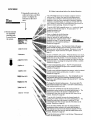
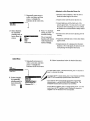
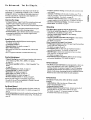
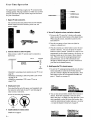
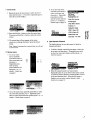
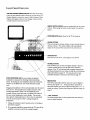
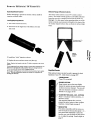
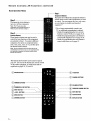
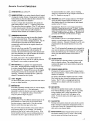
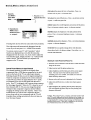
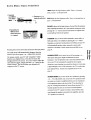
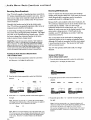
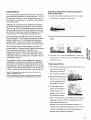
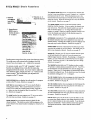
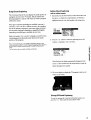
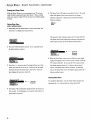
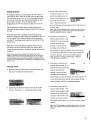
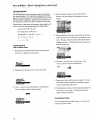
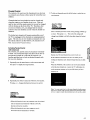
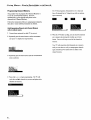
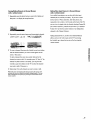
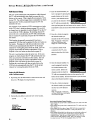
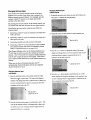
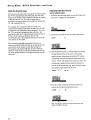
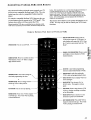
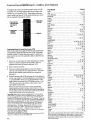
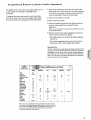
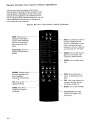
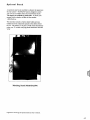
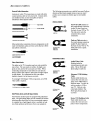
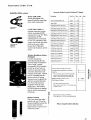
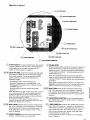
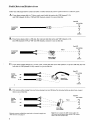
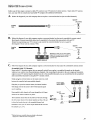
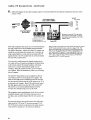
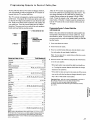
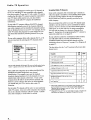
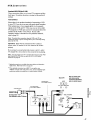
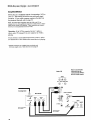
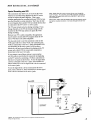
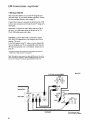
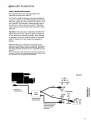

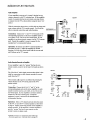
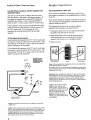
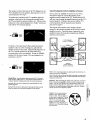

![DML-1200 [v04]](http://vs1.manualzilla.com/store/data/005824987_1-7e9516eac06e792a0e8f27802b417a45-150x150.png)