1
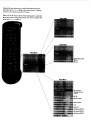
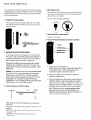
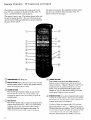
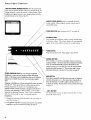
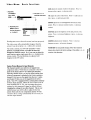
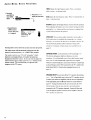
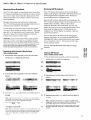
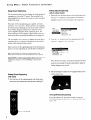
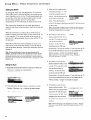
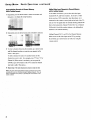
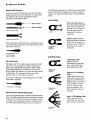
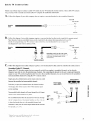
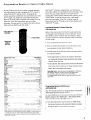
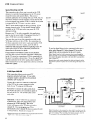
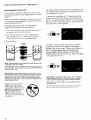
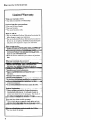
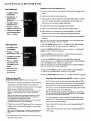
To program the remote to control another brand of VCR,
just press and hold vcal (or VCR2-LO),
and enter the two-digit
code number for your brand of VCR. Depending on the
age, brand, model, and type of VCR, some models may not
be able to respond to the remote control.
1 PRESSAND
HOLDVCRt
(ORVCP,2.LD).
PRESSPOWER
AND THEN VCR1
(ORVCP,2)TO
TEST.
2 PRESSTWO
NUMBER
BUTTONS.
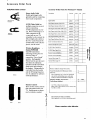
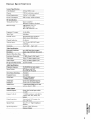
Aiwa
Akai
Audio Dynamics
Broksonic
Candle
Canon
_ehart
Citizen
Colortyme
Craig
Curtis Mathes
Daewoo
dbx
_D_ynatech
Electrohome
Emerson
Fisher
Funai
GE
Goldstar
Harman Kardon
Hitachi
Instant Rel_
JCL
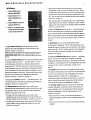
Programming Remote To Control Other Brands of VCRs
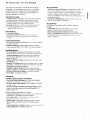
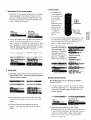
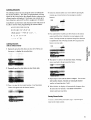
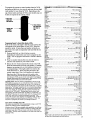
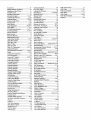
Refer to the chart at the right to find the code number that
corresponds to the brand name of your VCR. Keep this
number in mind. If more than one number is listed, you
may need to try each one separately until you find the one
that works.
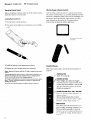
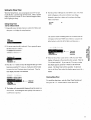
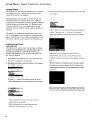
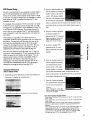
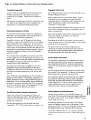
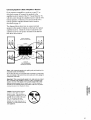
1 Press and hold VCR1or VCR2.LD
button on remote
(depending on which button you want to program for that
VCR). You can program each button to control a different
VCR.
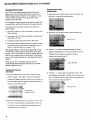
2 Press two number buttons (first one, then the other) to
enter the code number for your brand of VCR.
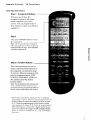
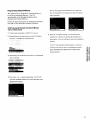
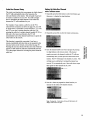
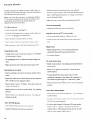
4 Release the VCR1button and point the remote at the VCR.
Press the POWER
button to test the code number. If nothing
happens, try pressing VCR1or VCR2(whichever button you
are programming). If the right number was entered, the
VCR should turn on. If the VCR does not react to the
remote, repeat steps 1 thru 4 with another code number.
Note: Some older VCRs do not have an OFF/ONswitch on their
remote controls and cannot be turned on and off remotely. If you
have this type of VCR, you can test the code number by pressing the
CHANNELbutton instead of the POWERbutton. Make sure the VCR is
already turned on when you test the code number.
Operating
Notes: After the remote is programmed, it will turn on the
VCR whenever you press VCRt(or VCR2) and then POWER.Some VCRs
turn on automatically when you press VCR1or YCR2. You'll be able to
control the VCR whenever the remote is in the "VCR mode". To put the
remote in the "VCR mode", press the VCR1or VCR2button (depending on
which button you programmed).
The other VCR buttons (such as pLAy,
PAUSE,STOP,REWIND,FF,and RECORD) will control the VCR when the
remote is in the "VCR mode". Pressing these function buttons may
automatically switch the remote from "TV mode" to "VCR mode". To
turn off the VCR, press VCR1(or VCR2), then POWER.To change channels
on the VCR, press VCR1(or VCR2), then CHANNELup or down. This
remote will control the basic functions of compatible VCRs. It will not
be able to control the advanced functions of all brands of VCRs. You
may have to reprogram
your remote if you change
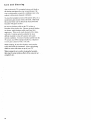
Notes About Controlling
Two VCRs
This remote can control two VCRs independently
operates on a different remote transmitting code.
its batteries.
as long as each VCR
If neither of your VCRs have switchable code capabilities, you still may
be able to use the VCRINCR2.LOfeature to control two VCRs of the same
brand since many older VCRs use remote codes that are different than
newer VCRs. You may want to experiment to see what works with your
particular VCRs.
JCPenney
JVC
Kenwood
15
03_17, 22, 23, 63, 66
14, 16
10
07, 09, 13, 44, 45, 46, 52
08, 53
01
07, 09, 13, 44, 45, 46, 52
14
07, 12
00, 07, 08, 14, 15, 44, 46, 53, 64, 67
13, 45, 52
14,16
15
27
08,09,10,13,15,20,23,27,34,41,
42,47,
49,57,62,65,67,
68,70
02,12,18,19,43,
48,58
15
00,07,08,32,53
09,14,46,60
14
05,15,35,36
08
08
02, 05, 07, 08, 14, 16, 30, 35, 51,53
02, 14, 16, 30,46
02, 14, 16, 30, 44,46
15
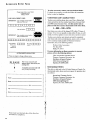
_avox
Marantz
Marta
MEI
Memorex
MGA
Midland
Minolta
Mitsubishi
Montgomery Ward
MTC
Multitech
NEC
Panasonic
Pentax
Pentax Research +
Philco
Philips
Pioneer
Portland
ProScan
Quartz
Quasar
RCA
Radio Shack/Realistic
Samsung
Sansui
Scott
Sears
Sha_
Shintom
Sony
S_nia
08, 29, 53,56
02, 08, 14, 16, 29, 30, 44,
31
46,6109
08
08, 09, 12,15
o4,27
04, 05, 27, 35,40
06
07,15
07, 15, 31,32
02, 14, 16, 30, 44, 46, 59, 61,64
O,_3J
05,35,44
46
08, 29, 53, 56
08,29
05, 16, 33 (laserdise), 50
44, 45, 52
00
02
08, 53
00, 05, 07, 08, 28, 35, 37, 54, 69
02, 06, 08, 09, 12, 15, 19, 27, 43, 53
07, 13, 22, 32, 42
16, 71
02, 12
04, 13, 41, 49, 68
02, 05, 09, 12, 18, 19, 35, 43, 48
06, 24, 27, 39, 45
17, 26, 31, 55
17, 26, 38
08, 15, 29, 53, 56
15
02, 15
09
30
15, 30, 69
08
Tandy_
Tashiko
Tatunjg
Teac
Technics
Teknika
08, 09, 15, 21
05, 13, 19, 48, 49
Toshiba
07, 09
Totevision
67
TMK
07
Unitech
14, 16, 44
Vector Research
16
Victor
14, 16, 44
Video Concep_
07
Videosonic
Wards
05,06,07,08,09, 12, 13, 15, 25,27, 31,35
02, 14, 16, 30, 46
Yamaha
11, 17, 26, 72
Zenith
Note: Refer to the information sheet packed with your remote control for
the latest list of brand names and code numbers.
21
t_
_
_
_ N"
_
_"