1
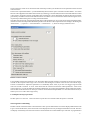
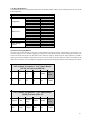
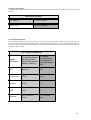
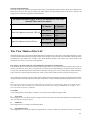
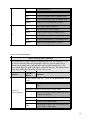
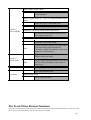
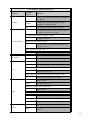
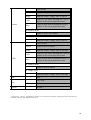
Track M ixe r Ele me nt Functions
Ele me nt
Encoder
M odifie r
Button
Function
-
changes the value of the parameter assigned in
the display
Option
Changes the according parameter to the
maximum or minimum value
Alt
The Encoder works in finest resolution
-
Recalls the non-edited value of the parameter
or toggles between two options
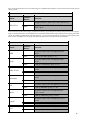
If a selection was made (Display flashes)
Encoder Button
Confirms selection
In the case of a menu selection
-
Track function - the function assigned in the
display is released
If the selected track is a file
-
To the change the file level
-
Record enable all tracks
Option
Record safe all tracks
-
Solo a track
Option
un-solo all tracks
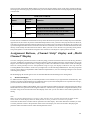
Rec/Ready
With Send Destination/Level on Multi C hannel display mode
Solo
-
Selects Pre/Post Send
With Send Destination/Level C hannel Strip display mode
-
Send Pre/Post change over switch.
-
Mutes tracks
option
Un-mutes all tracks
With EQ Frequency/Gain displayed
-
Bypass band
Mute
With Send Destination/Level multiple tracks displayed
-
Mutes the according FX send
With Send Destination/Level C hannel Strip displayed
-
Mutes the FX Sends on the according channel
-
Selects track
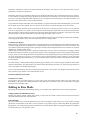
Shift
Sets Fader to unity gain and sends 0dB
volume
Select
21