1
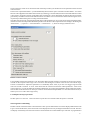
display blank spaces for a correct replication of Track Names between the individual channels. If these options are
checked it is possible that long parameter names can be separated in pieces.
Display duration (s)
This parameter determines how long the alternate longer version of the parameter name is shown in the display, after
releasing the relevant encoder. If the long paramter names preference is switched off, this parameter has no function.
Allow multiple infos
Show info when selecting tracks
Show info when editing volume
Show value unit for Instrument/Plug-in parameters
Volume and other paramters
The above mentioned parameters can be adjusted to your personal preference. Displaying units usually results in the
expense of length of other info, i.e. parameter name or track name
Maximum MIDI bandwith (%).
With this paramter you are able to increase or decrease data throughput. If you notice performance fluctuations during
work with the SAC you can decrease the value. We never encountered such problems with our test systems. Of course
decreasing this parameter also causes a decrease in automation accuracy. With the SAC, this parameter can only change
the data throughput from Logic to the SAC. However, it is also possible to change the datathroughput in the SAC’s
System menu. You will find more details in the SAC 2.2 manual under System menu settings.
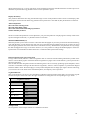
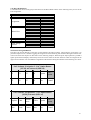
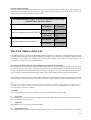
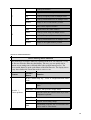
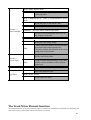
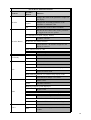
Button assignement in Logic Control mode
In Logic Control mode, the SAC’s button assignment does not conform with the labeling information printed on the
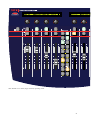
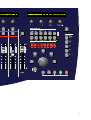
surface. You will find a graphic of the actual button assignments on pages 2 and 3 of this manual. (you can print the two
pages for referrence)
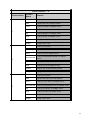
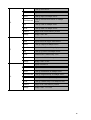
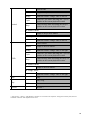
You can find the button assignment used in the following charts. We are currently producing special templates, which
will allow comfortable working with these button assignments, similar to earlier templates we produced for Digital
Performer and Pro Tools. We will be happy to send you these templates free of charge upon request. For the time being,
you can also write on the backs of the included templates, for temporary ease of operation.
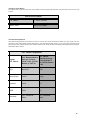
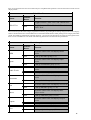
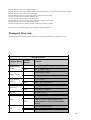
Jog Wheel Buttons
This group of buttons is set up in a circle around the Jog Wheel. In the left column of the charts you can see the original
function inscription of the SAC and in the right column the according function corresponding to Logic Audio.
J o g -W h e e l Ta s te n
S A C -Ta s te
L C -F u n k tio n
S hift
S hift
S c rub
S c rub
F rom
N u dg e
S to re M a rker
M a r ker
To
D rop
R eca ll M a r ker
C y c le
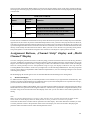
Transport Field
The assignment of the transport buttons is as labeled on the SAC.
8