1
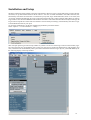
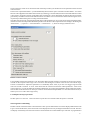
Click on the Logic Control icon. On the left side of the setup window you should now see the parameters of the selected
control surface.
In the section “Special Parameters” you should definitely deactivate the option “Touchless movable faders”. Use of this
function with equipment with reliable touch sensitivity technology is not advisable, because in this mode fader movement
is also used to recognize activation of the fader. Such “intelligence” cannot distinguish accurately between movement
generated by manual movement of the fader and motor movement. This can result in this function becoming the source
of potential problems during the recording of automation data.
The other selection options, which appear further down on the parameter list, are not relevant for the general functionality
of the SAC and we will skip further detailed explanations at this time. More important are the settings in the dialog box
“Preferrences…” (“Options” > “Control Surfaces” > “Preferrences…”), which we will pay attention to next.
Relative control resolution
Logic’s default value for this parameter is 128. This means that an encoder will have a resolution of 128 steps per rotation,
in order for the complete value range to be covered in a full 360 degree revolution. This isn’t the case with the Logic
Control or with the SAC. Adjust this parameter to a considerably lower value, so you can cover bigger range of values
with one encoder revolution. A lower value means that the intervals between the edited parameter’s value ecome
coarser. However, you can still make fine parameter adjustments, by pressing the [Alt] Button while rotating the encoder.
The encoders of the SAC have 24 values per rotation. You should set this parameter to a value between 24 and 48, to
enable you to cover wide value ranges easily.
Use multiple controls per parameter
Set this option to a value of 1. Due to the SAC’s layout there is no benefit when this option is activated.
Show long names while editing:
Disable both the “Parameter Name” and “Parameter value” options. Because the sizes of the displays differ between the
Logic Control and the SAC, names and values can be displayed incorrectly if elongated information is used. The SAC
can display considerably more characters and its control elements are located further apart. The SAC is programmed to
7