1
Master Section:
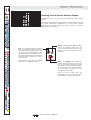
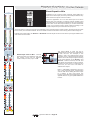
Mix Bus Outputs
Auxiliary Send/Group Masters
1 mix meters 2
21
21
18
18
15
15
12
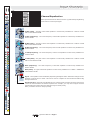
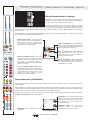
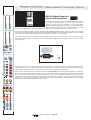
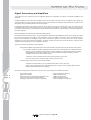
The master controls for mix bus outputs 1-8 vary slightly from
those offered on mix bus outputs 9-16. This is due to the fact
that mix busses 9-16 offer the additional feature of routing, and
panning, onto the stereo master bus. This makes mix busses 916 ideal for use as group outputs in a hybrid FOH/Monitor
application.
12
9
9
6
6
3
3
0
0
3
3
6
6
9
9
12
12
15
15
18
18
21
21
24
24
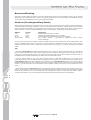
Mix Bus 1-8 Master Controls
9 mix meters 10
21
21
18
18
15
15
12
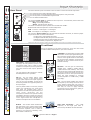
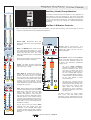
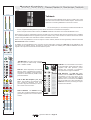
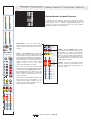
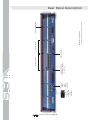
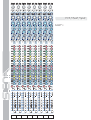
First, let's deal with the controls for mix bus masters 1-8. Note that for clarity, only the first pair of mix bus
outputs are illustrated on the front panel drawings below.
12
9
9
6
6
3
3
0
0
3
3
6
6
9
9
12
12
15
15
18
18
21
21
24
24
0
0
direct
direct
stereo
2
1
6
6
0
insert
0
direct
direct
10
9
6
6
stereo
insert
insert
MUTE
mix 1
mix 2
10
10
5
5
0
0
5
5
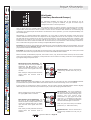
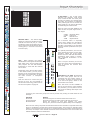
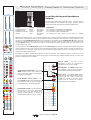
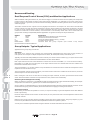
Fader The fader provides continuous
adjustment of the mix bus output level
from off (-inf) to +10dB.
10
10
15
15
20
20
auto
30 mute
auto
30 mute
40
40
5
5
SOLO
SOLO
stereo
c
Mute The MUTE switch mutes the mix
bus output signal post fader. (i.e. signal
is muted at all points except the mix bus
insert send and PFL bus). The mute
status is indicated by the corresponding
mute LED.
Note: the mute switch may be controlled
by Auto Mute master 5, see below.
MUTE
stereo
Auto Mute 5 Depress this switch to
assign any of the 16 mix bus output
mutes to auto mute group 5. The Siena
has five auto mute groups that can be
controlled from the master section of the
console. Any input channel may be
assigned to auto mute groups 1-4; both
input channels and mix bus masters may
be assigned to group 5.
insert
MUTE
MUTE
mix 1
mix 2
10
10
5
5
0
0
5
5
10
10
15
15
20
20
auto
30 mute
auto
30 mute
40
40
5
pan
r
stereo
pan
r
stereo
MUTE
MUTE
mix 9
mix 10
10
10
stereo
5
5
0
0
5
5
10
10
15
15
20
20
auto
30 mute
auto
30 mute
40
40
5
SOLO
MIDAS
SOLO
insert
l
5
SOLO
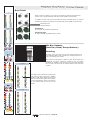
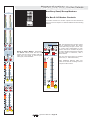
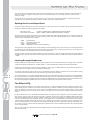
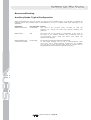
Insert When depressed, the
corresponding mix bus insert return is
inserted pre fader into the mix bus
output signal path.
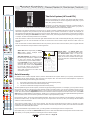
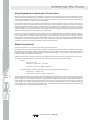
Stereo/Mono Use the recessed stereo
switch to link the odd/even pair of mix
busses for stereo operation. When set
for stereo, the following operational
changes occur:
stereo
5
c
insert
l
Stereo LED
Illuminates when mix
busses are linked for stereo operation,
see below.
SOLO
Solo When selected, the mix bus SOLO
switch routes signal onto the stereo After
Fade Listen (AFL) and mono Pre Fade
Listen (PFL) busses. The solo LED
indicator illuminates to show that the
mix bus solo is active. Depending on the
AFL/PFL selector in the master section,
you may now be listening to the mix bus
output signal after the fader (AFL) or pre
fader (PFL) on your local monitoring or
headphone outputs.
Any of the 16 mix bus master SOLO
switches may also trigger auto solo
messages on an external Helix digital
equaliser via the console's Solo Tracking
System. For more details, please refer to
Page 25.
Operators Manual - Page 17
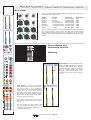
On each input channel,
separate level and pan controls
become available for the stereo
mix send. To switch the stereo
send pre fader, use the lower of
the two channel pre switches.
(The upper pre switch is inactive
in stereo mode.) Please see Page
10 for more details on input
channel controls.
The solos for a stereo bus are
adjusted such that odd bus solos
route signal to AFL left and even
bus solos route signal to AFL
right. When mix busses are
configured for mono operation,
solos are summed in mono onto
the AFL output.
All other controls (e.g. fader output
level, mute, solo and insert return
switching) remain independent for the
left and right sides of the mix bus master.