1
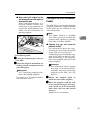
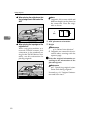
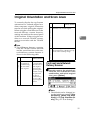
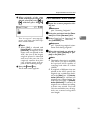
Printer/Scanner Unit
Type 2018
Operating Instructions
Scanner Reference
1
Network Scanner
2
Preparations for Use as a Network Scanner
3
Setting Originals
4
Sending Scan Files by E-mail
5
Using the Network Delivery Scanner Function
6
Using the Network TWAIN Scanner Function
7
Appendix
For safe and correct use of this machine, please be sure to read the Safety Information in the
"Copy Reference" before you use it.
Introduction
This manual describes detailed instructions on the operation and notes about the use of this machine.
To get maximum versatility from this machine all operators are requested to read this manual carefully
and follow the instructions. Please keep this manual in a handy place near the machine.
The scanner function is available when the Printer/Scanner option is installed in the machine.
Warning:
Use of controls or adjustment or performance of procedures other than those specified in this manual
might result in hazardous radiation exposure.
Two kinds of size notation are employed in this manual. With this machine refer to the inch version.
Trademarks
•
Adobe, PostScript, and Acrobat are trademarks of Adobe Systems Incorporated.
•
Ethernet is a registered trademark of Xerox Corporation.
•
Pentium is a registered trademark of Intel Corporation.
•
MS, Microsoft, and Windows are registered trademarks of Microsoft Corporation.
•
Other product names used herein are for identification purposes only and might be trademarks of
their respective companies. We disclaim any and all rights in those marks.
•
The product name of Windows® 95 is Microsoft® Windows® 95.
•
The product name of Windows® 98 is Microsoft® Windows® 98.
•
The product name of Windows® Me is Microsoft® Windows® Millennium Edition (Windows Me).
•
The product names of Windows® 2000 are as follows:
Microsoft® Windows® 2000 Professional
Microsoft® Windows® 2000 Server
Microsoft® Windows® 2000 Advanced Server
•
The product names of Windows® XP are as follows:
Microsoft® Windows® XP Home Edition
Microsoft® Windows® XP Professional
•
The product names of Windows ServerTM 2003 are as follows:
Microsoft® Windows ServerTM 2003 Standard Edition
Microsoft® Windows ServerTM 2003 Enterprise Edition
Microsoft® Windows ServerTM 2003 Web Edition
•
The product names of Windows NT® 4.0 are as follows:
Microsoft® Windows NT® Workstation 4.0
Microsoft® Windows NT® Server 4.0
Manuals for This Machine
The following manuals describe the operational procedures of this machine. For
particular functions, see the relevant parts of the manual.
Note
❒ The manuals provided are specific to machine type.
❒ Adobe Acrobat Reader is necessary to view the manuals as a PDF file.
❒ Tow CD-ROMs are provided:
• CD-ROM 1 "Operating Instructions for Printer / Scanner"
• CD-ROM 2 "Scanner Driver & Document Management Utilities"
❖ General Settings Guide
Provides an overview of the machine and describes System Settings (paper
trays, Key Operator Tools, etc.), and troubleshooting.
Refer to this manual for Address Book procedures such as registering fax
numbers, e-mail addresses, and user codes.
❖ Network Guide (PDF file - CD-ROM1)
Describes procedures for configuring the machine and computers in a network environment.
❖ Copy Reference
Describes operations, functions, and troubleshooting for the machine's copier
function.
❖ Facsimile Reference <Basic Features>
Describes operations, functions, and troubleshooting for the machine's facsimile function.
❖ Facsimile Reference <Advanced Features>
Describes advanced functions and settings for key operators.
❖ Printer Reference 1
Describes system settings and operations for the machine's printer function.
❖ Printer Reference 2 (PDF file - CD-ROM1)
Describes operations, functions, and troubleshooting for the machine's printer function.
❖ Scanner Reference (this manual) (PDF file - CD-ROM1)
Describes operations, functions, and troubleshooting for the machine's scanner function.
i
❖ Manuals for DeskTopBinder V2 Lite
DeskTopBinder V2 Lite is a utility included on the CD-ROM labeled "Scanner
Driver & Document Management Utilities".
• DeskTopBinder V2 Lite Setup Guide (PDF file - CD-ROM2)
Describes the installation of DeskTopBinder V2 Lite, and the operating environment for DeskTopBinder V2 Lite in detail. This guide can be displayed from the [Setup] dialog box when DeskTopBinder V2 Lite is
installed.
• DeskTopBinder V2 Lite Introduction Guide (PDF file - CD-ROM2)
Describes operations with DeskTopBinder V2 Lite and provides an overview of its functions. This guide is added to the [Start] menu when DeskTopBinder V2 Lite is installed.
• Auto Document Link Guide (PDF file - CD-ROM2)
Describes operations and functions of Auto Document Link installed with
DeskTopBinder V2 Lite. This guide is added to the [Start] menu when
DeskTopBinder V2 Lite is installed.
❖ Manuals for ScanRouter V2 Lite
ScanRouter V2 Lite is a utility included on the CD-ROM labeled "Scanner
Driver & Document Management Utilities".
• ScanRouter V2 Lite Setup Guide (PDF file - CD-ROM2)
Describes the installation of ScanRouter V2 Lite, settings, and the operating environment for ScanRouter V2 Lite in detail. This guide can be displayed from the [Setup] dialog box when ScanRouter V2 Lite is installed.
• ScanRouter V2 Lite Management Guide (PDF file - CD-ROM2)
Describes delivery server management and operations, and provides an
overview of ScanRouter V2 Lite functions. This guide is added to the [Start]
menu when ScanRouter V2 Lite is installed.
❖ Other manuals
• PostScript3 Supplement (PDF file - CD-ROM1)
• UNIX Supplement (available from an authorized dealer, or as a PDF file on
our Web site)
ii
TABLE OF CONTENTS
Manuals for This Machine ......................................................................................i
How to Read This Manual .....................................................................................1
Symbols ..................................................................................................................... 1
Names of Major Options ............................................................................................ 2
1. Network Scanner
Outline..................................................................................................................... 3
E-mail ......................................................................................................................... 3
Network Delivery Scanner.......................................................................................... 4
Network TWAIN Scanner ........................................................................................... 5
Control Panel.......................................................................................................... 6
Reading the Display and Using Keys......................................................................... 8
2. Preparations for Use as a Network Scanner
Initial Scanner Setup ............................................................................................. 9
Scanner Features....................................................................................................... 9
Scan Settings ........................................................................................................... 12
Destination List Settings........................................................................................... 14
Send Settings........................................................................................................... 14
Installing Software ............................................................................................... 17
Auto Run Program ...................................................................................................17
Software for Using a Network TWAIN Scanner .......................................................19
Software for Using the Network Delivery Scanner Function ....................................20
DeskTopBinder V2 Lite ............................................................................................21
Software Supplied on CD-ROM ............................................................................... 21
3. Setting Originals
Placing Originals..................................................................................................27
Placing on the Exposure Glass ................................................................................28
Placing in the Auto Document Feeder ..................................................................... 29
Original Orientation and Scan Area ................................................................... 31
For E-mail and a Network Delivery Scanner ............................................................ 31
For a Network TWAIN Scanner................................................................................33
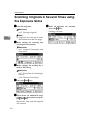
Scanning Originals in Several Times using the Exposure Glass.................... 34
4. Sending Scan Files by E-mail
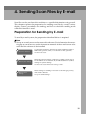
Preparation for Sending by E-mail ..................................................................... 35
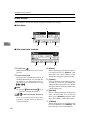
E-mail Screen........................................................................................................... 36
Sending Scan Files by E-mail .............................................................................37
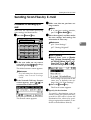
Procedure for Sending by E-mail .............................................................................37
Checking the Status of E-mail ............................................................................49
iii
5. Using the Network Delivery Scanner Function
Preparation for Delivering...................................................................................51
Network Delivery Scanner Screen ........................................................................... 52
Delivering Scan Files........................................................................................... 54
Delivery Procedure...................................................................................................54
Checking the Status of Delivery ......................................................................... 64
6. Using the Network TWAIN Scanner Function
Preparation for Using the Network TWAIN Scanner.........................................65
Network TWAIN Scanner Screen.............................................................................65
Scanning Originals ..............................................................................................66
Functions of the TWAIN Driver ................................................................................68
7. Appendix
Relationship between Resolution and File Size................................................69
When Using as E-mail or Network Delivery Scanner............................................... 69
When Using as a Network TWAIN Scanner.............................................................69
Max. Number of Addresses Which Can Be Specified ...................................... 70
Troubleshooting...................................................................................................71
When Scanning Is Not Performed as Expected.......................................................71
When the Delivery Function Does Not Work............................................................ 71
When an Error Message Appears on the Control Panel ..........................................72
When an Error Message Appears on the Client Computer...................................... 74
Specifications.......................................................................................................77
INDEX......................................................................................................... 78
iv
How to Read This Manual
Symbols
In this manual, the following symbols are used:
Important
If this instruction is not followed, paper might be misfed, originals might be
damaged, or files might be lost. Be sure to read this.
Preparation
This symbol indicates the prior knowledge or preparations required before operating.
Note
This symbol indicates precautions for operation or actions to take after misoperation.
Limitation
This symbol indicates numerical limits, functions that cannot be used together,
or conditions in which a particular function cannot be used.
Reference
This symbol indicates a reference.
[
]
Keys that appear on the machine's display panel.
[
]
Keys and buttons that appear on the computer's display.
{
}
Keys built into the machine's control panel.
{
}
Keys on the computer's keyboard.
1
Names of Major Options
Major options of this machine are referred to as follows in this manual:
• Exposure Glass Cover
• Auto Document Feeder → ADF
• Auto Document Feeder capable of scanning both sides of a sheet → ARDF
• Printer/Scanner Unit Type 2018 → printer/scanner controller
The following software products are referred to using a general name:
• DeskTopBinder V2 Lite and DeskTopBinder V2 Professional → DeskTopBinder V2 Lite/Professional
• ScanRouter V2 Lite and ScanRouter V2 Professional (optional) → ScanRouter
V2 Lite/Professional
2
1. Network Scanner
Outline
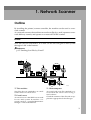
By installing the printer/scanner controller, the machine can be used as a network scanner.
As a network scanner, the machine can send scan files by e-mail, operate as a network delivery scanner, and operate as a network TWAIN scanner.
E-mail
Scan files that are attached to an e-mail can be sent using the e-mail system
through a LAN or the Internet.
Reference
p.35 “Sending Scan Files by E-mail”
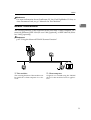
AAH008S
1. This machine
3. Client computer
Scan files that are attached to an e-mail
can be sent to an e-mail server.
An e-mail with scan files attached is received from the e-mail server using email software.
Check the contents of the file with an application appropriate for the file type.
2. E-mail server
An e-mail server is the SMTP server used
for an e-mail system. It transfers a received e-mail to a specified destination
through a LAN or the Internet.
3
Network Scanner
Network Delivery Scanner
The machine is used as a delivery scanner with ScanRouter V2 Lite/Professional. Scan files are stored in the delivery server and delivered to the folders of client computers on the same network.
1
Reference
p.51 “Using the Network Delivery Scanner Function”
Note
❒ When the optional ScanRouter V2 Professional is used, the machine can also
deliver scan files using e-mail, and the files can be viewed from a client computer using a Web browser.
AAH009S
1. This machine
3. Client computer
Scan files are sent to the delivery server.
The contents of stored files can be
checked in the following ways:
2. Delivery server
ScanRouter V2 Lite/Professional is installed in this computer which is used as
a delivery server.
A received file is delivered to the in-tray
of the specified destination. (A in the figure). According to the settings of the intray, the file is stored in the in-tray or in a
Windows folder. (B in the figure)
4
• View the file in the in-tray using DeskTopBinder V2 Lite to check the contents. (C in the figure)
• Use Auto Document Link to receive
the file stored in the in-tray, and check
the contents with an application appropriate for the file type. (D in the
figure)
• Access the Windows folder where the
file is stored via the network, and
check the contents with an application
appropriate for the file type. (E in the
figure)
Outline
Reference
For more information about ScanRouter V2 Lite, DeskTopBinder V2 Lite, or
Auto Document Link, see p.i “Manuals for This Machine”.
1
Network TWAIN Scanner
The scanning function of this machine can be used from a client computer via a
network (Ethernet, IEEE 1394 (IP over 1394) [optional], or IEEE 802.11b (Wireless LAN) [optional]).
Reference
p.65 “Using the Network TWAIN Scanner Function”
AAH010S
1. This machine
2. Client computer
The scanning function of the machine can
be used from a client computer via a network.
Originals are scanned using the TWAIN
driver for the machine from an application.
5
Network Scanner
Control Panel
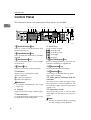
This illustration shows the control panel when options are installed.
1
1
Start Manual
Reception
Receive File
Immediate
Trance.
Memory
Trance.
01
ABC
05
Transmission
Stamp
02
DEF
06
03
Scanner
6
7
8
09
Standard
YZ
Detail
Fine
13
Shift
PQR
10
@. ___
@.
14
User Tools/
Counter
Copy
Space
Clear
Modes
On Hook Dial
Clear/Stop
ABC
JKL
Main
Power
DEF
Printer
On
OK
VWX
Pause/
Redial
GHI
JKL
MNO
PRS
TUV
WXY
Start
12
Duplex
Original
-&
15
1011 12 13
08
STU
11
9
04
GHI
07
5
Cancel
MNO
Switch
RX Mode
4
Search
Check
Job
Destination Destination Information
Facsimile
Communicating
2 3
Text
16
Combine/
Series
Sort
Lighter
Darker
Photo
OPER
Enter
Symbols
14
15
16
17 18 19
20
21
AAH026S
1. {Search Destination}} key
8. Scroll keys
Press to search for the destination from
the Destination List.
Press to check the destinations currently
selected.
Press to select an item.
{U}: scroll upward
{T}: scroll downward
{V}: scroll right
{W}: scroll left
3. {Job Information}} key
9. {User Tools/Counter}} key
Press to check the status of sent and delivered e-mail.
Press to change default or operation parameters according to requirement.
4. {Scanner}} key
10. {Clear Modes}} key
Press to activate the scanner function.
Press to clear the current settings.
5. Indicators
11. {Clear/Stop}} key
Display errors and machine status.
h:Error indicator
B:Load Paper indicator
D:Add Toner indicator
Clear: clears an entered numeric value.
Stop: stops scanning.
2. {Check Destination}} key
Reference
For more information, see Copy
Reference.
6. Display
Displays operation status and messages.
7. Selection keys
Correspond to items on the display. Press
to select the corresponding item.
6
12. Main power indicator and On
indicator
The main power indicator lights when
the main power switch is turned on. The
On indicator lights when the operation
switch is on.
13. Operation switch
Press to turn the power on. The On indicator lights. To turn the power off, press
again.
Note
❒ This key is inactivate during scanning
or while setting scanner defaults.
Control Panel
14. Quick Dial keys
Press to select the registered destination
with a single touch, or to enter letters and
symbols.
1
Reference
For more information, see General
Settings Guide.
Note
❒ You can register up to 32 destinations
using the Quick Dial keys.
15. Quick Dial Flip Plate
Flip this plate down to access the Quick
Dial keys 01 through 16; flip it up to access keys 17 through 32.
16. {Lighter}} and {Darker}} keys
Press to change the image density setting.
Select the image density in five increments, Lighter to Darker.
17. {Original}} key
Press to select the original type registered
with [Type 1(Text):] or [ Type 2(Photo):].
When the original type is selected, the
corresponding indicator lights.
18. {Cancel}} key
Press to cancel an operation or return to
the previous display.
19. {OK}} key
Press to set a selected item or an entered
numeric value.
20. Number keys
Press to enter numeric values.
21. {Start}} key
Press to start scanning or sending.
7
Network Scanner
Reading the Display and Using Keys
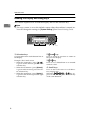
This section explains how to read the display and use the selection key.
1
Note
❒ The copy screen is set as the default screen when the machine is turned on.
You can change the settings in [ System Settings ]. See General Setting Guide.
4
1
8
Cancel
OK
2
3
AAH032S
1. Selection keys
2. {Cancel}} key
Correspond to items at the bottom line on
the display.
Example: The E-mail screen
Press to cancel an operation or return to
the previous display.
• When the instruction “press [
]”
is given in this manual, press the left
selection key.
• When the instruction “press [Manual]”
is given in this manual, press the center selection key.
• When the instruction “press [Options]”
is given in this manual, press the right
selection key.
Press to set a selected item or an entered
numeric value.
3. {OK}} key
4. Scroll keys
Press to move the cursor in each direction, step by step.
When the {U},{
{T},{
{V}, or {W} key appears in this manual, press the scroll key
of the same direction.
2. Preparations for Use as a
Network Scanner
To use the machine as a network scanner, you must make settings required for
use as a scanner as well as basic settings for use in a network.
Reference
First, see General Settings Guide for details about how to make basic settings,
and then make scanner settings.
For more information about settings for sending by e-mail, see Network Guide.
Initial Scanner Setup
This section explains all required settings and procedures for using the machine
as a network scanner.
Scanner Features
The settings for using the network scanner functions of the machine are listed
below. Make the necessary settings.
Note
❒ Make settings for the items marked with ❍ if necessary.
❖ Scan Settings
For explanations of settings, see p.12 “Scan Settings”.
Settings
Scan
Settings
Default
Scan
Settings
Default
E-mail
Delivery
Resolution
200dpi
❍
❍
Scan
Size
Auto Detect
❍
❍
1 Sided Original
❍
❍
Off
❍
❍
❍
❍
Original Setting
Mixed Orig. Sizes
Priority
Orig. Orientation
Priority
Original Type
Setting
Type 1(Text):
Text
(Print)
❍
❍
Type 2(Photo):
Photo
❍
❍
TWAIN
Note
❒ [Original Setting] will be effective only when you have installed the optional
ADF capable of scanning both sides of a sheet (ARDF).
9
Preparations for Use as a Network Scanner
❖ Destination List Settings
For explanations of settings, see p.14 “Destination List Settings”.
Settings
Destination List
Settings
2
Destination List
Priority
Default
E-mail
Delivery
Delivery Server
❍
❍
Update Server Dest.
List
TWAIN
❍
—
❖ Send Settings
For explanations of settings, see p.14 “Send Settings”.
Settings
Send
Settings
Default
E-mail
Delivery
TWAIN
TWAIN Standby
Time
10 sec.
❍
❍
❍
File Type Priority
Multi-page:TIFF
❍
Compression
On
❍
❍
Print&Del. Scanner
Journal
On
❍
❍
2048KB
❍
On (per max. size)
❍
British English
❍
None
❍
Max. E-mail Size
Divide & Send E-mail
E-mail Informatn.
Language
Sender's Name
Default
Setting procedure
A Press the {User Tools/Counter}} key.
User Tools/
Counter
Clear
Modes
On Hook Dial
Pause/
Redial
Clear/Stop
GHI
ABC
DEF
JKL
MNO
Start
PRS
TUV
WXY
AAH027S
10
Initial Scanner Setup
B Select [Scanner Features] using {U} or {T}, and then press the {OK}} key.
2
C Select a menu using {U} or {T}, and then press the {OK}} key.
D Select a setting using {U} or {T}, and then press the {OK}} key.
Example: TWAIN Standby Time setting
E Change the settings.
• Select an item using {U} or {T}, and then press the {OK}
} key.
• Enter numbers using the number keys, and then press the {OK}
} key.
The “Programmed” message appears, and then the Send Settings screen returns.
Note
❒ To cancel changing a setting, press the {Cancel}
} key. The setting returns
to the previous condition.
F Press the {Cancel}} key.
The Scanner Features screen reappears.
11
Preparations for Use as a Network Scanner
G Repeat steps C to F to make other settings.
H Press the {Cancel}} key.
The main menu appears.
Scan Settings
2
This section explains how to set the
defaults for scan settings.
The scan settings consist of the following. For the list about settings and
defaults, see p.9 “Scanner Features”.
❖ Default Scan Settings
Resolution and scan size can be set.
• Resolution
Select the resolution from 100dpi,
200dpi, 300dpi, 400dpi, or 600dpi.
• Scan Size
Select the size of the original to be
scanned.
When [Auto Detect] is selected, the
auto detect function of the machine is used to set the original
size.
When the size is specified, scanning is performed for that size, regardless of the actual size of the
original. The following sizes can be
selected:
11 × 17S, 81/2 × 14S, 81/2 × 13S,
81/ 2 × 11R, 81 /2 × 11S, 5 1/2 ×
81/2R, 51/2 × 81/2S, A3S, A4R,
A4S, A5R, A5S, B4 JISS (Japanese Industrial Standard), B5
JISR, B5 JISS, Custom size
Note
❒ When [Custom Size] is selected,
the dimensions of the scan area
(width and height) can be specified.
❒ When selecting [Custom Size] for
[Scan Size], see p.13 “Selecting a
custom size”.
12
❖ Original Setting
Note
❒ This setting is available only
when you have installed the optional ADF capable of scanning
both sides of a sheet (ARDF).
Set the default for whether originals are one-sided or two-sided
and if two-sided, the relationship
between those sides. When the
originals are always the same, set
this for the default to make operation easier. You can select [1 Sided
Original], [2 Sided Orig.(T to T
)]
(Top to Top), or [2 Sided Orig.(T to
B
)] (Top to Bottom).
Reference
p.31 “Original Orientation and
Scan Area”
❖ Mixed Orig. Sizes Priority
This setting determines whether
the original size is to be automatically detected when originals of
different sizes are inserted in the
ADF. You can select [On] or [Off].
Note
❒ If the original size is specified
when scanning, this setting is
ignored.
❒ When [Off] is selected, [Auto Detect] is selected for [Scan Size],
and originals of different sizes
are placed in the ADF, the maximum size of the originals is detected as the scan size.
Initial Scanner Setup
❖ Orig. Orientation Priority
Select the default for original
placement orientation. When originals are always positioned the
same way, select that orientation
as the default to make operation
easier.
Reference
p.31 “Original Orientation and
Scan Area”
❖ Original Type Setting
Select the original type registered
in [Type 1(Text):] or [Type 2(Photo):].
The original type that can be registered is as follows:
• Text (Print)
For standard originals containing mainly text (for print)
• Text (OCR)
For standard originals containing mainly text (for OCR)
• Text/Photo
For originals containing a mixture of text and photographs
• Photo
For originals containing photographs and other pictures
Note
❒ You can register “Text (Print)”
or ”Text (OCR)” in [Type 2(Photo):], or “Text/Photo” or ”Photo” in [Type 1(Text):].
❒ Printer printing is best
scanned with Text (Print).
Text (OCR) is suitable for
higher OCR accuracy.
Selecting a custom size
When selecting [Custom Size] as the
scan size, follow the procedure below.
A Select
[Custom Size] on the Scan
Size screen using the scroll keys,
and then press the {OK}
} key.
2
B Enter the width of the original using the number keys.
Enter the value in [Horiz.], and then
press the {OK}
} or {#}
} key.
C Enter
the height of the original
using the number keys.
Enter the value in [Vert.], and then
press the {OK}
} or {#}
} key.
The range of possible dimensions
for original sizes is as follows:
• Original Size
Horiz.: 128 - 432 mm(5.1” - 17.0”)
Vert.: 105 - 297 mm(4.2” - 11.6”)
The “Programmed” message appears, and then the Scan Size
screen returns.
D Press the {User Tools/Counter}} key.
13
Preparations for Use as a Network Scanner
Destination List Settings
This section explains how to set the
defaults for the destination list displayed.
The destination list settings consist of
the following. For the list about settings and defaults, see p.9 “Scanner
Features”.
2
❖ Destination List Priority
Select a destination list to be displayed when the machine is in the
initial state. You can select either
[E-mail] or [Delivery Server].
❖ Update Server Dest. List
To update the Delivery Server Destination List, press [Update Server
Dest. List].
Ordinarily, the Delivery Server
Destination List is automatically
updated. This function allows updating at any time.
Send Settings
This section explains how to set the
defaults for sending settings and how
the machine switches to the network
TWAIN scanner function.
The send settings consist of the following. For the list about settings and
defaults, see p.9 “Scanner Features”.
❖ TWAIN Standby Time
When the machine is being used to
send e-mail or functioning as a network delivery scanner, a scanning
request to the machine as a
TWAIN scanner will switch the
machine to the network TWAIN
scanner function. This setting determines the delay until the machine switches to the network
TWAIN scanner function.
14
• When [Off] is selected, the machine will switch to the network
TWAIN scanner function at
once.
• When [On] is selected, you can
enter the delay time with the
number keys (3 - 30 seconds).
The machine will switch to the
network TWAIN scanner function when the time set here
passes after the last key operation.
❖ File Type Priority
Select whether to send the file of
scanned originals using a single
page or multiple pages.
When sending using multiple pages, select either TIFF or PDF.
❖ Compression
This setting determines whether a
scan file is to be compressed.
Note
❒ The actual time required for file
transfer will vary depending on
the file size and network load.
❒ Compression reduces the time
required for transferring the
scan file.
❖ Print&Del. Scanner Journal
Select whether to print the Scanner
Journal automatically when the
number of delivered e-mails reaches 50.
Important
❒ When the main power switch is
turned off, all records are deleted.
Initial Scanner Setup
Note
❒ When [On] is selected, all
records are deleted after printing. When [Off] is selected,
records that exceed the limit are
automatically deleted from the
oldest records.
❖ Max. E-mail Size
Select whether the size of an e-mail
with a scan file attached is limited
or not.
When [On] is selected, enter the
size limit (64 - 8580 KB) with the
number keys.
Note
❒ When the SMTP limits the size,
match that setting.
❖ Divide&Send Mail
This function is effective only
when [On] is selected for [Max. Email Size].
When an e-mail with an attached
file exceeds the size specified in
[Max. E-mail Size], select whether or
not to divide the file and send using more than one e-mail. Select either [On (per page)], [On (per max.
size)], or [Off]. When [On (per max.
size)] is selected, enter the maximum number of divisions (2-130)
with the number keys.
Note
❒ When [Multi-page:TIFF] or [Multipage:PDF] is selected for [File
Type Priority], an attached scan
file will not be divided even if
[On (per page)] is selected.
❒ When [On (per max. size)] is selected, some received files may
not be able to be restored, depending on the type of e-mail
software.
❒ When [Off] is selected, the email is not sent if its size exceeds
the limit, and an error message
appears. The scan file is discarded.
❒ Set the maximum e-mail size
within the capacity of the SMTP
server.
2
❖ E-mail Informatn. Language
Select a language for E-mail Information Language for message,
date, key operator's e-mail address
to be sent.
Select one of the following 20 languages: British English, American
English, German, French, Italian,
Spanish, Dutch, Portuguese,
Polish, Czech, Swedish, Finnish,
Hungarian, Norwegian, Danish,
Japanese, Simplified Chinese, Traditional Chinese, Russian, and
Hangul.
Note
❒ “E-mail Information Language”
is as follows (Example: When
[British English] is selected):
“This E-mail was sent from. ”,
“Scan Date”, and “Queries to:”.
These messages cannot be
changed.
❖ Sender's Name Default
Select whether to register an administrator as a sender or to specify a sender each time e-mail is sent.
If the key operator code has been
set, enter the code with the number
keys, and then press the {OK}
} key.
• Select [None] to specify the sender each time.
• Select [Key Op's E-mail Address] to
specify an administrator as the
sender.
15
Preparations for Use as a Network Scanner
Important
❒ It is recommended that a sender's password be set to prevent
the sender's name from being
misused.
❒ When [On] is selected for [Key
Operator Code] in [Key Operator
Tools] of [System Settings] and
[On: Partial] is set for the range,
enter the key operator code
when [Sender's Name Default] in
[Send Settings] of [Scanner Features] is selected. For more information about System Settings,
see General Settings Guide.
2
16
Installing Software
Installing Software
The machine comes with three CD-ROMs containing various software.
The CD-ROM labeled“Scanner Driver & Document Management Utilities” contains the necessary software to use the machine as a network scanner. The CDROM labeled “Printer Driver & Utilities” contains the necessary software to use
the machine as a printer.
This section explains the software to use the machine as a network scanner.
2
Auto Run Program
When the CD-ROM is inserted into a client computer in Windows
95/98/Me/2000/XP, or Windows NT 4.0, the installer starts automatically (Auto Run) to install the TWAIN driver and various software.
Note
❒ Auto Run might not automatically work with certain operating system settings. In this case, launch “Set up.exe” located in the CD-ROM root directory.
❒ If you want to install the software without using Auto Run, hold down the
{Shift}
} key while inserting the CD-ROM. Keep the {Shift}
} key held down until
the client computer has finished accessing the CD-ROM.
❒ If [Cancel] is pressed during installation, the installation will be stopped and
all the remaining software will not be installed. If [Cancel] has been pressed,
reinstall the remaining software after restarting the client computer.
Limitation
❒ For installation in Windows 2000/XP, or Windows NT 4.0, log in as a member
of the administrators group.
17
Preparations for Use as a Network Scanner
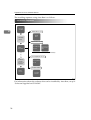
The installing sequence using Auto Run is as follows.
Installation Sequence
Insert the
CD-ROM.
2
TWAIN Driver Ver.3
TWAIN
Driver
The installer
starts up.
ScanRouter V2 Lite
Select
the software.
ScanRouter
V2 Lite
ScanRouter V2
Administration
Utility
Install all at once, or select and install individually.
DeskTopBinder V2 Lite
The
installation
complete
message is
displayed.
DeskTopBinder
V2 Lite
Acrobat Reader
Restart
your PC.
Acrobat
Reader
ZHSY070E
For information about the software that can be installed by Auto Run, see p.21
“Software Supplied on CD-ROM”.
18
Installing Software
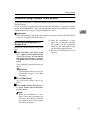
Software for Using a Network TWAIN Scanner
To use the machine as a network TWAIN scanner, it is essential to install the
TWAIN driver.
If you do not have applications that work with TWAIN, it is necessary to also
install DeskTopBinder V2 Lite. For information about the installation of DeskTopBinder V2 Lite, see p.21 “DeskTopBinder V2 Lite”.
2
Preparation
Before installation, check the operating environment for the TWAIN driver.
See p.21 “Type2018 TWAIN Driver”.
Using Windows 95/98/Me/2000/XP, or
Windows NT 4.0
Install the TWAIN driver using Auto
Run.
A Start
Windows, and then insert
the supplied CD-ROM labeled
“Scanner Driver & Document
Management Utilities” into the
CD-ROM drive of the client computer.
The CD-ROM Launcher screen appears.
❒ After the installation is complete, the “Type2018 TWAIN
V3” folder is in the “Program”
folder on the Start menu. Help
can be displayed from here.
❒ Be sure to read“Readme.txt”before use.
Reference
If the installer does not start automatically, see p.17 “Auto Run
Program”.
B Click [TWAIN Driver].
The Software Setup screen appears.
C The installer of the TWAIN driver starts. Follow the instructions
on the screen.
Note
❒ When the installation is complete, a message to prompt you
to restart the client computer
may appear. In this case, restart
the client computer.
19
Preparations for Use as a Network Scanner
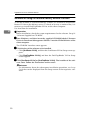
Software for Using the Network Delivery Scanner Function
To use the machine as a network delivery scanner, it is essential to install ScanRouter V2 Lite on the delivery server. To check an in-tray or retrieve files, it is
necessary to install DeskTopBinder V2 Lite on the client computer.
Use Auto Run for installation.
2
Preparation
Before installation, check the system requirements for the software. See p.21
“Software Supplied on CD-ROM”.
A Start Windows, and then insert the supplied CD-ROM labeled “Scanner
Driver & Document Management Utilities” into the CD-ROM drive of the
client computer.
The CD-ROM Launcher screen appears.
B Click the key of the software to be installed.
• Click [ScanRouter V2 Lite], and then the ScanRouter V2 Lite Setup screen appears.
• Click [DeskTopBinder V2 Lite], and then the DeskTopBinder V2 Lite Setup
screen appears.
C Click [ScanRouter V2 Lite] or [DeskTopBinder V2 Lite]. The installer of the software starts. Follow the instructions on the screen.
Reference
For information about the subsequent installation procedure, see Setup
Guide that can be displayed from the Setup screen of the respective software.
20
Installing Software
DeskTopBinder V2 Lite
Use Auto Run for installation.
Preparation
Before installation, check the system requirements for DeskTopBinder V2
Lite. See p.22 “DeskTopBinder V2 Lite”.
2
A Start Windows, and then insert the supplied CD-ROM labeled “Scanner
Driver & Document Management Utilities” into the CD-ROM drive of the
client computer.
The CD-ROM Launcher screen appears.
B Click [DeskTopBinder V2 Lite].
The DeskTopBinder V2 Lite Setup screen appears.
C Click [DeskTopBinder V2 Lite]. The Installer of the DeskTopBinder V2 Lite
starts. Follow the instructions on the screen.
Reference
For information about the subsequent installation procedure, see Setup
Guide that can be displayed from the Setup screen of DeskTopBinder V2
Lite.
Software Supplied on CD-ROM
List of files
CD-ROM
Drive
Wizard for the TWAIN driver and utilities
Drivers
Twain
TWAIN driver for Windows
95/98/Me/2000/XP, Windows NT 4.0
Utility
RouterV2
ScanRouter V2 Lite ,
ministration Utility
DeskV2
Acroread
ScanRouter V2 Ad-
DeskTopBinder V2 Lite
Acrobat Reader
Type2018 TWAIN Driver
This driver is required to scan an original on the machine.
To use the machine as a network TWAIN scanner, this driver must be installed.
❖ File storage folder
The files are stored in the following folder on the CD-ROM provided with this
machine:
\DRIVERS\TWAIN
21
Preparations for Use as a Network Scanner
❖ System requirements
Limitation
❒ Under Windows NT with RISC-based processors (MIPS R series, Alpha
AXP, or PowerPC), this driver is not available.
• Hardware
PC/AT compatible
• CPU
Pentium or faster (Pentium 150 MHz or faster recommended)
• Operating system
Microsoft Windows 95 (OSR 2 or later)
Microsoft Windows 98
Microsoft Windows Millennium Edition
Microsoft Windows 2000 Professional
Microsoft Windows 2000 Server
Microsoft Windows XP Home Edition
Microsoft Windows XP Professional
Microsoft Windows NT Workstation 4.0 (Service Pack 5 or later)
Microsoft Windows NT Server 4.0 (Service Pack 5 or later)
• Memory
Operating system minimum operation memory + 8 MB (64 MB or more
recommended)
• Hard disk space
100 MB or more
• Display resolution
800 × 600 pixels, 256 colors or higher
• Network protocol
TCP/IP
2
DeskTopBinder V2 Lite
DeskTopBinder V2 Lite is to be installed on the client computers for integration
and management of various kinds of files such as scan files, files created with applications, and existing files. This software allows you to use various functions
for scan files stored in the Document Server, e.g., viewing stored files. Also, with
ScanRouter V2 Lite, you can view the files stored in in-trays of the delivery server or use other functions for stored files.
Reference
See DeskTopBinder V2 Lite Help or the manuals for DeskTopBinder V2 Lite.
❖ File storage folder
The files are stored in the following folder on the CD-ROM provided with this
machine:
\UTILITY\DESKV2
22
Installing Software
❖ System requirements
• Hardware
PC/AT compatible
• CPU
Pentium 133 MHz or faster (Pentium II 266 MHz or faster recommended)
• Operating system
Microsoft Windows 95 (OSR 2 or later)
Microsoft Windows 98
Microsoft Windows Millennium Edition
Microsoft Windows 2000 Professional (Service Pack 1 or later)
Microsoft Windows 2000 Server (Service Pack 1 or later)
Microsoft Windows XP Home Edition
Microsoft Windows XP Professional
Microsoft Windows Server 2003 Standard Edition
Microsoft Windows Server 2003 Enterprise Edition
Microsoft Windows Server 2003 Web Edition
Microsoft Windows NT Workstation 4.0 (Service Pack 5 or later)
Microsoft Windows NT Server 4.0 (Service Pack 5 or later)
• Memory
48 MB or more (128 MB or more recommended)
• Hard disk space
50 MB or more (200 MB or more recommended)
• Display resolution
800 × 600 pixels, 64K colors or higher
• Network protocol
TCP/IP
2
❖ Software installed with DeskTopBinder V2 Lite
• Auto Document Link
Auto Document Link on the client computer monitors in-trays of the delivery server. In addition, the files delivered to in-trays can be retrieved or notification of the arrival of a file can be received at the client computer with
this software.
• Function Palette
Function Palette allows you to use functions such as the network TWAIN
scanner, printing, printing preview, sending files by e-mail, or sending faxes without starting DeskTopBinder V2 Lite. You must make settings in advance in the [Extended Features...] to use Function Palette. See the
DeskTopBinder V2/Lt manuals for more information.
• Extended Features Wizard
You can make settings equivalent to the settings made with [Extended Features...] of the [Tools] menu with Extended Features Wizard. See the DeskTopBinder V2/Lt manuals for more information.
23
Preparations for Use as a Network Scanner
ScanRouter V2 Lite
ScanRouter V2 Lite is to be installed on the delivery server. Scan files can be sorted in the delivery server, stored in specified in-trays, or saved in folders of client
computers on the same network.
Reference
See ScanRouter V2 Lite Help or the manuals for ScanRouter V2 Lite.
2
❖ File storage folder
The files are stored in the following folder on the CD-ROM provided with this
machine:
\UTILITY\ROUTERV2
❖ System requirements
Limitation
❒ When installing the software in Windows NT Server or Windows 2000
Server, a stand-alone server must be used. Do not use the primary domain
controller or backup domain controller.
❒ If you install this software in an operating system, such as Windows NT
Workstation and Windows 2000 Professional, in which a client server is
not permitted to be used in a network, you may violate the license agreement of Microsoft Corporation.
• Hardware
PC/AT compatible
• CPU
Pentium 200 MHz or faster (Pentium II 350 MHz or faster recommended)
• Operating system
Microsoft Windows 95 (OSR 2 or later)
Microsoft Windows 98
Microsoft Windows Millennium Edition
Microsoft Windows 2000 Professional (Service Pack 1 or later)
Microsoft Windows 2000 Server (Service Pack 1 or later)
Microsoft Windows XP Home Edition
Microsoft Windows XP Professional
Microsoft Windows NT Workstation 4.0 (Service Pack 5 or later)
Microsoft Windows NT Server 4.0 (Service Pack 5 or later)
• Memory
64 MB or more (128 MB or more recommended)
• Hard disk space
Minimum free space required for installing: 200 MB
24
Note
❒ In addition to the space required for installation, the hard disk should
have at least 500 MB of free space for files.
• Network protocol
TCP/IP
Installing Software
❖ Software installed with ScanRouter V2 Lite
• ScanRouter V2 Administration Utility
ScanRouter V2 Administration Utility manages the delivery system run by
ScanRouter V2 Lite.
You can register destination and sender information for the scan files in the
delivery server. In addition, you can perform maintenance for free disk
space monitoring, error log recording, and other features of the delivery
server.
2
Note
❒ ScanRouter V2 Administration Utility can be installed not only on the
delivery server but also on client computers. To install it, click [ScanRouter V2 Administration Utility] on the ScanRouter V2 Lite Setup screen.
25
Preparations for Use as a Network Scanner
2
26
3. Setting Originals
This chapter explains the procedure for placing originals on the exposure glass
and in the ADF, and setting the original scan area and orientation according to
the placement method.
To correctly display the top/bottom orientation of the scanned original on a client computer, the placement of the original and the settings made on the control
panel and scanner driver must match.
Placing Originals
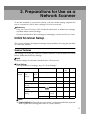
There are two orientations for placing the original. See the table below.
Note
❒ Normally, an original is or , but in the table below, a square original is
used to make original orientation easy to understand. If the actual shape of
the original is different, the combination of original orientation and the orientation specified on the control panel or scanner driver does not change.
❖ Specifying original orientation and setting originals
An original to be scanned
Exposure glass
ADF
Decide the placement method.
Place the original.
(There are two original orientations.)
Place the
original so
that the top
edge touches
the top left of
the exposure glass.
Place the
Place the top Place the
edge of the
original so
original so
original first. that the top
that the top
edge touches
edge touches
the back of
the rear of
the exposure
the ADF.
glass.
27
Setting Originals
When scanning using
the e-mail function or
the delivery scanner
function
Specify the
orien(Specified on the contation.
trol panel screen)
When scanning using
the TWAIN scanner
function
(Specified in the Scanner Control dialog
box)
3
The original displayed on a
computer
Placing on the Exposure Glass
Originals which do not fit into the
ADF, such as sheets with glued-on
parts, books, etc., can be placed directly on the exposure glass for scanning.
Note
❒ For information about the originals which can be placed on the exposure glass, see Copy Reference.
B Place the original on the exposure
glass with the side to be scanned
facing down. Align the original
with the back left corner mark.
There are two original orientations.
❖ When placing the original so that
the top edge touches the rear of
the exposure glass
A Lift
the exposure glass cover or
the ADF.
Note
❒ Lift the exposure glass cover or
ADF more than 30 degrees. The
opening/closing action triggers
the automatic original size detection process.
28
AAH004S
1. Positioning mark
Placing Originals
❖ When placing the original so that
the top edge touches the top left of
the exposure glass
When using the machine as a
network TWAIN scanner, this
orientation is the standard setting for the TWAIN driver. Normally, use this orientation for
placing originals.
AAH005S
1. Positioning mark
C Lower the exposure glass cover or
the ADF.
D Select the original orientation ac-
cording to the orientation of the
placed original.
Reference
p.27 “Specifying original orientation and setting originals”
Proceed to p.31 “Original Orientation and Scan Area”.
Placing in the Auto Document
Feeder
The ADF allows you to place multiple
originals at one time. Originals placed
in the ADF can be scanned on one
side or both sides.
Note
❒ The duplex function is available
only when you have installed the
optional ADF capable of scanning
both sides of a sheet (ARDF).
3
❖ Originals that can and cannot be
placed in the ADF
For information about the originals that can and cannot be placed
in the ADF, see Copy Reference.
Attempting to use unsuitable originals in the ADF can lead to a misfeed and damage to the originals.
Place such originals directly on the
exposure glass.
Important
❒ For information about original
sizes that can be detected automatically and notes on placing
originals in the ADF, see Copy
Reference.
A Adjust
the original guide to
match the size of the originals.
B Place the originals with the side
to be scanned facing up. (For originals which are to be scanned on
both sides, the first side should
face up.)
There are two orientations.
29
Setting Originals
❖ When placing the originals so that
the top edges touch the back of the
ADF
Note
❒ Originals of the same width and
different length can be placed at
the same time. Place the originals as shown:
3
AAH022S
AAH006S
❖ When placing the top edges of the
originals first
When using the machine as a
network TWAIN scanner, this
orientation is the standard setting for the TWAIN driver. Normally, use this orientation for
placing originals.
1. ADF placement orientation
2. Height
Reference
p.32 “Mixed size selection”
❒ Originals are scanned in the inserted order, starting with the
topmost page.
C Select the original orientation according to the orientation of the
placed originals.
Reference
p.27 “Specifying original orientation and setting originals”
Proceed to p.31 “Original Orientation and Scan Area”.
AAH007S
30
Original Orientation and Scan Area
Original Orientation and Scan Area
Note
❒ The difference between scanning
with the TWAIN scanner function
and the e-mail function or the network delivery scanner function is
shown in the following table.
Auto Detect Non-Mixed Original Sizes
TWAIN Scanner E-mail/Network
Delivery Scanner
A whole batch
of originals is
scanned using
the size of the
first original.
Auto detection
is used to determine the size of
each original
placed on the
exposure glass.
A batch of originals placed in
the ADF is
scanned using
the size of the
largest original
placed.
TWAIN Scanner E-mail/Network
Delivery Scanner
Size Specification Auto Detect Mixed Original Sizes
To correctly display the top/bottom
orientation of a scanned original on a
client computer, original orientation
must be set when placing the original.
When using the e-mail function or the
network delivery scanner function,
settings are made on the control panel
of the machine. When using the machine as a network TWAIN scanner,
settings are made with the TWAIN
driver.
Auto detection is used to determine the size of each original.
3
When an original is smaller than
the specified size, a blank space appears in the resulting image.
For E-mail and a Network
Delivery Scanner
A To make settings for original orientation, one-sided/two-sided
combination, and mixed original
sizes, press [Options].
Note
❒ The default can be changed using the initial scan settings [Original Setting], [Mixed Orig. Sizes
Priority], and [Orig. Orientation Priority]. See p.12 “Scan Settings”.
31
Setting Originals
❒ The duplex function is available
only when you have installed
the optional ADF capable of
scanning both sides of a sheet
(ARDF).
Orientation selection
A Select [Original Orientation] using
{U} or {T}, and then press the
{OK}
} key.
3
B Select the icon for the same orientation as the actual orientation of the original, [
] or
[
], and then press the {OK}
}
key.
B When scanning one-sided originals, select [1 Sided Original] using {U} or {T}, and then press
the {OK}
} key. When scanning
two-sided originals, select [2
Sided Orig.(T to T
)] or [2 Sided
Orig.(T to B
)] using {U} or
{T} according to the binding
side of the original, and then
press the {OK}
} key.
Top to top
original:
RS
Top to bottom original:
R
S
R S
R
S
The “Accepted ” message appears, and then the Send Options screen returns.
The “ Accepted” message appears, and then the Send Option
screen returns.
One-sided original/Two-sided
original selection
A Select [Original Setting] using
{U} or {T}, and then press the
{OK}
} key.
32
Mixed size selection
A Select [Mixed Sizes] using {U} or
{T}, and then press the {OK}
}
key.
Original Orientation and Scan Area
B When originals of the same
width and different length are
placed, select [On] using {U} or
{T}, and then press the {OK}
}
key.
For a Network TWAIN Scanner
A Open the scanner properties dialog box.
Reference
p.66 “Scanning Originals”
B Select the position from the [Document] list in the [Document] area.
The “ Accepted” message appears, and then the Send Options screen returns.
Note
❒ When [Off] is selected and
[Auto Detect] is selected for
[Scan Size], if originals of different sizes are placed in the
ADF, the size of the largest
original placed is detected
and set as the scan size. For
originals smaller than this
size, a blank space will appear in the resulting image.
C Press the {Cancel}
} key.
The E-mail screen appears.
C Select
[
/
] or [
the [Orientation:] list.
/
3
] in
Reference
p.27 “Specifying original orientation and setting originals”
D When the originals are placed in
the ADF, select [Simplex] or [Duplex] in the [Side:] list.
Note
❒ The duplex function is available
only when you have installed
the optional ADF capable of
scanning both sides of a sheet
(ARDF).
❒ If originals of different sizes are
placed in the ADF, specify the
original size or detection method in the [Size:] box. If [Auto detection (Uni-size)] is selected, all
originals are scanned using the
size of the first page. If [Auto detection (Multi-size)] is selected, all
originals are scanned according
to their own width. For both
Uni-size and Multi-size, all originals are scanned using their
own length.
33
Setting Originals
Scanning Originals in Several Times using
the Exposure Glass
A Place the originals.
Reference
p.27 “Placing Originals”
Note
❒ Originals are scanned in order.
Place them from the first page.
3
B Make settings for scanning area
and original orientation.
Reference
p.31 “Original Orientation and
Scan Area”
C Make settings for sending by email or delivering.
Reference
p.37 “Procedure for Sending by
E-mail”
p.54 “Delivery Procedure”
D Press the {Start}} key.
E When there are additional originals to scan, place them and press
the {Start}
} key.
Repeat this step until all originals
are scanned.
34
F After
all originals are scanned,
press the {#}
} key.
Sending will start.
4. Sending Scan Files by E-mail
Scan files can be sent from this machine to a specified destination using e-mail.
This chapter explains the preparation for sending scan files by e-mail, various
display screens, procedures for sending, and how to check the sending result
when this function is used.
Preparation for Sending by E-mail
To send by e-mail system, the preparation described below is required.
Note
❒ Set up an e-mail server on the network in advance. For information about setting up an e-mail server, see the instruction manuals of the e-mail server to be
used and the software to be installed.
1
Connect to Network
2
Make System Settings
Connect the machine to the network with an Ethernet cable or
IEEE 1394 (optional) cable, or use Wireless LAN (optional).
See Network Guide.
Make the network settings, settings for sending e-mail such as
for the SMTP server and TCP/IP, and the destination (sender)
settings in System Settings.
See Network Guide and General Settings Guide.
3
Make Scanner
Settings
Make settings for sending e-mail such as the file type priority
and sender's default.
See p.14 “Send Settings”.
35
Sending Scan Files by E-mail
E-mail Screen
These screens are shown when using the machine for e-mail .
❖ Main display
2
1
4
3
4
5
AAH018S
❖ When a destination is selected.
6
1. E-mail icon ( )
Indicates that the E-mail screen is displayed.
2. Destination field
Displays the selected destination. If
multiple destinations are selected, the
destinations are displayed in the order they were selected by pressing
{U} or {T}.
Note
❒ Press the {Check Destination}
} key to
check the selected destination.
3. [
]E-mail/Network Delivery
Scanner
Press to switch between the e-mail
function and the network delivery
scanner function.
36
7
5
AAH025S
4. [Manual]
When specifying a destination that is
not registered, press [Manual], and
then enter the e-mail address of the
destination using the Quick Dial keys.
5. [Options]
Press to make the scan settings such as
resolution or scan size, the sender, the
subject of the e-mail to be sent, and the
file type of the scan file attached to the
e-mail if necessary.
6. [Add Dest]
When selecting multiple destinations
after a manual entry of an e-mail address, press [Add Dest], and then enter
the e-mail address of the destination.
7. [EditDest]
When changing an e-mail address that
has been entered, press [EditDest], and
then enter the new e-mail address.
Sending Scan Files by E-mail
Sending Scan Files by E-mail
Procedure for Sending by Email
Scan files are sent after specifying
scan settings and destinations.
A Press the {Scanner}} key.
Search
Check
Job
Destination Destination Information
01
ABC
05
MNO
09
YZ
13
Shift
02
DEF
06
PQR
10
@. ___
@.
14
Space
03
GHI
07
STU
11
tings remain.
Note
❒ If a previous setting remains,
press the {Clear Modes}
} key.
E Place the original, and then make
the scan settings and settings for
orientation if necessary.
Scanner
Reference
p.12 “Scan Settings”
04
JKL
4
p.27 “Setting Originals”
08
VWX
12
Making the settings
-&
15
D Make sure that no previous set-
16
Symbols
AAH028S
B If the user codes are set, enter a
user code using the number keys,
and then press the {#}
} key.
The initial scanner screen appears.
Reference
For information about user
c odes, see Gene ral Settings
Guide.
C If the Network Delivery Scanner
screen appears, press [
switch to the E-mail screen.
] to
A Press [Options].
B Select items such as [Resolution], [Original Orientation],[Original Setting],[Mixed Sizes], and
[Scan Size] using {U} or {T},
and then change their settings.
Scan settings can be made in the
same way as default scan settings. See p.12 “Scan Settings”.
C Press the {Cancel}
} key.
The E-mail screen appears.
F Specify the destination
The E-mail screen appears.
To specify a destination, you can
select it using the Quick Dial key,
search for and select it from the
Destination List, select it by specifying a registration number, or enter the e-mail address directly.
37
On Hook Dial
Sending Scan Files by E-mail
Using a Quick Dial key to select a
destination
Searching to select a destination
by name
A Press the Quick Dial key in
which the destination is registered.
A Press the {Search Destination}
} key.
Search
Check
Job
Destination Destination Information
Search
Check
Job
Destination Destination Information
01
Scanner
02
ABC
01
02
ABC
05
06
MNO
09
4
DEF
PQR
10
YZ
13
@. ___
@.
14
03
GHI
07
STU
11
05
04
MNO
JKL
09
08
PQR
10
YZ
VWX
13
12
DEF
06
@. ___
@.
14
03
GHI
07
STU
11
Scanner
04
JKL
08
On Hook Dial
VWX
12
-&
15
16
-&
15
Shift
16
Space
Symbols
AAH030S
Shift
Space
Symbols
AAH029S
Reference
For more information about
how to register the destination, see General Settings
Guide.
B To select more destinations, repeat step A .
Note
❒ To deselect a destination,
press {U} or {T} to display
the destination in the Destination field, and then press
the {Clear/Stop}
} key.
B Select [Search by Name] using
{U} or {T}, and then press the
{OK}
} key.
C Enter the beginning of the destination name, and then press
the {OK}
} key twice.
Note
❒ Enter the first character or
characters of the destination
name.
❒ It is necessary to differentiate
between uppercase and lowercase.
Reference
For information about how
to enter characters, see General Settings Guide.
38
Sending Scan Files by E-mail
D Select the destination using
{U} or {T}, and then press the
{OK}
} key.
C Select the destination using
{U} or {T}, and then press the
{OK}
} key.
E To select more destinations, repeat steps A to D.
D To select more destinations, repeat steps A to C.
Note
❒ To deselect a destination,
press {U} or {T} to display
the destination in the Destination field, and then press
the {Clear/Stop}
} key.
Note
❒ To deselect a destination,
press {U} or {T} to display
the destination in the Destination field, and then press
the {Clear/Stop}
} key.
Selecting a destination from
Destination List
Searching to select a destination
by registration number
A Press the {Search Destination}
} key.
A Press the {Search Destination}
} key.
Search
Check
Job
Destination Destination Information
01
ABC
05
MNO
09
YZ
13
Shift
02
DEF
06
PQR
10
@. ___
@.
14
Space
03
GHI
07
STU
11
Search
Check
Job
Destination Destination Information
Scanner
04
01
JKL
ABC
08
05
VWX
MNO
12
09
16
13
-&
15
YZ
Symbols
Shift
AAH030S
B Select [Display Destination List]
using { U } or { T } , and then
press the {OK}
} key.
02
DEF
06
PQR
10
@. ___
@.
14
Space
03
GHI
07
STU
11
4
Scanner
On Hook Dial
04
JKL
08
VWX
12
-&
15
16
Symbols
AAH030S
B Select [Search by Registration No.]
using { U } or { T } , and then
press the {OK}
} key.
39
Sending Scan Files by E-mail
C Enter a 3-digit registration
number that has been assigned
to a destination using the number keys, and then press the
{OK}
} key.
B Select [Search by E-mail Address]
using { U } or { T } , and then
press the {OK}
} key.
C Enter the beginning of the email address, and then press
the {OK}
} key twice.
D Press the {OK}
} key.
4
E To select more destinations, repeat steps A to D.
Note
❒ To deselect a destination,
press {U} or {T} to display
the destination in the Destination field, and then press
the {Clear/Stop}
} key.
Searching to select a destination
by e-mail address
A Press the {Search Destination}
} key.
Search
Check
Job
Destination Destination Information
01
ABC
05
MNO
09
YZ
13
Shift
02
DEF
06
PQR
10
@. ___
@.
14
Space
03
GHI
07
STU
11
Reference
For information about how
to enter characters, see General Settings Guide.
D Select the destination using
{U} or {T}, and then press the
{OK}
} key.
On Hook Dial
04
JKL
08
VWX
12
E To select more destinations, repeat steps A to D.
16
Symbols
AAH030S
40
❒ It is necessary to differentiate
between uppercase and lowercase.
Scanner
-&
15
Note
❒ Enter the first character or
characters of the destination
name.
Note
❒ To deselect a destination,
press {U} or {T} to display
the destination in the Destination field, and then press
the {Clear/Stop}
} key.
Sending Scan Files by E-mail
Manual entry of an e-mail
address
A Press [Manual].
B Enter the e-mail address.
Note
❒ Letters, number, and periods
can be used. The symbols
()\,;:” cannot be used.
Reference
For information about how
to enter characters, see General Settings Guide.
C Press the {OK}
} key.
Note
❒ To change an e-mail address
that has been entered, press
[EditDest]. The E-mail Address screen appears. Enter
the new e-mail address, and
then press the {OK}
} key.
❒ If the entered destination is
longer than the Destination
field, the address will be
omitted and […] is displayed
instead.
D To enter more destinations,
press [Add Dest], and then repeat steps A to C.
Note
❒ To deselect a destination,
press {U} or {T} to display
the destination in the Destination field, and then press
the {Clear/Stop}
} key.
Checking selected destinations
A Check the selected destinations in the Destination field.
Note
❒ When multiple destinations
are selected, the selected destinations are displayed in the
order they were selected by
pressing {U} or {T}.
❒ Press the {Check Destination}
}
key to check the selected destination.
4
G Select the file type if necessary.
A Press [Options].
B Select [File Type] using {U} or
{T}, and then press the {OK}
}
key.
C Select the file type of the file to
be attached to the e-mail using
{U} or {T}, and then press the
{OK}
} key.
The “Accepted ” message appears, and then the Send Options screen returns.
D Press the {Cancel}
} key.
41
Sending Scan Files by E-mail
H Specify the e-mail sender.
To specify a sender, you can select
it using the Quick Dial key, search
for and select it from the Destination List, or select it by specifying a
registration number.
A Press [Options].
B Select [Sender's Name] using
{U} or {T}, and then press the
{OK}
} key.
Using a Quick Dial key to select a
sender
A Press the Quick Dial key in
which the sender is registered.
Search
Check
Job
Destination Destination Information
01
02
ABC
05
MNO
09
PQR
10
YZ
4
DEF
06
13
@. ___
@.
14
Shift
Space
03
Scanner
04
GHI
07
JKL
08
STU
11
VWX
12
-&
15
16
Symbols
AAH029S
Note
❒ Step H can be omitted if [Key
Op's E-mail Address] is specified for [Sender's Name Default]
in [Send Settings] of [Scanner
Features].
❒ When a sender is selected,
the sender name is automatically placed in the From field
of the e-mail so that the sender can be identified by the recipient.
❒ To prevent misuse of a sender name, we recommend you
set a sender's password for
that sender name.
❒ Be sure to select or enter a
sender name. Otherwise the
key operator's e-mail address
is used as the sender name.
See General Settings Guide.
Reference
For more information about
how to register the destination, see General Settings
Guide.
Note
❒ When a sender's password is
set, a screen for entering the
sender's password appears.
Enter the sender's password
using the number keys, and
then press the {OK}
} or {#}
}
key. If the password entered
is correct, the sender name is
displayed.
B Press the {OK}
} key.
The “Accepted ” message appears, and then the Return Receipt screen returns.
42
Sending Scan Files by E-mail
C For receiving a return receipt
confirmation, select [On] using
{U} or {T}, and then press the
{OK}
} key.
The “ Accepted” message appears, and then the Send Options screen returns.
Note
❒ When [On] is selected, an email notifying that the e-mail
has been read by the recipient is sent to the sender selected here. However, if the
mailing software used by the
recipient does not support
MDN (Message Disposition
Notification), the e-mail may
not be sent.
Searching to select a sender by
name
A Press the {Search Destination}
} key.
Search
Check
Job
Destination Destination Information
01
ABC
05
MNO
09
YZ
13
Shift
02
DEF
06
PQR
10
@. ___
@.
14
Space
03
GHI
07
STU
11
B Select [Search by Name] using
{U} or {T}, and then press the
{OK}
} key.
C Enter the beginning of the
sender name, and then press
the {OK}
} key twice.
4
Note
❒ Enter the first character or
c h ara c t e r s o f t he s e nd e r
name.
❒ It is necessary to differentiate
between uppercase and lowercase.
Reference
For information about how
to enter characters, see General Settings Guide.
D Select the sender using {U} or
{T}, and then press the {OK}
}
key.
Scanner
04
On Hook Dial
JKL
08
VWX
12
-&
15
16
Symbols
AAH030S
43
Sending Scan Files by E-mail
Note
❒ When a sender's password is
set, a screen for entering the
sender's password appears.
Enter the sender's password
using the number keys, and
then press the { OK}
} or {#}
}
key. If the password entered
is correct, the sender name is
displayed.
E Press the {OK}
} key.
Selecting a sender from
Destination List
A Press the {Search Destination}
} key.
Search
Check
Job
Destination Destination Information
01
ABC
05
MNO
09
YZ
13
4
Shift
02
DEF
06
PQR
10
@. ___
@.
14
Space
03
GHI
07
STU
11
Scanner
04
JKL
08
VWX
12
-&
15
16
Symbols
AAH030S
The “ Accepted” message appears, and then the Return Receipt screen returns.
F For receiving a return receipt
confirmation, select [On] using
{U} or {T}, and then press the
{OK}
} key.
B Select [Display Destination List]
using { U } or { T } , and then
press the {OK}
} key.
C Select the sender using {U} or
{T}, and then press the {OK}
}
key.
The “ Accepted” message appears, and then the Send Options screen returns.
Note
❒ When [On] is selected, an email notifying that the e-mail
has been read by the recipient is sent to the sender selected here. However, if the
mailing software used by the
recipient does not support
MDN (Message Disposition
Notification), the e-mail may
not be sent.
44
Note
❒ When a sender's password is
set, a screen for entering the
sender's password appears.
Enter the sender's password
using the number keys, and
then press the {OK}
} or {#}
}
key. If the password entered
is correct, the sender name is
displayed.
Sending Scan Files by E-mail
D Press the {OK}
} key.
Searching to select a sender
using a registration number
A Press the {Search Destination}
} key.
Search
Check
Job
Destination Destination Information
The “ Accepted” message appears, and then the Return Receipt screen returns.
E For receiving a return receipt
confirmation, select [On] using
{U} or {T}, and then press the
{OK}
} key.
01
ABC
05
MNO
09
YZ
13
Shift
02
DEF
06
PQR
10
@. ___
@.
14
Space
03
GHI
07
STU
11
Scanner
04
JKL
08
VWX
12
-&
15
16
4
Symbols
AAH030S
B Select [Search by Registration No.]
using { U } or { T } , and then
press the {OK}
} key.
The “ Accepted” message appears, and then the Send Options screen returns.
Note
❒ When [On] is selected, an email notifying that the e-mail
has been read by the recipient is sent to the sender selected here. However, if the
mailing software used by the
recipient does not support
MDN (Message Disposition
Notification), the e-mail may
not be sent.
C Enter a 3-digit registration
number that has been assigned
to a sender using the number
keys, and then press the {OK}
}
key twice.
45
Sending Scan Files by E-mail
Note
❒ When a sender's password is
set, a screen for entering the
sender's password appears.
Enter the sender's password
using the number keys, and
then press the { OK}
} or {#}
}
key. If the password entered
is correct, the sender name is
displayed.
D Press the {OK}
} key.
Searching to select a sender by
e-mail address
A Press the {Search Destination}
} key.
Search
Check
Job
Destination Destination Information
01
02
ABC
05
MNO
09
PQR
10
YZ
13
4
DEF
06
@. ___
@.
14
Shift
Space
03
GHI
07
STU
11
Scanner
04
JKL
08
VWX
12
-&
15
16
Symbols
AAH030S
The “ Accepted” message appears, and then the Return Receipt screen returns.
E For receiving a return receipt
conformation, select [On] using
{U} or {T}, and then press the
{OK}
} key.
B Select [Search by E-mail Address]
using { U } or { T } , and then
press the {OK}
} key.
C Enter the beginning of the
sender's e-mail address, and
then press the {OK}
} key twice.
The “ Accepted” message appears, and then the Send Options screen returns.
Note
❒ When [On] is selected, an email notifying that the e-mail
has been read by the recipient is sent to the sender selected here. However, if the
mailing software used by the
recipient does not support
MDN (Message Disposition
Notification), the e-mail may
not be sent.
F Press the {Cancel}
} key.
46
Note
❒ Enter the first character or
c h ara c t e r s o f t he s e nd e r
name.
❒ It is necessary to differentiate
between uppercase and lowercase.
Reference
For information about how
to enter characters, see General Settings Guide.
Sending Scan Files by E-mail
D Select the sender using {U} or
{T}, and then press the {OK}
}
key.
Note
❒ When a sender's password is
set, a screen for entering the
sender's password appears.
Enter the sender's password
using the number keys, and
then press the { OK}
} or {#}
}
key. If the password entered
is correct, the sender name is
displayed.
Note
❒ When [On] is selected, an email notifying that the e-mail
has been read by the recipient is sent to the sender selected here. However, if the
mailing software used by the
recipient does not support
MDN (Message Disposition
Notification), the e-mail may
not be sent.
I Specify a subject if necessary.
A Press [Options].
B Select [Attach Subject] using {U}
or {T}, and then press the {OK}
}
key.
4
E Press the {OK}
} key.
The “ Accepted” message appears, and then the Return Receipt screen returns.
F For receiving a return receipt
confirmation, select [On] using
{U} or {T}, and then press the
{OK}
} key.
The “ Accepted” message appears, and then the Send Options screen returns.
Note
❒ When a subject is set, it is
added to the scan file. The
subject appears automatically in the Subject field of the email.
❒ To specify a subject, you can
select it from the list, enter it
directly, or combine selecting
and entering it.
❒ A subject to select from the
list must be registered in
[System Settings] in advance.
See Network Guide.
❒ A subject can be entered using up to 64 characters.
47
Sending Scan Files by E-mail
Manual entry of a subject
A Select [Manual Input] using {U}
or {T}, and then press the {OK}
}
key.
B Enter a subject, and then press
the {OK}
} key.
4
B Select a subject using {U} or
{T}, and then press the {OK}
}
key.
The “Accepted ” message appears, and then the Send Options screen returns.
J Press the {Cancel}} key.
The initial scanner screen appears.
K Press the {Start}} key.
The “ Accepted” message appears, and then the Send Options screen returns.
Note
❒ The original is scanned and the
“ Scanning... ” message appears.
Note
❒ When the subject to be entered exceeds 64 characters,
“U” appears.
• To interrupt scanning, press
the {Clear/Stop}
} key.
❒ The scan file is sent and the
“ Sending... ” message appears.
Selecting a subject from the list
A Select [Select Programmed Subject] using {U} or {T}, and then
press the {OK}
} key.
48
• While sending a scan file,
you cannot do any other job.
• If sending fails, start the procedure again from the beginning.
Checking the Status of E-mail
Checking the Status of E-mail
The status of the last 50 sendings can
be checked. For every new sending
record after 50, the oldest record is
deleted.
Important
❒ When the main power switch is
turned off, all records are deleted.
A Press the {Job Information}} key.
Search
Check
Job
Destination Destination Information
01
ABC
05
MNO
Note
❒ When [Print&Del. Scanner Journal] is
set to [On], the whole scanner journal is printed when the number of
records reaches 50.
❖ Items that can be checked
• Date/Time
The date and time the e-mail
was sent or the date “Error”
was confirmed is displayed.
• Page
The number of pages of a
scan file is displayed.
• Status
One of the following is displayed: “Done” or “Error”.
• Destination
The function that was used
(e-mail or delivery function)
is displayed with an icon.
When multiple destinations
were selected, the first selected destination is displayed.
09
YZ
13
Shift
02
DEF
06
PQR
10
@. ___
@.
14
Space
03
GHI
07
STU
11
Scanner
04
JKL
08
VWX
12
-&
15
16
4
Symbols
AAH031S
B Check the displayed records.
C If you want to print the scanner
journal, press [Print], and then
press the {Start}
} key.
Note
❒ The whole scanner journal is
printed.
D Press the {Cancel}} key.
The display returns to the E-mail
screen.
49
Sending Scan Files by E-mail
4
50
5. Using the Network Delivery
Scanner Function
Scan files can be sent to a specified destination using the network delivery scanner function. This chapter explains the preparation sequence, various display
screens, delivery procedures, and how to check the delivery result when this
function is used.
Important
❒ A delivery server in which ScanRouter V2 Lite/Professional is installed is
necessary to use the network delivery scanner function. Information about
delivery destinations and senders must be registered first into the delivery
server. Also, configure connected devices in [Set I/O Device] of ScanRouter V2
Administration Utility. For more information, see ScanRouter V2 Administration Utility Help.
Preparation for Delivering
To use the machine as a network delivery scanner, the preparation described below is required.
1
Connect to Network
2
Make System Settings
3
4
Make Scanner
Settings
Install Delivery
Software
Connect the machine to the network with an Ethernet cable,
IEEE 1394 (optional) cable, or use Wireless LAN (optional).
See Network Guide.
Check the network settings in System Settings, and change if required.
See Network Guide.
Make settings for the network delivery scanner function, such as
Destination List Settings.
See p.9 “Initial Scanner Setup”.
Install the software required for using the network delivery
scanner functions, such as ScanRouter V2 Lite, on the delivery
server. After installing the software, make the required settings
for server maintenance and delivery service.
See p.24 “ScanRouter V2 Lite”.
51
Using the Network Delivery Scanner Function
5
6
Set Destination Information, Sender
Information, and connected devices
Install Client Computer
Software
Use ScanRouter V2 Administration Utility to add destinations,
senders, and connected devices.
On the client computers, install the application required for
viewing or retrieving files by connecting to the delivery server,
such as DeskTopBinder V2 Lite.
See p.22 “DeskTopBinder V2 Lite”.
Network Delivery Scanner Screen
These screens are shown when using the machine as a network delivery scanner.
❖ Main display
2
5
1
3
4
5
AAH019S
❖ When a destination is selected
6
1. Network Delivery Scanner icon
(
)
Indicates that the Network Delivery
Scanner screen is displayed.
52
7
5
AAH023S
2. Destination field
Displays the selected destination. If multiple destinations are selected, the destinations are displayed in the order they
were selected by pressing {U} or {T}.
Note
❒ Press the {Check Destination}
} key to
check the selected destination.
❒ Group destinations are denoted by
this symbol ( ).
Preparation for Delivering
3. [
] E-mail/Network Delivery
Scanner
Press to switch between the network
delivery scanner function and the email function.
4. [Manual]
When specifying a destination that is
not registered, press [Manual], and
then enter the e-mail address of the
destination using the Quick Dial keys.
5. [Options]
Press to make the scan settings such as
resolution or scan size, the sender,
and the subject of the e-mail to be sent.
6. [Add Dest]
When selecting multiple destinations
after a manual entry of a e-mail address, press [Add Dest], and then enter
the e-mail address of the destination.
5
7. [EditDest]
When changing the e-mail address
that has been entered, press [EditDest],
and then re-enter the e-mail address.
53
Using the Network Delivery Scanner Function
Delivering Scan Files
D Make sure that no previous set-
Delivery Procedure
tings remain.
Scan files are delivered after scan settings and destinations are specified. If
necessary, you can select a sender and
a subject.
A Press the {Scanner}} key.
Search
Check
Job
Destination Destination Information
01
ABC
05
5
MNO
09
YZ
13
Shift
02
DEF
06
PQR
10
@. ___
@.
14
Space
03
GHI
07
STU
11
E Place the original in the machine,
and then make the scan settings
and settings for orientation if necessary.
Scanner
Reference
p.12 “Scan Settings”
04
JKL
08
p.27 “Setting Originals”
VWX
12
Making the settings
-&
15
Note
❒ If a previous setting remains,
press the {Clear Modes}
} key.
16
Symbols
AAH028S
B If the user codes are set, enter a
user code using the number keys,
and then press the {#}
} key.
The initial scanner screen appears.
A Press [Options].
B Select items such as [Resolution], [Original Orientation],[Original Setting],[Mixed Sizes], and
[Scan Size] using {U} or {T},
and then change their settings.
Reference
For information about user
c odes, see Gene ral Settings
Guide.
C If the E-mail screen appears, press
[
] to switch to the Network
Delivery Scanner screen.
Scan settings can be made in the
same way as default scan settings. See p.12 “Scan Settings”.
C Press the {Cancel}
} key.
The Network Delivery Scanner
screen appears.
F Specify the destination.
The Network Delivery Scanner
screen appears.
54
To specify a destination, you can
select it using the Quick Dial key,
search for and select it from the
Destination List, select it by specifying a registration number, or enter the e-mail address directly.
On Hook Dial
Delivering Scan Files
Note
❒ When using ScanRouter V2
Lite/Professional , the Destination List is updated automatically.
Searching to select a destination
by name
A Press the {Search Destination}
} key.
Search
Check
Job
Destination Destination Information
Using a Quick Dial key to select a
destination
01
02
ABC
A Press the Quick Dial key in
which the destination is registered.
05
MNO
09
YZ
02
ABC
05
DEF
06
MNO
09
PQR
10
YZ
13
@. ___
@.
14
Shift
Space
03
GHI
07
STU
11
@. ___
@.
14
GHI
07
STU
11
04
JKL
08
VWX
12
-&
15
16
Scanner
Shift
01
PQR
10
13
Search
Check
Job
Destination Destination Information
DEF
06
03
Scanner
Space
Symbols
AAH030S
04
On Hook Dial
B Select [Search by Name] using
{U} or {T}, and then press the
{OK}
} key.
JKL
08
VWX
12
5
-&
15
16
Symbols
AAH029S
Reference
For more information about
how to register the destination, see General Settings
Guide.
C Enter the beginning of the destination name, and then press
the {OK}
} key twice.
B To select more destinations, repeat step A .
Note
❒ To deselect a destination,
press {U} or {T} to display
the Destination in the destination field, and then press
the {Clear/Stop}
} key.
Note
❒ Enter the first character or
characters of the destination
name.
❒ It is necessary to differentiate
between uppercase and lowercase.
Reference
For information about how
to enter characters, see General Settings Guide.
55
Using the Network Delivery Scanner Function
5
D Select the destination using
{U} or {T}, and then press the
{OK}
} key.
C Select the destination using
{U} or {T}, and then press the
{OK}
} key.
E To select more destinations, repeat steps A toD
D.
D To select more destinations, repeat steps A to C.
Note
❒ To deselect a destination,
press {U} or {T} to display
the destination in the Destination field, and then press
the {Clear/Stop}
} key.
Note
❒ To deselect a destination,
press {U} or {T} to display
the destination in the Destination field, and then press
the {Clear/Stop}
} key.
When selecting a destination
from Destination List
Searching to select a destination
by registration number
A Press the {Search Destination}
} key.
A Press the {Search Destination}
} key.
Search
Check
Job
Destination Destination Information
01
ABC
05
MNO
09
YZ
13
Shift
02
DEF
06
PQR
10
@. ___
@.
14
Space
03
GHI
07
STU
11
Search
Check
Job
Destination Destination Information
Scanner
04
01
JKL
ABC
08
05
VWX
MNO
12
09
16
13
-&
15
YZ
Symbols
Shift
AAH030S
B Select [Display Destination List]
using { U } or { T } , and then
press the {OK}
} key.
56
02
DEF
06
PQR
10
@. ___
@.
14
Space
03
GHI
07
STU
11
Scanner
On Hook Dial
04
JKL
08
VWX
12
-&
15
16
Symbols
AAH030S
B Select [Search by Registration No.]
using { U } or { T } , and then
press the {OK}
} key.
Delivering Scan Files
C Enter a 3-digit registration
number that has been assigned
to a destination using the number keys, and then press the
{OK}
} key.
C Enter the beginning of the
comment, and then press the
{OK}
} key twice.
D Press the {OK}
} key.
E To select more destinations, repeat steps A to D.
Note
❒ To deselect a destination,
press {U} or {T} to display
the destination in the Destination field, and then press
the {Clear/Stop}
} key.
Searching to select a destination
by comment
A Press the {Search Destination}
} key.
Search
Check
Job
Destination Destination Information
01
ABC
05
MNO
09
YZ
13
Shift
02
DEF
06
PQR
10
@. ___
@.
14
Space
03
GHI
07
STU
11
5
Note
❒ Enter the first character or
characters of the comment.
❒ It is necessary to differentiate
between uppercase and lowercase.
Reference
For information about how
to enter characters, see General Settings Guide.
D Select the destination using
{U} or {T}, and then press the
{OK}
} key.
Scanner
On Hook Dial
04
JKL
08
VWX
E To select more destinations, repeat steps A toD
D.
12
-&
15
B Select [Search by Comment] using {U} or {T}, and then press
the {OK}
} key.
16
Symbols
AAH030S
Note
❒ To deselect a destination,
press {U} or {T} to display
the destination in the Destination field, and then press
the {Clear/Stop}
} key.
57
Using the Network Delivery Scanner Function
Manual entry of a destination
Note
❒ When using ScanRouter V2 Professional, it is possible to enter
the e-mail address of the destination directly. However, settings for sending e-mail must be
made in advance.
A Press [Manual].
B Enter the e-mail address.
5
Note
❒ It is possible to use letters,
number, and periods. The
symbols ()\,;:” cannot be
used.
Reference
For information about how
to enter characters, see General Settings Guide.
C Press the {OK}
} key.
Note
❒ To change an e-mail address
that has been entered, press
[EditDest]. The display returns to the E-mail Address
screen. Make any changes,
and then press the {OK}
} key.
❒ If the entered destination is
longer than the Destination
field, the address will be
omitted and […] is displayed
instead.
D To enter more destinations,
press [Add Dest], and then repeat steps A to C.
58
Note
❒ To deselect a destination,
press {U} or {T} to display
the destination in the Destination field, and then press
the {Clear/Stop}
} key.
Checking selected destinations
A Use the Destination field to
check which destinations are
selected.
Note
❒ When multiple destinations
are selected, the selected destinations are displayed in the
order they were selected by
pressing {U} or {T}.
❒ Press the {Check Destination}
}
key to check the details of the
selected destination.
G Specify the sender (scan file de-
liver source) if necessary.
To specify a sender, you can search
for and select it from the Destination List, or select it by specifying a
registration number.
A Press [Options].
B Select [Sender's Name] using
{U} or {T}, and then press the
{OK}
} key.
Delivering Scan Files
Note
❒ When a sender is selected,
the sender name is automatically placed in the From field
of the e-mail so that the sender can be identified by the recipient.
Using a Quick Dial key to select a
sender
A Press the Quick Dial key in
which the sender is registered.
Search
Check
Job
Destination Destination Information
01
02
ABC
05
DEF
06
MNO
09
PQR
10
YZ
13
@. ___
@.
14
Shift
Space
03
04
JKL
08
STU
11
VWX
12
-&
15
The “Accepted ” message appears, and then the Send Options screen returns.
Note
❒ When [On] is selected, an email notifying that the e-mail
has been read by the recipient is sent to the sender selected here. However, if the
mailing software used by the
recipient does not support
MDN (Message Disposition
Notification), the e-mail may
not be sent.
Scanner
GHI
07
C For receiving a return receipt
confirmation, select [On] using
{U} or {T}, and then press the
{OK}
} key.
16
Symbols
5
AAH029S
Reference
For more information about
how to register the destination, see General Settings
Guide.
B Press the {OK}
} key.
Searching to select a sender by
name
A Press the {Search Destination}
} key.
B Select [Search by Name] using
{U} or {T}, and then press the
{OK}
} key.
The “ Accepted” message appears, and then the Return Receipt screen returns.
59
On Hook Dial
Using the Network Delivery Scanner Function
C Enter the beginning of the
sender name, and then press
the {OK}
} key twice.
Note
❒ Enter the first character or
ch arac ters of th e s en der
name.
❒ It is necessary to differentiate
between uppercase and lowercase.
5
Reference
For information about how
to enter characters, see General Settings Guide.
D Select the sender using {U} or
{T}, and then press the {OK}
}
key.
F For receiving a return receipt
conformation, select [On] using
{U} or {T}, and then press the
{OK}
} key.
The “Accepted ” message appears, and then the Send Options screen returns.
Note
❒ When [On] is selected, an email notifying that the e-mail
has been read by the recipient is sent to the sender selected here. However, if the
mailing software used by the
recipient does not support
MDN (Message Disposition
Notification), the e-mail may
not be sent.
When selecting a sender from
Destination List
A Press {Search Destination}
}.
E Press the {OK}
} key.
Search
Check
Job
Destination Destination Information
01
ABC
05
MNO
09
The “ Accepted” message appears, and then the Return Receipt screen returns.
YZ
13
Shift
02
DEF
06
PQR
10
@. ___
@.
14
Space
03
GHI
07
STU
11
Scanner
04
JKL
08
VWX
12
-&
15
16
Symbols
AAH030S
60
Delivering Scan Files
B Select [Display Destination List]
using { U } or { T } , and then
press the {OK}
} key.
C Select the sender using {U} or
{T}, and then press the {OK}
}
key.
Note
❒ When [On] is selected, an email notifying that the e-mail
has been read by the recipient is sent to the sender selected here. However, if the
mailing software used by the
recipient does not support
MDN (Message Disposition
Notification), the e-mail may
not be sent.
Searching to select a sender by
registration number
A Press the {Search Destination}
} key.
D Press the {OK}
} key.
Search
Check
Job
Destination Destination Information
01
ABC
05
MNO
09
YZ
The “ Accepted” message appears, and then the Return Receipt screen returns.
E For receiving a return receipt
conformation, select [On] using
{U} or {T}, and then press the
{OK}
} key.
13
Shift
02
DEF
06
PQR
10
@. ___
@.
14
Space
03
GHI
07
STU
11
5
Scanner
04
JKL
08
VWX
12
-&
15
16
Symbols
AAH030S
B Select [Search by Registration No.]
using { U } or { T } , and then
press the {OK}
} key.
The “ Accepted” message appears, and then the Send Options screen returns.
61
Using the Network Delivery Scanner Function
C Enter a 3-digit registration
number that has been assigned
to a sender using the number
keys, and then press the {OK}
}
key twice.
H Specify a subject if necessary.
A Press [Options].
B Select[Attach Subject] using {U}
or {T}, and then press the {OK}
}
key.
D Press the {OK}
} key.
Note
❒ When a subject has been set,
this information is added to
the scan file.
5
The “ Accepted” message appears, and then the Return Receipt screen returns.
E For receiving a return receipt
conformation, select [On] using
{U} or {T}, and then press the
{OK}
} key.
The “ Accepted” message appears, and then the Send Options screen returns.
Note
❒ When [On] is selected, an email notifying that the e-mail
has been read by the recipient is sent to the sender selected here. However, if the
mailing software used by the
recipient does not support
MDN (Message Disposition
Notification), the e-mail may
not be sent.
62
❒ When ScanRouter V2 Professional is used to send files using e-mail, the subject is
automatically placed in the
Subject field of the e-mail.
❒ To specify a subject, you can
select it from the list, enter it
directly, or combine selecting
and entering it.
❒ A subject to select from the
list must be registered in
[System Settings] in advance.
See Network Guide.
❒ A subject can be entered using up to 64 characters.
Manual entry of a subject
A Select [Manual Input] using {U}
or {T}, and then press the {OK}
}
key.
Delivering Scan Files
B Enter a subject, and then press
the {OK}
} key.
The “ Accepted” message appears, and then the Send Options screen returns.
Note
❒ When the subject to be entered exceeds 64 characters,
“U” appears.
B Select a subject using {U} or
{T}, and then press the {OK}
}
key.
The “Accepted ” message appears, and then the Send Options screen returns.
I Press the {Cancel}} key.
The initial scanner screen appears.
J Press the {Start}} key.
5
Note
❒ The originals is scanned and the
“ Scanning... ” message appears.
When selecting a subject from
the list
A Select [Select Programmed Subject] using {U} or {T}, and then
press the {OK}
} key.
• To interrupt scanning, press
the {Clear/Stop}
} key.
❒ The scan file is sent and the
“ Sending... ” message appears.
• While sending a scan file,
you cannot do any other job.
• If sending fails, start the all
procedure again from the beginning.
63
Using the Network Delivery Scanner Function
Checking the Status of Delivery
The status of the last 50 deliveries can
be checked. For every new delivery
record after 50, the oldest record is
deleted.
Important
❒ When the main power switch is
turned off, all records are deleted.
A Press the {Job Information}} key.
Search
Check
Job
Destination Destination Information
01
ABC
05
MNO
Note
❒ When [Print&Del. Scanner Journal] is
set to [On], the whole journal is
p ri n t ed w h e n th e nu m b er o f
records reaches 50.
❖ Items that can be checked
• Date/Time
The date and time the delivery
was requested or the date “Error ” was confirmed is displayed.
• Page
The number of pages of a scan
file is displayed.
• Status
One of the following is displayed: “Done” or “Error”.
• Destination
The function that was used (email, or delivery function) is
displayed with an icon.
When multiple destinations
were selected, the first selected
destination is displayed.
5
64
09
YZ
13
Shift
02
DEF
06
PQR
10
@. ___
@.
14
Space
03
GHI
07
STU
11
Scanner
04
JKL
08
VWX
12
-&
15
16
Symbols
AAH031S
B Check the displayed records.
C If you want to print the scanner
journal, press [Print], and then
press the {Start}
} key.
Note
❒ The whole scanner journal is
printed.
D Press the {Cancel}} key.
The display returns to the E-mail
screen.
6. Using the Network TWAIN
Scanner Function
This chapter describes the operations for scanning originals with the network
TWAIN scanner using DeskTopBinder V2 Lite. In addition, the preparation for
using the network TWAIN scanner and some functions of the TWAIN driver are
introduced.
Preparation for Using the Network TWAIN
Scanner
To use the machine as a network TWAIN scanner, the preparation described below is required.
1
Connect to Network
2
Make System Settings
3
Install Software
Connect the machine to the network with an Ethernet cable,
IEEE 1394 (optional) cable, or use Wireless LAN (optional).
See Network Guide.
Check the network settings in System Settings, and change if required.
See Network Guide.
On the client computers, install the software required for using
the network TWAIN scanner functions, such as a TWAIN driver
and DeskTopBinder V2 Lite.
See p.19 “Software for Using a Network TWAIN Scanner”.
Network TWAIN Scanner Screen
When using the machine as a network TWAIN scanner, it is not necessary to
press the {Scanner}
} key on the control panel. When the TWAIN driver becomes
active on a client computer, the display automatically switches to the following
screen.
Press [Exit] to use functions other than the network TWAIN scanner function.
65
Using the Network TWAIN Scanner Function
Scanning Originals
This section explains how to scan
originals using the network TWAIN
scanner function.
A Start DeskTopBinder V2 Lite, and
then select the scanner driver.
A On the [Start] menu, point to
[Program], point to [DeskTopBinder V2], and then click [DeskTopBinder V2].
B Click [Scanner Settings] on the
[Tools] menu.
If the scanner is already selected, no scanner settings are necessary. Check the settings in the
[File format for scanned image(s)]
area, and then proceed to step
E.
C Click [Select Scanner Driver...].
D Select the name of the machine
you want to use in the list, and
then click [Select...].
E Click [OK].
6
B Place the original in the scanner.
Reference
p.27 “Setting Originals”
C Make the scan settings.
A On the [File] menu, point to
[Add Document], and then click
[Scan].
The TWAIN driver starts.
After a short while, the dialog
box of the TWAIN driver that
operates the scanner appears.
This dialog box is called the
Scanner Properties dialog box.
66
Note
❒ The name of the scanner currently being used is shown
on the title bar of the dialog
bo x. W h en m ult iple m achines are connected, make
sure that the indicated machine is the machine you
want to use. If it is different,
click [Select Scanner] to select
the scanner again.
❒ If the machine you want to
use is not displayed in the
list, make sure that the IP address is configured and that
the machine is correctly connected to the network. If the
machine is still not displayed
in the list after confirming
the above, consult with your
network administrator.
B Depending on the type of original or the objective for scanning, click the appropriate
button in [Mode].
• [Standard] is suitable for scanning standard originals that
are comprised of mainly text.
• [Photo] is suitable for scanning originals that include
photos, shaded illustrations,
etc.
• [OCR] is suitable for conversion processing with an OCR
(Optical Character Reading)
application after scanning
the original.
• [Filing] is suitable for use with
filing applications, etc.
Scanning Originals
Note
❒ For advanced settings, click
[Detail] to display the Detail
window. For information
about the Detail window, see
TWAIN driver Help.
C According to the settings of
[Document] and [Orientation:],
change the other setting of the
[Document] group.
Reference
p.33 “For a Network TWAIN
Scanner”
For information about making settings for the [Document] group, see TWAIN
driver Help.
When you want to configure the
scanning area
When you do not configure the
scanning area, the area scanned is
the size specified in the [Size:] box.
A Click [Preview].
The original that was placed is
scanned and the [Preview] dialog
box appears. The scanning area
in the preview is displayed
within the broken lines.
Note
❒ When you change the scan
settings after previewing the
original, scan that original
again.
B Configure the scanning area by
dragging a border or a corner.
When reconfiguring the area,
click
and drag one corner of
the area towards or away from
its opposite corner.
Note
❒ Depending on the scanning
resolution, the area to be
scanned may be subject to restrictions.
C Click [Close].
Note
❒ When an original placed in
the ADF is previewed, place
that original again.
D Click [Scan].
When there are additional originals to scan, place the original, and
then click [Continue]. When there
are no more originals, click [Complete].
E Save
the scan file in DeskTopBinder V2 Lite.
A On the [File] menu, click [Exit].
B Enter the file name, and then
click [OK].
The scan file is stored in DeskTopBinder V2 Lite, and DeskTopBinder Viewer closes.
6
- Editing and printing scan files
With DeskTopBinder V2 Lite, it is
possible to edit and print scan files.
For more information about how to
edit and print, see DeskTopBinder V2
Lite Help.
67
Using the Network TWAIN Scanner Function
Functions of the TWAIN Driver
The following is an introduction to
the various functions of the TWAIN
driver:
❖ Automatic Tilt Correction
This function automatically corrects character strings that were
scanned slanted.
❖ Printing to the Image
This function allows you to imprint dates, page numbers, or your
favorite characters on a scan file.
You can also change the fonts of
the imprints as well as change the
ascending order of images to a descending order.
❖ Scanning Mode Registration
This function allows you to register other scanning configurations
that are often used as scanning
modes besides the already pre-installed ones. After registration,
you can quickly scan with these
scanning configurations.
6
Reference
For more information about
these functions or other functions, see TWAIN driver Help.
68
7. Appendix
Relationship between Resolution and File
Size
Resolution and scan area are inversely related. The higher the resolution is set,
the smaller the area that can be scanned. Conversely, the larger the scan area, the
lower the resolution that can be set.
The relationship between the scanning resolution and the file size is shown below. If the file size is too large, the message “Exceeded max.data capacity. Check
the scanning resolution.” appears on the control panel of the machine. Specify
the scan size and resolution again.
Limitation
❒ Depending on the image compression level, the maximum image size will be
limited.
When Using as E-mail or Network Delivery Scanner
All combinations up to 297 × 432 mm/11.6 × 17.0 inches (A3, 11 × 17 inches) and
600 dpi are possible.
When Using as a Network TWAIN Scanner
All combinations up to 297 × 432 mm/11.6 × 17.0 inches (A3, 11 × 17 inches) and
600 dpi are possible.
Reference
To specify the scanning area or resolution when using the machine as a network TWAIN scanner, see TWAIN driver Help.
Note
❒ When the originals cannot be scanned, select [No compression] in Select Device
Data Compression.
69
Appendix
Max. Number of Addresses Which Can Be
Specified
The number of addresses which can be
specified at a time when sending
The number of addresses which can be
registered in the list
E-mail
Delivery Server
100 *1
100 *2
150
See the manuals for ScanRouter V2 Lite/Professional.
The max. number of files which can be
scanned
1
The max. number of pages which can
be scanned
100
The max. number of pages which can
be scanned as a single file
100
*1
*2
Up to 50 addresses can be entered directly. All remaining addresses have to be specified using the registered ones.
The maximum number of addresses which can be specified varies depending on the
software you use, ScanRouter V2 Lite or ScanRouter V2 Professional. For more information, see the manuals for ScanRouter V2 Lite/Professional.
Note
❒ Sometimes the machine cannot scan files to the maximum number depending
on the type of originals.
❒ When the power switch is turned off, all records are deleted.
7
70
Troubleshooting
Troubleshooting
This section contains advice on what to do if you have problems scanning an
original, or if the network delivery scanner or e-mail function does not work.
Various messages that may appear on the control panel or client computer are
listed, along with causes and solutions.
When Scanning Is Not Performed as Expected
Problems
Causes and solutions
No image results from scanning.
The original was placed with the front and back reversed.
When the original is placed directly on the exposure glass, the
side to be scanned must face down. When the original is fed via
the ADF, the side to be scanned must face up. See p.27 “Setting
Originals”.
The image is distorted or out
of position.
• The original was moved during scanning. Do not move the
original during scanning.
• The original was not pressed flat against the exposure glass.
Make sure that the original is pressed flat against the exposure glass.
The scanned image is dirty.
The exposure glass or the exposure glass cover is dirty. Clean
these parts. See General Settings Guide.
The scanned image is upside
down.
The original was placed upside down. Place the original in the
correct orientation. See p.27 “Setting Originals”.
7
When the Delivery Function Does Not Work
Problems
Causes and solutions
The delivery scanner function screen is not displayed.
• If the network TWAIN scanner screen appears when the machine is switched to scanner mode, press [Exit] to switch to
the network delivery scanner screen.
• If the display does not switch from network TWAIN scanner
to network delivery scanner, the delivery scanner settings
are not correct. See p.9 “Scanner Features”, and then make
the appropriate settings.
71
Appendix
When an Error Message Appears on the Control Panel
Note
❒ If an error message that is not included in this section appears, turn off the
main power switch of the machine, and then turn it on again. If the message
still appears, note the content of the message and the error number (if listed
in the table), and contact your service representative. For information about
how to turn off the main power switch, see General Settings Guide.
Message
Causes and solutions
Cannot detect original size Select
scan size
• Place the original correctly.
• Specify the scan size.
• When placing an original directly
on the exposure glass, the lifting/lowering action of the ADF
triggers the automatic original
size detection process. Lift the
ADF by more than 30 degrees.
Cannot enter manually more than nnn
destinations.
Note
❒ “nnn” in the message represents a changeable number.
7
When there are nnn or more destinations for a delivery or an e-mail, split
the destinations into two or more
groups.
Cannot specify more than 100 destina- When there are 100 or more destinations.
tions for a delivery or an e-mail, split
the destinations into two or more
groups.
Exceeded max. data capacity Check
resolution and Start
Specify the scan size and resolution
again. Note that it may not be possible to scan very large originals at a
high resolution. See p.69 “Relationship between Resolution and File
Size”.
Specify the scan size and resolution
again. Note that it may not be possible to scan very large originals at a
Note
high resolution. See p.69 “Relation❒ This message appears when using the ADF.
ship between Resolution and File
❒ “nnn” in the message represents a changeable num- Size”.
ber.
Exceeded max. data capacity Check the
resolution and reset nnn original(s)
Exceeded max. E-mail size. Sending E- • Increase the size of [Max. E-mail
mail has been cancelled.
Size].
• Set [Divide & Send E-mail] to [On (per
page)] or [On (per max. size)].
72
Troubleshooting
Message
Causes and solutions
Exceeded max. page capacity. Do you
want to send the scanned data? Scanned
data will be cleared when selecting
[No].
Because the number of pages has
reached the maximum number that
can be sent, the data up to this point
is sent. Scan the remaining pages after transmission.
Exceeded max.memory capa. Scanning
will be cancelled. Scanned data will
be cleared.
Because of insufficient memory
space, the first page could not be
scanned. Try one of the following
measures:
• Wait for a while, and then retry
the scan operation.
• Reduce the scan area or scanning
resolution.
Exceeded max. memory capacity. Do you
want to send the scanned data? Scanned
data will be cleared when selecting
[No].
Because there is not enough free
memory space in the machine for delivery or e-mail, only some of the
pages could be scanned. Specify
whether or not to deliver the data.
No valid dest. lists. Check the settings or the server status.
Check that the delivery server is on
and the authentic settings for the delivery server are correct.
Original is being scanned by another
function.
The machine is using another function such as copying. Retry scanning
after the operation with the other
function is completed.
Sending has failed. Press Job Information key to check the status.
While a file was being sent, a network error occurred and the file
could not be sent correctly. Try the
operation once more.
7
If the message is still shown, the network may be crowded. Consult the
network administrator.
Use the Job Information screen to
check for the file where the problem
occurred. See p.49 “Checking the
Status of E-mail” or p.64 “Checking
the Status of Delivery”.
If there is not enough free hard disk
space in the destination server, free
the necessary hard disk space.
Destination list has been updated. Se- A specified destination or sender's
name was cleared when the destinalected destinations/sender will be
cleared.
tion list in the delivery server was
updated. Specify the destination or
sender's name again.
E-mail address entered is incorrect.
Please re-enter.
Make sure the e-mail address is correct, and then enter it again.
73
Appendix
Message
Causes and solutions
Specified group contains some invalid
dest. Do you want to select only valid
dest.?
The group contains members whose
e-mail addresses are not registered.
Please check the e-mail addresses of
the group and make selections again.
Updating destination list. Reselect
destination(s) or sender's name later.
If a destination or a sender's name
was already selected, re-select it after
this message disappears.
Updating destination list has failed.
Try again?
Check whether the server is connected.
When an Error Message Appears on the Client Computer
This section describes the main possible causes and actions for error messages
displayed on the client computer when the TWAIN driver is used.
Note
❒ If an error message that is not contained in this section appears, turn off the
main power switch of the machine, and then turn it on again. If the message
is still shown after scanning is performed again, note the content of the message and the error number (if listed in the table), and contact your service representative. For information about how to turn off the main power switch, see
General Settings Guide.
7
Message
Causes and solutions
[Cannot add any more scanning mode.]
The maximum number of modes that can
be stored is 99. Delete unneeded modes.
[Cannot connect to the scanner. Check the network Ac- The access mask is set. Consult the network
or scanner administrator.
cess Mask settings in User Tools.]
[Cannot detect the paper size of the original. Specify the
scanning size.]
• Place the original correctly.
• Specify the scan size.
• When placing an original directly on the
exposure glass, the lifting/lowering action of the ADF triggers the automatic
original size detection process. Lift the
ADF by more than 30 degrees.
[Cannot find the scanner. Check if the scanner main
power is on.]
• Check whether the main power switch
of the machine is turned off.
• Check whether the machine is connected to the network correctly.
• Deselect the personal firewall function
of the client computers.
[Cannot specify any more scanning area.]
74
The maximum number of scanning areas
that can be stored is 99. Delete unneeded
scanning areas.
Troubleshooting
Message
Causes and solutions
[Clear Misfeed(s) in ADF.]
Remove the jammed originals. When originals are misfed, place them again. Check
whether the originals are suitable to be
scanned by the machine.
[Communication error has occurred on the network.]
Check whether the client computer can use
the TCP/IP protocol.
[Error has occurred in the scanner.]
Check whether the scanning settings made
with the application exceed the setting
range of the machine.
[Error has occurred in the scanner driver.]
• Check whether the network cable is
connected correctly to the client computer.
• Check whether the Ethernet board of
the client computer is recognized correctly by Windows.
• Check whether the client computer can
use the TCP/IP protocol.
[Fatal error has occurred in the scanner.]
An unrecoverable error has occurred in the
machine. Call your service representative.
[Insufficient memory. Close all other applications, then
restart scanning.]
Close all the unnecessary applications running on the client computer.
[Insufficient memory. Reduce the scanning area.]
• Reset the scan size.
7
• Lower the resolution.
• Set with no compression. See p.14
“Send Settings”.
Note
❒ When a paper misfeed occurs in the machine during printing, scanning cannot
be performed. In this case, after the misfed paper has been removed, proceed
with scanning.
[Invalid Winsock version. Please use version 1.1 or high- Reinstall the operating system of the comer.]
puter or copy Winsock from the operating
system CD-ROM.
[No response from the scanner.]
• Check whether the machine is connected to the network correctly.
• The network is crowded. Wait for a
while, and then try to reconnect.
[No User Code is registered. Consult your system administrator.]
Access is restricted with user codes. Consult the system administrator of the machine.
[Please call your service representative.]
An unrecoverable error has occurred in the
machine. Call your service representative.
75
Appendix
Message
Causes and solutions
[Scanner is in use for other function. Please wait.]
A function of the machine other than the
scanner function is being used such as the
copier function. Wait for a while and reconnect.
[Scanner is not available. Check the scanner connection status.]
• Check whether the main power switch
of the machine is turned off.
• Check whether the machine is connected to the network correctly.
• Deselect the personal firewall function
of the client computers.
7
76
[Scanner is not ready. Check the scanner and the options.]
Check whether the ADF cover is closed.
[The name is already in use. Check the registered
names.]
You tried to register a name that is already
in use. Use another name.
Specifications
Specifications
Scan method
Scan speed
*1
Flatbed scanning
• E-mail/Network Delivery Scanner
Approx.43 pages/minute [Scan size:A4R, Original
type: Text(Print), Resolution: 200dpi, Compression: On
(MH), Document feeder: ADF, ITU-T No.1 Chart]
• TWAIN Scanner
Approx.25 pages/minute [Scan size:A4R, Colors/Gradations:Binary, Resolution: 200dpi, Select device data
compression (Binary/Halftone): Data compression
(MMR), Document feeder: ADF, ITU-T No.1 Chart]
Maximum power consumption
Less than 1280 W
Image sensor type
CCD Image Sensor
Scan types
Sheet, book
Interface
Ethernet interface (10BASE-T or 100BASE-TX), IEEE 1394
(IP over 1394) [optional], and IEEE 802.11b (Wireless LAN)
[optional]
Maximum scan size
297 × 432 mm/11.6 × 17.0 inches(A3, 11 × 17 inches)
Scan sizes that can be detected au- • Exposure glass
tomatically
11” × 17”S, 8.5” × 14”S, 8.5” × 11”RS, 8” × 13”S
7
• ADF
11” × 17”S, 8.5” × 14”S, 8.5” × 11”RS, 5.5” × 8.5”RS,
10” × 14”S
Resolution
600 dpi
Variable range of scan resolution
• E-mail/Network Delivery Scanner
Setting range: 100 dpi, 200 dpi, 300 dpi, 400 dpi, and 600
dpi
• TWAIN Scanner
Setting range: 100 dpi - 600 dpi
File formats that can be sent by e- TIFF, PDF
mail
Compression method
Binary: TIFF (MH, MR, MMR)
Protocol
Network: TCP/IP
Sending e-mail:SMTP
*1
Scanning speeds vary according to machine operating conditions, computer (specification, network traffic, and software, etc.), and original types.
77
INDEX
A
E
Automatic Tilt Correction, 68
Auto run program, 17
E-mail, 35
E-mail Informatn. Language, 15
E-mail Screen, 36
C
Checking the status of delivery, 64
Checking the Status of E-mail, 49
Compression, 14
Control Panel, 6
D
Default Scan Settings, 12
Delivering Scan Files, 54
Delivery Procedure, 54
Checking selected destinations, 58
Manual entry of a destination, 58
Manual entry of a subject, 62
Searching to select a destination by
comment, 57
Searching to select a destination by
name, 55
Searching to select a destination by
registration number, 56
Searching to select a sender by name, 59
Searching to select a sender by
registration number, 61
Using a Quick Dial key to select a
destination, 55
Using a Quick Dial key to select a sender, 59
When selecting a destination from
Destination List, 56
When selecting a sender from
Destination List, 60
When selecting a subject from the list, 63
DeskTopBinder V2 Lite, 21, 22, 65
Destination List Priority, 14
Destination List Settings, 10, 14
Divide&Send Mail, 15
78
F
File Type Priority, 14
Functions of the TWAIN Driver, 68
I
Initial scanner setup, 9
Installing software, 17
M
Max. E-mail Size, 15
Max. Number of Addresses Which Can Be
Specified and Files Which Can Be Stored, 70
Mixed Orig. Sizes Priority, 12
Mode, 66
N
Network delivery scanner, 51
Network Delivery Scanner Screen, 52
Network TWAIN scanner, 65
O
Original orientation and scan area, 31
For a Network TWAIN Scanner, 33
For E-mail and a Network Delivery
Scanner, 31
Original Setting, 12
Original Type Setting, 13
Orig. Orientation Priority, 13
Outline, 3
E-mail, 3
Network delivery scanner, 4
Network TWAIN scanner, 5
P
Placing Originals, 27
Placing on the exposure glass, 28
Placing original in the Auto Document
Feeder (ADF), 29
Preparation for Delivering, 51
Preparation for Sending by E-mail, 35
Preview, 67
Print & Del. Scanner Journal, 14
Printing to the image, 68
Procedure for Sending by E-mail, 37
Checking selected destinations, 41
Manual entry of an e-mail address, 41
Manual entry of a subject, 48
Searching to select a destination by email address, 40
Searching to select a destination by
name, 38
Searching to select a destination by
registration number, 39
Searching to select a sender by e-mail
address, 46
Searching to select a sender by name, 43
Searching to select a sender using a
registration number, 45
Selecting a destination from Destination
List, 39
Selecting a sender from Destination List,
44
Selecting a subject from the list, 48
Using a Quick Dial key to select a
destination, 38
Using a Quick Dial key to select a
sender, 42
R
Reading the Display and Using Keys, 8
Relationship between resolution and file size, 69
When Using as a Network TWAIN
Scanner, 69
When Using as E-mail or Network
Delivery Scanner, 69
Resolution, 12
S
Save, 67
Scanner Features, 9
Setting procedure, 10
Scanning mode registration, 68
Scanning originals, 66
Scanning Originals in Several Times using
the Exposure Glass, 34
ScanRouter V2 Lite, 24
Scan Settings, 9, 12
Scan size, 12
Selecting a custom size, 13
Sender's Name Default, 15
Sending Scan Files by E-mail, 37
Send Settings, 10, 14
Setting Originals, 27
SMTP server, 3
Software for Using the Network Delivery
Scanner Function, 20
Software supplied on CD-ROM, 21
Specifications, 77
T
Troubleshooting, 71
When an Error Message Appears on the
Client Computer, 74
When an Error Message Appears on the
Control Panel, 72
When Scanning Is Not Performed as
Expected, 71
When the Delivery Function Does Not
Work, 71
TWAIN Standby Time, 14
Type2018 TWAIN Driver, 21
U
Update server dest. list, 14
79
80
EN
USA
B622-8580
In accordance with IEC 60417, this machine uses the following symbols for the main power switch:
a means POWER ON.
c means STAND BY.
Note to users in the United States of America
Note:
This equipment has been tested and found to comply with the limits for a Class B digital device, pursuant
to Part 15 of the FCC Rules. These limits are designed to provide reasonable protection against harmful
interference in a residential installation. This equipment generates, uses and can radiate radio frequency
energy and, if not installed and used in accordance with the instructions, may cause harmful interference
to radio communications. However, there is no guarantee that interference will not occur in a particular
installation. If this equipment does cause harmful interference to radio or television reception, which can
be determined by turning the equipment off and on, the user is encouraged to try to correct the interference by one more of the following measures:
Reorient or relocate the receiving antenna.
Increase the separation between the equipment and receiver.
Connect the equipment into an outlet on a circuit different from that to which the receiver is
connected.
Consult the dealer or an experienced radio /TV technician for help.
Caution:
Changes or modifications not expressly approved by the party responsible for compliance could void the
user's authority to operate the equipment.
Note to users in Canada
Note:
This Class B digital apparatus complies with Canadian ICES-003.
Remarque concernant les utilisateurs au Canada
Avertissement:
Cet appareil numérique de la classe B est conforme à la norme NMB-003 du Canada.
Caution (in case of 100BASE-TX environment):
Network interface cable with ferrite core must be used for RF interference suppression.
Declaration of Conformity
Product Name: Printer/Scanner Controller
Model Number: Printer/Scanner Unit Type 2018
Responsible party: Ricoh Corporation
Address: 5 Dedrick Place, West Caldwell, NJ 07006
Telephone number: 973-882-2000
This device complies with part 15 of FCC Rules.
Operation is subject to the following two conditions:
1. This device may not cause harmful interference, and
2. this device must accept any interference received,
including interference that may cause undesired operation.
Copyright © 2003
Printer/Scanner Unit Type 2018 Operating Instructions Scanner Reference
EN USA B622-8580