1
Chapter 6 - The Default Configuration
ISIS is fully functional from the moment it is installed thanks to the default configuration. Almost every ISIS key is
user programmable but we suggest that you take some time to explore and become familiar with the default configuration before changing any key functions.
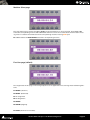
Surface Labels
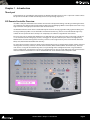
The black legends on the ISIS control surface indicate the default key functions
The SHIFT key
Many keys have alternative functions accessed by holding down the SHIFT key while pressing the function key.
Orange legends on the ISIS control surface indicate SHIFTed functions.
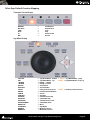
Channel Strip Functions
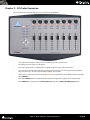
By default, the channel strip on the ISIS Main Unit is assigned as a Master/Monitor Strip.
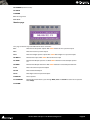
In the Master/Monitor Strip, the controls function as follows:
•
ENCODER - Monitor Volume
•
ENCODER (Press) - Reset Monitor Reference Volume
•
PLAY - Master automation Play SHIFT + PLAY - Master/Monitor bus Play
•
WRITE - Master automation Write SHIFT + WRITE Master/Monitor bus Write
PLAY & WRITE lit - Auto-Write
PLAY & WRITE off - Off/Isolate
•
MUTE - Monitor volume mute
•
SOLO - Monitor Volume dim
•
FADER - Master Mix gain
The channel strip on the ISIS Main Unit can also be remapped to control any Pyramix Mixer Strip.
Please see Chapter 5 - User Configuration for details.
ISIS User Guide : Chapter 6 - The Default Configuration
Page 18