1
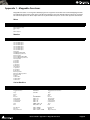
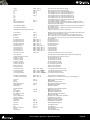
Play 30.0-Sonic N/A
Play 5.0-Sonic A-3
Record Soundfile-Sonic N/A
Save AS-Sonic S-S
Redo Edit-Sonic /
Segment End-Sonic A-F10
Segment start-Sonic A-F9
Small-Sonic C-6
Standard-Sonic C-7
Start of Track-Sonic F9
Stop Record-Sonic CS-F9
Sync Mark-Sonic A-F11
Sync Mark to Left Gate-Sonic S-F4
Sync Mark to Wherever-Sonic S-F3
Sync to Left Gates-Sonic C-F1
Sync to Matching-Sonic N/A
Tiny-Sonic N/A
To in point-Sonic F5
To out Point-Sonic F7
Transport Panel-Sonic F15
Undo Edit -Sonic A-Z
Create Segments With Delete-Sonic
Create Segments With Delete Ripple-Sonic
Zoom around InPoint-Sonic CS-F5
Zoom around OutPoint-Sonic CS-F6
Zoom to 1.0-Sonic C-1
Zoom to 2.0-Sonic C-2
Zoom to 30.0-Sonic C-5
Zoom to 5.0-Sonic C-3
Zoom to Entire EDL CS-F7
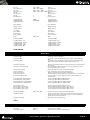
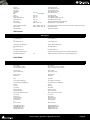
Wherever
Store TC
Project
Project
New
New from Template
Open
Save
CTRL + N
CTRL + O
CTRL + S
Save As
Save as Template
Save as Version 4.1
Save as Version 4.3
Close
Information && Settings
CTRL + F
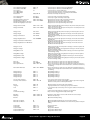
Create a new Editing Project or Digitizing session
Create a new Project based on a Template
Open an existing Editing Project or Digitizing session
Save current Project. If not previously saved, the Save As window will
appear
Save current Project with a new name
Save current Project as a Template
Save current Project as Version 4.1
Save current Project as Version 4.3
Close current Project. If file has changed, the Save window will appear
Opens Project Information and Settings Window
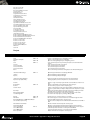
Import...
Export...
Opens InterChange Import Manager
Opens InterChange Export Manager
Import from Tape (Capture)
Export to Tape (Auto Edit)
Capture (record) into current Project from an external device
Export (playback) current composition to an external device
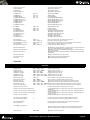
Archive
Creates a copy of current project with all associated files to another location
Create an optimized set of media files for current project
Convert entire project to another sampling rate
Stretch or Pitch change entire project from 24fps to 25fps (4% time compression or pitch down) or 25fps to 24fps (4.17% time expansion or pitch
up)
Change the speed (and pitch) of entire project by resampling its media
(Typically for 0.1% pull-up or pull down operations)
Reconform current project or selection by relinking to new media
Reconform current project by loading a Change EDL
Consolidate
Convert
Stretch / Pitch
CTRL + H
Resample
Relink to New Media
Load Change EDL
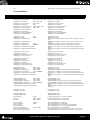
Render
CTRL + W
Mix Down
CTRL + Y
Generate CD Image / SACD Edited Master
Surround Post-processing
Render project or current selection to a new file
Mix current project or selection down to a new file through the mixer
Generate a CD Image from the current project
Encode current composition in a different Surround format such as AC3 or
DTS
Mount Referenced Media
Auto-Mount Media
Show Used Media
Select Online Clips
Select Offline Clips
Clean Up Media
Mount all media referenced by the current project
Media are automatically mounted when dragged onto the timeline
Highlight (in Media Manager window) all media used in current project
Select all clips that reference a currently mounted Media
Select all clips that reference no currently mounted Media
Delete all media not used by the current project
ALT + U
ISIS User Guide : Appendix 1 - Mappable Functions
Page 44