1
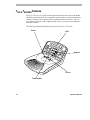
TOUCH TRACKER Overview
3
2
4
1
30
5
6
29
7
28
27
STS
MON
1024
CAM
8
L
9
26
Display
ON
1
Auxillary
25
2
ON
Mon Arm
3
OFF
User
24
Site
23
Iris
22
Close
PG UP
LCD
Clear
10
OFF
Set
Shot
Call
4
Prog
7
5
11
Callibrate
6
Run
12
Hold
8
B_PAS
9
Salvo
13
Open
PG DN
Clear
Mon
Exit
0
Last
Cam
Next
Ack
ENTER
14
21
20
19
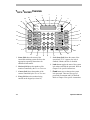
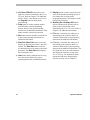
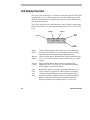
1. Status field shows the status of the
connected switching system. Refer to the
appropriate operating instructions for
additional information.
2. Monitor field shows the number of the
monitor controlled by the TOUCH TRACKER.
3. Camera field shows the number of the
camera controlled by the TOUCH TRACKER.
4. Entry field shows the numbers being
entered on the keypad (see item 18).
1-4
18
17
16
15
5. Lock Status field shows the status of the
system lock. If “L” appears, the lock is
enabled; if blank, the lock is disabled.
6. Lock button toggles the state of the system
lock when used with the password. Refer to
Chapter 2 for specific instructions.
7. Pswd button sets or changes the system
lock password. There are two types of
passwords: Permanent and User Defined.
Refer to Chapter 2 for specific instructions.
Operator's Manual