1
MODEL: MX-C380P
Operation Guide
BEFORE
BEFORE USING
USING
THE
THE MACHINE
MACHINE
PRINTING
PRINTING
SYSTEM
SYSTEM SETTINGS
SETTINGS
TROUBLESHOOTING
TROUBLESHOOTING
Downloaded From ManualsPrinter.com Manuals
MANUALS PROVIDED WITH THE MACHINE
Operation manuals in PDF format (this manual)
The manuals in PDF format provide detailed explanations of the procedures for using the machine in each mode. To
view the PDF manuals, download them from the hard drive in the machine. The procedure for downloading the manuals
is explained in "Downloading the Operation Guide" in the Quick Start Guide.
1. BEFORE USING THE MACHINE
This chapter provides information, such as basic operation procedures and how to load paper.
2. PRINTING
This chapter provides detailed explanations of the procedures for printing.
3. SYSTEM SETTINGS
This chapter explains the "System Settings", which are used to configure a variety of parameters
to suit the aims and the needs of your workplace. Current settings can be displayed or printed out
from the "System Settings".
4. TROUBLESHOOTING
This chapter explains how to remove paper misfeeds and provides answers to frequently asked
questions regarding the operation of the machine in each mode. Refer to this manual when you
have difficulty using the machine.
Printed manuals
Manual name
Safety Guide
Software Setup
Guide
Quick Start Guide
Contents
This manual contains instructions for using the machine safely and lists the specifications of the machine
and its peripheral devices.
This manual explains how to install the software and configure settings to use the machine.
This manual provides easy-to-understand explanations of all the functions of the machine in a single
volume. Detailed explanations of each of the functions can be found in the manuals in PDF format.
i
Downloaded From ManualsPrinter.com Manuals
ABOUT OPERATION MANUAL
This manual explains how to use the MX-C380P digital full colour printer.
Please note
• For information on installing the drivers and software cited in this manual, please refer to the Software Setup Guide.
• For information on your operating system, please refer to your operating system manual or the online Help function.
• The explanations of screens and procedures in a Windows environment are primarily for Windows Vista®. The screens may
vary depending on the version of the operating system or the software application.
• The explanations of screens and procedures in a Macintosh environment are based on Mac OS X v10.4 in the case of Mac OS
X. The screens may vary depending on the version of the operating system or the software application.
• Wherever "MX-xxxx" appears in this manual, please substitute your model name for "xxxx".
• Considerable care has been taken in preparing this manual. If you have any comments or concerns about the manual, please
contact your dealer or nearest SHARP Service Department.
• This product has undergone strict quality control and inspection procedures. In the unlikely event that a defect or other problem
is discovered, please contact your dealer or nearest SHARP Service Department.
• Aside from instances provided for by law, SHARP is not responsible for failures occurring during the use of the product or its
options, or failures due to incorrect operation of the product and its options, or other failures, or for any damage that occurs due
to use of the product.
Warning
• Reproduction, adaptation or translation of the contents of the manual without prior written permission is prohibited, except as
allowed under copyright laws.
• All information in this manual is subject to change without notice.
Illustrations and the operation panel and display shown in this manual
The peripheral devices are generally optional, however, some models include certain peripheral devices as standard equipment.
The explanations in this manual assume that 500-sheet paper feed units (total of four trays) are installed on the machine.
For some functions and procedures, the explanations assume that devices other than the above are installed.
The display screens, messages, and key names shown in the manual may differ from those on the actual machine
due to product improvements and modifications.
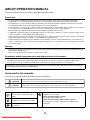
Icons used in the manuals
The icons in the manuals indicate the following types of information:
Warning
This alerts you to a situation where there is a risk of human death or injury.
Caution
This alerts you to a situation where there is a risk of human injury or property damage.
This alerts you to a situation where
there is a risk of machine damage or
failure.
This provides a supplemental
explanation of a function or procedure.
This explains how to cancel or correct
an operation.
This indicates the name of a system setting and provides a brief
explanation of the setting.
When "System Settings:" appears:
A general setting is explained.
When "System Settings (Administrator):" appears:
A setting that can only be configured by an administrator is
explained.
ii
Downloaded From ManualsPrinter.com Manuals
CHAPTER 1
BEFORE USING THE MACHINE
This chapter provides information on basic operation procedures, how to load paper and machine maintenance.
LOADING PAPER
BEFORE USING THE MACHINE
PART NAMES AND FUNCTIONS . . . . . . . . . . . . . .
• EXTERIOR . . . . . . . . . . . . . . . . . . . . . . . . . . . . .
• INTERIOR . . . . . . . . . . . . . . . . . . . . . . . . . . . . .
• SIDE AND BACK . . . . . . . . . . . . . . . . . . . . . . . .
• OPERATION PANEL . . . . . . . . . . . . . . . . . . . . .
IMPORTANT POINTS ABOUT PAPER . . . . . . . . . 1-37
• NAMES AND LOCATIONS OF TRAYS . . . . . . 1-37
• USEABLE PAPER . . . . . . . . . . . . . . . . . . . . . . 1-37
1-3
1-3
1-5
1-6
1-7
TRAY SETTINGS FOR TRAYS 1 TO 4 . . . . . . . . . 1-40
• LOADING PAPER AND CHANGING THE
PAPER SIZE . . . . . . . . . . . . . . . . . . . . . . . . . . 1-40
USING THE OPERATION PANEL . . . . . . . . . . . . . . 1-8
• USING THE DISPLAY . . . . . . . . . . . . . . . . . . . . 1-8
LOADING PAPER IN THE BYPASS TRAY . . . . . . 1-42
• IMPORTANT POINTS WHEN USING THE
BYPASS TRAY. . . . . . . . . . . . . . . . . . . . . . . . . 1-43
USING THE WEB PAGE . . . . . . . . . . . . . . . . . . . . 1-12
TURNING THE POWER ON AND OFF . . . . . . . . . 1-13
• ENERGY SAVE FUNCTIONS . . . . . . . . . . . . . 1-14
• [POWER SAVE] KEY . . . . . . . . . . . . . . . . . . . . 1-14
USER AUTHENTICATION . . . . . . . . . . . . . . . . . . .
• AUTHENTICATION BY USER NUMBER. . . . .
• AUTHENTICATION BY LOGIN NAME /
PASSWORD. . . . . . . . . . . . . . . . . . . . . . . . . . .
• ACCESSING THE WEB PAGE . . . . . . . . . . . .
1-15
1-15
USER CONTROL . . . . . . . . . . . . . . . . . . . . . . . . . .
• USER LIST . . . . . . . . . . . . . . . . . . . . . . . . . . . .
• DEFAULT SETTING. . . . . . . . . . . . . . . . . . . . .
• PAGE LIMIT GROUP LIST. . . . . . . . . . . . . . . .
• AUTHORITY GROUP LIST . . . . . . . . . . . . . . .
• FAVOURITE OPERATION GROUP LIST . . . .
• VIEW USER COUNT . . . . . . . . . . . . . . . . . . . .
1-21
1-21
1-24
1-26
1-27
1-29
1-30
PERIPHERAL DEVICES
PERIPHERAL DEVICES . . . . . . . . . . . . . . . . . . . . 1-45
FINISHER . . . . . . . . . . . . . . . . . . . . . . . . . . . . . . . . 1-46
• PART NAMES . . . . . . . . . . . . . . . . . . . . . . . . . 1-46
• SUPPLIES . . . . . . . . . . . . . . . . . . . . . . . . . . . . 1-46
1-17
1-20
SHARP OSA . . . . . . . . . . . . . . . . . . . . . . . . . . . . . . 1-47
• STANDARD APPLICATION . . . . . . . . . . . . . . . 1-47
• EXTERNAL ACCOUNT APPLICATION . . . . . . 1-48
REMOTE OPERATION OF THE MACHINE. . . . . . 1-31
JOB LOG . . . . . . . . . . . . . . . . . . . . . . . . . . . . . . . . 1-32
• SAVE / DELETE JOB LOG . . . . . . . . . . . . . . . 1-32
• VIEW JOB LOG . . . . . . . . . . . . . . . . . . . . . . . . 1-32
ITEMS RECORDED IN THE JOB LOG . . . . . . . . . 1-33
STORAGE BACKUP . . . . . . . . . . . . . . . . . . . . . . . 1-35
• EXPORT SETTINGS . . . . . . . . . . . . . . . . . . . . 1-35
• IMPORT SETTINGS. . . . . . . . . . . . . . . . . . . . . 1-35
DEVICE CLONING . . . . . . . . . . . . . . . . . . . . . . . . . 1-36
• EXPORT SETTINGS . . . . . . . . . . . . . . . . . . . . 1-36
• IMPORT SETTINGS. . . . . . . . . . . . . . . . . . . . . 1-36
1-1
Downloaded From ManualsPrinter.com Manuals
BEFORE USING THE MACHINE
MAINTENANCE
REPLACING THE TONER CARTRIDGES. . . . . . . 1-49
REPLACING THE TONER COLLECTION
CONTAINER . . . . . . . . . . . . . . . . . . . . . . . . . . . . . . 1-52
REPLACING THE DEVELOPER CARTRIDGE
/ DRUM CARTRIDGE . . . . . . . . . . . . . . . . . . . . . . . 1-55
• REPLACING THE DEVELOPER
CARTRIDGE . . . . . . . . . . . . . . . . . . . . . . . . . . 1-55
• REPLACING THE DRUM CARTRIDGE. . . . . . 1-60
REPLACING THE STAPLE CARTRIDGE IN
THE FINISHER . . . . . . . . . . . . . . . . . . . . . . . . . . . . 1-62
REGULAR MAINTENANCE . . . . . . . . . . . . . . . . . .
• CLEANING THE MAIN CHARGER OF
THE PHOTOCONDUCTIVE DRUM . . . . . . . . .
• CLEANING THE BYPASS FEED ROLLER . . .
• CLEANING THE LASER UNIT. . . . . . . . . . . . .
• CLEANING THE PT CHARGER . . . . . . . . . . .
1-64
1-64
1-67
1-69
1-73
ENTERING TEXT
FUNCTIONS OF THE MAIN KEYS . . . . . . . . . . . . 1-75
1-2
Downloaded From ManualsPrinter.com Manuals
BEFORE USING THE MACHINE
BEFORE USING THE MACHINE
This section provides basic information about the machine. Please read this chapter before using the machine.
PART NAMES AND FUNCTIONS
EXTERIOR
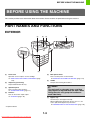
(1)
(2)
(3)
(4)
When a finisher is installed
(5)
(1)
(2)
(6)
(7)
Front cover
(5)
Open this cover to replace a toner cartridge.
☞ REPLACING THE TONER CARTRIDGES (page
1-49)
Main power switch
This is used to power on the machine.
☞ TURNING THE POWER ON AND OFF (page 1-13)
(6)
Handle
Grasp it when moving the machine.
Output tray (centre tray)
Output is delivered to this tray.
(3)
Caution
Operation panel
The main unit is extremely heavy, and thus
two people are required to do the work. When
lifting the main unit, grasp the handles on
each side firmly.
This is used to select functions.
☞ OPERATION PANEL (page 1-7)
(4)
Finisher*
This can be used to staple output.
☞ FINISHER (page 1-46)
(7)
* Peripheral device.
1-3
Downloaded From ManualsPrinter.com Manuals
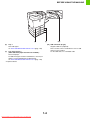
Bypass tray
Use this tray to feed paper manually.
When loading paper larger than A4 or 8-1/2" x 11", be
sure to pull out the bypass tray extension.
☞ LOADING PAPER IN THE BYPASS TRAY (page 1-42)
BEFORE USING THE MACHINE
(8)
(8)
(9)
Tray 1
(10) USB connector (A type)
This holds paper.
☞ TRAY SETTINGS FOR TRAYS 1 TO 4 (page 1-40)
(9)
Supports USB 2.0 (Hi-Speed).
This is used to connect a USB device such as USB
memory to the machine.
For the USB cable, use a shielded cable.
Tray 2/Tray 3/Tray 4
(when 500-sheet paper feed units are installed)*
These hold paper.
For 500-sheet paper feed unit combinations, consult your
dealer or nearest SHARP Service Department.
☞ TRAY SETTINGS FOR TRAYS 1 TO 4 (page 1-40)
* Peripheral device.
1-4
Downloaded From ManualsPrinter.com Manuals
(10)
BEFORE USING THE MACHINE
INTERIOR
(11)
(12)
(13)
(14)
(15)
(16)
Toner collection
container removed
and main charger
cover open
(17)
(18) (19)
(16) Paper reversing section
This is used when 2-sided printing is performed. Open
this part to remove a paper misfeed.
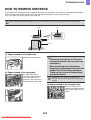
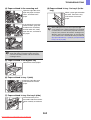
☞ 4. TROUBLESHOOTING "REMOVING MISFEEDS"
(page 4-2)
(11) Developer cartridges
This contains the developer that is necessary to transfer
the toner to the paper.
When replacing the drum cartridge, the developer cartridge
must be removed before the drum cartridge is replaced.
☞ REPLACING THE DEVELOPER CARTRIDGE (page
1-55)
(17) Main charger cover
Open this cover to clean the main charger.
☞ CLEANING THE MAIN CHARGER OF THE
PHOTOCONDUCTIVE DRUM (page 1-64)
(12) Drum cartridges
This contains the photosensitive drum that is used to
create images for printing.
☞ REPLACING THE DRUM CARTRIDGE (page 1-60)
\
(18) Toner collection container
This collects excess toner that remains after printing.
☞ REPLACING THE TONER COLLECTION
CONTAINER (page 1-52)
(13) Toner cartridges
These contain toner for printing. When the toner runs out
in a cartridge, the cartridge of the colour that ran out must
be replaced.
☞ REPLACING THE TONER CARTRIDGES (page
1-49)
Your service technician will collect the toner collection
container.
(19) Toner collection container release lever
Turn this lever when you need to release the toner
collection container lock to replace the toner collection
container or clean the laser unit.
☞ REPLACING THE TONER COLLECTION
CONTAINER (page 1-52)
(14) Fusing unit
Heat is applied here to fuse the transferred image onto
the paper.
Caution
(20) Paper tray right side cover
Open this to remove a paper misfeed in trays.
☞ 4. TROUBLESHOOTING "REMOVING MISFEEDS"
(page 4-2)
The fusing unit is hot. Take care not to burn
yourself when removing a paper misfeed.
(15) Right side cover
Open this cover to remove a misfeed.
☞ 4. TROUBLESHOOTING "REMOVING MISFEEDS"
(page 4-2)
(21) Right side cover release lever
To remove a paper misfeed, pull and hold this lever up to
open the right side cover.
☞ 4. TROUBLESHOOTING "REMOVING MISFEEDS"
(page 4-2)
1-5
Downloaded From ManualsPrinter.com Manuals
(20) (21)
BEFORE USING THE MACHINE
SIDE AND BACK
(1)
(2)
(3)
(4)
(5)
(1)
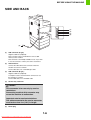
USB connector (A type)
Supports USB 2.0 (Hi-Speed).
This is used to connect a USB device such as USB
memory to the machine.
This connector is not initially available for use. If you wish
to use the connector, contact your service assistance.
(2)
LAN connector
Connect the LAN cable to this connector when the
machine is used on a network.
For the LAN cable, use a shielded type cable.
(3)
USB connector (B type )
Supports USB 2.0 (Hi-Speed).
A computer can be connected to this connector to use
the machine as a printer.
For the USB cable, use a shielded cable.
(4)
Service-only connector
Caution
This connector is for use only by service
technicians.
Connecting a cable to this connector may
cause the machine to malfunction.
Important note for service technicians:
The cable connected to the service connector
must be less than 3 m (118") in length.
(5)
Power plug
1-6
Downloaded From ManualsPrinter.com Manuals
BEFORE USING THE MACHINE
OPERATION PANEL
(1)
(2)
(3)
(4)
(5)
(6)
(7)
BACK
OK
PRINT
READY
DATA
(10)
(11)
JOB
STATUS
(12)
SYSTEM
SETTINGS
(13)
LOGOUT
(8)
(9)
(1)
(14)
(8)
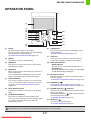
Display
Press this key to log out after you have logged in and
used the machine.
☞ USER AUTHENTICATION (page 1-15)
Messages and keys appear in the display.
Use the arrow keys and the [OK] key to select displayed
items and perform various operations.
☞ USING THE OPERATION PANEL (page 1-8)
(2)
(9)
[OK] key
(10) PRINT mode indicators
[BACK] key
• READY indicator
Print jobs can be received when this indicator is lit.
• DATA indicator
This blinks while print data is being received and lights
steadily while printing is taking place.
Press this key to return to the previous screen without
discarding your settings.
(4)
[PRINT] key
When you wish to print a print hold job, press this key to
switch to print mode.
You can hold down the [PRINT] key to check the total
pages used, remaining toner, and machine display.
(5)
(11) Main power indicator
This lights up when the machine's main power switch is
in the "on" position.
☞ TURNING THE POWER ON AND OFF (page 1-13)
[JOB STATUS] key
Press this key to display the job status screen. The job status
screen is used to check information on jobs and to cancel jobs.
For details, see "CHECKING THE PRINT STATUS"
(page 2-79).
(6)
(12) [POWER] key (
)
Use this key to turn the machine power on and off.
☞ TURNING THE POWER ON AND OFF (page 1-13)
Sharp OSA shortcut key
(13) [POWER SAVE] key (
Press this key to display a shortcut key to Sharp OSA
mode.
(7)
Arrow keys
Press these keys to move the selection frame that is
used to select setting keys and items in the display.
Press this key to enter a selected setting.
(3)
[LOGOUT] key
Use this key to put the machine into auto power shut-off
mode to save energy.
The [POWER SAVE] key (
) blinks when the machine
is in auto power shut-off mode.
☞ [POWER SAVE] KEY (page 1-14)
[SYSTEM SETTINGS] key
Press this key to display the system settings menu
screen. The system settings are used to configure paper
tray settings, and adjust parameters to make the
machine easier to use.
(14) [STOP] key (
)
Press this key to stop a printing job.
☞ [POWER SAVE] KEY (page 1-14)
The indicators of the operation panel may differ depending on the country and region.
1-7
Downloaded From ManualsPrinter.com Manuals
) / indicator
BEFORE USING THE MACHINE
USING THE OPERATION PANEL
This section explains how to use the operation panel.
• To enter text, see "ENTERING TEXT" (page 1-75).
• For information on the screens and procedures for using the system settings, see "Common Operation Methods"
(page 3-5) in "3. SYSTEM SETTINGS".
USING THE DISPLAY
Base screen
04/04/2010
04/04/2010
BACK
OK
(2)
(1)
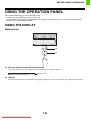
(1) Move the selection frame with the arrow keys
Use the arrow keys to move the selection frame in the display to the desired setting key.
04/04/2010
Selection frame
(2) [OK] key
When the selection frame is on the desired setting, press the [OK] key to enter your selection. The setting screen will appear.
1-8
Downloaded From ManualsPrinter.com Manuals
BEFORE USING THE MACHINE
Selecting items in lists and returning to the previous screen
BACK
OK
(2)
(3)
(1)
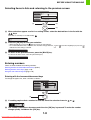
(1) When selections appear as a list in a setting screen, select the desired item in the list with the
keys.
Items that are currently set are indicated by
.
(2) Press the [OK] key to enter your selection.
• When the [OK] key is pressed,
appears next to the selected item.
• For a selected item that has a checkbox, the checkbox changes between
indicates that the setting is selected.
and
each time the [OK] key is pressed.
(3) To return to the previous screen, press the [BACK] key.
To return to the base screen, select the [Basic Menu] key.
Entering numbers
There are three methods for entering numbers.
Entering with the increment/decrement keys (below)
Entering with the arrow keys (page 1-10)
Using the soft numeric keypad (page 1-10)
Entering with the increment/decrement keys
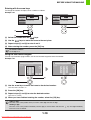
To change the paper size, enter a number as follows.
BACK
OK
(2)
(1)
(1) If a setting requires that a number be entered, move the selection frame to
or
.
(2) The number increases or decreases each time the [OK] key is pressed. To make the number
change quickly, hold down the [OK] key.
1-9
Downloaded From ManualsPrinter.com Manuals
BEFORE USING THE MACHINE
Entering with the arrow keys
To change the number of copies, enter a number as follows.
Example: 123
BACK
OK
BACK
OK
(4)
(1)
(2)
(1) Select the number with the
(2) Use the
keys.
keys to move the frame to the next place.
(3) Repeat steps (1) and (2) to enter 2 and 3.
(4) After entering the number, press the [OK] key
To restore a number...
Set all digits to 0.
Using the soft numeric keypad
To enter a password or page number, use the soft numeric keypad to enter the number.
Example: 123
(4)
BACK
OK
BACK
OK
(2)
(1)
(1) Use the arrow keys to move the frame to the desired number.
Here the frame is moved to "1".
(2) Press the [OK] key.
(3) Repeat steps (1) and (2) to enter the desired number.
Here enter "2" and "3".
(4) When you have finished entering the number, select the [OK] key.
Adding a digit..
Move the cursor to the position where you want to add a digit and enter the digit.
Deleting a digit..
Move the cursor to the position immediately after the digit you wish to delete and select the
before the cursor is deleted.
1-10
Downloaded From ManualsPrinter.com Manuals
key. The digit immediately
BEFORE USING THE MACHINE
Items that appear in the display
(2)
(3)
A4
(1)
F.Colour
A4
(5)
(4)
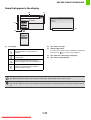
(1)
Icon display
(2)
This shows messages.
This icon appears when a USB memory or
other USB device is connected to the
machine.
(3)
Settings appear here.
This icon appears when the data security kit
is being used.
(4)
This shows the current page / total pages.
(5)
This shows an operation hint.
If you move the selection frame to the bottom setting and
then press the
key, the next screen appears.
This icon appears when the machine is
communicating with an external application.
This icon appears when the machine and
computer are communicating using the
remote operation function.
The display illustrations shown in this manual are only images, and may differ from the actual screens.
System Settings (Administrator): Keys Touch Sound
This is used to adjust the volume of the beep that sounds when keys are touched. The key touch sound can also be turned
off.
1-11
Downloaded From ManualsPrinter.com Manuals
BEFORE USING THE MACHINE
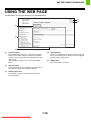
USING THE WEB PAGE
The procedures for using the Web page are explained below.
(4)
(5)
(1)
(2)
(3)
(1)
(4)
Common buttons
The [Submit] button used to store settings, the [Update]
button used to update settings, and the [Cancel] button
used to cancel a setting and return to the previous screen
appear here.
After changing a setting, be sure to click the [Submit]
button.
(2)
(5)
Web page menu
The items that can be set in the Web page appear here.
Click an item to display the settings of that item.
(3)
Settings appear here.
The settings of an item selected from the Web page
menu appear here.
1-12
Downloaded From ManualsPrinter.com Manuals
[Logout] button
When user authentication is enabled, click this button to
log out from the Web server. When you are not logged in,
this button is the [Login] button.
[Help] button
This shows Help for each item.
BEFORE USING THE MACHINE
TURNING THE POWER ON AND OFF
The machine has two power switches. One is the main power switch on the left side of the machine, and the other is the
[POWER] key ( ) on the right side of the operation panel.
Main power switch
When the main power switch is switched on, the main
power indicator on the operation panel lights up.
[POWER] key
Main power indicator
BACK
OK
PRINT
"On" position
READY
DATA
JOB
STATUS
SYSTEM
SETTINGS
LOGOUT
"Off" position
[POWER] key
Turning on the power
Turning off the power
(1) Switch the main power switch to the "on"
position.
(1) Press the [POWER] key (
power.
(2) Press the [POWER] key (
power.
(2) Make sure that the display is off.
) to turn on the
) to turn off the
(3) Switch the main power switch to the "off"
position.
• When turning off the power, be sure to press the [POWER] key (
) on the operation panel, then wait 20 seconds and
switch off the main power switch. In the event that the main power is suddenly interrupted due to a power failure or other
reason, turn the machine power back on and then turn it off in the correct order.
If the machine is left for a long time with the main power having been turned off prior to the [POWER] key (
), abnormal
noises, degraded image quality, and other problems may result.
• Before switching off the main power switch, make sure that the display is off and the DATA indicator for printing is not lit or
blinking on the operation panel.
Switching off the main power switch or removing the power cord from the outlet while any of the indicators are lit or blinking
may cause failure, such as damage to the hard drive or loss of data.
• Switch off both the [POWER] key (
) and the main power switch and unplug the power cord if you suspect a machine
failure, if there is a bad thunderstorm nearby, or when you are moving the machine.
When using the fax or Internet fax function, always keep the main power switch in the "on" position.
Restarting the machine
In order for some settings to take effect, the machine must be restarted.
If a message in the display prompts you to restart the machine, press the [POWER] key (
then press the key again to turn the power back on.
) to turn off the power and
In some states of the machine, pressing the [POWER] key (
) to restart will not make the settings take effect. In this case,
use the main power switch to switch the power off and then on.
1-13
Downloaded From ManualsPrinter.com Manuals
BEFORE USING THE MACHINE
ENERGY SAVE FUNCTIONS
This product has the following two energy save functions that conform to the Energy Star guidelines to help conserve
natural resources and reduce environmental pollution.
Preheat Mode (Low power mode)
Preheat mode automatically lowers the temperature of the fusing unit and thereby reduces power consumption if the
machine remains in the standby state for the interval of time set in "Preheat Mode Setting" in the system settings
(administrator).
The machine automatically wakes up and returns to normal operation when a print job is received, or a key is pressed
on the operation panel.
Auto power shut-off mode (Sleep mode)
Auto power shut-off mode automatically shuts off power to the display and the fusing unit if the machine remains in the
standby state for the interval of time set in "Auto Power Shut-Off Timer" in the system settings (administrator). This
mode provides the lowest level of power consumption. Considerably more power is saved than in preheat mode,
however, the wakeup time is longer. This mode can be disabled in the system settings (administrator).
The machine automatically wakes up and resumes normal operation when a print job is received or when the [POWER
SAVE] key ( ) is pressed.
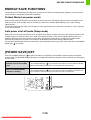
[POWER SAVE] KEY
Press the [POWER SAVE] key ( ) to put the machine in auto power shut-off mode or wake it up from auto power
shut-off mode. The [POWER SAVE] indicator has an indicator that indicates whether or not the machine is in auto power
shut-off mode.
When the [POWER SAVE]
indicator is off in the standby
state
The machine is ready to be used.
If the [POWER SAVE] key (
) is pressed when the indicator is off, the indicator will blink
and the machine will enter auto power shut-off mode after a brief interval.
When the [POWER SAVE]
indicator is blinking
The machine is in auto power shut-off mode.
If the [POWER SAVE] key (
) is pressed when the indicator is blinking, the indicator will
turn off and the machine will return to the ready state after a brief interval.
BACK
PRINT
OK
READY
DATA
JOB
STATUS
SYSTEM
SETTINGS
[POWER SAVE]
key / indicator
LOGOUT
1-14
Downloaded From ManualsPrinter.com Manuals
BEFORE USING THE MACHINE
USER AUTHENTICATION
User authentication restricts the use of the machine to users that have been registered. The functions that each user is
allowed to use can be specified, allowing the machine to be customized to meet the needs of your workplace.
When the administrator of the machine has enabled user authentication, each user must log in to use the machine.
There are different types of user authentication, and each type has a different login method.
For more information, see the explanations of the login methods.
☞ AUTHENTICATION BY USER NUMBER (see below)
☞ AUTHENTICATION BY LOGIN NAME / PASSWORD (page 1-17)
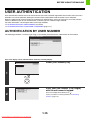
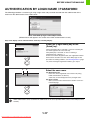
AUTHENTICATION BY USER NUMBER
The following procedure is used to log in using a user number received from the administrator of the machine.
When controlled by user number
Keys in the display can be selected with the arrow keys and the [OK] key.
Select [User Number] key.
1
BACK
OK
Enter your user number (5 to 8 digits)
with the soft numeric keypad.
2
Each entered digit will be displayed as " ".
For the procedure for entering numbers, see "Entering
numbers" (page 1-9).
1-15
Downloaded From ManualsPrinter.com Manuals
BEFORE USING THE MACHINE
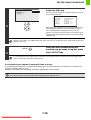
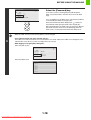
Select the [OK] key.
After the entered user number is authenticated, the user count
screen will appear briefly.
BACK
OK
3
When page limits have been set in "Pages Limit Group List" in
the Web page, the number of pages remaining will appear.
(The remaining number of pages that the user can use
appears.) The amount of time that this screen appears can be
changed using "Message Time Setting" in the system settings
(administrator).
When the user number is an 8-digit number, this step is not necessary. (Login takes place automatically after the user
number is entered.)
LOGOUT
4
When you have finished using the
machine and are ready to log out, press
the [LOGOUT] key.
If a preset duration of time elapses after the machine is last used, the Auto Clear function will activate. When Auto
Clear activates, logout takes place automatically.
If an incorrect user number is entered 3 times in a row...
If "A Warning when Login Fails" is enabled in the Web page, the machine will lock for 5 minutes if an incorrect user
number is entered 3 times in a row.
Verify the user number that you should use with the administrator of the machine.
The administrator can clear the locked state.
This is done from [User Control] and then [Default Settings] in the Web page menu.
1-16
Downloaded From ManualsPrinter.com Manuals
BEFORE USING THE MACHINE
AUTHENTICATION BY LOGIN NAME / PASSWORD
The following procedure is used to log in using a login name and password received from the administrator of the
machine or the administrator of the LDAP server.
When controlled by login name and password
(Different items will appear in the screen when LDAP authentication is used.)
Keys in the display can be selected with the arrow keys and the [OK] key.
Select the [Login Name] key or the
[Quick] key.
1
BACK
A
OK
If the [Login Name] key is selected, a screen for selecting the
user name appears. Go to the next step.
If the [Quick] key is selected, an area for entering a
"Registration No." appears [---].
Use the soft numeric keypad to enter your registration number
that has been stored in "User List" in the Web page. For the
procedure for entering numbers, see "Entering numbers" (page
1-9). After entering the registration number, go to step 3.
Select the user name.
B
(A) [Direct Entry] key
Users who are not registered users and are only using
LDAP authentication use this key.
A text entry screen will appear. Enter your login name.
(B) [User List] key
Select your user name that has been stored in "User List"
in the Web page.
2
BACK
OK
LDAP authentication can be used when the administrator of the server provides LDAP service on the LAN (local area
network).
1-17
Downloaded From ManualsPrinter.com Manuals
BEFORE USING THE MACHINE
Select the [Password] key.
A text entry screen for entering the password will appear.
Enter your password that is stored in "User List" in the Web
page.
BACK
If you are logging in to an LDAP server, enter the password that
is stored with your LDAP server login name.
Each entered character will be displayed as " ". When you
have finished entering the password, select the [OK] key.
When authentication is by LDAP server and you have different
passwords stored in "User List" in the Web page and in the
LDAP server, use the password stored in the LDAP server.
OK
• When an LDAP server has been stored, [Auth to:] can be changed.
3
• If you selected a login user name from the user list…
The LDAP server was stored when your user information was stored, and thus the LDAP server will appear as the
authentication server when you select your login name. Go to step 4.
• When logging in using the [Direct Entry] key...
Select the [Auth to:] key.
Direct Entry
Auth to:
Select the LDAP server.
Authenticate to:
Login Locally
Server 1
Server 2
Server 3
Server 4
Server 5
Server 6
Server 7
1-18
Downloaded From ManualsPrinter.com Manuals
BEFORE USING THE MACHINE
Select the [OK] key.
After the entered login name and password are authenticated,
the user count screen will appear briefly.
4
BACK
OK
(Different items will appear in the screen when LDAP
authentication is used.)
LOGOUT
5
When page limits have been set in "Pages Limit Group List" in
the Web page, the number of pages remaining will appear.
(The remaining number of pages that the user can use
appears.) The amount of time that this screen appears can be
changed using "Message Time Setting" (Web page only) in the
system settings (administrator).
When you have finished using the
machine and are ready to log out, press
the [LOGOUT] key.
If a preset duration of time elapses after the machine is last used, the Auto Clear function will activate. When Auto
Clear activates, logout takes place automatically.
If an incorrect login name or password is entered 3 times in a row...
If "A Warning when Login Fails" is enabled in the Web page, the machine will lock for 5 minutes if an incorrect login
name or password is entered 3 times in a row.
Verify the login name and password that you should use with the administrator of the machine.
• The administrator can clear the locked state.
This is done from [User Control] and then [Default Settings] in the Web page menu.
• When LDAP authentication is used, the [E-mail Address] key may appear, depending on the authentication method. If the
[E-mail Address] key appears in step 3, select the key.
A text entry screen will appear. Enter your e-mail address.
• USER LIST (page 1-21)
This is used to store names of users of the machine. Detailed information such as the login name, user number, and password
are also stored. Ask the administrator of the machine for the information that you need to use the machine.
Registration is performed in [User List] in [User Control] in the Web page menu.
1-19
Downloaded From ManualsPrinter.com Manuals
BEFORE USING THE MACHINE
ACCESSING THE WEB PAGE
The login method for accessing the Web server in the machine varies depending on whether or not user authentication
is enabled.
For information on accessing the Web server in the machine, see "ACCESSING THE WEB SERVER IN THE
MACHINE" in the Quick Start Guide.
When user authentication is not enabled
If you click a setting that requires administrator authority after accessing the Web page, a login screen will appear. Enter
your password.
When user authentication is enabled
Use the procedure below to log in. Note that when auto login user is enabled, the authentication screen will not appear.
When the login method is login name / password ( / e-mail address)
To access the Web page, enter a login name and password in the login screen that appears. If the login method is set to
login name / password / e-mail address, a text box will appear for entry of your [E-mail Address]. If this box appears,
enter your e-mail address.
When the authentication method is user number
To access the Web page, enter a user number in the login screen that appears.
In user number mode, you can also login from [Admin Login] in the login screen.
• User authentication is initially disabled (factory default setting).
• To prevent passwords from being leaked onto the network during login, it is recommended that the SSL function be
enabled in the Web browser.
• To log out…
Click the [Logout] key at the upper right of the Web page, or close the Web browser.
1-20
Downloaded From ManualsPrinter.com Manuals
BEFORE USING THE MACHINE
USER CONTROL
User Control is used to configure settings for user authentication in the Web page. Select the [User Control] key in the
Web page menu to configure the settings.
USER LIST
This is used to store, edit, and delete users when user authentication is enabled.
When the [User List] key is selected, the following screen appears.
(1)
(2)
(3)
(1) User List
(4)
(3) [Delete All Users] key
This shows the factory-stored users and the currently
stored users.
Use this to delete all stored users. (Excluding factory
stored users.) This operation can only be performed by
an administrator.
(2) [Delete] key
Use this to delete a registered user.
(4) [Add] key
Use this to add a new user.
Storing a user
Select the [Add] key in the above screen to open a registration screen. Up to 1000 users can be stored.
For more information, see "Settings" (page 1-22).
Editing/deleting a user
To open an edit screen for a user, select the user from the list in the above screen. To open a delete screen for a user,
select the checkbox next to the user (
) and then select [Delete].
For more information, see "Settings" (page 1-22).
• When auto login is enabled, "Delete All Users" cannot be used.
• The factory-stored users cannot be deleted.
1-21
Downloaded From ManualsPrinter.com Manuals
BEFORE USING THE MACHINE
Factory-stored users
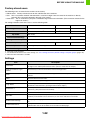
The following users are stored in the machine at the factory.
• Administrator: Factory-stored account for the administrator of the machine.
• User: This is used when network authentication is used and a login name not stored in the machine is directly
entered. (This cannot be selected in the login user screen.)
• Other User: This is used when a print job is executed using invalid user information. (This cannot be selected in the
login user screen.)
For settings related to each of the users, see the following table.
User Name
Administrator
User
Other User
Login Name
admin
users
Other
Password
(See the Safety Guide.)* 1
users*1
–
My Folder
Main Folder
Authentication Settings
Login Locally
Pages Limit Group
Unlimited*1
Authority Group*2
Admin
Favourite Operation Group
Card Settings*3
–
User*1
Guest*1
Following the System Settings*1
Not set
*1 Items that can be changed.
*2 For detailed information of each of the settings, see "List of settings and factory default settings of template groups" (page 1-28).
*3 When the HID card reader is avaiable.
Settings
Item
User Name
Apply User Name to Log-in
Name*1
Description
Store the name of the user (max. 32 characters). This user name is used as the key name in
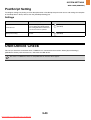
the login screen and the print hold user name. (The user name must be unique.)
Select this key to enter the entered user name in the login name.
Initial
This determines where the user name will appear in the user list. Up to 10 characters can be
entered.
Index
Select the desired custom index.
User Number*2
Enter a user number (5 to 8 digits).
Login Name*1
Enter the login name used when authentication by login name/password is enabled
(maximum of 255 characters). (The login name must be unique.)
Password*1, 3
Enter the password used when authentication by login name/password is enabled (1 to 32
characters). (The password can be omitted.)
E-mail Address
Enter the e-mail address for LDAP authentication (maximum of 64 characters).
My Folder
A folder ("My Folder") can be specified as the folder used by the user for print hold. A
previously created folder can be selected or you can create and select a new folder.
Authentication Settings*1
Select [Login Locally] or [Network Authentication] (when LDAP is enabled) for "Authenticate
to:".
Authentication Server
When [Network Authentication] is selected, select the server to be used for user
authentication from the list of LDAP servers stored in the Web pages.
1-22
Downloaded From ManualsPrinter.com Manuals
BEFORE USING THE MACHINE
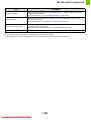
Item
Description
Pages Limit Group
Specify page limits for the user by selecting one of the stored page limit groups. The factory
default setting is [Unlimited].
For more information, see "PAGE LIMIT GROUP LIST" (page 1-26).
Authority Group
Specify the authority of the user by selecting one of the stored authority groups. The factory
default setting is [User].
For more information, see "AUTHORITY GROUP LIST" (page 1-27).
Favourite Operation Group
The favourite operation group that will be applied at login appears. The factory default setting
is [Following the System Settings].
The setting can be changed in the [User Control] menu in the Web pages.
Custom Index
Select the custom index.
*1 Does not appear when "User Number" is selected for the authentication method.
*2 Only appears when "User Number" is selected for the authentication method.
*3 Not required when network authentication is used, as the password stored in the LDAP server is used.
1-23
Downloaded From ManualsPrinter.com Manuals
BEFORE USING THE MACHINE
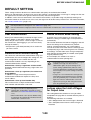
DEFAULT SETTING
These settings enable or disable user authentication and specify the authentication method.
When user authentication is enabled, each user of the machine is registered. When a user logs in, settings for that user
are applied. This function allows greater control of security and cost management.
In addition, even if the user information is not stored in the machine, it is possible to log in by directly entering user
information stored on an LDAP server. In this case, the login user will be the factory-stored "User". For more information,
see "Factory-stored users" (page 1-22).
• For the procedure for storing users, see "USER LIST" (page 1-21).
• For more information on login procedures when user authentication is enabled, see "USER AUTHENTICATION" (page
1-15).
User Authentication
Device Account Mode Setting
When [User Authentication] is enabled, the login screen
appears before an operation is begun in any mode
except the job status screen*. You must log in as one of
the stored users. (After logging in, you can move freely
through the modes.)
* Except when a print hold (retention) file is used in the
job status screen.
A specific user can be stored as an auto login user.
When this setting is enabled, login can be performed
automatically.
This function eliminates the bother of logging in but still
allows the settings of the selected user (network
settings, favourite operations, etc.) to be applied.
You can also allow users other than the auto login user
to temporarily log in and work using their own authority
and settings. To allow other users to log in temporarily
when [Device Account Mode] is enabled, select [Allow
Login by Different User].
As an example, this enables uses such as
"authentication for colour printing only".
Authentication Method Setting
This selects the authentication method. When using user
authentication, be sure to configure this setting first. The
items configured for users stored after the user
authentication method is set vary depending on the
selected authentication method.
• If auto login fails for some reason when auto login is
enabled, or the login user does not have
administrator rights, all system settings or the
system settings (administrator) will lock. In this
event, the administrator should select the [Admin
Password] key in the system settings screen and
log in again.
Authenticate a User by Login Name and Password
Standard authentication method using a login name and
password.
Authenticate a User by Login Name, Password and
E-mail Address
In addition to a login name and password, this
authentication method also requires the entry of an
e-mail address.
• To log in as a user other than the auto login user
when [Allow Login by Different User] is enabled,
press the [LOGOUT] key to cancel the auto user
login state. The user authentication screen will
appear to let you log in. After using the machine,
press the [LOGOUT] key to log out.
Authenticate a User by User Number Only
This can be used as a simple authentication method
when network authentication is not used.
• The login screen will vary depending on the
authentication method that is selected. For more
information, see "USER AUTHENTICATION" (page
1-15).
• When "Authenticate a User by User Number Only"
is selected for the authentication method, network
authentication cannot be used.
Actions when the Limit of Pages
for Output Jobs
This setting determines whether or not a job will be
completed if the page limit is reached while the job is in
progress.
The following selections are available.
• Job is Stopped when the Limit of Pages is Reached
• Job is Completed even when the Limit of Pages is
Reached
1-24
Downloaded From ManualsPrinter.com Manuals
BEFORE USING THE MACHINE
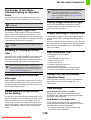
The Number of User Name
Displayed Setting on Operation
Panel
When login is performed by network authentication
using user information that is not stored in the
machine, the login user will be the factory-stored
"User". For more information, see "Factory-stored
users" (page 1-22).
The number of users that are displayed in the user
selection screen can be selected (6, 12, or 18 users).
Display Usage Status after Login
This setting also applies to the user selection screen
of print hold.
When user authentication is enabled, this setting
specifies whether or not the page counts of a user
appear when the user logs in.
A Warning when Login Fails
This setting is used to display a warning and prohibit
login for five minutes if login fails three times in a row.
This prevents an unauthorised person from attempting to
guess a password. (The number of failed login attempts
is retained even if the power is turned off.)
Locking of the operation panel for 5 minutes can be
cancelled.
Disabling of Printing by Invalid
User
Disable Switching of Display Order
This is used to prohibit changes to the order of display
(search number order, ascending, descending) in the
user list.
When this setting is enabled, selecting a tab on the user
list screen does not change the order. The display order
will remain fixed at the order that is in effect when this
setting is enabled.
User Information Print
The following lists can be printed.
• User List
• List of Number of Pages Used
• Page Limit Group List*
• Authority Group List
• Favourite Operation Group List*
• All User Information Print
Select the key of the desired list to begin printing.
* Cannot be printed when no groups are stored.
Printing by users whose information is not stored in the
machine, such as printing without entering valid user
information in the printer driver or printing of a file on an
FTP server from the Web pages, can be prohibited.
When a print job is executed by a user that is not
stored in the machine, the factory-stored "Other User"
is used as the login user. For more information, see
"Factory-stored users" (page 1-22).
Release the Lock on Machine
Operation Panel
Automatically print stored jobs
after login
When retention is enabled in the printer driver and print
data has been spooled to the machine, you can have the
spooled print data automatically print out when the user
who enabled retention logs in.
If the operation panel of the machine is locked due to
login failure, release the lock by logging in as an
administrator.
Card Settings
Default Network Authentication
Server Setting
Use this to set the default network authentication server.
When a user logs in from the Web page or sends a print
job to the machine using user information that is not
stored on the machine, the authentication server is not
known. This setting is used to specify one of the LDAP
servers stored on the machine as the authentication
server.
(when the HID card reader is available.)
Configure this setting if user authentication will be
performed using a Sharp OSA external authentication
application and an HID card.
Card Reader Device Registration
In this setting, the product ID and vender ID of the
connected HID card reader are displayed. To store the
HID card reader, touch the [Read] key.
* For settings that enable an HID card to be used,
consult your service technician.
1-25
Downloaded From ManualsPrinter.com Manuals
BEFORE USING THE MACHINE
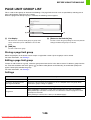
PAGE LIMIT GROUP LIST
This is used to store groups of Account Limit Settings. The page limits for each user are specified by selecting one of
these stored groups when the user is stored.
When the [Page Limit Group List] key is selected, the following screen appears.
(1)
(3)
(2)
(1) List display
(3) [Return to the Defaults] key
This shows the currently stored groups. A group name
can be selected to open an edit/delete screen for that
group.
Use this to return the group settings to the factory default
settings and delete the groups from the list.
(2) [Add] key
Use this to add a new group.
Storing a page limit group
Select the [Add] key in the above screen to open a registration screen. Up to 20 groups can be stored.
For more information, see "Settings".
Editing a page limit group
To open an edit screen for a group, select the group name from the list in the above screen. To delete a group from the
list, select the checkbox next to the group (
) and then select [Return to the Defaults]. A confirmation prompt will
appear. Select [OK] to delete the group.
For more information, see "Settings".
Settings
Item
Description
Group Name
Store the name of the group (max. 32 characters).
Select the Group Name to be
the Registration Model
Select one of the previously stored groups for use as a template for the new group. When
selected, the group's settings are applied.
Function names
The names of the functions that can be configured are displayed. Set a limit for each function.
Page Limit
When [Prohibited] is selected for a mode, input and output from the mode are prohibited.
When [Unlimited] is selected for a mode, there is no limit to the number of pages that can be
input/output in that mode.
When [Limited] is selected, enter a limit (1 to 99,999,999 pages).
1-26
Downloaded From ManualsPrinter.com Manuals
BEFORE USING THE MACHINE
AUTHORITY GROUP LIST
Use this to store groups of user authority settings. The authority of each user is specified by selecting one of these
stored groups when the user is stored.
When the [Authority Group List] key is selected, the following screen appears.
(1)
(2)
(1) List display
(2) [Add] key
This shows the currently stored groups. A group name
can be selected to open an edit/delete screen for that
group.
Use this to add a new group.
Storing an authority group
Select the [Add] key in the above screen to open a registration screen. Up to 20 groups can be stored.
For information on the settings, see "List of settings and factory default settings of template groups" (page 1-28).
Editing an authority group
A group can be selected from the list in the above screen to open an edit/delete screen for the group. For information on
the settings, see "List of settings and factory default settings of template groups" (page 1-28).
To return a group to the factory default state, select the checkbox next to the group (
), and then select [Return to the
Administrator Authority], or [Return to the User Authority], or [Return to the Guest Authority]. The selected authority will
be given to the users in that group and the group will be deleted from the list.
1-27
Downloaded From ManualsPrinter.com Manuals
BEFORE USING THE MACHINE
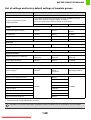
List of settings and factory default settings of template groups
Item
Description
Group Name
Store the name of the group (max. 32 characters).
Select the Group Name to be the
Registration Model
Select one of the previously stored groups for use as a template for the new
group. When selected, the group's settings are applied.
The factory default groups and their settings are shown below.
Admin
User
Guest
Printer
Colour Mode Approval Setting
Allowed
Allowed
Only Black & White
Allowed
FTP Pull Print
Allowed
Allowed
Prohibited
USB Memory Direct Print
Allowed
Allowed
Prohibited
Network Folder Pull Print
Allowed
Allowed
Prohibited
Allowed
Allowed
Prohibited
Allowed
Allowed
Allowed
Approval Settings for 2-Sided Print
[1-Sided/2-Sided
Approved]
[1-Sided/2-Sided
Approved]
[1-Sided/2-Sided
Approved]
Output Approval Settings
Allowed
Allowed
Prohibited
Allowed*2
Only user authority
settings
are allowed
All settings prohibited
Print hold
Print Hold Image Check
Sharp OSA
Approval Settings to Use a Sharp OSA
Common Functions
Machine Settings
System Settings Operational Authority
System Settings*1
Web Settings Operational Authority
Display of Device/Network Status
Allowed
Power Reset
Prohibited
Machine Identification
Prohibited
E-mail Alert and Status
Prohibited
Allowed
Prohibited
Job Log Setting
Prohibited
Port Control/ Filter Settings
Prohibited
Custom Link Setting
Prohibited
Operation Manual Download
Allowed
*1 For information on each setting, see the system settings (general/administrator) lists.
*2 All allowed except "Change Administrator Password".
Depending on the machine specifications and peripheral devices installed, it may not be possible to use some settings.
1-28
Downloaded From ManualsPrinter.com Manuals
BEFORE USING THE MACHINE
FAVOURITE OPERATION GROUP LIST
This is used to store favourite operation groups.
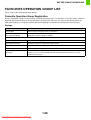
Favourite Operation Group Registration
Groups of preferred settings can be stored as "favourite operation groups". For example, a user who speaks a different
language would normally have to change the display language each time he or she uses the machine; however, by
storing the language in a favourite operation group, the language is automatically selected when the user logs in.
Settings
Item
Description
Group Name
Store the name of the group (max. 32 characters).
Select the Group Name to be
the Registration Model
Select one of the previously stored groups for use as a template for the new group. When
selected, the group's settings are applied.
System Settings
Display Language Setting
Select the display language.
Key Operation Setting
Set the key input time and Auto Key Repeat setting.
Keys Touch Sound
Set the sound made when keys are selected.
Keyboard Select
Set the language that appears on the keyboard.
Automatically print stored jobs
after login
When retention is enabled in the printer driver and print data has been spooled to the
machine, you can have the spooled print data automatically print out when the user who
enabled retention logs in.
1-29
Downloaded From ManualsPrinter.com Manuals
BEFORE USING THE MACHINE
VIEW USER COUNT
This displays the total number of pages printed by each user.
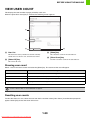
When the [View User Count] key is selected, the following screen appears.
(1)
(2)
(4)
(3)
(1) User List
(3) [Show] key
This shows the factory-stored users and the currently
stored users. To select a user, select the user name.
This shows the counts of the selected user.
(4) [Clear Count] key
(2) [Select All] key
Use this to reset the counts of the selected user.
This selects all users.
Showing user count
Select a user in the above screen and select the [Show] key. The counts of that user will appear.
Item
Settings
Next
This shows the next user (in the order of the registration numbers).
Previous
This shows the previous user (in the order of the registration numbers).
Pages used
The counts and the number of pages remaining of the selected user are shown by function.
Page Limit
The page limit set for the user appears in parentheses below the count.
Counts of devices that are not installed do not appear.
Resetting user counts
To clear the count of a user, select the user from the list and then select [Clear Count]. A confirmation prompt will
appear. Select [OK] to clear the count of that user.
1-30
Downloaded From ManualsPrinter.com Manuals
BEFORE USING THE MACHINE
REMOTE OPERATION OF THE MACHINE
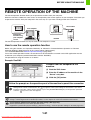
The remote operation function allows you to operate the machine from your computer.
When this function is added, the same screen as the operation panel screen appears on your computer. This allows you
to operate the machine from your computer in the same way as if you were standing in front of the machine.
The machine
Your computer
Operation panel
Operate the
machine using
your computer
screen.
Network
The remote operation function can only be used on one computer at a time.
How to use the remote operation function
Before using this function, set "Operational Authority" to "Allowed" in "Remote Software Operation" of "Remote
Operation Settings" (Web page only) in the system settings (administrator).
☞ 3. SYSTEM SETTINGS "Remote Operation Settings" (page 3-53)
To use the remote operation function, the machine must be connected to a network and a VNC application must be
installed on your computer (recommended VNC software: RealVNC).
The procedure for using this function is as follows:
Example: RealVNC
Connect from the computer to the
machine.
(1) Start the VNC viewer
1
(2) Enter the IP address of the machine in the
"Server" entry box.
(3)
(2)
(3) Click the [OK] button.
Follow the prompts on the operation panel of the machine to permit the connection.
2
During remote software communication, the
key appears in the system settings of the machine. If you wish to
break the connection, exit the remote software or press the [SYSTEM SETTINGS] key on the operation panel and
select the
key in the screen that appears.
Use the operation panel in the same way as you would on the machine. Note that a key cannot be held down to continuously
change a value being entered. For detailed procedures, see the chapters for each of the functions in this manual.
System Settings (Administrator): Remote Operation Settings (Web page only)
Set the operation authority for the remote operation function.
Registration is performed in [System Settings] - [Operation Settings] - "Remote Operation Settings" in the Web page menu.
1-31
Downloaded From ManualsPrinter.com Manuals
BEFORE USING THE MACHINE
JOB LOG
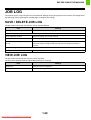
The machine retains a log of the jobs that are performed. Settings for the job log stored in the machine are configured on
the Web page. Select [Job Log] on the Web page to configure the settings.
SAVE / DELETE JOB LOG
The log of jobs executed on the machine can be stored or deleted.
Item
Job Log
Settings
The total number of stored job logs appears.
Save Job Log
Save and Delete the Data
Deletes the job log after saved if checked.
[Save] button
Saves the job log.
The Number of Job Log to Notify by
E-mail
Select the number of jobs that triggers e-mail notification.
Informs the address configured in E-mail alert when the designated number is
reached.
Delete Job Log
[Delete] button
Deletes the job log.
VIEW JOB LOG
The log of jobs executed on the machine can be displayed.
The items to be displayed and the applicable period can be selected.
Item
Settings
Select Item
Select the item to be displayed.
[Show] button
Displays the job log.
1-32
Downloaded From ManualsPrinter.com Manuals
BEFORE USING THE MACHINE
ITEMS RECORDED IN THE JOB LOG
The machine records the jobs that are performed in the job log.
The main information that is recorded in the job log is described below.
• To make it easy to total the usage counts of differently configured machines, the items recorded in the job log are fixed,
regardless of what peripheral devices are installed or the objective of the recording. For this reason, items may appear in
the log for functions that are not available on the machine.
• In some cases, job information may not be correctly recorded, such as when a power failure occurs during a job.
• JOB LOG (page 1-32)
The job log can be stored, deleted, or checked.
Registration is performed in [Job Log] in the Web page menu.
No.
1
Item name
Main items
Description
Job ID
The job ID is recorded.
Job IDs appear in the log as consecutive numbers up to a maximum
of 999999, after which the count resets to 1.
2
Job Mode
The job mode, such as print.
3
Computer Name
The name of the computer that sent a print job.*
4
User Name
The user name when the user authentication function is used.
5
Login Name
The login name when the user authentication function is used.
6
Starting Date & Time
The date and time the job was started.
7
Completing Date &
Time
The date and time the job was completed.
8
Black & White Total
Count
For a print job, the total count is recorded.
For a print hold job, the number of stored black & white pages is
recorded.
9
Full Colour Total Count
For a print job, the total count is recorded.
For a print hold job, the number of stored full colour pages is
recorded.
10
2-Colour Total Count
Indicates the total 2-colour count.
11
Single Colour Total
Count
Indicates the total single colour count.
12
Count according to size
Counts by paper size in colour mode and black & white mode.
13
Number of sheets
according to size
Indicates the sheet count by paper type.
14
Invalid Paper
Count(Black & White)
Indicates the black & white invalid sheet count.
15
Invalid Paper
Count(Colour)
Indicates the colour invalid sheet count.
1-33
Downloaded From ManualsPrinter.com Manuals
BEFORE USING THE MACHINE
No.
16
Item name
Number of Reserved
Sets
Number of specified sets.
17
Number of Completed
Sets
Number of completed sets.
18
Number of Reserved
Pages
Number of reserved print jobs.
19
Number of Completed
Pages
Number of completed pages of a set.
20
Result
The result of a job.
21
Error Cause
When an error occurs during a job, the cause of the error.
Output
The output mode of a printed job.
23
Staple
The status of stapling.
24
Staple Count
The staple count.
25
Printer Tone
The tone used for a print job.
Print Hold
Print hold status.
Storing Mode
Print hold store mode.
28
File Name
Name of file stored by retention print.*
29
Data Size [KB]
File size.
Colour Setting
Colour mode selected by user.
31
Special Modes
Special modes selected when the job was executed.
32
File Name 2
Records the file names of print jobs.*
Original Size
This records the paper size of the print job.
34
Original Type
This records the "Original Type" of the print driver.
35
Paper Size
For a print job, the paper size.
For a print hold job, the paper size of the stored file.
36
Paper Type
The paper type used for printing.
37
Paper Property:
Disable Duplex
Indicates that duplex was disabled in "Paper Type".
38
Paper Property: Fixed
Paper Side
Indicates that fixed side was specified in "Paper Type".
39
Paper Property:
Disable Staple
Indicates that stapling was disabled in "Paper Type".
40
Duplex Setup
Indicates the duplex setting.
41
Resolution
Indicates the printing resolution.
Model Name
Indicates the model name of the machine.
43
Unit Serial Number
Indicates the serial number of the machine.
44
Name
Indicates the name of the machine that is set in the Web pages.
45
Machine Location
Indicates the installation location of the machine that is set in the Web
pages.
22
26
27
30
33
42
Main items
Description
Print Job Related Item
Print Hold Related
Item
Common Functionality
Detailed Items
Machine Item
*In some environments this is not recorded.
1-34
Downloaded From ManualsPrinter.com Manuals
BEFORE USING THE MACHINE
STORAGE BACKUP
User information stored in the machine can be backed up to your computer or restored from your computer via the Web
page.
Settings and information stored in the machine can be backed up to your computer.
Settings can be exported or imported in XML format using the Web page. Select [Storage Backup] in the Web page
menu and configure the settings.
• The data is saved to the computer that is accessing the Web page.
• This function cannot be used while the system settings are in use, while a job is being executed, or when there is a
reserved job.
• For machines for which data can be imported, contact your dealer or nearest SHARP Service Department.
EXPORT SETTINGS
Use these settings to back up data to your computer.
Item
Settings
Export Settings Type
Select the type of settings that you want to export.
Password
Enter the password that will be required to import settings (maximum of 16
characters).
IMPORT SETTINGS
Use these settings to restore data that was previously backed up to your computer to the machine.
Item
Settings
Import settings from file
Enter the name of the file to be imported (maximum of 200 characters). Click
[Browse] to select the file from the file selection dialog box.
Password
If a password has been set for the file to be imported, enter the password (maximum
of 16 characters).
1-35
Downloaded From ManualsPrinter.com Manuals
BEFORE USING THE MACHINE
DEVICE CLONING
Device cloning is used to save the machine's setting information in XML format and copy the information to another
machine.
This function saves you the trouble of repeatedly configuring the same settings in multiple machines. Select [Device
Cloning] in the Web page menu and configure the settings.
• The data is saved to the computer that is accessing the Web page.
• This function cannot be used while the system settings are in use, while a job is being executed, or when there is a
reserved job.
• For machines for which data can be imported, contact your dealer or nearest SHARP Service Department.
• The following data is not copied when device cloning is performed:
- List print.
- Count and device status display items.
- IP address of the machine, device name, administrator password and other information that is specific to the machine.
- Screen contrast, colour adjustment, and other adjusted values particular to each hardware device.
EXPORT SETTINGS
Use these settings to back up data to your computer.
Item
Settings
Export Settings Type
Select the type of settings that you want to export.
Password
Enter the password that will be required to import settings (maximum of 16
characters).
IMPORT SETTINGS
Use these settings to restore data that was previously backed up to your computer to the machine.
Item
Settings
Import settings from file
Enter the name of the file to be imported (maximum of 200 characters). Click
[Browse] to select the file from the file selection dialog box.
Password
If a password has been set for the file to be imported, enter the password (maximum
of 16 characters).
1-36
Downloaded From ManualsPrinter.com Manuals
BEFORE USING THE MACHINE
LOADING PAPER
IMPORTANT POINTS ABOUT PAPER
This section provides information that you should know before loading paper in the paper trays.
Be sure to read this section before loading paper.
NAMES AND LOCATIONS OF TRAYS
The names of the trays are as follows.
Bypass tray
Tray 1
Tray 2
Tray 3
Tray 4
USEABLE PAPER
Various types of paper are sold. This section explains what plain paper and what special media can be used with the
machine. For detailed information on the sizes and types of paper that can be loaded in each tray of the machine, see
the specifications in the Safety Guide and "Paper Tray Settings" (page 3-37) in "3. SYSTEM SETTINGS".
Plain paper, special media
Plain paper that can be used
• SHARP standard plain paper (80 g/m2 (21 lbs.)). For paper specifications, see the specifications in the Safety Guide.
• Plain paper other than SHARP standard paper (60 g/m2 to 105 g/m2 (16 lbs. to 28 lbs.))
Recycled paper, coloured paper and pre-punched paper must meet the same specifications as plain paper. Contact
your dealer or nearest SHARP Service Department for advice on using these types of paper.
* The "g/m2" (lbs.) units used in these explanations indicate the weight of the paper.
1-37
Downloaded From ManualsPrinter.com Manuals
BEFORE USING THE MACHINE
Types of paper that can be used in each tray
The following types of paper can be loaded in each tray.
"–" in the table indicates "cannot be used".
Tray 1/Tray 2/Tray 3/Tray 4
Bypass tray
Plain paper
Permitted
Permitted
Pre-printed
Permitted
Permitted
Recycle Paper
Permitted
Permitted
Letter head
Permitted
Permitted
Pre-punched
Permitted
Permitted
Colour
Permitted
Permitted
Heavy paper*1
–
Permitted
Labels
–
Permitted
Glossy paper
–
Permitted
Transparency film
–
Permitted
Envelopes
–
Permitted
Thin paper*2
–
Permitted
*1 "Heavy paper" is heavy paper up to 209 g/m2 (110 lbs. index).
*2 Thin paper from 55 g/m2 to 59 g/m2 (15 lbs. to 16 lbs.) can be used.
Print side face up or face down
Paper is loaded with the print side face up or face down depending on the paper type and tray.
Trays 1 to 4
Load the paper with the print side face up.
However, if the paper type is "Pre-Punched", "Letter Head" or "Pre-Printed", load the paper with the print side face
down*.
Bypass tray
Load the paper with the print side face down.
However, if the paper type is "Pre-Punched", "Letter Head" or "Pre-Printed", load the paper with the print side face up*.
* If "Disabling of Duplex" (Web page only) is enabled in the system settings (administrator), load the paper in the normal
way (face up in trays 1 to 4; face down in the bypass tray).
1-38
Downloaded From ManualsPrinter.com Manuals
BEFORE USING THE MACHINE
Paper that cannot be used
• Special media for inkjet printers
(fine paper, glossy paper, glossy film, etc.)
• Carbon paper or thermal paper
• Pasted paper
• Paper with clips
• Paper with fold marks
• Torn paper
• Oil-feed transparency film
• Thin paper less than 55 g/m2 (15 lbs.)
• Paper that is 210 g/m2 (110 lbs. index) or heavier
• Irregularly shaped paper
• Stapled paper
• Damp paper
• Curled paper
• Paper on which either the print side or the reverse side
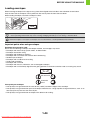
has been printed on by another printer or multifunction
device.
• Paper with a wave-like pattern due to moisture
absorption
Non-recommended paper
• Iron-on transfer paper
• Japanese paper
• Perforated paper
• Various types of plain paper and special media are sold. Some types cannot be used with the machine. Contact your
dealer or nearest SHARP Service Department for advice on using these types of paper.
• The image quality and toner fusibility of paper may change due to ambient conditions, operating conditions, and paper
characteristics, resulting in image quality inferior to that of SHARP standard paper. Contact your dealer or nearest
authorised service representative for advice on using these types of paper.
• The use of non-recommended or prohibited paper may result in skewed feeding, misfeeds, poor toner fusing (the toner
does not adhere to the paper well and can be rubbed off), or machine failure.
• The use of non-recommended paper may result in misfeeds or poor image quality. Before using non-recommended paper,
check if printing can be performed properly.
When removing printed output...
When removing printed output, remove slowly so as not to fold the paper.
When removing output, do not fold the paper or forcefully lift it up.
In particular, applying too much force horizontally may cause the actuator to come off. Take care that the paper does not
catch the actuator when removing output.
When a finisher is not installed, the actuator for output tray full detection may come off.
If the actuator is not reattached, output tray full detection will not take place and output may protrude from the machine.
If the actuator comes off, see "The actuator came off (when a finisher is not installed)" (page 4-22) in "4.
TROUBLESHOOTING".
1-39
Downloaded From ManualsPrinter.com Manuals
BEFORE USING THE MACHINE
TRAY SETTINGS FOR TRAYS 1 TO 4
LOADING PAPER AND CHANGING THE PAPER SIZE
A maximum of 500 sheets of paper from size A5 to A4 (5-1/2" x 8-1/2" to size 8-1/2" x 14") can be loaded in trays 1 and 2.
A maximum of 500 sheets of paper from size B5 to A4 (7-1/4" x 10-1/2" to size 8-1/2" x 14") can be loaded in trays 3 and 4.
Pull out the paper tray.
Gently pull the tray out until it stops.
To load paper, go to step 3. To load a different size of paper, go
to the next step.
1
Do not pull hard on the tray. This may cause failure.
Adjust the guide plates A and B by
squeezing their lock levers and sliding
them to match the vertical and
horizontal dimensions of the paper to be
loaded.
A
The guide plates A and B are slidable. Slide each guide plate
while squeezing its lock lever.
B
2
• Be sure to place the guide to match the size of the paper. If the guide is not placed correctly, paper skewing or
misfeeds may occur.
• The loaded paper should not go higher than these protrusions.
Fan the paper.
Fan the paper well before loading it. If the paper is not fanned,
multiple sheets may feed at once and cause a misfeed.
3
When handling paper, take care not to cut yourself on the edges of the paper.
1-40
Downloaded From ManualsPrinter.com Manuals
BEFORE USING THE MACHINE
Insert the paper into the tray.
Load the paper with the print side face up. The stack must not
be higher than the indicator line (maximum of 500 sheets).
Indicator
line
4
• If paper is loaded higher than the line, paper misfeeds may occur.
• When pushing in a tray, take care that your fingers do not become pinched in the tray.
Gently push the paper tray into the
machine.
Push the tray firmly all the way into the machine.
5
When pulling out a tray after paper is loaded, do not pull hard. The tray may be damaged, the machine may topple,
and injury may result.
If you loaded a different type or size of paper than was loaded previously, be sure to change the "Paper Tray Settings"
in the system settings. If these settings are not configured correctly, automatic paper selection will not operate
correctly and printing may take place on the wrong size or type of paper, or a misfeed may occur.
Caution
If children are present, ensure that the children do not sit or play on a tray that has been pulled out.
Sitting on a tray may damage the tray and cause the machine to topple, resulting in injury.
Do not place heavy objects on the tray or press down on the tray.
System Settings: Paper Tray Settings (page 3-37)
Change these settings when you change the size or type of paper loaded in a tray.
1-41
Downloaded From ManualsPrinter.com Manuals
BEFORE USING THE MACHINE
LOADING PAPER IN THE BYPASS TRAY
The bypass tray can be used to print on plain paper, envelopes, label sheets, and other special media. Up to 100 sheets
of paper can be loaded (up to 40 sheets of heavy paper) for continuous printing similar to the other trays.
Open the bypass tray.
When loading paper larger than A4 or 8-1/2" x 11", be sure to
pull the bypass tray extension all the way out. If the bypass tray
extension is not pulled all the way out, the size of the loaded
paper will not be correctly displayed.
1
Do not place heavy objects on the bypass tray or press down on the tray. The bypass tray may be damaged, the
machine may topple, and injury may result.
Set the bypass tray guides to the width
of the paper.
2
Insert the paper along the bypass tray
guides all the way into the bypass tray
until it stops.
Load the paper with the print side face down.
3
• Do not force the paper in.
• If the bypass tray guides are set wider than the paper, move the bypass tray guides in until they correctly fit the
width of the paper. If the bypass guides are set too wide, the paper may skew or be creased.
Caution
If children are present, ensure that the children do not sit or play on a bypass tray that has been
pulled out. Sitting on a tray may damage the tray and cause the machine to topple, resulting in
injury.
1-42
Downloaded From ManualsPrinter.com Manuals
BEFORE USING THE MACHINE
IMPORTANT POINTS WHEN USING THE BYPASS TRAY
• When using plain paper other than SHARP standard paper or special media other than SHARP-recommended
transparency film, or when printing on the reverse side of previously used paper, the paper must be loaded one sheet
at a time. Loading more than one sheet at a time will cause misfeeds.
• Before loading paper, straighten any curling in the paper. If curled paper is not straightened, a misfeed may occur.
• When adding paper, remove any paper remaining in the bypass tray, combine it with the paper to be added, and
reload as a single stack. If paper is added without removing the remaining paper, a misfeed may result.
Inserting paper
Place paper in the horizontal orientation.
Inserting transparency film
• Use SHARP-recommended transparency film. When using
transparency film, place the film on the bypass tray with the rounded
corner at the left front. This ensures that the print side faces in the
correct direction.
• Do not touch the print side of transparency film.
• When loading multiple sheets of transparency film in the bypass tray,
be sure to fan the sheets several times before loading.
• When printing on transparency film, be sure to remove each sheet as it
exits the machine. Allowing sheets to stack in the output tray may result
in curling.
1-43
Downloaded From ManualsPrinter.com Manuals
BEFORE USING THE MACHINE
Loading envelopes
When inserting envelopes in the bypass tray, place them aligned to the left side in the orientation shown below.
Only the front side of envelopes can be printed on. Be sure to place the front side face down.
When loading envelopes, load one envelope at a time.
• Do not print on both sides of an envelope. This may result in misfeeds or poor print quality.
• Some operating environments may cause creasing, smudging, misfeeds, poor toner fusing, or machine failure.
Restrictions apply to some types of envelopes. For more information, consult a qualified service technician.
Important points when using envelopes
Envelopes that cannot be used
Do not use the following envelopes. Envelopes misfeed, and smudges may result.
• Envelopes with metal clasps, plastic hooks, or ribbon hooks
• Envelopes closed with string
• Envelopes with windows or backing
• Envelopes with an uneven front surface due to embossing
• Double-layer envelopes
• Envelopes with an adhesive for sealing
• Hand-made envelopes
• Envelopes with air inside
• Envelopes with creases, fold marks, torn or damaged envelopes
• Envelopes with an incorrectly aligned corner gluing position on the back cannot be used as creasing may result.
Can be used
Cannot be
used
Print quality on envelopes
• Print quality is not guaranteed in the area 10 mm (13/32") around the edges of the envelope.
• Print quality is not guaranteed on parts of envelopes where there is a large step-like change of thickness, such as on
four-layer parts or parts less than three layers.
• Print quality is not guaranteed on envelopes witn adhesive for sealing.
1-44
Downloaded From ManualsPrinter.com Manuals
BEFORE USING THE MACHINE
PERIPHERAL DEVICES
This section describes the peripheral devices that can be used with the machine and explains how to use the finisher, as
well as Sharp OSA (application communication module and external account module).
PERIPHERAL DEVICES
Peripheral devices can be installed on the machine to increase its range of functionality.
The peripheral devices are generally optional, however, some models include certain peripheral devices as standard
equipment.
(As of July, 2010)
Product name
Product number
MX-CSX1
500-sheet paper feed unit
MX-CSX2
Description
Additional tray. A maximum 500 sheets of paper can be loaded
in each tray.
Finisher
MX-FN12
Output device that enables the use of the staple function and
offset function.
When a finisher is installed, be sure to attach the finisher cover
(MX-CV10).
Finisher cover
MX-CV10
When a finisher is installed, this cover protects the top of the
finisher.
Barcode font kit
AR-PF1
Adds barcode fonts to the machine.
XPS expansion kit
MX-PUX1
The machine can be used as an XPS compatible printer.
To install this kit, a 1 GB expansion memory board (MX-SMX3)
is required.
Expansion memory board
MX-SMX3
This expands the memory that can be used on the machine.
Application integration module
MX-AMX1
The application integration module can be combined with the
network scanner function to append a metadata file to a scanned
image file.
Application communication module
MX-AMX2
This allows the machine to be linked over a network to an
external software application.
External account module
MX-AMX3
This is required to use an external account application on the
machine.
Some options may not be available in some countries and regions.
1-45
Downloaded From ManualsPrinter.com Manuals
BEFORE USING THE MACHINE
FINISHER
The finisher is equipped with the offset function, which offsets each set of output from the previous set.
In addition, each set of sorted output can be stapled.
PART NAMES
The following parts can be accessed when the finisher is open.
(1)
(2)
(3)
(1)
Output tray
Stapled and offset output is delivered to this tray.
The tray is slidable. Extend the tray for large output
(8-1/2" x 14", 8-1/2" x 13", 8-1/2" x 13-1/2", and
8-1/2" x 13-2/5" sizes).
(2)
(4)
(5)
(3)
Open this cover to remove a paper misfeed, replace
staples, or remove a staple jam.
(4)
Staple case
This holds the staple cartridge. Pull the case out to
replace the staple cartridge or remove a staple jam.
Lever
Use this to move the finisher in order to remove a paper
misfeed, replace staples, or remove a staple jam.
Front cover
(5)
Staple case release lever
Use this to remove the staple case.
Do not place heavy objects on the finisher or press down on it.
Use caution when you turn on the power and when printing is taking place, as the tray may move up and down.
SUPPLIES
The finisher requires the following staple cartridge:
Staple cartridge
(approx. 5000 staples per cartridge x 3 cartridges)
MX-SCX1
1-46
Downloaded From ManualsPrinter.com Manuals
BEFORE USING THE MACHINE
SHARP OSA
Sharp OSA (Open Systems Architecture) is an architecture that enables external applications to be directly connected to
a machine over a network.
When a machine that supports Sharp OSA is used, the keys that are displayed on the operation panel and functions can
be linked to an external application.
There are two types of external applications: "standard application" and "external account application". An "external
account application" is used for centralized account management of a machine on a network. A "standard application"
refers to all other applications.
STANDARD APPLICATION
When a previously registered standard application is selected in the Web pages of the machine, the machine retrieves
the operation screen from the registered URL. Control of the operation screen is performed by the standard application.
Standard application setup
To enable a general application in the Web pages of the machine, click [Application Settings] in the administrator menu
frame, and then [External Applications Settings] and [Standard Applications]. Configure settings for the standard
application in the screen that appears.
Selecting a standard application
The procedure for selecting a general application that has been enabled in the Web pages of the machine is explained
below.
Keys in the display can be selected with the arrow keys and the [OK] key.
JOB
STATUS
Press the Sharp OSA shortcut key.
1
SYSTEM
SETTINGS
Select the standard application.
If two or more standard applications have been stored in the
Web pages, the screen to select the standard application will
appear. Select the standard application that you wish to use.
If only one standard application has been stored in the Web
pages, connection to the standard application will begin.
2
BACK
OK
The machine connects to the standard application.
3
The message "Connecting to the external application." appears while the machine communicates with the standard
application.
1-47
Downloaded From ManualsPrinter.com Manuals
BEFORE USING THE MACHINE
EXTERNAL ACCOUNT APPLICATION
An external account application can be used in "external authentication mode" or "external count mode". When external
authentication mode is used, the login screen is retrieved from the application when the machine is started. When a job
ends, a job notification screen is sent to the application to enable counts to be kept for each authenticated user.
When "external count mode" is used, the login screen is not displayed when the machine is started. Only a job result
notification is sent to the application. User authentication by the external account application cannot be used, however,
the external account application can be used in combination with the internal account function.
External account application setup
To enable an external account application in the Web pages of the machine, click [Application Settings] in the
administrator menu frame, and then [External Applications Settings] and [External Accounting Application Settings].
Configure settings for the external account application in the screen that appears. The setting change will take effect
after the machine is restarted. To restart the machine, see "TURNING THE POWER ON AND OFF" (page 1-13).
Operation in external account mode
The two modes for using an external account application operate as explained below.
External authentication mode
When the "Enable Authentication by External Server" checkbox is selected in "External Application Setting" in the Web
page, the machine enters external authentication mode. When the machine is powered on in external authentication
mode, the machine accesses the external account application and displays the login screen. The login screen also
appears when the [Call] key is selected to run a job in the job status complete screen. (The login screen does not appear
if the user has already logged in by the normal method.)
The [JOB STATUS] key can be pressed while the login screen appears to show the job status screen. To return to the
previous state, press the mode select key.
• The user control function of the machine cannot be used in external authentication mode.
However, "User Registration", "User Count Display", "User Count Reset", "User Information Print", and "The Number of
User Name Displayed Setting" can be used.
• The mode select key cannot be used while the login screen appears.
If login fails
If the login screen fails to appear or the application does not operate correctly, the machine may also stop operating
correctly. In this event, it is recommended that you quit external account mode from the Web pages of the machine. For
more information, see [Help] in the Web pages.
To forcibly exit external account mode from the machine's operation panel, follow these steps:
Change "External Application Setting" in the Web page. Restart the machine to make the change take effect. To restart
the machine, see "TURNING THE POWER ON AND OFF" (page 1-13).
External count mode
When only the "External Account Control" setting is enabled in "External Application Setting" in the Web page, the
machine enters external count mode.
Unlike external authentication mode, when the machine is started in "external count mode", the login screen of the
external account application is not displayed. Only the job result is sent to the external account application. External
count mode can be used together with the user control function of the machine. (External count mode can also be used
when the user control function is disabled.)
1-48
Downloaded From ManualsPrinter.com Manuals
BEFORE USING THE MACHINE
MAINTENANCE
This section explains how to clean the machine and replace the toner cartridges and the toner collection container.
REPLACING THE TONER CARTRIDGES
When it is time to replace a supply item, a message instructing you to replace the item will appear in the display.
When replacing a toner cartridge, carefully check the indicated colour and replace the toner cartridge for that colour.
• Do not replace a supply item before the replacement message appears in the display.
• After using up a cartridge, pack it with the packing case, packing material and bag that are used for the original cartridge.
Open the front cover.
Locations of colour toner cartridges
1
(Y)
(M)
(C)
(Bk)
(Y): Yellow (M): Magenta
(C): Cyan (Bk): Black
Example: Replacing the yellow toner cartridge
Pull the toner cartridge toward you.
2
1-49
Downloaded From ManualsPrinter.com Manuals
BEFORE USING THE MACHINE
Take out the new toner cartridge, hold it
with both hands, and shake 5 or 6 times
horizontally.
3
Protective
material
• When shaking the toner cartridge, be sure to shake with the protective material inserted in the cartridge. If you
shake the cartridge after removing the protective material, toner may spill out.
• Shake the toner cartridge only in the horizontal direction. If shaken in any other direction, toner may collect in one
part of the cartridge.
Remove the protective material from the
new toner cartridge.
4
• Hold the toner cartridge firmly while removing the protective material.
• After the protective material has been removed, do not point the toner cartridge down or shake it. Toner may spill out.
Insert the new toner cartridge
horizontally and push it firmly in.
The shape of the toner cartridge varies by colour. Insert in the
same location as the toner cartridge that was removed.
5
1-50
Downloaded From ManualsPrinter.com Manuals
BEFORE USING THE MACHINE
Close the front cover.
6
• Before moving the machine, remove the toner cartridge. Moving the machine with the toner cartridge installed may
cause a failure.
• When the developer cartridge has been removed, do not remove or insert the toner cartridge. This may cause a failure.
• After the toner cartridge is replaced, the machine automatically enters image adjustment mode. Image adjustment
will not take place if the cover is not closed.
• Take care that your fingers are not pinched when closing the cover.
Caution
• Do not throw a toner cartridge into a fire. Toner may fly and cause burns.
• Store toner cartridges out of the reach of small children.
• Store the box that contains the toner cartridge horizontally; do not store it standing up. If the toner cartridge is stored
standing up, the toner may solidify inside the cartridge.
• Store the toner in a location that is cooler than 40°C (104°F). Storage in a hot location may cause the toner in the cartridge
to solidify.
• If a toner cartridge other than a SHARP-recommended toner cartridge is used, the machine may not attain full quality and
performance and there is a risk of damage to the machine. Be sure to use a SHARP-recommended toner cartridge.
• Place the old toner cartridge in the bag that contained the new toner cartridge, seal the bag, and place it in the box.
• Keep the used toner cartridge in a plastic bag (do not discard it).
• To view the approximate amount of toner remaining, continually touch the
[PRINT] key during printing or when the machine is idle. The percentage of
toner remaining will appear in the display while the key is touched. When the
percentage falls to "25-0%", obtain a new toner cartridge and keep it ready for
replacement. When the remaining toner falls to "25-0%", colours in the output
may be faint or partially missing when an image with dark colours is printed.
1-51
Downloaded From ManualsPrinter.com Manuals
Total Count
Toner Quantity
B/W:00,000,000
Full Colour:00,000,000
2-colour:00,000,000
Single colour:00,000,000
[Bk]:100-75%
[C]:100-75%
[M]:100-75%
[Y]:100-75%
BEFORE USING THE MACHINE
REPLACING THE TONER COLLECTION
CONTAINER
The toner collection container collects excess toner that is produced during printing.
When it is time to replace a supply item, a message instructing you to replace the item will appear in the display. Follow
the procedure below to replace the toner collection container.
• Do not subject the toner collection container to shock. The amount of collected toner may be incorrectly detected and
cause machine failure.
• Do not replace a supply item before the replacement message appears in the display.
• Toner may spill when the toner collection container is replaced. Before replacing the toner collection container, take
measures such as placing covers on and around the machine to prevent soiling.
Open the front cover.
1
Release the used toner collection
container.
(1) Turn the toner collection container lock
lever to the right until it is horizontal.
Mark
2
(2) Tip the toner collection container forward.
Grasp the toner collection container with both hands at
the marks on the upper right and lower left of the
container and slowly tip the container toward you.
Mark
1-52
Downloaded From ManualsPrinter.com Manuals
BEFORE USING THE MACHINE
Remove the toner collection container.
3
• If the toner collection container is tipped forward too far, it will not be possible to remove it.
• Do not point the holes down as used toner will spill out.
• Hold the container by both hands and lift it up slowly.
• Do not discard the toner collection container. Place it in a plastic bag and keep it until your service technician comes
to perform maintenance.
(2)
4
(1)
Install the new toner collection
container.
Insert the container from above at a slant. (The direction
opposite to when you removed it.)
Turn the lock lever on the toner
collection container to the left.
Turn the lock lever to the left until it stops.
5
If the lock lever does not turn, check if the toner collection container is installed correctly. In particular, make sure that
the top left corner of the toner collection container is correctly in place.
Close the front cover.
6
Take care that your fingers are not pinched when closing the cover.
1-53
Downloaded From ManualsPrinter.com Manuals
BEFORE USING THE MACHINE
Caution
• Do not throw the toner collection container into a fire. Toner may fly and cause burns.
• Store the toner collection container out of the reach of small children.
• Place the old toner collection container in the bag that contained the new toner collection container, seal the bag, and
place it in the box.
• Toner may spill when the toner collection container is replaced. Take measures so that there will be no problem if toner
spills on the machine, around the machine, or on your clothes.
• Do not touch the part soiled with toner of the removed toner collection container. If you accidentally touch the toner,
immediately wash your hands.
1-54
Downloaded From ManualsPrinter.com Manuals
BEFORE USING THE MACHINE
REPLACING THE DEVELOPER CARTRIDGE
/ DRUM CARTRIDGE
Before replacing the developer cartridge or drum cartridge, turn off the main power of the machine and wait briefly.
REPLACING THE DEVELOPER CARTRIDGE
When it is time to replace a supply item, a message instructing you to replace the item will appear in the display. When
replacing a developer cartridge, carefully check the indicated colour and replace the developer cartridge for that colour.
It is also necessary to remove the developer cartridge in order to replace the drum cartridge. Refer to the procedure
below to remove the developer cartridge when replacing the drum cartridge.
Do not replace a supply item before the replacement message appears in the display.
Press the [POWER] key ( ) on the
operation panel to turn off the panel
power, and then switch the main power
switch to the off position.
1
Open the front cover and remove the
toner collection container.
☞ REPLACING THE TONER COLLECTION
CONTAINER (page 1-52)
2
Do not point the holes down as used toner will spill out.
1-55
Downloaded From ManualsPrinter.com Manuals
BEFORE USING THE MACHINE
Open the main charger cover.
(1) Turn the main charger cover lock levers in
the direction of an arrow below.
When the lock levers are horizontal, the lock is released.
3
(2) Grasp the lock levers and tip the cover
forward.
Remove the developer cartridge.
(1) Grasp the developer cartridge lock and pull
it forward and down.
(2) Squeeze the lever on the developer
cartridge
(3)
(2)
(2)
4
Roller
(3) Pull the developer cartridge out
horizontally.
(4) Support the developer cartridge near the
middle with your hand and completely
remove the developer cartridge.
• When removing the developer cartridge, grasp it with both hands at the middle.
• Try to keep the developer cartridge horizontal as you remove it. If tipped during removal, developer may spill out.
• There will be toner on the roller area of the removed developer cartridge. Do not touch the roller area. If you
accidentally touch the toner, immediately wash your hands.
• Place the old developer cartridge in the bag that contained the new developer cartridge, seal the bag, and place it in
the box.
1-56
Downloaded From ManualsPrinter.com Manuals
BEFORE USING THE MACHINE
Protective material
Shake the new developer cartridge 5 or 6
times as shown.
Hold the developer cartridge firmly as shown below and shake
forward and back, left and right.
Remove the protective material after shaking the developer
cartridge.
• The part of the developer cartridge shown in the next illustration is easily
deformed or damaged. Do not touch this part when handling the cartridge.
5
• Do not touch the roller in the developer cartridge. If the roller is accidentally
touched, image problems may result. In that case, replace the developer cartridge
with a new cartridge.
• The seal must not be removed when shaking the new developer cartridge.
• Take care not to damage the developer cartridge when shaking it. If damaged, the
developer in the cartridge may leak out.
Insert the new developer cartridge
horizontally.
Insert the new developer cartridge in the same location as the
cartridge that was removed.
6
• Do not tilt the developer cartridge or insert it in the wrong direction or orientation. This may damage the developer
cartridge or drum cartridge and cause failure.
• When inserting the developer cartridge, grasp it with both hands at the middle.
• Do not remove the seal from the developer cartridge until the cartridge is installed in the machine. If the seal is
removed when the cartridge is not locked, the cartridge may fall out of the machine.
Insert with the arrow on the cartridge aligned with the arrow on the machine.
Detach the end of the seal from the
developer cartridge.
7
Align the notch in the seal with the tab on the attachment part
and pull up. Be careful not to completely remove the seal by
pulling too hard.
1-57
Downloaded From ManualsPrinter.com Manuals
BEFORE USING THE MACHINE
Grasp the developer cartridge lock and
replace it on the machine.
8
Hold the developer cartridge with one
hand and slowly remove the seal with
the other hand.
Slowly pull the seal straight and horizontally out.
9
If excessive force is used or the seal is pulled out diagonally, it may tear.
There is a mark (red belt) on the end of the seal. After removing the seal, be sure to verify that the mark (red belt) is on
the end of the seal.
If the seal has been cut on the developer cartridge, the cartridge cannot be used. Replace with a new developer
cartridge.
Close the main charger cover and rotate
the lock levers in the direction of the
arrows to lock the cover.
When the lock levers are vertical, the cover is locked.
10
(2)
11
Install the toner collection container.
☞ REPLACING THE TONER COLLECTION
CONTAINER (page 1-52)
(1)
1-58
Downloaded From ManualsPrinter.com Manuals
BEFORE USING THE MACHINE
Close the front cover.
12
Take care that your fingers are not pinched when closing the cover.
DATA
Turn on the power.
Switch the main power switch "ON" and press the [POWER]
key (
) on the operation panel to turn on the operation panel
power.
13
Caution
• Do not throw the developer cartridge into a fire. Toner may fly and cause burns.
• Store the developer cartridge out of the reach of small children.
• When replacing the developer cartridge, be aware that it may soil your clothes or the immediate surroundings.
• Do not touch the part soiled with toner of the removed toner collection container. If you accidentally touch the toner,
immediately wash your hands.
1-59
Downloaded From ManualsPrinter.com Manuals
BEFORE USING THE MACHINE
REPLACING THE DRUM CARTRIDGE
When it is time to replace a supply item, a message instructing you to replace the item will appear in the display. When
replacing a drum cartridge, carefully check the indicated colour. If black is indicated, replace the drum cartridge for
black. If cyan, magenta, or yellow is indicated, replace the drum cartridge for colour.
• Do not replace a supply item before the replacement message appears in the display.
• Do not leave the drum cartridge outside of its package for a long time, and do not remove cartridge from its package in a
location where there is bright sunlight or bright light. This may cause a failure.
• When you remove a drum cartridge, place it in a dark location and do not allow light to shine on the cartridge.
Turn off the power and remove the developer cartridge.
For the procedure for removing the developer cartridge, see steps 1 to 4 of "REPLACING THE DEVELOPER CARTRIDGE"
(page 1-55).
To remove the drum cartridge, the developer cartridge must first be removed.
1
Drum cartridge alignment
mark on machine
Drum cartridge
Developer cartridge
Hold down the lever on the drum
cartridge with your finger and pull the
drum cartridge toward you.
Place one hand at the middle of the drum cartridge and pull out
with both hands.
2
• Do not touch toner on the old drum cartridge. If you accidentally touch the toner, immediately wash your hands.
• Place the old drum cartridge in the bag that contained the new drum cartridge, seal the bag, and place it in the box.
1-60
Downloaded From ManualsPrinter.com Manuals
BEFORE USING THE MACHINE
Drum cartridge alignment
mark on machine
Drum cartridge
alignment mark
Right Hand
Remove the protective material from the
drum cartridge and slowly insert the
drum cartridge along the guides.
Make sure that the
mark on the drum cartridge is aligned
with the
mark on the machine as you insert the drum
cartridge.
Drum
3
Left Hand
• To remove the protective material, slowly pull it straight out so that it does not tear.
• When installing the drum cartridge, do not touch or damage the drum. This may cause a failure.
• After removing the protective material, immediately insert the drum cartridge in the machine. Do not allow the drum
cartridge to be directly exposed to sunlight or electric light.
• Do not tilt the drum cartridge or insert it in the wrong direction or orientation. This may damage the drum cartridge or
cause a failure.
Make sure that the colours on the new drum cartridge and the insertion label match.
4
Replace the developer cartridge and toner collection container, close the front
cover of the machine, and turn on the power.
For the procedure for replacing the developer cartridge and toner collection container, see steps 7 to 8 and steps 10 to 11 of
"REPLACING THE DEVELOPER CARTRIDGE" (page 1-55).
1-61
Downloaded From ManualsPrinter.com Manuals
BEFORE USING THE MACHINE
REPLACING THE STAPLE CARTRIDGE IN
THE FINISHER
When the staple cartridge runs out of staples, a message will appear in the operation panel. Follow the procedure below
to replace the staple cartridge.
Open the cover.
1
While pressing the lever over to the left,
slide the finisher to the left until it stops.
Gently slide the finisher until it stops
2
Lower the staple case release lever and
remove the staple case.
Pull the staple case out to the right
3
Remove the empty staple cartridge from
the staple case.
Gently grasp the right side of the staple cartridge as shown and
lift to the left and up. The lock will release easily. After the lock
releases, continue lifting the staple cartridge to the left and up
to remove it.
4
• Even when a message appears in the operation panel, staples may occasionally remain in the staple cartridge.
• If staples remain, the lock will not release easily. Forcing the lock to release may deform the staple case and staple
cartridge, causing failure.
1-62
Downloaded From ManualsPrinter.com Manuals
BEFORE USING THE MACHINE
Insert a new staple cartridge into the
staple case as shown.
Push the staple cartridge in until it clicks into place.
5
Replace the staple case.
Push the staple case in until it clicks into place.
6
Slide the finisher back to the right.
Gently slide the finisher back to the right until it locks into its
original position.
7
Take care that your fingers are not pinched when closing the cover.
Close the cover.
8
Take care that your fingers are not pinched when closing the cover.
Make a test print in staple sort mode to verify that stapling takes place correctly.
1-63
Downloaded From ManualsPrinter.com Manuals
BEFORE USING THE MACHINE
REGULAR MAINTENANCE
To ensure that the machine continues to provide top quality performance, periodically clean the machine.
Caution
Do not use a flammable spray to clean the machine. If gas from the spray comes in contact with hot electrical
components or the fusing unit inside the machine, fire or electrical shock may result.
Do not use thinner, benzene, or similar volatile cleaning agents to clean the machine. These may degrade or discolour the
housing.
CLEANING THE MAIN CHARGER OF THE
PHOTOCONDUCTIVE DRUM
If black lines or coloured lines appear, use the charger cleaner to clean the main charger.
A replacement main charger cleaner is included with the drum cartridge (black). When you replace the drum cartridge
(black), replace the main charger cleaner as well.
Press the [POWER] key ( ) on the
operation panel to turn off the panel
power, and then switch the main power
switch to the off position.
1
Open the front cover and remove the
toner collection container.
☞ REPLACING THE TONER COLLECTION
CONTAINER (page 1-52)
2
Do not point the holes down as used toner will spill out.
1-64
Downloaded From ManualsPrinter.com Manuals
BEFORE USING THE MACHINE
Release the lock levers and open the
main charger cover.
☞ REPLACING THE DEVELOPER CARTRIDGE (page
3
1-55)
Remove the charger cleaner.
(1)
(2)
4
(1) Flip down the charger cleaner lock (A) in the
direction of the arrow, and lift the left end of
the charger cleaner.
(2) Move the charger cleaner to the left and pull
it out.
(A)
Clean the main charger.
(A)
Holes to be cleaned by the charger cleaner are indicated by
labels similar to (A).
Position of mark
(1) Gently push the charger cleaner all the way in.
5
(2) Gently pull the charger cleaner out.
(3) Repeat the above (1) to (2) three times.
Take care not to let the tip of the charger cleaner become soiled by toner.
• Clean with the mark (
) on the charger cleaner facing down.
• Do not use the charger cleaner for any purpose other than cleaning the main charger.
1-65
Downloaded From ManualsPrinter.com Manuals
BEFORE USING THE MACHINE
Repeat step 5 with each of the other
main chargers.
6
Main charger
There are a total of 4 places to be cleaned in the machine as shown.
Replace the charger cleaner in its
original position.
(2)
7
(1)
Insert the tip of the charger cleaner in toward the right and then
press down on the end of the charger cleaner. The charger
cleaner will lock into place.
Close the main charger cover and rotate
the lock levers in the direction of the
arrows to lock the cover.
☞ REPLACING THE DEVELOPER CARTRIDGE (page
8
1-55)
Install the toner collection container.
☞ REPLACING THE TONER COLLECTION
(2)
9
CONTAINER (page 1-52)
(1)
Close the front cover.
10
DATA
11
Turn on the power.
Switch the main power switch "ON" and press the [POWER]
key (
) on the operation panel to turn on the operation panel
power.
1-66
Downloaded From ManualsPrinter.com Manuals
BEFORE USING THE MACHINE
CLEANING THE BYPASS FEED ROLLER
If you find that paper fed from the bypass tray misfeeds or is soiled by the roller, clean the roller.
Before starting, remove the paper from the bypass tray.
Press the [POWER] key ( ) on the
operation panel to turn off the panel
power, and then switch the main power
switch to the off position.
1
Remove the roller cover from the bypass
tray.
2
Marks
Place your fingers behind the
marks on the roller cover and
pull straight toward you. Pull alternately on the left and right
side of the roller cover.
To clean the rollers, wipe each roller
with a clean cloth.
3
Caution
When cleaning the rollers, be careful not to injure your hands.
Do not touch the surface of the roller if your hands are dirty.
If the dirt is difficult to remove, moisten the cloth with a small amount of water or neutral detergent, and then wipe with
a clean, dry cloth until no moisture remains.
Attach the roller cover on the bypass
tray.
4
Press the cover onto the bypass tray so that it locks into place.
1-67
Downloaded From ManualsPrinter.com Manuals
BEFORE USING THE MACHINE
DATA
5
Turn on the power.
Switch the main power switch "ON" and press the [POWER]
key (
) on the operation panel to turn on the operation panel
power.
1-68
Downloaded From ManualsPrinter.com Manuals
BEFORE USING THE MACHINE
CLEANING THE LASER UNIT
When the laser unit inside the machine becomes dirty, line patterns (coloured lines) may form in the printed image.
Follow the steps below to clean the laser unit.
Identifying lines (colored lines) caused by a dirty laser unit
• Coloured lines always appear in the same place. (The lines are never black.)
• The coloured lines are parallel to the direction of paper feeding.
Direction of
paper feeding
Coloured Line
Press the [POWER] key ( ) on the
operation panel to turn off the panel
power, and then switch the main power
switch to the off position.
1
Open the front cover and remove the
toner collection container.
☞ REPLACING THE TONER COLLECTION
CONTAINER (page 1-52)
2
Do not point the holes down as used toner will spill out.
Remove the cleaning tool for the writing
unit from the front cover.
3
1-69
Downloaded From ManualsPrinter.com Manuals
BEFORE USING THE MACHINE
Make sure that the cleaner at the tip of
the cleaning tool is not dirty.
Cleaner
4
If the cleaner is dirty, remove the cleaner and replace it with a clean one. For the procedure for replacing the cleaner,
see steps 5 through 7. If the cleaner is not dirty, go to step 8.
Pull out the replacement cleaner from
the toner collection container.
5
Remove the dirty cleaner.
Firmly grasp the tool close to where the cleaner is attached.
Use your other hand to press down on the hook that secures
the cleaner and remove the cleaner.
6
Return the removed cleaner to the toner collection container
Attach the new cleaner to the cleaning
tool.
Firmly grasp the tool close to where the cleaner is attached.
Use your other hand to press down on the hook that secures
the cleaner and remove the cleaner.
7
Make sure that the cleaner is firmly attached to the cleaning tool.
1-70
Downloaded From ManualsPrinter.com Manuals
BEFORE USING THE MACHINE
Clean the laser unit.
(1) Point the cleaner down and slowly insert
the tool into the hole that you wish to clean.
The parts of the writing unit that require cleaning are
indicated by labels similar to (A).
(A)
8
(2) Insert the cleaning tool all the way into the
hole and then pull it back out.
Pull the cleaning tool out until you feel the tip of the tool
leave the cleaning surface of the laser unit.
(3) Repeat step (2) two or three times and then
remove the cleaning tool.
Repeat step 8 to clean all holes in the
laser unit.
9
Holes to be cleaned
There are a total of 4 holes to be cleaned in the laser unit.
If the cleaner becomes dirty during cleaning, replace with a new cleaner. For the procedure for replacing the cleaner,
see steps 5 to 7.
Replace the cleaning tool.
10
1-71
Downloaded From ManualsPrinter.com Manuals
BEFORE USING THE MACHINE
Install the toner collection container.
☞ REPLACING THE TONER COLLECTION
(2)
11
CONTAINER (page 1-52)
(1)
Close the front cover.
12
Take care that your fingers are not pinched when closing the cover.
DATA
13
Turn on the power.
Switch the main power switch "ON" and press the [POWER]
key (
) on the operation panel to turn on the operation panel
power.
1-72
Downloaded From ManualsPrinter.com Manuals
BEFORE USING THE MACHINE
CLEANING THE PT CHARGER
If black or coloured lines still remain after the main charger have been cleaned, use the PT charger cleaner to clean the
PT charger.
Press the [POWER] key ( ) on the
operation panel to turn off the panel
power, and then switch the main power
switch to the off position.
1
Open the front cover and remove the
toner collection container.
☞ REPLACING THE TONER COLLECTION
CONTAINER (page 1-52)
2
Do not point the holes down as used toner will spill out.
Clean the PT charger.
(1) Slowly pull the PT charger cleaner out until
you feel a slight resistance.
3
(2) Slowly push the PT charger cleaner back in.
(3) Repeat the above (1) to (2) three times.
(2)
4
Install the toner collection container.
☞ REPLACING THE TONER COLLECTION
CONTAINER (page 1-52)
(1)
1-73
Downloaded From ManualsPrinter.com Manuals
BEFORE USING THE MACHINE
Close the front cover.
5
Take care that your fingers are not pinched when closing the cover.
DATA
6
Turn on the power.
Switch the main power switch "ON" and press the [POWER]
key (
) on the operation panel to turn on the operation panel
power.
1-74
Downloaded From ManualsPrinter.com Manuals
BEFORE USING THE MACHINE
ENTERING TEXT
This section explains the text entry screen.
FUNCTIONS OF THE MAIN KEYS
Key
Description
This key changes the text entry screen from the lower case screen to the upper case
screen. The upper case screen will continue to appear until the [Caps] key is selected
again so that it is no longer highlighted. The [Caps] key is convenient when you wish to
enter all capital letters. (This key will vary depending on your country or region.)
This key temporarily changes the keys in the text entry screen to upper case when lower
case letters appear, or to lower case when upper case letters appear.
Select a letter key after selecting the [Shift] key to enter that letter. After the letter is
entered, the [Shift] key will no longer be highlighted and the original text entry screen will
appear.
The [Shift] key is convenient when you only need to enter one upper case letter or one
lower case letter.
To cancel selection of the [Shift] key, select the [Shift] key again. The [Shift] key will no
longer be highlighted. (This key will vary depending on your country or region.)
Select this key to enter a line break when entering the body text of an e-mail message.
(This key will vary depending on your country or region.)
Select this key to delete the characters to the left of the cursor one character at a time.
Select this key to enter a space between letters.
This key temporarily changes the entry screen to the accented letter and symbol entry
screen. Select a letter key after selecting the [AltGr] key to enter that letter. After the letter
is entered, the [AltGr] key will no longer be highlighted and the original text entry screen
will appear.
To cancel selection of the [AltGr] key, select the [AltGr] key again. The [AltGr] key will no
longer be highlighted.
These keys move the cursor left and right.
Shows explanations of each key.
.biz
.info
http:
Use this key to enter a previously stored text string such as ".com".
Text strings are stored in "Soft Keyboard Template Setting" in "Operation Setting" in the
"System Settings" on the Web page.
Select this key to return to the previous setting screen without entering text.
Select this key to enter the text that currently appears and return to the previous setting
screen.
1-75
Downloaded From ManualsPrinter.com Manuals
BEFORE USING THE MACHINE
Key
Search
Description
Select this key and search results will appear based on the entered characters.
When this key is selected, the "Input Mode" screen appears.
Input mode screen
Select this key to select character entry mode.
Select this key to select symbol entry mode. Symbol mode is used to enter symbols and
accented letters.
Select this key to temporarily change the key layout of character entry mode to a different
language. Select the key layout that you wish to use.
• Some keys described above may not appear in certain key layouts or in the keyboards of certain countries or regions.
• On some keyboards that show the English alphabet, the [AltGr] screen continues to appear until the [AltGr] key is selected
to remove the highlighting.
• The key layouts that can be selected vary depending on the language selected in "Display Language Setting" in the
system settings (administrator).
• The following symbols cannot be used when entering a file name or folder name.
\ ? / " ; : , < > ! * | & #
Some computer environments may not allow the use of spaces and the symbols indicated below. For example, hyperlinks
will not operate correctly or nonsense characters may appear.
$ % ' ( ) + - . = @ [ ] ^ ` { } _ ~
1-76
Downloaded From ManualsPrinter.com Manuals
CHAPTER 2
PRINTING
This chapter provides detailed explanations of the procedures for printing.
For the procedures for using the display of the machine, see "USING THE OPERATION PANEL" (page 1-8) in "1.
BEFORE USING THE MACHINE".
For the procedure for accessing the Web pages, see the Quick Start Guide.
For the procedures for using the Web page, see "USING THE WEB PAGE" (page 1-12) in "1. BEFORE USING THE
MACHINE".
PRINTER FUNCTION OF THE MACHINE . . . . . . . . 2-3
CONVENIENT PRINTING FUNCTIONS
PRINTING FROM WINDOWS
CONVENIENT FUNCTIONS FOR CREATING
PAMPHLETS AND POSTERS . . . . . . . . . . . . . . . .
• CREATING A PAMPHLET (Pamphlet). . . . . . .
• INCREASING THE MARGIN (Margin Shift) . . .
• CREATING A LARGE POSTER (Poster
Printing) . . . . . . . . . . . . . . . . . . . . . . . . . . . . . .
BASIC PRINTING PROCEDURE . . . . . . . . . . . . . . . 2-4
• SELECTING THE PAPER . . . . . . . . . . . . . . . . . 2-6
• PRINTING ON ENVELOPES . . . . . . . . . . . . . . . 2-7
PRINTING WHEN THE USER
AUTHENTICATION FUNCTION IS ENABLED . . . . 2-8
FUNCTIONS TO ADJUST THE SIZE AND
ORIENTATION OF THE IMAGE. . . . . . . . . . . . . . .
• ROTATING THE PRINT IMAGE 180
DEGREES (Rotate 180 degrees) . . . . . . . . . . .
• ENLARGING/REDUCING THE PRINT
IMAGE (Zoom/XY-Zoom) . . . . . . . . . . . . . . . . .
• ADJUSTING LINE WIDTHS WHEN
PRINTING (Line Width Settings) . . . . . . . . . . .
• REVERSING THE IMAGE (Mirror Image) . . . .
VIEWING PRINTER DRIVER HELP. . . . . . . . . . . . 2-10
SAVING FREQUENTLY USED PRINT
SETTINGS . . . . . . . . . . . . . . . . . . . . . . . . . . . . . . . 2-11
• SAVING SETTINGS AT THE TIME OF
PRINTING . . . . . . . . . . . . . . . . . . . . . . . . . . . . 2-11
• USING SAVED SETTINGS . . . . . . . . . . . . . . . 2-13
CHANGING THE PRINTER DRIVER
DEFAULT SETTINGS . . . . . . . . . . . . . . . . . . . . . . 2-14
COLOUR MODE ADJUSTMENT FUNCTION . . . .
• ADJUSTING THE BRIGHTNESS AND
CONTRAST OF THE IMAGE (Colour
Adjustment) . . . . . . . . . . . . . . . . . . . . . . . . . . .
• PRINTING FAINT TEXT AND LINES IN
BLACK (Text To Black/Vector To Black) . . . . .
• SELECTING COLOUR SETTINGS TO
MATCH THE IMAGE TYPE (Advanced
Colour) . . . . . . . . . . . . . . . . . . . . . . . . . . . . . . .
PRINTING FROM A MACINTOSH
BASIC PRINTING PROCEDURE . . . . . . . . . . . . . .
• SELECTING PAPER SETTINGS . . . . . . . . . . .
• PRINTING . . . . . . . . . . . . . . . . . . . . . . . . . . . .
• SELECTING THE PAPER . . . . . . . . . . . . . . . .
• PRINTING ON ENVELOPES . . . . . . . . . . . . . .
2-16
2-16
2-17
2-19
2-20
PRINTING WHEN THE USER
AUTHENTICATION FUNCTION IS ENABLED . . . 2-21
FUNCTIONS THAT COMBINE TEXT AND
IMAGES . . . . . . . . . . . . . . . . . . . . . . . . . . . . . . . . .
• ADDING A WATERMARK TO PRINTED
PAGES (Watermark) . . . . . . . . . . . . . . . . . . . .
• PRINTING AN IMAGE OVER THE PRINT
DATA (Image Stamp) . . . . . . . . . . . . . . . . . . . .
• CREATING OVERLAYS FOR PRINT
DATA (Overlays) . . . . . . . . . . . . . . . . . . . . . . .
FREQUENTLY USED FUNCTIONS
SELECTING THE COLOUR MODE . . . . . . . . . . . . 2-23
SELECTING A PRINT MODE SETTING . . . . . . . . 2-25
TWO-SIDED PRINTING . . . . . . . . . . . . . . . . . . . . . 2-26
FITTING THE PRINT IMAGE TO THE PAPER . . . 2-28
PRINTING MULTIPLE PAGES ON ONE
PAGE . . . . . . . . . . . . . . . . . . . . . . . . . . . . . . . . . . . 2-29
STAPLING OUTPUT . . . . . . . . . . . . . . . . . . . . . . . 2-31
2-1
Downloaded From ManualsPrinter.com Manuals
2-33
2-33
2-35
2-36
2-37
2-37
2-38
2-39
2-40
2-41
2-41
2-42
2-43
2-45
2-45
2-46
2-47
PRINTING
PRINT FUNCTIONS FOR SPECIAL
PURPOSES . . . . . . . . . . . . . . . . . . . . . . . . . . . . . .
• PRINTING SPECIFIED PAGES ON
DIFFERENT PAPER (Different Paper). . . . . . .
• ADDING INSERTS WHEN PRINTING ON
TRANSPARENCY FILM (Transparency
Inserts) . . . . . . . . . . . . . . . . . . . . . . . . . . . . . . .
• PRINTING A CARBON COPY (Carbon
Copy) . . . . . . . . . . . . . . . . . . . . . . . . . . . . . . . .
• TWO-SIDED PRINTING WITH SPECIFIC
PAGES PRINTED ON THE FRONT SIDE
(Chapter Inserts). . . . . . . . . . . . . . . . . . . . . . . .
CHECKING THE PRINT STATUS
2-48
JOB STATUS SCREEN . . . . . . . . . . . . . . . . . . . . . 2-79
• SPOOL SCREEN/JOB QUEUE
SCREEN/COMPLETED JOB SCREEN . . . . . . 2-79
2-48
PRINTING AN ENCRYPTED PDF FILE. . . . . . . . . 2-81
2-50
2-51
GIVING A PRINT JOB
PRIORITY/CANCELLING A PRINT JOB . . . . . . . . 2-82
• GIVING A PRINT JOB PRIORITY . . . . . . . . . . 2-82
• CANCELLING A PRINT JOB . . . . . . . . . . . . . . 2-83
2-52
CHANGING TO ANOTHER PAPER SIZE AND
PRINTING WHEN PAPER RUNS OUT . . . . . . . . . 2-84
RETRIEVING AND USING A FILE FROM THE
JOB STATUS SCREEN . . . . . . . . . . . . . . . . . . . . . 2-86
RETENTION (PRINT HOLD) FUNCTION
SAVING PRINT FILES (Retention) . . . . . . . . . . . . 2-54
PRINTING A STORED FILE. . . . . . . . . . . . . . . . . . 2-56
• PRINT SETTINGS SCREEN . . . . . . . . . . . . . . 2-59
• MULTI-FILE PRINTING . . . . . . . . . . . . . . . . . . 2-60
APPENDIX
PRINTER DRIVER SPECIFICATION LIST . . . . . . 2-88
DELETING A STORED FILE . . . . . . . . . . . . . . . . . 2-65
SEARCHING FOR A STORED FILE . . . . . . . . . . . 2-67
PRINTING WITHOUT THE PRINTER
DRIVER
DIRECTLY PRINTING FROM THE MACHINE. . . .
• DIRECTLY PRINTING A FILE ON AN FTP
SERVER. . . . . . . . . . . . . . . . . . . . . . . . . . . . . .
• DIRECTLY PRINTING A FILE IN USB
MEMORY . . . . . . . . . . . . . . . . . . . . . . . . . . . . .
• DIRECTLY PRINTING A FILE IN A
NETWORK FOLDER . . . . . . . . . . . . . . . . . . . . .
DIRECTLY PRINTING FROM A COMPUTER . . . .
• SUBMIT PRINT JOB . . . . . . . . . . . . . . . . . . . .
• FTP PRINT . . . . . . . . . . . . . . . . . . . . . . . . . . . .
• E-MAIL PRINT . . . . . . . . . . . . . . . . . . . . . . . . .
2-69
2-70
2-72
2-74
2-77
2-77
2-77
2-78
2-2
Downloaded From ManualsPrinter.com Manuals
PRINTING
PRINTER FUNCTION OF THE MACHINE
The machine is equipped standard with a full colour printing function. To enable printing from your computer, a printer
driver must be installed.
See the table below to determine which printer driver to use in your environment.
Environment
Windows
Macintosh
Printer driver type
PCL6, PCL5c*
The machine supports the Hewlett-Packard PCL6 and PCL5c printer
control languages. It is recommended that you use the PCL6 printer
driver. If you have a problem printing from older software using the PCL6
printer driver, use the PCL5c printer driver.
* The PCL5c printer driver cannot be available in some countries.
PS
This printer driver supports the PostScript 3 page description language
developed by Adobe Systems Incorporated, and enables the machine to
be used as a PostScript 3 compatible printer.
(A PPD file is available if it is desired to use the Windows standard PS
printer driver.)
Remarks
Can be used in the
standard machine
configuration.
Installing the printer driver in a Windows environment
To install the printer driver and configure settings in a Windows environment, see "2 - SETUP IN A WINDOWS
ENVIRONMENT" in the Software Setup Guide.
The explanations in this manual of printing in a Windows environment generally use the screens of the PCL6 printer driver.
The printer driver screens may differ slightly depending on the printer driver that you are using.
Installing the printer driver in a Macintosh environment
To install the printer driver and configure settings in a Macintosh environment, see "3 - SETUP IN A MACINTOSH
ENVIRONMENT"in the Software Setup Guide.
In a Macintosh environment, the machine can only be used if it is connected to your network.
2-3
Downloaded From ManualsPrinter.com Manuals
PRINTING
PRINTING FROM WINDOWS
BASIC PRINTING PROCEDURE
The following example explains how to print a document from "WordPad", which is a standard accessory program in
Windows.
Select [Print] from the [File] menu of
WordPad.
If you are using Windows 7, click the
button.
1
The menu used to execute printing may vary depending on the software application.
Open the printer driver properties
window.
(1) Select the printer driver of the machine.
• If the printer drivers appear as icons, click the icon
of the printer driver to be used.
• If the printer drivers appear as a list, select the
name of the printer driver to be used from the list.
(2) Click the [Preferences] button.
• If you are using Windows 2000, the [Preferences]
button does not appear. Click a tab on the "Print"
dialog box to adjust the settings on that tab.
• In Windows 98/Me/NT 4.0, click the [Properties]
button.
2
(1)
(2)
The button that is used to open the printer driver properties window (usually [Properties] or [Printing Preferences])
may vary depending on the software application.
2-4
Downloaded From ManualsPrinter.com Manuals
PRINTING
(1)
Select print settings.
(2)
(1) Click the [Paper] tab.
(2) Select the paper size.
To select settings on other tabs, click the desired tab
and then select the settings.
(3) Click the [OK] button.
3
(3)
• Make sure the paper size is the same as the paper size set in the software application.
• Up to eight custom paper sizes can be stored. Storing a custom paper size makes it easy to specify that size each
time you need to use it.
To store a paper size, select [Custom Paper] or one of [User1] to [User7] from the pull-down menu and click the
[Custom] button.
Click the [Print] button.
Printing begins.
In Windows 98/Me/NT 4.0, click the [OK] button.
4
2-5
Downloaded From ManualsPrinter.com Manuals
PRINTING
SELECTING THE PAPER
This section explains how to configure the "Paper Selection" setting on the [Paper] tab of
the printer driver properties window.
Before printing, check the paper sizes, paper types, and paper remaining in the machine's
trays. To view the most recent tray information, click the [Tray Status] button.
• When [Auto Select] is selected in "Paper Source"
The tray that has the size and type of paper selected in "Paper Size" and "Paper Type" on the [Paper] tab is
automatically selected.
• When other than [Auto Select] is selected in "Paper Source"
The specified tray is used for printing regardless of the "Paper Size" setting.
When [Bypass Tray] is selected
The "Paper Type" must also be selected. Check the bypass tray and make sure that the desired type of paper is
loaded, and then select the appropriate "Paper Type" setting.
• Special media such as envelopes can also be placed in the bypass tray. For the procedure for loading paper and other
media in the bypass tray, see "LOADING PAPER IN THE BYPASS TRAY" (page 1-42) in "1. BEFORE USING THE
MACHINE".
• When "Enable Detected Paper Size in Bypass Tray" (Web page only : disabled by factory default) or "Enable Selected
Paper Type in Bypass Tray" (Web page only : enabled by factory default) is enabled in the system settings (administrator),
printing will not take place if the paper size or paper type specified in the printer driver is different from the paper size or
paper type specified in the settings of the bypass tray.
• When [Auto Select] is selected in "Paper Type"
A tray with plain paper or recycled paper of the size specified in "Paper Size" is automatically selected. (The factory
default setting is plain paper only.)
• When other than [Auto Select] is selected in "Paper Type"
A tray with the specified type of paper and the size specified in "Paper Size" is used for printing.
System Settings (Administrator): Exclude Bypass-Tray from Auto Paper Select (Web page only)
When [Auto Select] is selected in "Paper Selection", specify whether or not the paper in the bypass tray will be excluded from
the paper that can be selected. This setting is disabled by factory default, and thus paper in the bypass tray is included in the
paper that can be automatically selected. If special media are frequently loaded in the bypass tray, it is recommended that
this setting be enabled.
2-6
Downloaded From ManualsPrinter.com Manuals
PRINTING
PRINTING ON ENVELOPES
The bypass tray can be used to print on special media such as envelopes. The procedure for printing on an envelope
from the printer driver properties screen is described below.
For the types of paper that can be used in the bypass tray, see "IMPORTANT POINTS ABOUT PAPER" (page 1-37) in
"BEFORE USING THE MACHINE". For the procedure for loading paper in the bypass tray, see "LOADING PAPER IN
THE BYPASS TRAY" (page 1-42) in "1. BEFORE USING THE MACHINE".
Select the envelope size in the appropriate settings of the application ("Page Settings" in many applications) and then
perform the following steps.
(1)
(2)
(1) Click the [Paper] tab.
(3)
(2) Select the envelope size from the "Paper
Size" menu.
(3) Select [Bypass Tray] from the "Paper
Source" menu of "Paper Selection".
(4) Select [Envelope] from the "Paper Type"
menu.
Set the paper type of the bypass tray to [Envelope] and
make sure the envelope is loaded in the bypass tray.
(4)
• It is recommended that you do a test print to check the print result before using an envelope.
• In the case of media that can only be loaded in a certain orientation such as an envelope, you can rotate the image 180
degrees if needed. For more information, see "ROTATING THE PRINT IMAGE 180 DEGREES (Rotate 180 degrees)"
(page 2-37).
• For more information on "Paper Selection", see "SELECTING THE PAPER" (page 2-6).
2-7
Downloaded From ManualsPrinter.com Manuals
PRINTING
PRINTING WHEN THE USER
AUTHENTICATION FUNCTION IS ENABLED
When the user authentication function is enabled, your user information (login name, password, etc.) must be entered in
the printer driver properties window before you can print. The information that must be entered varies depending on the
authentication method being used, so check with the administrator of the machine before printing.
Open the printer driver properties
window from the print window of the
software application.
(1) Select the printer driver of the machine.
(2) Click the [Preferences] button.
1
(1)
(2)
The button that is used to open the printer driver properties window (usually [Properties] or [Printing Preferences])
may vary depending on the software application.
2-8
Downloaded From ManualsPrinter.com Manuals
PRINTING
(1)
Enter your login name and password.
(2)
(1) Click the [Job Handling] tab.
(2) Enter your user information.
• When authentication is by login name/password
Select the [Login Name] and [Password]
checkboxes so that checkmarks
appear, and
enter your login name and password. Enter 1 to 32
characters for the password.
• When authentication is by user number
Click the [User Number] checkbox
and enter a
user number (5 to 8 digits).
(3) Enter the user name and job name as
necessary.
• User Name
Click the [User Name] checkbox
and enter your
user name (maximum of 32 characters). Your
entered user name will appear at the top of the
operation panel. If you do not enter a user name,
your computer login name will appear.
• Job Name
Click the [Job Name] checkbox
and enter a job
name (maximum of 30 characters). The entered job
name will appear at the top of the operation panel
as a file name. If you do not enter a job name, the
file name set in the software application will appear.
2
(4)
(3)
(4) Click the [OK] button.
To have a confirmation window appear before printing starts, select the [Auto Job Control Review] checkbox so that a
checkmark
appears.
Start printing.
3
• When user authentication is enabled, printing is possible without entering user information if black and white printing is set
in the printer driver. For black and white print settings, see "BLACK AND WHITE PRINTING" (page 2-24). The number of
pages printed is added to the "Other User" count. In this case, other print functions may be restricted. For more
information, ask your administrator.
• The machine's user authentication function cannot be used when the PPD file* is installed and the Windows standard PS
printer driver is used. For this reason, printing will not be possible if printing by invalid users is prohibited.
* The PPD file enables the machine to print using the standard PS printer driver of the operating system.
• Disabling of Printing by Invalid User
This is used to prohibit printing of print jobs by users whose user information is not stored in the machine. When this
function is enabled, printing is not allowed when user information is not entered or incorrect information is entered.
This setting can be configured in [User Control] - [Default Settings] - [Disabling of Printing by Invalid User] in the Web page
menu. (Administrator rights are required.)
2-9
Downloaded From ManualsPrinter.com Manuals
PRINTING
VIEWING PRINTER DRIVER HELP
When selecting settings in the printer driver, you can display Help to view explanations of the settings.
Open the printer driver properties
window from the print window of the
software application.
(1) Select the printer driver of the machine.
(2) Click the [Preferences] button.
1
(1)
(2)
The button that is used to open the printer driver properties window (usually [Properties] or [Printing Preferences])
may vary depending on the software application.
Click the [Help] button.
The Help window will open to let you view explanations of
the settings on the tab.
To view Help for settings in a dialog box, click the
underlined text at the top of the Help window.
2
Pop-up help
Help can be displayed for a setting by clicking the setting and pressing the [F1] key.
* To view Help for a setting in Windows 98/Me/NT 4.0/2000/XP/Server 2003, click the
button in the upper right-hand
corner of the printer driver properties window and then click the setting.
You can also view the same Help by right-clicking the setting and clicking the [Help] box that appears.
Information icon
Some restrictions exist on the combinations of settings that can be selected in the printer driver properties window.
When a restriction exists on a selected setting, an information icon (
) will appear next to the setting. Click the icon to
view an explanation of the restriction.
2-10
Downloaded From ManualsPrinter.com Manuals
PRINTING
SAVING FREQUENTLY USED PRINT
SETTINGS
Settings configured on each of the tabs at the time of printing can be saved as user settings. Saving frequently used
settings or complex colour settings under an assigned name makes it easy to select those settings the next time you
need to use them.
SAVING SETTINGS AT THE TIME OF PRINTING
Settings can be saved from any tab of the printer driver properties window. Settings configured on each tab are listed at
the time of saving, allowing you to check the settings as you save them.
Open the printer driver properties
window from the print window of the
software application.
(1) Select the printer driver of the machine.
(2) Click the [Preferences] button.
1
(1)
(2)
The button that is used to open the printer driver properties window (usually [Properties] or [Printing Preferences])
may vary depending on the software application.
Save the print settings.
(1) Configure print settings on each tab.
(2) Click the [Save] button.
2
(1)
(2)
2-11
Downloaded From ManualsPrinter.com Manuals
PRINTING
(1)
Check and save the settings.
(2)
(1) Check the displayed settings.
(2) Enter a name for the settings (maximum
of 20 characters).
(3) Click the [OK] button.
3
(3)
Click the [OK] button.
4
Start printing.
5
• Up to 30 sets of user settings can be saved.
• The following items cannot be saved in user settings.
- A watermark that you created
- Paper insertion settings
- Overlay file
- The login name, password, user name, and job name entered in the [Job Handling] tab
2-12
Downloaded From ManualsPrinter.com Manuals
PRINTING
USING SAVED SETTINGS
Open the printer driver properties
window from the print window of the
software application.
(1) Select the printer driver of the machine.
(2) Click the [Preferences] button.
1
(1)
(2)
The button that is used to open the printer driver properties window (usually [Properties] or [Printing Preferences])
may vary depending on the software application.
Select the print settings.
(1) Select the user settings that you wish to
use.
(2) Click the [OK] button.
2
(1)
(2)
Start printing.
3
Deleting saved settings
Select the user settings that you want to delete in (1) of step 2 above, and click the [Delete] button.
2-13
Downloaded From ManualsPrinter.com Manuals
PRINTING
CHANGING THE PRINTER DRIVER
DEFAULT SETTINGS
The default settings of the printer driver can be changed using the procedure below. The settings selected using this
procedure are saved and become the default settings when printing from a software application. (Settings selected in
the printer driver properties window when printing from an application remain in effect only while the application is in
use.)
Click the [Start] button (
1
) and select [Control Panel] and then [Printer].
• In Windows 7, click the [start] button and then click [Devices and Printers].
• In Windows XP/Server 2003, click the [start] button and then click [Printers and Faxes].
• In Windows 98/Me/NT 4.0/2000, click the [Start] button, point to [Settings], and then select [Printers].
In Windows XP, if [Printers and Faxes] does not appear in the [start] menu, select [Control Panel], select [Printers and
Other Hardware], and then select [Printers and Faxes].
Open the printer properties window.
(1)
(2)
(1) Click the icon of the printer driver of the
machine.
In Windows 7, right-click the icon of the printer driver
of the machine. Go to step (3).
(2) Click the [Organize] menu.
In Windows 98/Me/NT 4.0/2000/XP/Server 2003, click
the [File] menu.
2
(3) Select [Properties].
• In Windows 7, click the [Printer properties] menu.
• In Windows NT 4.0, select [Document Defaults]
from the [File] menu to open the printer driver
properties window. Go to step 4.
(3)
Click the [Printing Preferences] button
on the [General] tab.
• In Windows 7, click the [Preferences] button on the
[General] tab.
• In Windows 98/Me, click the [Setup] tab.
3
2-14
Downloaded From ManualsPrinter.com Manuals
PRINTING
Configure the settings and click the
[OK] button.
For explanations of the settings, see printer driver Help.
4
2-15
Downloaded From ManualsPrinter.com Manuals
PRINTING
PRINTING FROM A MACINTOSH
BASIC PRINTING PROCEDURE
The following example explains how to print a document from the standard accessory program "TextEdit" in Mac OS X
("SimpleText" in Mac OS 9).
SELECTING PAPER SETTINGS
Select paper settings in the printer driver before selecting the print command.
Select [Page Setup] from the [File]
menu of TextEdit.
In Mac OS 9, select [Page Setup] from the [File] menu of
SimpleText.
1
Select paper settings.
(1)
(1) Make sure that the correct printer is
selected.
(2) Select paper settings.
The paper size, paper orientation, and enlarge/reduce
can be selected.
(3) Click the [OK] button.
2
(2)
(3)
The machine name that appears in the "Format for" menu is normally [SCxxxxxx]. In Mac OS X v10.6, it is normally
[RDVxxxxxx]. ("xxxxxx" is a sequence of characters that varies depending on your machine model.)
2-16
Downloaded From ManualsPrinter.com Manuals
PRINTING
PRINTING
Select [Print] from the [File] menu of
TextEdit.
In Mac OS 9, select [Print] from the [File] menu of
SimpleText.
1
The menu used to execute printing may vary depending on the software application.
Make sure that the correct printer is
selected.
2
The machine name that appears in the "Printer" menu is normally [SCxxxxxx]. ("xxxxxx" is a sequence of characters
that varies depending on the machine model.)
Select print settings.
• In Mac OS X, click
next to [Copies & Pages] and
select the settings that you wish to configure from the
pull-down menu. The corresponding setting screen will
appear. If the settings do not appear in Mac OS X v10.5
to 10.5.8 and 10.6, click " " next to the printer name.
• In Mac OS 9, click
next to [General] and select the
settings that you wish to configure from the pull-down
menu. The corresponding setting screen will appear.
3
2-17
Downloaded From ManualsPrinter.com Manuals
PRINTING
Click the [Print] button.
Printing begins.
4
2-18
Downloaded From ManualsPrinter.com Manuals
PRINTING
SELECTING THE PAPER
This section explains the [Paper Feed] settings ("Paper Source" setting in [General] in Mac OS 9) in the print settings
window.
• When [Auto Select] is selected
A tray with plain paper or recycled paper (the factory default setting is plain paper only) of the size specified in "Paper
Size" in the page settings window is automatically selected.
• When a paper tray is selected
The specified tray is used for printing regardless of the "Paper Size" setting in the page settings window.
For the bypass tray, a paper type can also be specified. Make sure that the paper type setting for the bypass tray is
correct and that the set type of paper is actually loaded in the bypass tray, and then select the appropriate bypass tray
(paper type).
• Special media such as envelopes can also be placed in the bypass tray. For the procedure for loading paper and other
media in the bypass tray, see "LOADING PAPER IN THE BYPASS TRAY" (page 1-42) in "1. BEFORE USING THE
MACHINE".
• When "Enable Detected Paper Size in Bypass Tray" (Web page only : disabled by factory default) or "Enable Selected
Paper Type in Bypass Tray" (Web page only : enabled by factory default) is enabled in the system settings (administrator),
printing will not take place if the paper size or paper type specified in the printer driver is different from the paper size or
paper type specified in the settings of the bypass tray.
• When a paper type is selected
A tray with the specified type of paper and the size specified in "Paper Size" in the page settings window is used for
printing.
System Settings (Administrator): Exclude Bypass-Tray from Auto Paper Select (Web page only)
When [Auto Select] is used for printing, this setting determines whether or not the paper in the bypass tray will be excluded
from the paper that can be selected. This setting is disabled by factory default, and thus paper in the bypass tray is included
in the paper that can be automatically selected. If special media are frequently loaded in the bypass tray, it is recommended
that this setting be enabled.
2-19
Downloaded From ManualsPrinter.com Manuals
PRINTING
PRINTING ON ENVELOPES
The bypass tray can be used to print on special media such as envelopes. The procedure for printing on an envelope
from the printer driver properties screen is described below.
For the types of paper that can be used in the bypass tray, see "IMPORTANT POINTS ABOUT PAPER" (page 1-37) in
"BEFORE USING THE MACHINE". For the procedure for loading paper in the bypass tray, see "LOADING PAPER IN
THE BYPASS TRAY" (page 1-42) in "1. BEFORE USING THE MACHINE".
Select the envelope size in the appropriate settings of the application ("Page Settings" in many applications) and then
perform the following steps.
Select the paper size.
(1)
(1) Select the envelope size from the "Paper
Size" menu on the page setup screen.
In Mac OS 9, select the envelope size from the
"Paper" menu on the page setup screen.
(2) Click the [OK] button.
1
(2)
In the case of media that can only be loaded in a certain orientation such as an envelope, you can rotate the image
180 degrees if needed. For more information, see "ROTATING THE PRINT IMAGE 180 DEGREES (Rotate 180
degrees)" (page 2-37).
Select the bypass tray.
(1)
(1) Select [Paper Feed] on the print screen.
In Mac OS 9, select [General].
(2) Select [Bypass Tray(Envelope)] from the
"All pages from" menu.
• In Mac OS 9, select [Bypass Tray(Envelope)] from
the "All pages from" menu of "Paper Source".
• Set the paper type of the bypass tray to [Envelope]
and make sure the envelope is loaded in the bypass
tray.
2
(2)
For more information on "Paper Feed", see "SELECTING THE PAPER" (page 2-19).
It is recommended that you do a test print to check the print result before using an envelope.
2-20
Downloaded From ManualsPrinter.com Manuals
PRINTING
PRINTING WHEN THE USER
AUTHENTICATION FUNCTION IS ENABLED
When the user authentication function is enabled, you must enter your user information (login name, password, etc.) in
order to print. The information that must be entered varies depending on the authentication method being used, so
check with the administrator of the machine before printing.
Select [Print] from the application's
[File] menu.
1
The menu used to execute printing may vary depending on the software application.
Display the job handling screen.
(1)
(1) Make sure that the machine's printer
name is selected.
(2) Select [Job Handling].
• In Mac OS X v10.5 to 10.5.8 and 10.6, select [Job
Handling] and then click the [Authentication] tab in
the screen that appears.
• In Mac OS 9, select [User Authentication].
2
(2)
The machine name that appears in the "Printer" menu is normally [SCxxxxxx]. ("xxxxxx" is a sequence of characters
that varies depending on the machine model.)
2-21
Downloaded From ManualsPrinter.com Manuals
PRINTING
Start printing.
(1) Enter your user information.
• When authentication is by login name/password
Enter your login name in "Login Name" and your
password in "Password" (1 to 32 characters).
• When authentication is by user number
Enter your user number (5 to 8 digits) in "User
Number".
(2) Enter the user name and job name as
necessary.
3
(1)
(2)
(3)
• User Name
Enter your user name (maximum of 32 characters).
Your entered user name will appear at the top of the
operation panel. If you do not enter a user name,
your computer login name will appear.
• Job Name
Enter a job name (maximum of 30 characters). The
entered job name will appear at the top of the
operation panel as a file name. If you do not enter a
job name, the file name set in the software
application will appear.
(3) Click the [Print] button.
In Mac OS X, you can click the
(lock) button after entering your login name and password, or user number, to
simplify operation the next time you wish to print based on the same user authentication.
• When user authentication is enabled, printing is possible without entering user information if black and white printing is set
in the printer driver. For black and white print settings, see "BLACK AND WHITE PRINTING" (page 2-24). The number of
pages printed is added to the "Other User" count. In this case, other print functions may be restricted. For more
information, ask your administrator.
• Disabling of Printing by Invalid User
This is used to prohibit printing of print jobs by users whose user information is not stored in the machine. When this
function is enabled, printing is not allowed when user information is not entered or incorrect information is entered.
This setting can be configured in [User Control] - [Default Settings] - [Disabling of Printing by Invalid User] in the Web page
menu. (Administrator rights are required.)
2-22
Downloaded From ManualsPrinter.com Manuals
PRINTING
FREQUENTLY USED FUNCTIONS
This section explains frequently used functions.
• SELECTING THE COLOUR MODE
• TWO-SIDED PRINTING (page 2-26)
• FITTING THE PRINT IMAGE TO THE PAPER (page
2-28)
• PRINTING MULTIPLE PAGES ON ONE PAGE (page
2-29)
• STAPLING OUTPUT (page 2-31)
The explanations assume that the paper size and other basic settings have already been selected. For the basic
procedure for printing and the steps for opening the printer driver properties window, see the following section:
☞ Windows: BASIC PRINTING PROCEDURE (page 2-4)
☞ Macintosh: BASIC PRINTING PROCEDURE (page 2-16)
In Windows, view printer driver Help for details on printer driver settings for each printing function.
SELECTING THE COLOUR MODE
This section explains how to select the colour mode in the printer driver properties window. The following three
selections are available for the colour mode:
Automatic:
The machine automatically determines whether each page is colour or black and white and prints the
page accordingly. Pages with colours other than black and white are printed using Y (Yellow), M
(Magenta), C (Cyan) and Bk (Black) toner. Pages that are only black and white are printed using Bk
(Black) toner only. This is convenient when printing a document that has both colour and black and
white pages, however, the printing speed is slower.
Color:
All pages are printed in colour. Both colour data and black and white data are printed using Y (Yellow),
M (Magenta), C (Cyan) and Bk (Black) toner.
Black and White: All pages are printed in black and white. Colour data such as images or materials for a presentation
are printed using black toner only. This mode helps conserve colour toner when you do not need to
print in colour, such as when proofreading or checking the layout of a document.
When "Color Mode" is set to [Automatic]
Even if the print result is black and white, the following types of print jobs will be counted as 4-colour (Y (Yellow), M
(Magenta), C (Cyan), and Bk (Black)) print jobs. To be always counted as a black and white job, select [Black and White].
• When the data is created as colour data.
• When the application treats the data as colour data even though the data is black and white.
• When an image is hidden under a black and white image.
Windows
(1) (2)
(1) Click the [Color] tab.
(2) Select the "Color Mode" that you wish to
use.
2-23
Downloaded From ManualsPrinter.com Manuals
PRINTING
BLACK AND WHITE PRINTING
[Black and White] can be selected on the [Main] tab as well as on the [Color] tab. Click the [Black and White Print]
checkbox on the [Main] tab so that a checkmark
appears.
The [Black and White Print] checkbox on the [Main] tab and the "Color Mode" setting on the [Color] tab are linked. When
the [Black and White Print] checkbox is selected
on the [Main] tab, [Black and White] is also selected on the [Color]
tab.
Macintosh
(2)
(1)
(1) Select [Color].
(2) Select the "Color Mode" that you wish to
use.
2-24
Downloaded From ManualsPrinter.com Manuals
PRINTING
SELECTING A PRINT MODE SETTING
This section explains the procedure for selecting a print mode setting. The "Print Mode Settings" consist of the following
three items:
Normal:
This mode is suitable for printing data such as regular text or a table.
High Quality: The print quality of colour photos and text is high.
Fine:
Select this when you want to a print colour photo with greater clarity or print graphics with gradations, etc.
(This mode cannot be selected when using the PCL5c printer driver.)
Windows
(1)
(2)
(1) Click the [Advanced] tab.
(2) Select the "Print Mode".
Macintosh
(2)
(1)
(1) Select [Color].
(2) Select the "Print Mode".
2-25
Downloaded From ManualsPrinter.com Manuals
PRINTING
TWO-SIDED PRINTING
The machine can print on both sides of the paper. This function is useful for many purposes, and is particularly
convenient when you want to create a simple pamphlet. Two-sided printing also helps conserve paper.
Orientation
Print results
Windows
Macintosh
Windows
Macintosh
2-Sided(Book)
Long-edged binding
(Flip on long edge)
2-Sided(Tablet)
Short-edged binding
(Flip on short edge)
Windows
Macintosh
Windows
Macintosh
2-Sided(Book)
Short-edged binding
(Flip on short edge)
2-Sided(Tablet)
Long-edged binding
(Flip on long edge)
Vertical
Horizontal
The pages are printed so that they can be bound at
the side.
The pages are printed so that they can be bound at
the top.
Windows
(1)
(2)
(1) Configure the settings on the [Main] tab.
(2) Select [2-Sided(Book)] or [2-Sided(Tablet)].
2-26
Downloaded From ManualsPrinter.com Manuals
PRINTING
Macintosh
(1)
(2)
(1) Select [Layout].
(2) Select [Long-edged binding] or
[Short-edged binding].
• In Mac OS X v10.2.8, select the settings in
[Advanced].
• In Mac OS 9, select [Output/Document Style] and
then select [Flip on long edge] or [Flip on short
edge].
2-27
Downloaded From ManualsPrinter.com Manuals
PRINTING
FITTING THE PRINT IMAGE TO THE PAPER
This function is used to automatically enlarge or reduce the printed image to match the size of the paper loaded in the
machine.
This is convenient for such purposes as enlarging an A5 or invoice size document to A4 or letter size to make it easier to
view, and to print when the same size of paper as the document image is not loaded in the machine.
A5 or Invoice
A4 or Letter
The following example explains how to print an A5 size document on A4 size paper.
Windows
(1)
(2)
(3)
(1) Click the [Paper] tab.
(4)
(2) Select the size of the print image (for
example: A5).
(3) Select [Fit To Paper Size].
(4) Select the actual paper size to be used for
printing (for example: A4).
Macintosh
(This function can only be used in Mac OS X v10.4.11, v10.5 to 10.5.8 and 10.6)
(2)
(1)
(1) Select [Paper Handling].
(2) Check the size of the print image (for
example: A5).
To change the print image size, use the "Paper Size"
menu that appears when [Page Setup] is selected.
(3) Select [Scale to fit paper size].
(4) Select the actual paper size to be used for
printing (for example: A4).
(3)
(4)
2-28
Downloaded From ManualsPrinter.com Manuals
PRINTING
PRINTING MULTIPLE PAGES ON ONE PAGE
This function can be used to reduce the print image and print multiple pages on a single sheet of paper.
This is convenient when you want to print multiple images such as photos on a single sheet of paper, and when you
want to conserve paper. This function can also be used in combination with two-sided printing for maximum
conservation of paper.
For example, when [2-Up] (2 pages per sheet) and [4-Up] (4 pages per sheet) are selected, the following print results will
be obtained, depending on the order selected.
Print results
N-Up
(Pages per
sheet)
Left To Right
Right To Left
Top To Bottom
(When the print orientation
is landscape)
2-Up
(2 pages per
sheet)
N-Up
(Pages per
sheet)
Right, and Down
Down, and Right
Left, and Down
Down, and Left
4-Up
(4 pages per
sheet)
• The page orders for 6-Up, 8-Up, 9-Up, and 16-Up are the same as for 4-Up.
• In a Windows environment, the page order can be viewed in the print image in the printer driver properties window.
In a Macintosh environment, the page orders are displayed as selections.
• In a Macintosh environment, the number of pages that can be printed on a single sheet is 2, 4, 6, 9, or 16.
2-29
Downloaded From ManualsPrinter.com Manuals
PRINTING
Windows
(1) Configure the settings on the [Main] tab.
(1)
(2) Select the number of pages per sheet.
(3) If you wish to print borderlines, click the
[Border] checkbox so that a checkmark
appears.
(4) Select the order of the pages.
(2) (3)
(4)
Macintosh
(1)
(1) Select [Layout].
(2)
(2) Select the number of pages per sheet.
(3) Select the order of the pages.
(4) If you wish to print borderlines, select the
desired type of borderline.
(4)
(3)
2-30
Downloaded From ManualsPrinter.com Manuals
PRINTING
STAPLING OUTPUT
The staple function can be used to staple output.
This function saves considerable time when preparing handouts for a meeting or other stapled materials. The staple
function can also be used in combination with two-sided printing to create materials with a more sophisticated
appearance.
Stapling positions can be selected to obtain the following stapling results.
* Stapling takes place in one location only.
Orientation
Left
Right
Top
Vertical
Horizontal
• To use the staple function, a finisher is required.
• For the maximum number of sheets that can be stapled, see "SPECIFICATIONS" in the Safety Guide.
The maximum number of sheets that can be stapled at once includes any covers and/or inserts that are inserted.
• The staple function cannot be used in combination with the offset function, which offsets the position of each output job
from the previous job.
• When the staple function is disabled in "Device Control" (Web page only) in the machine's system settings (administrator),
stapling is not possible.
2-31
Downloaded From ManualsPrinter.com Manuals
PRINTING
Windows
(1)
(3)
(1) Configure the settings on the [Main] tab.
(2)
(2) Select the "Binding Edge".
(3) Select the staple function.
For the staple function, select the number of staples in
the "Staple" menu.
Macintosh
(1)
(2)
(3)
(1) Select [Printer Features].
(2) Select the "Binding Edge".
(3) Select the staple function.
For the staple function, select the number of staples in
the "Staple" menu.
• In Mac OS X v10.2.8, select the settings in
[Advanced].
• In Mac OS 9, select the settings in
[Output/Document Style].
2-32
Downloaded From ManualsPrinter.com Manuals
PRINTING
CONVENIENT PRINTING FUNCTIONS
This section explains convenient functions for specific printing objectives.
• FUNCTIONS THAT COMBINE TEXT AND IMAGES
(page 2-45)
• PRINT FUNCTIONS FOR SPECIAL PURPOSES
(page 2-48)
• CONVENIENT FUNCTIONS FOR CREATING
PAMPHLETS AND POSTERS
• FUNCTIONS TO ADJUST THE SIZE AND
ORIENTATION OF THE IMAGE (page 2-37)
• COLOUR MODE ADJUSTMENT FUNCTION (page
2-41)
The explanations assume that the paper size and other basic settings have already been selected. For the basic
procedure for printing and the steps for opening the printer driver properties window, see the following section:
☞ Windows: BASIC PRINTING PROCEDURE (page 2-4)
☞ Macintosh: BASIC PRINTING PROCEDURE (page 2-16)
In Windows, view printer driver Help for details on printer driver settings for each printing function.
CONVENIENT FUNCTIONS FOR CREATING
PAMPHLETS AND POSTERS
CREATING A PAMPHLET (Pamphlet)
The pamphlet function prints on the front and back of
each sheet of paper so that the sheets can be folded and
bound to create a pamphlet. This is convenient when
you wish to compile printed output into a pamphlet.
Windows
(1)
(2)
(3)
(1) Configure the settings on the [Main] tab.
(2) Select [Pamphlet Style].
(3) Select the "Binding Edge".
2-33
Downloaded From ManualsPrinter.com Manuals
PRINTING
Macintosh
(1)
(2)
(1) Select [Printer Features].
(2) Select the "Binding Edge".
(3) Select [Tiled Pamphlet] or [2-Up Pamphlet].
• In Mac OS X v10.2.8, select from the "2-Side
Printing" and "Binding Edge" menus in [Advanced].
• In Mac OS 9, select the settings in
[Output/Document Style].
(3)
2-34
Downloaded From ManualsPrinter.com Manuals
PRINTING
INCREASING THE MARGIN (Margin Shift)
This function is used to shift the print image to increase
the margin at the left, right, or top of the paper. This is
convenient when you wish to staple or punch the output
but the binding area overlaps the text. When a finisher is
installed, the staple function can be used with this
function.
Windows
(2)
(1)
(1) Configure the settings on the [Main] tab.
(2) Select the "Binding Edge".
(3) Select the "Margin Shift".
Select from the "Margin Shift" menu. If you wish to
configure another numeric setting, select the setting from
the pull-down menu and click the [Settings] button. Click
the
button or directly enter the number.
(3)
Macintosh
(1)
(2)
(1) Select [Printer Features].
(2) Select the "Binding Edge".
(3) Select the "Margin Shift".
• In Mac OS X v10.2.8, select from the "Binding
Edge" and "Margin Shift" menus in [Advanced].
• In Mac OS 9, select [Advanced] and then select the
binding edge and margin shift from the margin shift
menu.
(3)
2-35
Downloaded From ManualsPrinter.com Manuals
PRINTING
CREATING A LARGE POSTER (Poster Printing)
(This function is only available in Windows.)
One page of print data can be enlarged and printed
using multiple sheets of paper (4 sheets (2 x 2), 9 sheets
(3 x 3) or 16 sheets (4 x 4)). The sheets can then be
attached together to create a large poster. To enable
precise alignment of the edges of the sheets during
attachment, borderlines can be printed and overlapping
edges can be created (overlap function).
Windows
(This function can be used when the PCL6 or PS printer driver is used.)
(1) Click the [Paper] tab.
(1)
(2) Select the [Poster Printing] checkbox
and click the [Poster Settings] button.
(3) Select poster settings.
Select the number of sheets of paper to be used from the
pull-down menu. If you wish to print borderlines and/or
use the overlap function, select the corresponding
checkboxes
.
(2)
(3)
2-36
Downloaded From ManualsPrinter.com Manuals
PRINTING
FUNCTIONS TO ADJUST THE SIZE AND
ORIENTATION OF THE IMAGE
ROTATING THE PRINT IMAGE 180 DEGREES
(Rotate 180 degrees)
This feature rotates the image 180 degrees so that it can
be printed correctly on paper that can only be loaded in
one orientation (such as envelopes or paper with punch
holes). (In Mac OS X, a portrait image cannot be rotated
180 degrees.)
ABCD
ABCD
Windows
(1)
(1) Select the setting on the [Main] tab.
(2)
(2) Select the [Rotate 180 degrees] checkbox
.
Macintosh
(1) Select [Page Setup] from the [File] menu
and click the
button.
In Mac OS 9, select [Page Setup] from the [File] menu
and select [PostScript Options]. Then select the [Flip
Horizontal] and [Flip Vertical] checkbox
.
(2) Click the [OK] button.
(1)
(2)
2-37
Downloaded From ManualsPrinter.com Manuals
PRINTING
ENLARGING/REDUCING THE PRINT IMAGE
(Zoom/XY-Zoom)
This function is used to enlarge or reduce the image to a
selected percentage. This allows you to enlarge a small
image or add margins to the paper by slightly reducing
an image.
When using the PS printer driver (Windows), you can set
the width and length percentages separately to change
the proportions of the image. (XY-Zoom)
Windows
(1) Click the [Paper] tab.
(1)
(2) Select [Zoom] and click the [Settings]
button.
The actual paper size to be used for printing can be
selected from the pull-down menu.
(3) Select the zoom ratio.
Directly enter a number (%) or click the
button to
change the ratio in increments of 1%. You can also select
[Upper Left] or [Center] for the base point on the paper.
(2)
(3)
Macintosh
(1) Select [Page Setup] from the [File] menu
and enter the ratio (%).
In Mac OS 9, select [Page Setup] from the [File] menu
and enter the ratio (%).
(2) Click the [OK] button.
(1)
(2)
2-38
Downloaded From ManualsPrinter.com Manuals
PRINTING
ADJUSTING LINE WIDTHS WHEN PRINTING
(Line Width Settings)
(This function is only available in Windows.)
When lines in special applications such as CAD cannot
be printed correctly, this setting can be used to adjust
line widths, such as making overall line widths wider.
(This setting is only effective for vector data; raster data
such as bitmap images cannot be adjusted.) When the
data includes lines of varying widths, you can also print
all lines at the minimum width. (Only for black and white
printing.)
Windows
(This function can be used when the PCL6 printer driver is used.)
(1) Click the [Advanced] tab.
(1)
(2)
(2) Adjust the line width.
Select a number from the pull-down menu.
• The units of line-width adjustment can be set to
"Fixed Width" or "Ratio". Click the [Compatibility]
button and select the units from the "Line Width
Unit" menu.
• To print all lines in the data at the minimum line
width, click the [Compatibility] button and select the
[Minimum Line Width] checkbox ( ).
2-39
Downloaded From ManualsPrinter.com Manuals
PRINTING
REVERSING THE IMAGE (Mirror Image)
The image can be reversed to create a mirror image.
This function can be used to conveniently print a design
for a woodblock print or other printing medium.
B
B
Windows
(This function can be used when the PS printer driver is used.)
(1)
(1) Click the [Advanced] tab.
(2)
(2) Select a mirror image setting.
If you wish to reverse the image horizontally, select
[Horizontal]. If you wish to reverse the image vertically,
select [Vertical].
Macintosh
(This function can only be used in Mac OS 9.)
(1)
(1) Select [Page Setup] from the [File] menu
and select [PostScript Options].
(2)
(2) Select "Visual Effects".
To reverse the image horizontally, select [Flip Horizontal].
To reverse the image vertically, select [Flip Vertical].
(3) Click the [OK] button.
(3)
2-40
Downloaded From ManualsPrinter.com Manuals
PRINTING
COLOUR MODE ADJUSTMENT FUNCTION
ADJUSTING THE BRIGHTNESS AND CONTRAST OF
THE IMAGE (Colour Adjustment)
The brightness and contrast can be adjusted in the print settings when printing a photo or other image. These settings
can be used for simple corrections when you do not have image editing software installed on your computer.
Windows
(1) Click the [Color] tab.
(1)
(2) Click the [Color Adjustment] button.
(3) Adjust the colour settings.
To adjust a setting, drag the slide bar
or
button.
or click the
(2)
(3)
Macintosh
(This function can only be used in Mac OS X v10.3.9 and v10.4.11.)
(1) Select [Color].
(1)
(2) Click the [Color Adjustment] button.
(3) Select the [Color Adjustment] checkbox
and adjust the colour.
Adjust the settings by dragging the slide bars
(2)
(3)
2-41
Downloaded From ManualsPrinter.com Manuals
.
PRINTING
PRINTING FAINT TEXT AND LINES IN BLACK
(Text To Black/Vector To Black)
(This function is only available in Windows.)
When printing a colour image in greyscale, colour text
and lines that are faint can be printed in black. (Raster
data such as bitmap images cannot be adjusted.) This
allows you to bring out colour text and lines that are faint
and difficult to see when printed in greyscale.
ABCD
ABCD
• [Text To Black] can be selected to print all text other
than white text in black.
• [Vector To Black] can be selected to print all vector
graphics other than white lines and areas in black.
Windows
(1) Click the [Color] tab.
(1)
(2) Select the [Text To Black] checkbox
and/or the [Vector To Black] checkbox
(2)
2-42
Downloaded From ManualsPrinter.com Manuals
.
PRINTING
SELECTING COLOUR SETTINGS TO MATCH THE
IMAGE TYPE (Advanced Colour)
Preset colour settings are available in the machine's printer driver for various uses. These enable printing using the most
suitable colour settings for the colour image type.
Advanced colour settings can also be configured to match the objective of the colour image, such as colour
management settings and the screening setting for adjustment of colour tone expression.
Windows
(1)
(2)
(1) Click the [Color] tab.
(2) Select the "Image Type".
A document type to match the data to be printed can be
selected from the pull-down menu.
• Standard (for data that includes text, photos, graphs,
etc.)
• Graphics (for data with many drawings or illustrations)
• Photo (for photo data or data that uses photos)
• CAD (for engineering drawing data)
• Scan (for data scanned by a scanner)
• Custom (for data to be printed with special settings)
(3) Select advanced colour settings.
If you wish to select advanced settings, click the
[Advanced Color] button.
If you wish to perform colour management using
Windows ICM* in your operating system, select [Custom]
for the image type at step (2) and then select the
[Windows ICM] checkbox
. To configure advanced
colour management settings such as "Source Profile",
select the desired settings from the menus.
*Cannot be selected when using the PS printer driver on
Windows Vista/Server 2008.
(3)
2-43
Downloaded From ManualsPrinter.com Manuals
PRINTING
Macintosh
(1) Select [Color].
(1)
(2) Select colour print settings.
To use the Mac OS Color Management function, select
the [ColorSync] checkbox
. When this is done, "Image
Type" cannot be selected.
(3) Select the colour image type.
(2)
An image type to match the data to be printed can be
selected from the pull-down menu.
• Standard (for data that includes text, photos, graphs,
etc.)
• Graphics (for data with many drawings or illustrations)
• Photo (for photo data or data that uses photos)
• CAD (for engineering drawing data)
• Scan (for data scanned by a scanner)
• Custom (for data to be printed with special settings)
[Neutral Gray] can be used when [Custom] is selected.
(3)
(4) Select advanced colour settings.
(4)
If you wish to select detailed settings, click the [Advanced
Color] button.
To configure colour management settings, select the
desired settings from the menus. To use "CMYK
Simulation", select the [CMYK Simulation] checkbox
and then select the desired setting.
• In Mac OS X v10.5 to 10.5.8 and 10.6, click the [Advanced] tab to configure advanced colour settings.
• In Mac OS X v10.2.8, select the colour image type from the "Image Type" menu.
• In Mac OS 9, select [Color], [Color2], and [Color3] to configure colour print settings.
The following colour management settings are available.
• Windows ICM*1 checkbox:
• ColorSync checkbox*2:
• Source Profile:
• Rendering Intent:
• Output Profile:
• CMYK Correction*3:
• Screening:
• Neutral Gray:
• Pure Black Print*4:
• Black Overprint*4:
• CMYK Simulation*4:
• Simulation Profile*4:
Colour management method in a Windows environment
Colour management method in a Macintosh environment
Select the colour profile used to display the image on the computer screen.
Standard value used when converting the colour balance of the image displayed on the
computer screen to a colour balance that can be printed by the machine.
Selecting a colour profile for the image to be printed
When printing a CMYK image, you can correct the image to obtain the optimum result.
Select the most suitable image processing method for the image being printed.
Select the toner colour used to print grey areas.
Black text and vector graphics can be printed using black toner only.
Prevents whitening of the outline of black text.
The colour can be adjusted to simulate printing using the process colours used by printing
presses.
Selecting a process colour
*1 Cannot be selected when using the PS printer driver on Windows Vista/Server 2008.
*2 Cannot be selected in Mac OS X v10.2.8.
In Mac OS 9, can be selected in the "Colour Matching" menu.
*3 Can only be used when using the PCL6 printer driver.
*4 Can only be used when using the PS printer driver (Windows/Macintosh).
2-44
Downloaded From ManualsPrinter.com Manuals
PRINTING
FUNCTIONS THAT COMBINE TEXT AND
IMAGES
ADDING A WATERMARK TO PRINTED PAGES
(Watermark)
CO
NF
ID
EN
TI
AL
Faint shadow-like text can be added to the background
of the printed image as a watermark. The size, colour,
density, angle, and print position of the watermark text
can be adjusted. The text can be selected from a
pre-stored list, or entered to create an original
watermark.
Windows
(1)
(2)
(1) Click the [Watermarks] tab.
(2) Select the watermark settings.
Select a stored water mark from the pull-down menu. You
can click the [Edit] button to edit the font colour and select
other detailed settings.
If you wish to create a new watermark...
Enter the text of the watermark in the "Text" box and
click the [Add] button.
Macintosh
(2)
(1)
(1) Select [Watermarks].
(2) Click the [Watermark] checkbox and
configure watermark settings.
Detailed watermark settings can be configured such as
selection of the text and editing of the font and colour.
Adjust the size and angle of the text by dragging the slide
bar
.
In Mac OS 9, select [Watermark] and configure the
settings.
2-45
Downloaded From ManualsPrinter.com Manuals
PRINTING
PRINTING AN IMAGE OVER THE PRINT DATA
(Image Stamp)
(This function is only available in Windows.)
A bitmap or JPEG image stored on your computer can
be printed over the print data. The size, position, and
angle of the image can be adjusted. This feature can be
used to "stamp" the print data with a frequently used
image or an icon of your own creation.
MEMO
MEMO
Windows
(This function can be used when the PCL6 or PS printer driver is used.)
(1)
(2)
(1) Click the [Watermarks] tab.
(2) Select the image stamp setting.
If an image stamp has already been stored, it can be
selected from the pull-down menu.
If you have not stored an image stamp, click the [Image
File], select the file you wish to use for the image stamp,
and click the [Add] button.
2-46
Downloaded From ManualsPrinter.com Manuals
PRINTING
CREATING OVERLAYS FOR PRINT DATA (Overlays)
(This function is only available in Windows.)
The print data can be printed in a previously created
overlay. By creating table rulings or a decorative frame
in an application different from that of the text file and
registering the data as an overlay file, an attractive print
result can be easily obtained without the need for
complex manipulations.
XXXX
XXX
XXXX
XXX
XXXX
XXXX
1
10
0
10
100
150
120
250
XXX
XXXX
XXX
XXXX
1
10
0
10
100
150
120
250
Overlay file
Windows
Create an overlay file.
(1)
(1) Click the [Advanced] tab.
(2)
Configure the printer driver settings from the software
application that you wish to use to create the overlay file.
(2) Click the [Edit] button.
(3) Create an overlay file.
Click the [Create Overlay] button and specify the name
and folder to be used for the overlay file that you wish to
create. The file will be created when the settings are
completed and printing is started.
(3)
• When printing is started, a confirmation message
will appear. The overlay file will not be created until
the [Yes] button is clicked.
• To register a previously existing overlay file, click
the [Load Overlay] button.
Printing with an overlay file
(1)
(2)
(1) Click the [Advanced] tab.
Configure the printer driver settings from the application
from which you wish to print using the overlay file.
(2) Select the overlay file.
A previously created or stored overlay file can be selected
from the pull-down menu.
2-47
Downloaded From ManualsPrinter.com Manuals
PRINTING
PRINT FUNCTIONS FOR SPECIAL
PURPOSES
PRINTING SPECIFIED PAGES ON DIFFERENT PAPER
(Different Paper)
• Using this function in a Windows environment
The front and back cover and specified pages of a
document can be printed on paper that is different
from the other pages. Use this function when you wish
to print the front and back cover on heavy paper, or
insert coloured paper or a different paper type at
specified pages. You can also insert paper as an
insert without printing on it.
1
2
3
4
5
• Using this function in a Macintosh environment
The front cover and last page can be printed using
paper that is different from the other pages. This
function can be used, for example, when you want to
print only the front cover and last page on thick paper.
Windows
(1)
(1) Click the [Special Modes] tab.
(2)
(2) Select [Different Paper] and click the
[Settings] button.
(3) Select paper insertion settings.
Select the insertion position, paper source, and printing
method from the corresponding menus. Click the [Add]
button to show the selected settings in "Information".
When you have completed the settings, click the [Save]
button in "User Settings" to save the settings.
• When [Bypass Tray] is selected in "Paper Source",
be sure to select the "Paper Type" and load that
type of paper in the bypass tray.
(3)
• About paper insertion settings
When [Other Page] is selected for "Insert Position",
the insert position can be specified by directly
entering a page number. However, inserts cannot
be successively inserted at the same page. When
"Printing Method" is set to [2-Sided], the specified
page and the next page after it will be printed on the
front and reverse side of the paper, and thus an
insert setting at a page printed on the reverse side
will not be effective.
2-48
Downloaded From ManualsPrinter.com Manuals
PRINTING
Macintosh
(This function can only be used in Mac OS 9, Mac OS X v10.4.11, v10.5 to 10.5.8 and 10.6.)
(1)
(2) (3)
(1) Select [Printer Features].
(2) Select [Different Paper].
(3) Select cover insertion settings.
Select the print setting, paper tray, and paper type for the
cover page and last page.
In Mac OS 9, select [Different Paper] and then select
the settings for the cover page and last page.
2-49
Downloaded From ManualsPrinter.com Manuals
PRINTING
ADDING INSERTS WHEN PRINTING ON
TRANSPARENCY FILM (Transparency Inserts)
When printing on transparency film, this function helps
prevent the sheets of transparency film from sticking
together by inserting a sheet of paper between each
sheet of film. It is also possible to print the same content
on each inserted sheet of paper as is printed on the
corresponding sheet of transparency film.
A B C
Windows
(1) Click the [Special Modes] tab.
(1)
(2) Select [Transparency Inserts] and click the
[Settings] button.
(3) Select transparency insert settings.
To print the same content on the insert as is printed on
the sheet of transparency film, select the [Printed]
checkbox
. Select the paper source and type if
needed.
(2)
Set [Transparency] for the "Paper Type" of the bypass
tray.
(3)
Macintosh
(1)
(2) (3)
(1) Select [Printer Features].
(2) Select [Transparency Inserts].
(3) Select transparency insert settings.
To print the same content on the insert as is printed on the
sheet of transparency film, select [Print] in "Transparency
Inserts". Select the paper source and type if needed.
• Set [Transparency] for the "Paper Type" of the
bypass tray.
• In Mac OS X v10.2.8, select the [Transparency
Inserts] checkbox
in [Advanced].
• In Mac OS 9, select [Transparency Inserts] and
select from the "Transparency Inserts" menu. Select
the paper source and type if needed.
2-50
Downloaded From ManualsPrinter.com Manuals
PRINTING
PRINTING A CARBON COPY (Carbon Copy)
(This function is only available in Windows.)
This function is used to print an additional copy of the
print image on paper that is the same size but from a
different paper tray.
For example, if carbon copy print is selected when
standard paper is loaded in tray 1 and coloured paper is
loaded in tray 2, a print result similar to a carbon copy
slip can be obtained with a single selection of the print
command. As another example, if standard paper is
loaded in tray 1 and recycled paper is loaded in tray 2,
Carbon Copy can simultaneously print one copy for
presentation and one copy as a duplicate.
A
AAA
Windows
(1) Click the [Special Modes] tab.
(1)
(2) Select [Carbon Copy] and click the
[Settings] button.
(3) Select the carbon copy settings.
Select the tray for the "Top Copy" and then select the tray
for the carbon copy (or copies) in "Carbon Copy".
When the bypass tray is selected, be sure to select
the "Paper Type".
(2)
(3)
2-51
Downloaded From ManualsPrinter.com Manuals
PRINTING
TWO-SIDED PRINTING WITH SPECIFIC PAGES PRINTED
ON THE FRONT SIDE (Chapter Inserts)
(This function is only available in Windows.)
You can have specific pages printed on the front side of
the paper.
When a page (such as the first page of a chapter) is
specified as a front side page, the page will be printed on
the front side of the paper even if would normally be
printed on the reverse side (the reverse side will be left
blank and the page will be printed on the front side of the
next sheet of paper).
Example:
When pages 4 and 8 are specified as page settings.
Back is blank
Windows
(This function can be used when the PCL6 printer driver is used.)
(1) Click the [Special Modes] tab.
(1)
(2) Select [Chapter Inserts] and click the
[Settings] button.
(3) Select the chapter settings.
Enter the page numbers that are to begin chapters in
"Page Settings". Click the [Add] button and your settings
will appear in "Information". When you have finished
selecting settings, click the [Save] button in "User
Settings" to save the settings.
(2)
(3)
2-52
Downloaded From ManualsPrinter.com Manuals
PRINTING
RETENTION (PRINT HOLD) FUNCTION
This function is used to store a print job as a file on the
machine's hard drive, allowing the job to be printed from
the operation panel when needed.
When printing from a computer, a password (5 to 8
digits) can be set to maintain the secrecy of information
in a stored file.
When a password is set, the password must be entered
to print a stored file from the machine.
HDD
Approximate number of pages and files that can be stored by retention function
Examples of data types*1
Full colour
data
(Text and photo
example)
Number of pages*2
Number of files
Max. 2500
Size:
A4 (8-1/2" x 11")
Max. 3000
Black & white
data
(Text)
Max. 5500
Size:
A4 (8-1/2" x 11")
*1 The data types above are examples to make the explanation easier to understand. The actual number of pages and
number of files that can be stored will vary depending on the contents of the print images and the settings when the
files are stored.
*2 The indicated numbers are guidelines for the number of pages that can be stored when all pages are full colour, and
when all pages are black & white.
Important points when using retention function
Note the following when using retention function:
• Files are assigned the "Sharing" property. "Sharing" files can be retrieved and printed by anyone, and thus a
password should be set for sensitive or confidential files that you do not wish others to use.
• A file with a password is saved as a "Confidential" file. Be sure to keep the password secret.
• Even if a file has a password, the property can be changed to "Sharing" in the Web page. Do not store sensitive
documents or documents that you do not want to be used by others.
• Except in cases provided for by law, SHARP Corporation bears no responsibility for any damages that result from the
leaking of sensitive information due to manipulation by a third party of any data saved using the retention function, or
incorrect operation of the retention function by the operator that saves the data.
Print hold files can also be printed from the Web page. To print a file, select [Document Operations] - [Print Hold] in the Web
page menu and then select the desired file. You can also view a preview of a stored file and change the property of a stored
file in the Web page.
2-53
Downloaded From ManualsPrinter.com Manuals
PRINTING
SAVING PRINT FILES (Retention)
The explanations assume that the paper size and other basic settings have already been selected. For the basic
procedure for printing and the steps for opening the printer driver properties window, see the following section:
☞ Windows: BASIC PRINTING PROCEDURE (page 2-4)
☞ Macintosh: BASIC PRINTING PROCEDURE (page 2-16)
In Windows, view printer driver Help for details on printer driver settings for each printing function.
[Retention] menu
Hold Only
This setting is used to hold a print job on the machine's hard drive without printing it.
Hold After Print
This setting is used to hold a print job on the machine's hard drive after it is printed.
Sample Print
When a print job is sent to the machine, only the first set of copies is printed. After checking the contents of the first set
of copies, you can print the remaining sets from the operation panel of the machine. This prevents the occurrence of
excessive misprints.
To print files stored on the machine's hard drive, see "PRINTING A STORED FILE" (page 2-56).
Windows
(1)
(2)
(1) Click the [Job Handling] tab.
(2) Select the retention setting.
Click the [Retention] checkbox
. Select the retention
method in "Retention Settings". To enter a password (5 to
8 digit number), click the [Password] checkbox
.
2-54
Downloaded From ManualsPrinter.com Manuals
PRINTING
Macintosh
(2)
(1)
(1) Select [Job Handling].
(2) Select the retention setting.
Click the [Retention] checkbox
. Select the retention
method in "Retention Settings". To simplify operation the
next time the same password is set, click the
(lock)
button after entering the password (5 to 8 digit number).
2-55
Downloaded From ManualsPrinter.com Manuals
PRINTING
PRINTING A STORED FILE
A file stored using retention function can be retrieved and printed when needed. The settings used when the file was
stored are also stored, and thus the file can be printed again using those settings. Output settings, 2-sided printing,
paper size, the number of copies, and other settings can be selected.
Keys in the display can be selected with the arrow keys and the [OK] key.
1
Press the [PRINT] key.
PRINT
Select the key of the desired file.
If a password is set for the selected file, a password entry
screen will appear.
Enter the password with the soft numeric keypad (5 to 8 digits)
and select the [OK] key.
For the procedure for entering numbers, see "Entering
numbers" (page 1-9) in "1. BEFORE USING THE MACHINE".
BACK
OK
2
• You can select the [File Name] key, the [User Name] key, or the [Date] key to change the order of display of the
files.
• The [Multi-File Print] key can be selected to select multiple files for printing.
☞ MULTI-FILE PRINTING (page 2-60)
Select the [Print] key.
3
BACK
OK
2-56
Downloaded From ManualsPrinter.com Manuals
PRINTING
Select the [Print and Delete] key or the
[Print and Save] key.
4
BACK
OK
• If the [Print and Delete] key is selected, the files will be
automatically deleted after printing.
• If the [Print and Save] key is selected, the files will be saved
after printing.
• Output settings, 2-sided printing, paper size, the number of
copies, and other settings can be selected. For more
information, see "PRINT SETTINGS SCREEN" (page 2-59).
• A file saved in black and white or greyscale cannot be printed in colour.
• If print settings are changed when a stored file is printed, the only changed setting that can be stored is the number of
copies.
• The printing speed may be somewhat slow depending on the resolution and exposure mode settings of the stored file.
2-57
Downloaded From ManualsPrinter.com Manuals
PRINTING
Automatically print all stored data
When user authentication is enabled, all retained (stored) print jobs of a user who logs in can be printed automatically
after log in.
After all jobs are printed, the files are deleted.
To use the print all function, the following steps are necessary:
• "Automatically print stored jobs after login" must be enabled in [User Control] - [Default Settings] in the Web page
menu. (Administrator rights are required.)
• At the time of retention print, in addition to user authentication information, the user name stored in the machine
must be entered in "User Name" of the job ID in the printer driver.
☞ Windows: PRINTING WHEN THE USER AUTHENTICATION FUNCTION IS ENABLED (page 2-8)
☞ Macintosh: PRINTING WHEN THE USER AUTHENTICATION FUNCTION IS ENABLED (page 2-21)
(1) Log into the machine.
Enter your user number or login name and password in the user authentication screen of the machine.
(2) Perform print all.
A confirmation prompt will appear. Select the [OK] key. The print files stored in the machine will be printed automatically and
then deleted.
Files with a password and files that are protected by the print hold function of the machine will not be printed.
If you do not wish to "print all"...
Select the [Cancel] key in step (2).
2-58
Downloaded From ManualsPrinter.com Manuals
PRINTING
PRINT SETTINGS SCREEN
When a file is stored in the machine, the print settings that were in effect when the file was printed from the printer driver
are also stored. However, the settings below can be changed when you print a stored file.
For the procedures for operating the settings screen, see "USING THE OPERATION PANEL" (page 1-8) in "1. BEFORE
USING THE MACHINE".
(1)
(2)
(3)
(4)
(5)
(6)
(1)
(5)
[Print and Delete] key
Use this key to select the orientation of the image on the
reverse side of the paper for 2-sided printing. To have the
front and back images oriented in the same direction,
select the [2-Sided Booklet] key. To have the front and
back images oriented opposite to each other, select the
[2-Sided Tablet] key. Note that the size and orientation of
the saved image may cause these keys to have the
opposite effect.
Select the [Off] key when you only wish to print on one
side of the paper.
Printing begins when this key is selected. When printing
is finished, the file will be automatically deleted.
(2)
[Print and Save] key
Printing begins when this key is selected. The file will not
be deleted after printing.
(3)
[Paper Select] key
Use this key to select the paper tray from which paper is
fed.
(4)
[Copies] key
Use this key to set the number of copies.
(6)
[Output] key
Use this key to select Sort, Group, Staple Sort* or Offset*.
* When a finisher is installed.
2-59
Downloaded From ManualsPrinter.com Manuals
[2-Sided Print] key
PRINTING
MULTI-FILE PRINTING
Multiple files in a folder can be selected for printing.
Keys in the display can be selected with the arrow keys and the [OK] key.
Select the [Multi-File Print] key.
1
BACK
OK
Select the keys of the files that you wish
to print.
BACK
• Selected file keys will be highlighted to indicate that they
have been selected.
• To cancel the selection of a file, select the highlighted file key
so that it is no longer highlighted.
• To select all displayed file keys except those of confidential
files, select the [Select All] key.
• The [Batch Print] key can be used to print all files of a
particular user or all files that have the same password. For
more information, see "Batch printing" (page 2-62).
OK
2
• Multi-file printing of confidential files is not possible.
• If the screen is changed with the [BACK] key while a file is selected, the selection of the file will be cancelled.
• When the [Select All] key is selected, it will change into the [Cancel All] key. To cancel the selection of all files that
was made with the [Select All] key, select the [Cancel All] key.
• If all files are selected without using the [Select All] key, the key will not change into the [Cancel All] key. If selection
of all files is cancelled without using the [Cancel All] key, the key will remain the [Cancel All] key.
Select the [OK] key
The selected file is entered and the screen changes to the print
screen.
3
BACK
OK
2-60
Downloaded From ManualsPrinter.com Manuals
PRINTING
Printing a selected file.
(3)
The number of selected files appears in the number of selected
files display.
If you wish to use the number of copies that was stored with the
file, go to step (3).
(2)
(1)
BACK
OK
(1) Select the [Apply the Number from Stored
Setting of Each Job] checkbox so that it is
not selected ( ).
(2) Set the number of copies.
Select the number with the
keys and use the
keys to move the frame to the next place.
After entering the number, press the [OK] key.
☞ "Entering numbers" (page 1-9) in "1. BEFORE
USING THE MACHINE".
4
(3) Select the [Print and Delete] key or the
[Print and Save] key.
BACK
• If the [Print and Delete] key is selected, the files will be
automatically deleted after printing.
• If the [Print and Save] key is selected, the files will be
saved after printing.
OK
2-61
Downloaded From ManualsPrinter.com Manuals
PRINTING
Batch printing
All files that have the same user name and password can be printed at once. When the [Multi-File Print] key is selected,
it changes into the [Batch Print] key.
Keys in the display can be selected with the arrow keys and the [OK] key.
Select the [Batch Print] key.
1
BACK
OK
Select the [User Name] key.
When user authentication is used, the user name that was used
for login is automatically selected.
2
BACK
OK
2-62
Downloaded From ManualsPrinter.com Manuals
PRINTING
Select the user name.
(A)
(B)
(C)
3
BACK
OK
BACK
OK
(D)
There are three ways to select the user name:
(A) Select the [User List] key and press the [OK] key.
A user list (D) appears. Select with the
keys
and press the [OK] key.
If you accidentally select the wrong user name, select the
key of the correct name.
If the [Quick] key is selected, an area for entering the
"Registration No." [----] appears in the message display.
Use the soft numeric keypad to enter the "Registration No."
that has been set in [User Control] - [User List] in the Web
page (administrator). For the procedure for entering
numbers, see "Entering numbers" (page 1-9) in "1.
BEFORE USING THE MACHINE". This will allow you to
select the user name.
(B) Select the [Direct Entry] key and press the [OK] key.
A text entry screen appears. Directly enter the user name.
(C) Select the [Default User List] key and press the [OK]
key.
The user name can be selected from the factory stored
users.
When [Selection of [All Users] is not allowed] checkbox and [Selection of [User Unknown] is not allowed] checkbox are
disabled in "Print Hold Setting" (Web page only) in the system settings (administrator), the [All Users] key and [User
Unknown] key can be selected.
The [All Users] key can be selected to select all files in the folder (the files of all users).
The [User Unknown] key can be selected to select all files in the folder that do not have a user name.
2-63
Downloaded From ManualsPrinter.com Manuals
PRINTING
If a password has been established,
select the [Password] key.
4
BACK
OK
Enter the password with the soft numeric keypad (5 to 8 digits)
and select the [OK] key. For the procedure for entering
numbers, see "Entering numbers" (page 1-9) in "1. BEFORE
USING THE MACHINE". Only files that have the same
password will be selected.
If you do not wish to enter a password, go to the next step.
To change the number of copies,
configure the settings.
If you wish to use the number of copies stored with each file, go
to step 6.
(2)
(1)
BACK
OK
(1) Select the [Apply the Number from Stored
Setting of Each Job] checkbox so that it is
not selected ( ).
(2) Set the number of copies.
Select the number with the
keys and use the
keys to move the frame to the next place.
After entering the number, press the [OK] key.
☞ "Entering numbers" (page 1-9) in "1. BEFORE
USING THE MACHINE".
5
BACK
OK
Select the [Print and Delete] key or the
[Print and Save] key.
• If the [Print and Delete] key is selected, the files will be
automatically deleted after printing.
• If the [Print and Save] key is selected, the files will be saved
after printing.
6
BACK
OK
All files that match the current search conditions can be deleted by selecting the [Delete the Data] key.
2-64
Downloaded From ManualsPrinter.com Manuals
PRINTING
DELETING A STORED FILE
Stored files that are no longer needed can be deleted.
☞ PRINTING A STORED FILE (page 2-56)
Keys in the display can be selected with the arrow keys and the [OK] key.
Select the [Delete] key.
1
BACK
OK
Check the file and then select the [Yes]
key.
2
BACK
OK
A file whose property is "Protect" cannot be deleted. To delete a protected file, change its property to "Sharing" or
"Confidential".
This setting can be configured in [Print Hold] in [Document Operations] in the Web page menu.
2-65
Downloaded From ManualsPrinter.com Manuals
PRINTING
Automatic deletion of files
You can have stored data automatically deleted at regular intervals by specifying a periodic deletion time. Periodic
deletion of files stored in the machine helps to prevent the leaking of sensitive information and frees space on the hard
drive.
Every day, every week, or every month can be selected for the deletion cycle, and a time can be set for each selection.
For example, you can set file deletion to take place every week on Friday at 6:00 PM.
Automatic file deletion settings are configured in "Automatic Deletion of File Settings" (Web page only) in the system
settings (administrator).
To check the settings, print the following list in the system settings.
To check information on the deletion cycle: Print "Print Hold" of the "Administrator Settings List" (Web page only) in the
system settings (administrator).
When "Automatic Deletion of File Settings" (Web page only) is enabled in the system settings (administrator), all files will be
deleted when the set time arrives.
• System Settings (Administrator): Automatic Deletion of File Settings (Web page only)
Configure settings for automatic deletion at regular intervals of files stored using the print hold function.
• System Settings (Administrator): Administrator Settings List (Web page only)
Use this to print a list of the administrator settings, including print hold settings.
2-66
Downloaded From ManualsPrinter.com Manuals
PRINTING
SEARCHING FOR A STORED FILE
When there are many stored files, it may take time to find a file. The search function can be used to find a file quickly.
Searching is possible even when you only know part of the file name.
Keys in the display can be selected with the arrow keys and the [OK] key.
1
Press the [PRINT] key.
PRINT
Select the [Search] key.
2
BACK
OK
Select the [User Name] key or the [File
Name] key.
• If you know the user name, select the [User Name] key and
go to "Using the user name to search" in step 4.
• If you know the file name, select the [File Name] key and go
to "Using the file name to search" in step 4.
3
BACK
OK
2-67
Downloaded From ManualsPrinter.com Manuals
PRINTING
Using the user name to search
(A)
(B)
(C)
4
BACK
OK
BACK
OK
(D)
There are three ways to select the user name:
(A) Select the [User List] key and press the [OK] key.
A user list (D) appears. Select with the
keys
and press the [OK] key.
If you accidentally select the wrong user name, select the
key of the correct name.
If the [Quick] key is selected, an area for entering the
"Registration No." [----] appears in the message display.
Use the soft numeric keypad to enter the "Registration No."
that has been set in [User Control] - [User List] in the Web
page (administrator). For the procedure for entering
numbers, see "Entering numbers" (page 1-9) in "1.
BEFORE USING THE MACHINE". This will allow you to
select the user name.
(B) Select the [Direct Entry] key and press the [OK] key.
A text entry screen appears. Directly enter the user name.
Searching is possible even if you only enter the first several
letters of the user name.
(C) Select the [Default User List] key and press the [OK]
key.
The user name can be selected from the factory stored
users.
After the user name is selected, the [Password] key can be
selected. To search for files of the selected user name that
have a certain password, select the [Password] key and enter
the password.
(It is not possible to search using a password only.)
Using the file name to search
Enter the file name in the text entry screen that appears and
select the [OK] key.
Select the [Start Search] key.
The search results will appear in a screen similar to the
following screen. A list of the files that match your search
criteria will appear. Select the desired file from the list.
The job settings screen will appear.
BACK
OK
5
To return to the list screen of print hold data, select the
[Cancel] key.
To return to the file search screen, select the [Search
Again] key.
You can also use the Web pages to search for a file. Click [Document Operations], [Print Hold], and then [Search] in
the Web page menu.
2-68
Downloaded From ManualsPrinter.com Manuals
PRINTING
PRINTING WITHOUT THE PRINTER
DRIVER
When you do not have the printer driver installed on your computer, or when the software application used to open a file
that you wish to print is not available, you can print directly to the machine without using the printer driver.
The file types (and corresponding extensions) that can be printed directly are shown below.
File Type
TIFF
JPEG
PCL
PDF/
Encrypted
PDF
PS
XPS
Extension
tiff, tif
jpeg, jpg,
jpe, jfif
pcl
pdf
ps
xps
• Even if the print result is black and white, the following types of print jobs will be counted as 4-colour (Y (Yellow), M (Magenta), C
(Cyan), and Bk (Black)) print jobs. To be always counted as a black and white job, select black and white printing.
- When the data is created as colour data.
- When the application treats the data as colour data even though the data is black and white.
- When an image is hidden under a black and white image.
• To print PDF and PS files, the PS3 expansion kit must be installed.
• To print XPS files, the XPS expansion kit must be installed.
• Depending on the file type, it may not be possible to print some files in the above table.
DIRECTLY PRINTING FROM THE MACHINE
A file on an FTP server, in a network folder or in a USB memory device connected to the machine can be selected and
printed from the operation panel of the machine without using the printer driver.
2-69
Downloaded From ManualsPrinter.com Manuals
PRINTING
DIRECTLY PRINTING A FILE ON AN FTP SERVER
When an FTP server is configured in the machine's Web pages, you can specify and print a file on the FTP server from
the operation panel of the machine. This saves you the trouble of downloading the file and printing it from a computer.
To configure FTP server settings, click [Application Settings] and then [Setting for Print from the machine (FTP)] in the Web
page menu. (Administrator rights are required.) Up to 20 FTP servers can be configured.
Keys in the display can be selected with the arrow keys and the [OK] key.
1
Press the [PRINT] key.
PRINT
(1)
Access the FTP server.
(1) Select the [Ex Data Access] key.
(2) Select the [FTP] key.
The [FTP] key cannot be selected when any FTP server
has not been configured.
BACK
OK
BACK
OK
2
(2)
Select the key of the FTP server that you
wish to access.
3
BACK
OK
2-70
Downloaded From ManualsPrinter.com Manuals
PRINTING
Select the key of the file that you wish to
print.
BACK
• The
icon appears to the left of keys of files that can be
printed.
• The
icon is displayed to the left of keys of folders on the
FTP server. To display the files and folders in a folder, select
the key of the folder.
OK
4
• A total of 100 keys of files and folders can be displayed.
• Press the [BACK] key to move up one folder level.
• Select the [File or Folder Name] key and press the [OK] key to change the order of the files and folders displayed on
the screen. The order switches between ascending order and descending order each time you press the [OK] key.
Print the selected file.
(2)
(1) Select print conditions.
If you selected a file (PCL, PS, or XPS) in step 4 that
includes print settings, the settings will be applied.
(1)
(2) Select the [Print] key.
BACK
Printing begins. When the message appears in the
display, select the [OK] key.
OK
5
When you select a PDF file that has a password, you must enter the password in the job status screen to begin printing.
☞ PRINTING AN ENCRYPTED PDF FILE (page 2-81)
2-71
Downloaded From ManualsPrinter.com Manuals
PRINTING
DIRECTLY PRINTING A FILE IN USB MEMORY
A file in a USB memory device connected to the machine can be printed from the operation panel of the machine without
using the printer driver. When the printer driver of the machine is not installed on your computer, you can copy a file into
a commercially available USB memory device and connect the device to the machine to print the file directly.
Keys in the display can be selected with the arrow keys and the [OK] key.
Connect the USB memory device to the
machine.
1
Use a FAT32 USB memory with a capacity of no more than 32 GB.
2
Press the [PRINT] key.
PRINT
(1)
Access the USB memory device.
(1) Select the [Ex Data Access] key.
(2) Select the [USB Memory] key.
BACK
OK
BACK
OK
3
(2)
2-72
Downloaded From ManualsPrinter.com Manuals
PRINTING
Select the key of the file that you wish to
print.
BACK
• The
icon appears to the left of keys of files that can be
printed.
• The
icon is displayed to the left of keys of folders in the
USB memory. To display the files and folders in a folder,
select the key of the folder.
OK
4
• A total of 100 keys of files and folders can be displayed.
• Press the [BACK] key to move up one folder level.
• Select the [File or Folder Name] key and press the [OK] key to change the order of the files and folders displayed on
the screen. The order switches between ascending order and descending order each time you press the [OK] key.
Print the selected file.
(2)
(1) Select print conditions.
If you selected a file (PCL, PS, or XPS) in step 4 that
includes print settings, the settings will be applied.
(1)
(2) Select the [Print] key.
BACK
Printing begins after the selected file is transferred. When
the message appears in the display, select the [OK] key.
OK
5
To cancel printing...
To cancel printing while the file is being transferred, select the [Cancel] key in the message screen that appears in the
display.
Remove the USB memory device from
the machine.
6
When you select a PDF file that has a password, you must enter the password in the job status screen to begin printing.
☞ PRINTING AN ENCRYPTED PDF FILE (page 2-81)
2-73
Downloaded From ManualsPrinter.com Manuals
PRINTING
DIRECTLY PRINTING A FILE IN A NETWORK FOLDER
You can use the machine's operation panel to select and print a file on a server or in a shared folder of an individual's
computer on the same network as the machine.
Keys in the display can be selected with the arrow keys and the [OK] key.
1
Press the [PRINT] key.
PRINT
(1)
Access the network.
(1) Select the [Ex Data Access] key.
(2) Select the [Network Folder] key.
BACK
OK
BACK
OK
2
(2)
2-74
Downloaded From ManualsPrinter.com Manuals
PRINTING
Access the network folder.
(1) Select the key of the workgroup that you
wish to access.
(1)
(2) Select the key of the server or computer
that you wish to access.
BACK
If a screen appears prompting you to enter a user name
and password, check with your server administrator and
enter the appropriate user name and password.
OK
(3) Select the key of the network folder.
(2)
BACK
OK
BACK
OK
3
(3)
• You can select the [Search] key and enter a keyword to search for a workgroup, server, or network folder. For the
procedure for entering text, see "ENTERING TEXT" (page 1-75) in "1. BEFORE USING THE MACHINE".
• Up to 100 workgroups, 100 servers, and 100 network folders can be displayed.
• Press the [BACK] key to move up one folder level.
• To change the sorting order of the displayed keys, select the key that shows
or
in each screen. The order
switches between ascending order and descending order each time you press the [OK] key.
• To go to a particular page, select the
number.
1
key that shows the current page number and enter the desired page
2-75
Downloaded From ManualsPrinter.com Manuals
PRINTING
Select the key of the file that you wish to
print.
BACK
• The
icon appears to the left of keys of files that can be
printed.
• The
icon is displayed to the left of keys of folders in the
network folder. To display the files and folders in a folder,
select the key of the folder.
OK
4
• A total of 100 keys of files and folders can be displayed.
• Press the [BACK] key to move up one folder level.
• Select the [File or Folder Name] key and press the [OK] key to change the order of the files and folders displayed on
the screen. The order switches between ascending order and descending order each time you press the [OK] key.
Print the selected file.
(2)
(1) Select print conditions.
If you selected a file (PCL, PS, or XPS) in step 4 that
includes print settings, the settings will be applied.
(1)
(2) Select the [Print] key.
BACK
Printing begins after the selected file is transferred. When
the message appears in the display, select the [OK] key.
OK
5
When you select a PDF file that has a password, you must enter the password in the job status screen to begin printing.
☞ PRINTING AN ENCRYPTED PDF FILE (page 2-81)
2-76
Downloaded From ManualsPrinter.com Manuals
PRINTING
DIRECTLY PRINTING FROM A COMPUTER
Settings can be configured in the Web pages of the machine to enable direct printing from a computer without using the
printer driver.
SUBMIT PRINT JOB
You can specify a file to be printed directly without using the printer driver.
In addition to a file on your computer, this procedure can be used to print any file that can be accessed from your
computer, such as a file on another computer connected to the same network.
To directly print a file on a computer, click [Document Operations] and then [Submit Print Job] in the Web page menu.
FTP PRINT
You can print a file from your computer by simply dragging and dropping the file onto the FTP server of the machine.
• Configuring settings
To enable FTP Print, click [Application Settings] and then [Setting for Print from the PC] in the Web page menu, and
configure the port number. (Administrator rights are required.)
• Performing FTP Print
Type "ftp://" and then the IP address of the machine in the address bar of your computer's Web browser as shown
below.
(Example)
ftp://192.168.1.28
Drag and drop the file that you wish to print onto the "lp" folder that appears in your Web browser. The file will
automatically begin printing.
• If you printed a file (PCL, PS, or XPS) that includes print settings, the settings will be applied.
• When user authentication is enabled, the print function may be restricted. For more information, ask your administrator.
2-77
Downloaded From ManualsPrinter.com Manuals
PRINTING
E-MAIL PRINT
An e-mail account can be configured in the machine to have the machine periodically check your mail server and
automatically print received e-mail attachments without using the printer driver.
• Configuring settings
To use E-mail Print, you must first configure an e-mail account in the machine. To configure an account, click
[Application Settings] and then [E-mail Print Settings] in the Web page menu. (Administrator rights are required.)
• Using E-mail Print
To print a file using E-mail Print, use your e-mail program on your computer to send the file as an attachment to the
machine's e-mail address.
Control commands can be entered in the message of the e-mail to specify the number of copies and print format.
Commands are entered in the format "command name=value".
As an example, the control commands include the following:
Function
Command name
Values
Copies
COPIES
1-999
Staples*1
STAPLEOPTION
NONE, ONE
Output
COLLATE
OFF, ON
2-sided print
DUPLEX
OFF, TOP, LEFT, RIGHT
Account
number*2
ACCOUNTNUMBER
Number (5 to 8 digits)
File type
LANGUAGE
PCL, PCLXL, POSTSCRIPT, PDF, TIFF,
JPG, XPS
Paper
PAPER
Name of available paper (A4, LETTER, etc.)
Print hold
FILE
OFF, ON
Black & white
printing
B/W PRINT
OFF, ON
Fit to page
FITIMAGETOPAGE
OFF, ON
Example
COPIES=2
DUPLEX=LEFT
ACCOUNTNUMBER=11111
PAPER=A4
B/W PRINT=ON
*1 Only effective when a finisher is installed.
*2 Can be omitted except when authentication is by user number.
• Enter the commands in Plain Text format. If entered in Rich Text format (HTML), the commands will have no effect.
• To receive a list of the control commands, enter the command "Config" in the e-mail message.
• If nothing is entered in the body text (message) of the e-mail, printing will take place according to the "Printer Default
Settings" (Web page only) in the system settings. If you printed a file (PCL, PS, or XPS) that includes print settings, the
settings will be applied.
• Only enter a "File type" when you are specifying a page-description language. Normally there is no need to enter a file
type.
2-78
Downloaded From ManualsPrinter.com Manuals
PRINTING
CHECKING THE PRINT STATUS
JOB STATUS SCREEN
The job status screen is displayed when the [JOB STATUS] key on the operation panel is pressed. The job status
screen shows the status of jobs by mode. When the [JOB STATUS] key is pressed, the job status screen of the mode
that was being used before the key was pressed appears.
Job Queue
JOB
STATUS
SPOOL SCREEN/JOB QUEUE SCREEN/COMPLETED
JOB SCREEN
The job status screen consists of the job queue screen that shows print jobs waiting to be printed and the job currently in
progress, the completed job screen that shows jobs that have been completed, and the spool screen that shows print
jobs that have been spooled and encrypted PDF jobs that are waiting for a password to be entered.
(1)
Job Queue
(2)
Complete
Spool
(3)
(4)
(1)
Job status screen selector keys (
)
Select these keys to switch through the job queue
screen, the completed jobs screen, and the spool screen.
(3)
Job list (spool screen)
Spooled print jobs and encrypted PDF print jobs that
require a password to be entered are displayed.
(2)
Job list (job queue screen)
Jobs waiting to be printed appear in the job queue as
keys. The jobs are printed in order from the top of the
queue. Each job key shows information on the job and
the current status of the job.
(4)
Job list (completed jobs screen)
This shows up to 99 completed jobs. The result (status)
of each completed job is shown.
2-79
Downloaded From ManualsPrinter.com Manuals
PRINTING
Job key display
Each job key shows the position of the job in the job queue and the current status of the job.
(1)
(1)
(2)
(3)
(4)
(5)
(6)
Indicates the number (position) of the job in the job
queue.
Message
Status
"Printing"
Printing is in progress.
"Waiting"
The job is waiting to be executed.
"Toner
Empty"
The toner cartridge is out of toner.
Replace the toner cartridge with a
new cartridge.
"Paper
Empty"
The paper used for the job has run
out. Add paper or change to a
different paper tray.
"Limit"
The printing page limit has been
exceeded. Check with the
administrator of the machine.
"Error"
An error occurred while the job was
being executed. Clear the error
condition.
Number of completed sets
"Rendering"
Analyzing print data.
This shows the number of sets completed. "000" appears
while the job is waiting in the job queue.
"Spooling"
Print data is being received or a job is
waiting for analysis after being
spooled.
"Encrypt
PDF"
Upon analysis, if a spooled job is
found to be an encrypted PDF, it
changes to the password entry wait
state.
Mode icon
The
icon appears when the job is a print job. In the
completed jobs screen, a colour bar appears next to the
icon to indicate whether the job was executed in colour or
black & white. (However, the colour bar icon does not
appear in the key of a job that used retention function.)
(3)
User name
The computer login name of the user will appear in the
print job.
A "User Name" can be entered in the printer driver to
display the name of the user who executed the job.
(4)
Status
Shows the job status.
When the job currently being printed is finished, the job
moves up one position in the job queue.
This number does not appear in keys in the completed
jobs screen.
(2)
(6)
Number of sets entered
This shows the number of sets specified.
(5)
2-80
Downloaded From ManualsPrinter.com Manuals
PRINTING
PRINTING AN ENCRYPTED PDF FILE
Encrypted PDF is used to protect a PDF file by requiring the entry of a password to print or edit the file. To directly print
an encrypted PDF file on an FTP server or in a USB memory device, etc. connected to the machine, follow the steps
below to enter the password and begin printing.
Keys in the display can be selected with the arrow keys and the [OK] key.
Press the [JOB STATUS] key.
JOB
STATUS
1
Select the encrypted PDF print job.
(1)
Spool
(1) Change the print job status mode to
[Spool].
(2)
Select either of the
keys with the
keys
and press the [OK] key. The mode changes each time the
[OK] key is pressed.
2
BACK
OK
(2) Select the print job key of the PDF file that
has the password.
Select the [Yes] key.
A text entry screen appears. Enter the password (32 characters
or less) and select the [OK] key. The print job is released and
moved to the [Job Queue].
3
BACK
OK
When both a master password and a user password (which is used to open the file) have been set, enter the master
password.
• To print an encrypted PDF file using the printer driver, enter the password when opening the file on your computer.
• Printing is not possible if you do not know the password for an encrypted PDF file. To delete a spooled print job, select the
[No] key in the screen of step 3 and select the [Stop/Delete] key.
• Encrypted PDF versions that can be directly printed are 1.6 (Adobe® Acrobat® 7.0) and earlier.
2-81
Downloaded From ManualsPrinter.com Manuals
PRINTING
GIVING A PRINT JOB
PRIORITY/CANCELLING A PRINT JOB
GIVING A PRINT JOB PRIORITY
You can give priority to a print job that is waiting to be printed and print it ahead of the other jobs.
Keys in the display can be selected with the arrow keys and the [OK] key.
Press the [JOB STATUS] key.
JOB
STATUS
1
(1)
Give the desired job priority.
Job Queue
(1) Change the print job status mode to [Job
Queue].
(2)
Select either of the
keys with the
keys
and press the [OK] key. The mode changes each time the
[OK] key is pressed.
BACK
OK
(2) Select the key of the print job to which you
want to give priority.
(3) Select the [Priority] key.
The job being printed stops and the job selected in (3) is
printed.
2
(3)
BACK
OK
To check print information on the selected job, select the [Detail] key.
2-82
Downloaded From ManualsPrinter.com Manuals
PRINTING
CANCELLING A PRINT JOB
A job being printed, a job waiting to be printed, or a spooled job can be cancelled.
Keys in the display can be selected with the arrow keys and the [OK] key.
Press the [JOB STATUS] key.
JOB
STATUS
1
(1)
Cancel the job.
Spool
(1) Change the print job status mode to [Spool]
or [Job Queue].
(2)
Select either of the
keys with the
keys
and press the [OK] key. The mode changes each time the
[OK] key is pressed.
BACK
OK
(2) Select the key of the print job that you wish
to cancel.
(3) Select the [Stop/Delete] key.
(4) A message appears to confirm the
cancellation. Select the [Yes] key.
The selected job key is deleted and printing is cancelled.
(3)
BACK
OK
2
(4)
BACK
OK
It is also possible to cancel printing with the [STOP] key (
) on the operation panel. When the [STOP] key (
pressed, a message will appear asking you if you want to cancel the job.
If you do not want to cancel the selected print job...
Select the [No] key in step (5).
2-83
Downloaded From ManualsPrinter.com Manuals
) is
PRINTING
CHANGING TO ANOTHER PAPER SIZE AND
PRINTING WHEN PAPER RUNS OUT
If printing stops because the machine ran out of paper, or if the size of paper specified in the printer driver is not loaded
in the machine, a message will appear in the display. Printing will begin automatically when the [OK] key is selected and
paper is loaded in the machine. If you wish to print on paper in another tray because the desired size of paper is not
immediately available, follow the steps below.
Keys in the display can be selected with the arrow keys and the [OK] key.
Press the [JOB STATUS] key.
JOB
STATUS
1
Display details on the print job for which
there is no paper.
Job Queue
(1)
(1) Select the key of the job for which "Paper
Empty" appeared.
(2) Select the [Detail] key.
BACK
OK
BACK
OK
2
(2)
2-84
Downloaded From ManualsPrinter.com Manuals
PRINTING
Select the [Paper] key.
Colour / B/W:
A4
3
BACK
OK
Select the key of the tray that has the
paper you wish to use.
Printing begins.
4
BACK
OK
If you changed to a different paper size, printing may not take place correctly; for example part of the text or image may run
off the paper.
2-85
Downloaded From ManualsPrinter.com Manuals
PRINTING
RETRIEVING AND USING A FILE FROM THE
JOB STATUS SCREEN
Files stored selecting other than "Hold Only" in "Retention Settings" can be manipulated from the job status complete
screen.
Keys in the display can be selected with the arrow keys and the [OK] key.
1
Press the [JOB STATUS] key.
JOB
STATUS
Change the print job status mode to
[Complete].
Complete
Select either of the
keys with the
keys and
press the [OK] key. The mode changes each time the [OK] key
is pressed.
2
BACK
OK
2-86
Downloaded From ManualsPrinter.com Manuals
PRINTING
Select the desired file in the completed
jobs.
Complete
(1)
(1) Select the key of the desired file.
(2) Select the [Call] key.
BACK
OK
BACK
OK
The job settings screen appears.
Select and perform the desired operation.
☞ PRINTING A STORED FILE (page 2-56)
☞ DELETING A STORED FILE (page 2-65)
3
(2)
To view information on a file, select the file and then select the [Detail] key.
2-87
Downloaded From ManualsPrinter.com Manuals
PRINTING
APPENDIX
PRINTER DRIVER SPECIFICATION LIST
Available functions and output results may vary depending on the type of printer driver being used.
PCL6
PCL5c
PS
Windows
PPD*1
Macintosh
PPD*1
1-999
1-999
1-999
1-999
1-999
Yes
Yes
Yes
Yes
Yes
2,4,6,8,9,16
2,4,6,8,9,16
2,4,6,8,9,16
2,4,6,9,16*2,3
2,4,6,9,16
Order
Selectable
Selectable
Selectable
Selectable
Selectable
Border
On/Off
On/Off
On/Off
Yes
Selectable
2-Sided Print
Yes
Yes
Yes
Yes
Yes
Fit To Page
Yes
Yes
Yes
No
Yes*4
Selectable
Selectable
Selectable
No
Yes
Black and White Print
Yes
Yes
Yes
Yes
Yes
Staple*5
Yes
Yes
Yes
Yes
Yes
Paper Size
Yes
Yes
Yes
Yes
Yes
8 size
8 size
8 size
Yes*2
Yes
Paper Selection
Yes
Yes
Yes
Yes
Yes
Output tray
Yes
Yes
Yes
Yes
Yes
Pamphlet
Yes
Yes
Yes
Yes
Yes
0 mm to 30 mm
0 mm to 30 mm
0 mm to 30 mm
Yes
Yes
Poster Printing
Yes
No
Yes
No
No
Rotate 180 degrees
Yes
Yes
Yes
Yes
Yes
Yes*6
Yes*6
Yes
Yes*6
Yes*6
Line Width Settings
Yes
No
No
No
No
Mirror Image
No
No
Yes
Yes
Yes*7
Different Paper
Yes
Yes
Yes
No
Yes*8,9
Transparency Inserts
Yes
Yes
Yes
No
Yes
Carbon Copy
Yes
Yes
Yes
No
No
Chapter Inserts
Yes
No
No
No
No
Retention
Yes
Yes
Yes
No
Yes
Colour Adjustment
Yes
Yes
Yes
No
Yes*10,11,12
Text To Black/
Vector To Black
Yes
Yes
Yes
No
No
Advanced Colour
Yes
Yes
Yes
Yes
Yes
Function
Frequently used
functions
Copies
Orientation
N-Up
Number of
pages
Binding Edge
Paper
Custom Paper
Convenient
printer functions
Margin Shift
Zoom/XY-Zoom
Special
functions
Colour mode
adjusting
function
2-88
Downloaded From ManualsPrinter.com Manuals
PRINTING
PCL6
PCL5c
PS
Windows
PPD*1
Macintosh
PPD*1
Watermark
Yes
Yes
Yes
Yes
Yes
Image Stamp
Yes
No
Yes
No
No
Overlay
Yes
Yes
Yes
No
No
Normal/
High Quality/
Fine
Normal/
High Quality
Normal/
High Quality/
Fine
Normal/
High Quality/
Fine
Normal/
High Quality/
Fine
Graphics Mode
Selection
Yes
Yes
No
No
No
Toner Save*13
Yes
Yes
Yes
Yes
Yes
Resident font
80 fonts
80 fonts
136 fonts
136 fonts*14
35 fonts
bitmap,
TrueType,
Graphics
bitmap,
TrueType,
Graphics
bitmap,
TrueType,
Type1
bitmap,
TrueType,
Type1
No*15
Auto Configuration
Yes
Yes
Yes
No
Yes*11
User Authentication
Yes
Yes
Yes
No
Yes
Function
Functions to
combine text
and images
Image Quality
Font
Print Mode
Selectable download
font
Other functions
*1 The specifications of each function in Windows PPD and Macintosh PPD vary depending on the operating system
version and the software application.
*2 Cannot be used in Windows NT 4.0.
*3 Only 2-Up and 4-Up printing can be used in Windows 98.
*4 Only Mac OS X v10.4.11, v10.5 to 10.5.8 and 10.6 can be used.
*5 Can be used when a finisher is installed.
*6 The horizontal and vertical proportion cannot be set separately.
*7 Only Mac OS 9.0 to 9.2.2 can be used.
*8 Only covers can be inserted.
*9 Cannot be used in Mac OS X v10.2.8 or v10.3.9.
*10 Cannot be used in Mac OS 9.0 to 9.2.2.
*11 Cannot be used in Mac OS X v10.2.8.
*12 Cannot be used in Mac OS X v10.5 to 10.5.8 and 10.6.
*13 This setting may not operate in some software applications and operating systems.
*14 The number of available resident fonts is 35 in Windows NT 4.0.
*15 True Type and Type1 can be selected in some versions of LaserWriter.
2-89
Downloaded From ManualsPrinter.com Manuals
CHAPTER 3
SYSTEM SETTINGS
This chapter explains the system settings, which are used to configure a variety of parameters to suit the aims and
needs of your workplace. The current selections that have been made for the settings can be viewed or printed out.
To quickly check where a setting is located in the system settings menu, see "System Settings Menu (Operation Panel)"
(page 3-64) or "System Settings Menu (Web Page)" (page 3-65).
List of system settings on the operation panel
See "System Settings (General) List" (page 3-8) or "System Settings (Administrator) List" (page 3-20).
List of system settings in the Web page
See "System Settings (General) List" (page 3-31) or "System Settings (Administrator) List" (page 3-45).
For the procedures for using the display, see "USING THE OPERATION PANEL" (page 1-8) in "1. BEFORE USING
THE MACHINE".
For the procedures for using the Web page, see "USING THE WEB PAGE" (page 1-12) in "1. BEFORE USING THE MACHINE".
SYSTEM SETTINGS (ADMINISTRATOR)
ON THE OPERATION PANEL
SYSTEM SETTINGS
System Settings . . . . . . . . . . . . . . . . . . . . . . . . . . . 3-3
Accessing the System Settings
(Administrator) . . . . . . . . . . . . . . . . . . . . . . . . . . . 3-16
• When User Authentication is not Enabled . . . . 3-16
• When User Authentication is Enabled . . . . . . . 3-17
Configuring the System Settings . . . . . . . . . . . . . 3-4
Common Operation Methods . . . . . . . . . . . . . . . . . 3-5
Accessing the Web Server in the Machine . . . . . . 3-6
• Opening the Web pages. . . . . . . . . . . . . . . . . . . 3-6
System Settings (Administrator) List . . . . . . . . . 3-20
Energy Save. . . . . . . . . . . . . . . . . . . . . . . . . . . . . . 3-23
SYSTEM SETTINGS (GENERAL) ON THE
OPERATION PANEL
Operation Settings . . . . . . . . . . . . . . . . . . . . . . . . 3-24
• Other Settings. . . . . . . . . . . . . . . . . . . . . . . . . . 3-24
• Machine Display Pattern Setting . . . . . . . . . . . 3-24
Accessing the System Settings (General) . . . . . . 3-7
Device Control . . . . . . . . . . . . . . . . . . . . . . . . . . . . 3-24
• Other Settings. . . . . . . . . . . . . . . . . . . . . . . . . . 3-24
System Settings (General) List . . . . . . . . . . . . . . . 3-8
Display Contrast . . . . . . . . . . . . . . . . . . . . . . . . . . 3-10
Network Settings . . . . . . . . . . . . . . . . . . . . . . . . . . 3-25
Total Count . . . . . . . . . . . . . . . . . . . . . . . . . . . . . . 3-10
• Job Count . . . . . . . . . . . . . . . . . . . . . . . . . . . . . 3-10
• Device Count . . . . . . . . . . . . . . . . . . . . . . . . . . 3-10
Default Settings . . . . . . . . . . . . . . . . . . . . . . . . . . . 3-11
• Clock Adjust . . . . . . . . . . . . . . . . . . . . . . . . . . . 3-11
• Keyboard Select . . . . . . . . . . . . . . . . . . . . . . . . 3-12
List Print (User) . . . . . . . . . . . . . . . . . . . . . . . . . . . 3-12
Paper Tray Settings . . . . . . . . . . . . . . . . . . . . . . .
• Tray Settings . . . . . . . . . . . . . . . . . . . . . . . . . .
• Paper Type Registration . . . . . . . . . . . . . . . . . .
• Auto Tray Switching . . . . . . . . . . . . . . . . . . . . .
• Custom Size Registration (Bypass) . . . . . . . . .
3-13
3-13
3-15
3-15
3-15
USB-Device Check . . . . . . . . . . . . . . . . . . . . . . . . 3-15
3-1
Downloaded From ManualsPrinter.com Manuals
SYSTEM SETTINGS
List Print (Administrator) . . . . . . . . . . . . . . . . . . . 3-26
List Print (Administrator) . . . . . . . . . . . . . . . . . . . 3-61
Security Settings . . . . . . . . . . . . . . . . . . . . . . . . . . 3-27
Sharp OSA Settings . . . . . . . . . . . . . . . . . . . . . . . 3-61
Product Key . . . . . . . . . . . . . . . . . . . . . . . . . . . . . . 3-28
Enable/Disable Settings . . . . . . . . . . . . . . . . . . . . 3-62
Storing/Calling of System Settings . . . . . . . . . . . 3-29
Product Key . . . . . . . . . . . . . . . . . . . . . . . . . . . . . . 3-63
Sharp OSA Settings . . . . . . . . . . . . . . . . . . . . . . . 3-30
APPENDIX . . . . . . . . . . . . . . . . . . . . . . . . . . . . . . . 3-64
• System Settings Menu (Operation Panel) . . . . 3-64
• System Settings Menu (Web Page) . . . . . . . . . 3-65
SYSTEM SETTINGS (GENERAL) IN THE
WEB PAGE
System Settings (General) List . . . . . . . . . . . . . . 3-31
Total Count . . . . . . . . . . . . . . . . . . . . . . . . . . . . . . 3-34
• Job Count . . . . . . . . . . . . . . . . . . . . . . . . . . . . . 3-34
• Device Count . . . . . . . . . . . . . . . . . . . . . . . . . . 3-34
Default Settings . . . . . . . . . . . . . . . . . . . . . . . . . . . 3-35
• Clock Adjust . . . . . . . . . . . . . . . . . . . . . . . . . . . 3-35
• Keyboard Select . . . . . . . . . . . . . . . . . . . . . . . . 3-36
List Print (User) . . . . . . . . . . . . . . . . . . . . . . . . . . . 3-36
Paper Tray Settings . . . . . . . . . . . . . . . . . . . . . . .
• Auto Tray Switching . . . . . . . . . . . . . . . . . . . . .
• Tray Settings . . . . . . . . . . . . . . . . . . . . . . . . . .
• Custom Size Registration (Bypass) . . . . . . . . .
3-37
3-37
3-37
3-40
Paper Type Registration . . . . . . . . . . . . . . . . . . . . 3-40
Printer Condition Settings . . . . . . . . . . . . . . . . . .
• Printer Default Settings. . . . . . . . . . . . . . . . . . .
• PCL Settings. . . . . . . . . . . . . . . . . . . . . . . . . . .
• PostScript Setting . . . . . . . . . . . . . . . . . . . . . . .
3-41
3-41
3-42
3-43
USB-Device Check . . . . . . . . . . . . . . . . . . . . . . . . 3-43
SYSTEM SETTINGS (ADMINISTRATOR) IN
THE WEB PAGE
Accessing the System Settings
(Administrator) . . . . . . . . . . . . . . . . . . . . . . . . . . . 3-44
• When User Authentication is not Enabled . . . . 3-44
• When User Authentication is Enabled . . . . . . . 3-44
System Settings (Administrator) List . . . . . . . . . 3-45
Energy Save. . . . . . . . . . . . . . . . . . . . . . . . . . . . . . 3-51
Operation Settings . . . . . . . . . . . . . . . . . . . . . . . . 3-52
• Remote Operation Settings . . . . . . . . . . . . . . . 3-53
• Soft Keyboard Template Setting. . . . . . . . . . . . 3-53
Device Control . . . . . . . . . . . . . . . . . . . . . . . . . . . . 3-54
Printer Settings . . . . . . . . . . . . . . . . . . . . . . . . . . . 3-58
• Default Settings . . . . . . . . . . . . . . . . . . . . . . . . 3-58
• Interface Settings . . . . . . . . . . . . . . . . . . . . . . . 3-59
Print Hold Setting . . . . . . . . . . . . . . . . . . . . . . . . . 3-60
• Automatic Deletion of File Settings. . . . . . . . . . 3-60
3-2
Downloaded From ManualsPrinter.com Manuals
SYSTEM SETTINGS
SYSTEM SETTINGS
System Settings
The system settings are used to configure a variety of parameters to suit the aims and needs of your workplace. The
system settings are also used to display or print out the current settings and status of the machine. The system settings
allow you to make the machine easier to use.
The system settings consist of settings that are used by general users, and settings that can only be configured by an
administrator of the machine. These two groups of settings are distinguished in this manual as follows.
System Settings (General)
System Settings (Administrator) *Login Required
System settings that can be configured by general users
(including the administrator). For example, the following
settings can be configured:
•
•
•
•
System settings that can be configured by the administrator.
To configure these settings, login as an administrator is
required. For example, the following settings can be
configured:
Date and time settings
Paper tray settings (paper size and paper type)
Settings related to the printer function
Displaying the number of pages printed.
•
•
•
•
For more information, see "SYSTEM SETTINGS (GENERAL)
ON THE OPERATION PANEL" (page 3-7) and "SYSTEM
SETTINGS (GENERAL) IN THE WEB PAGE" (page 3-31).
Energy save settings
Settings related to the operation panel
Settings for peripheral devices installed on the machine.
Network connection settings
For more information, see "SYSTEM SETTINGS
(ADMINISTRATOR) ON THE OPERATION PANEL" (page
3-16) and "SYSTEM SETTINGS (ADMINISTRATOR) IN THE
WEB PAGE" (page 3-44).
Settings for general users
Settings for administrators
• Administrator password
To maintain security, the administrator of the machine should promptly change the password after the machine is
purchased. (For the factory default administrator password, see "TO THE ADMINISTRATOR OF THE MACHINE" in the
Safety Guide.) The password is changed in "Security Settings" in the Web page.
*To ensure a high level of security, change the password at regular intervals.
• The above groupings of "General" and "Administrator" are used as a convenient means of clarifying the functions of the
settings. These groupings do not appear in the display.
3-3
Downloaded From ManualsPrinter.com Manuals
SYSTEM SETTINGS
Configuring the System Settings
There are two ways to configure the system settings: using the machine's operation panel, and using the Web page that
appears when the machine's Web server is accessed.
The Web page enables easy configuration of the settings from your computer via the network.
To configure the settings using the machine, see "Common Operation Methods" (page 3-5). To configure the settings
using the Web page, see "Accessing the Web Server in the Machine" (page 3-6).
The settings are explained on the following pages of this manual:
System settings on the operation panel
• SYSTEM SETTINGS (GENERAL) ON THE OPERATION PANEL (page 3-7)
• SYSTEM SETTINGS (ADMINISTRATOR) ON THE OPERATION PANEL (page 3-16)
System settings in the Web page
• SYSTEM SETTINGS (GENERAL) IN THE WEB PAGE (page 3-31)
• SYSTEM SETTINGS (ADMINISTRATOR) IN THE WEB PAGE (page 3-44)
3-4
Downloaded From ManualsPrinter.com Manuals
SYSTEM SETTINGS
Common Operation Methods
This section explains special operation methods that are common to all system settings.
Be sure to read this section, as the information is omitted in the explanations of some of the individual settings.
For the procedures for using the display, see "USING THE OPERATION PANEL" (page 1-8) in "1. BEFORE USING
THE MACHINE".
Example:Daylight Saving Time Setting (Default Settings) screen, Paper Type Registration
(Paper Tray Settings) screen, and Energy Save screen
(8)
(1)
(2)
(3)
(4)
(5)
(9)
BACK
OK
(6)
(10)
(7)
(11)
(1)
(7)
[OK] key (Display)
Press these keys to move the selection frame used to
select settings and items in the display.
Select this key when you have finished configuring the
settings in the displayed screen.
(2)
(8)
[Cancel] key
Select box
(9)
Select
to display a list of the items that can be
selected. Select an item in the list to select it.
(4)
Scroll bar
This switches between
and
each time you
select it. To enable the corresponding setting, select the
checkbox so that a checkmark appears
. To disable
the setting, clear the checkmark
.
Radio buttons (
) are also used to select settings in
this way. (However, radio buttons are used to select a
single item out of several.)
[OK] key (Operation panel)
(11) Text box (numerical)
Select this box to enter a number. For the procedure for
entering numbers, see "Entering numbers" (page 1-9) in
"1. BEFORE USING THE MACHINE".
[Back] key
This key returns you to the previous screen.
3-5
Downloaded From ManualsPrinter.com Manuals
keys
(10) Checkbox
When the selection frame is moved to a setting key and
this key is pressed, the current setting is stored or the
setting screen for that setting key appears. When the
selection frame is moved to a checkbox or radio button,
the checkbox or radio button will switch between
and
each time this key is pressed.
(6)
,
When settings extend over multiple screens, select the
key or the
key to switch through the screens.
This bar shows the position of the current display in the
whole screen.
You can move the screen up and down with the
keys.
(5)
Text box
Select this box to open a text entry screen. When you
have finished entering text in the screen, the text will
appear in the text box.
This key cancels a setting and returns you to the
previous screen.
(3)
Arrow keys
SYSTEM SETTINGS
Accessing the Web Server in the Machine
When the machine is connected to a network, the machine's built-in Web server can be accessed from a Web browser
on your computer.
For the procedures for using the display, see "USING THE WEB PAGE" (page 1-12) in "1. BEFORE USING THE
MACHINE".
Opening the Web pages
This accesses the Web server in the machine and displays the Web page. The Web page can be used to configure the
system settings.
(Example: When the machine's IP address is
192.168.1.28)
Start your Web browser and enter the IP
address of the machine.
You must use a computer that is connected to the same
network as the machine.
After the IP address is entered, the Web page will appear.
1
If user authentication is enabled, a login screen will appear after the IP address is entered. Enter your user name and
password.
Click [System Settings] in the menu bar
of the Web page and click the item that
you wish to set.
When you have finished configuring the settings, click the
[Submit] button.
To update the machine's setting information, click the [Update]
button.
2
When you click an item, you may be prompted to enter your user name and password (or other information) for user
authentication. In that case, enter your user information as appropriate.
Recommended Web browsers
• Internet Explorer: 6.0 or higher (Windows)
• Netscape Navigator: 9 (Windows)
• Firefox: 2.0 or higher (Windows)
• Safari: 1.5 or higher (Macintosh)
3-6
Downloaded From ManualsPrinter.com Manuals
SYSTEM SETTINGS
OPERATION PANEL (GENERAL)
SYSTEM SETTINGS (GENERAL) ON
THE OPERATION PANEL
This section explains system settings that can be configured on the operation panel by general users.
Accessing the System Settings (General)
BACK
OK
PRINT
Make sure that the machine is in the standby state and
then press the [SYSTEM SETTINGS] key on the
operation panel.
When the [SYSTEM SETTINGS] key is pressed, the
following menu screen appears on the display.
READY
DATA
JOB
STATUS
SYSTEM
SETTINGS
LOGOUT
Use the arrow keys to select the desired item, press the
[OK] key, and configure the settings.
For detailed explanations of each of the settings, see the
following pages of this chapter.
USB-Device Check
BACK
OK
• To quit the system settings, select the [Exit] key in the top right corner of the screen.
• For the procedure to follow when user authentication is enabled, see "USER AUTHENTICATION" (page 1-15) in
"1. BEFORE USING THE MACHINE".
3-7
Downloaded From ManualsPrinter.com Manuals
SYSTEM SETTINGS
OPERATION PANEL (GENERAL)
System Settings (General) List
When the system settings are accessed with general rights, the following items appear. For items that can only be
accessed with administrator rights, see "System Settings (Administrator) List" (page 3-20).
Depending on the machine specifications and peripheral devices installed, it may not be possible to use some settings.
Display Contrast
Item
Factory default setting
Page
3-10
■ Display Contrast
Total Count
Item
Factory default setting
Page
3-10
■ Total Count
● Job Count
–
3-10
● Device Count
–
3-10
Default Settings
Item
Factory default setting
Page
3-11
■ Default Settings
● Clock Adjust
X Clock Adjust
Specify Time Zone
–
Date & Time Settings
–
Synchronize with Internet Time Server
Disable
X Daylight Saving Time Setting
Varies depending on country and region
Select Setting Type
Varies depending on country and region
Start Time
Varies depending on country and region
Completing Time
Varies depending on country and region
Adjustment Time
Varies depending on country and region
X Date Format
Varies depending on country and region
● Keyboard Select
Varies depending on country and region
3-8
Downloaded From ManualsPrinter.com Manuals
3-11
3-12
SYSTEM SETTINGS
OPERATION PANEL (GENERAL)
List Print (User)
Item
Factory default setting
Page
■ List Print (User)
● All Custom Setting List
–
● Printer Test Page
–
3-12
Paper Tray Settings
Item
Factory default setting
Page
3-13
■ Paper Tray Settings
● Tray Settings
X Tray 1
X Tray 2*
X Tray 3*
Plain, Auto-AB (Auto-Inch)
3-13
X Tray 4*
X Bypass
Select Similar Sizes for Auto Detection
Auto-AB: 216 mm x 330 mm (8-1/2" x 13")
Auto-Inch: 8-1/2" x 14"
● Paper Type Registration
–
3-15
● Auto Tray Switching
Enabled
3-15
● Custom Size Registration (Bypass)
Custom 1: X=297 mm (11"),
Y=210 mm (8-1/2")
Custom 2: X=297 mm (11"),
Y=210 mm (8-1/2")
Custom 3: X=297 mm (11"),
Y=210 mm (8-1/2")
3-15
* When a 500-sheet paper feed unit is installed.
USB-Device Check
Item
Factory default setting
–
■ USB-Device Check
3-9
Downloaded From ManualsPrinter.com Manuals
Page
3-15
SYSTEM SETTINGS
OPERATION PANEL (GENERAL)
Display Contrast
Use this to set the contrast of the machine's display. Select the [Display Contrast] key.
In the screen that appears, select the [Lighter] key or the [Darker] key to adjust the contrast.
Total Count
This function shows the page count in each mode. Select the [Total Count] key.
Job Count
This displays or prints out the counts of all jobs.
• Each sheet of paper used for automatic two-sided printing is counted as two pages.
• Pages printed directly from the machine such as list prints are included in the "Other Prints" count.
• The items displayed (or printed) will vary depending on the machine specifications and peripheral devices installed.
Device Count
This is used to display or print the counts of the peripheral devices installed on the machine.
The items displayed (or printed) will vary depending on the machine specifications and peripheral devices installed.
3-10
Downloaded From ManualsPrinter.com Manuals
SYSTEM SETTINGS
OPERATION PANEL (GENERAL)
Default Settings
The default settings for operation of the machine can be configured. Select the [Default Settings] key and select the settings.
Clock Adjust
Use this to set the date and time in the machine's built-in clock.
Set the time.
Item
Settings
Current Date
The current time set in the machine appears.
Specify Time Zone
If your region is ahead of GMT (Greenwich Mean Time), select [+]. If your region is
behind GMT, select [-]. Next, specify the time difference between your region and
GMT in hours and minutes.
Date & Time Settings
Select and set the year, month, day, hour, and minute.
Synchronize with Internet Time Server
This can be used when the machine is connected to the Internet. The machine's time
is automatically adjusted to the time of an Internet time server.
Daylight Saving Time Setting
Enable daylight saving time.
Item
Settings
Daylight Saving Time Setting
Select whether or not the Daylight Saving Time Setting is enabled. If disabled, the
following settings will not be possible.
Select Setting Type
Specify whether the starting and ending day of daylight saving time are to be set
using the day of the week or the date.
Start Time
Set the starting time of daylight saving time. Set the starting month. If you selected "Day
of the Week" in "Select Setting Type", set the starting week of daylight saving time and
then the starting day. If you selected "Date" in "Select Setting Type", set the starting date.
Set the hour and minute and the UTC (Coordinated Universal Time) setting.
Completing Time
Set the ending time of daylight saving time in the same way as you set the starting time.
Adjustment Time
Set the time that adjustment will take place when daylight saving time begins.
When this function is used, the time changes at the beginning and end of daylight saving time as indicated in the table
below.
Standard time ➞ Daylight saving time
Daylight saving time ➞ Standard time
Europe*
Last Sunday in March, 1:00 to 2:00 AM
Last Sunday in October, 1:00 to 0:00 AM
Australia, New Zealand
Last Sunday in October, 2:00 to 3:00 AM
Last Sunday in March 3:00 to 2:00 AM
Other countries
Select the [Daylight Saving Time Setting] checkbox so that a checkmark
appears. The clock
setting is configured to normal time plus one hour. When the
is selected, clock returns to
normal time.
Area
* In some countries, the starting and ending times of daylight saving time may be different than the times set in the machine.
3-11
Downloaded From ManualsPrinter.com Manuals
SYSTEM SETTINGS
OPERATION PANEL (GENERAL)
Date Format
The format used to print the date on lists and other output can be changed.
Item
Settings
Current Setting
The current time appears in the format set in the date format settings.
Format
Set the order of display of the year, month, and day (YYYY/MM/DD).
Separator
Select one of three symbols or a blank space for the separator used in the date.
Day-Name Position
Select whether the day name appears before or after the date.
Time Display
Select 12-hour format or 24-hour format for the time.
12-Hour Display: 12:00AM to 11:59AM/12:00PM to 11:59PM
24-Hour Display: 00:00 to 23:59
If "Disabling of Clock Adjustment" (page 3-52) has been enabled in the system settings (administrator) in the Web page
menu, the date and time cannot be set.
Keyboard Select
The layout of the keyboard that appears in text entry screens can be changed.
The keyboard layouts that can be selected are shown below.
English (US)
English (UK)
Japanese
French
German
Swedish
Norwegian
Finnish
Danish
Russian
Greek
Turkish
List Print (User)
Lists showing the settings and information stored in the machine can be printed. Select the [List Print (User)] key and
select the settings.
List name
Description
All Custom Setting List
This list shows the hardware status, software status, printer condition settings, paper
tray settings, and total counts.
Printer Test Page
This is used to print the PCL Symbol Set List, various font lists, and the NIC page
(network interface settings, etc.).
• PCL Symbol Set List
• PCL Internal Font List
• PCL Extended Font List
• PS Font List
• PS Extended Font List
• NIC Page
• The items that appear will vary depending on the functions that have been added to the machine.
• If "Prohibit Test Page Printing" (page 3-58) has been enabled in the system settings (administrator) in the Web page
menu, it will not be possible to print a test page.
3-12
Downloaded From ManualsPrinter.com Manuals
SYSTEM SETTINGS
OPERATION PANEL (GENERAL)
Paper Tray Settings
Paper tray and paper type settings are explained in this section. Select the [Paper Tray Settings] key to configure the
settings.
Tray Settings
These settings specify the paper type, paper size, and functions allowed for each paper tray.
When the [Tray Settings] key is selected, a list appears showing the trays and the current settings.
Auto-AB
BACK
OK
Settings of each tray
Select the [Change] key in the above screen to change the settings.
The following settings can be configured.
Item
Description
Type
Select the type of paper that is loaded in the tray.
The paper types that can be selected vary by paper tray. For more information, see
"Tray Settings" (page 3-14).
To store a new paper type, see "Paper Type Registration" (page 3-15).
Size
Select the paper size from the list. The paper sizes that can be selected vary by tray.
The sizes that can be selected may also be restricted by the paper type selected
above. For more information, see "Tray Settings" (page 3-14).
If the desired size does not appear in the list, select [Custom Size] and directly enter
the size (only for the bypass tray). For more information, see "Tray Settings" (page
3-14).
Approving Feeding
Select whether or not printing is allowed using the specified tray.
• If the paper size specified here is different from the size of paper that is loaded in a tray, a problem or misfeed may result
when printing.
To change the paper size in a tray, see "1. BEFORE USING THE MACHINE".
• Paper properties such as "Fixed Paper Side" are automatically set when the paper type is selected. The paper tray
properties cannot be changed in this screen.
• If "Disabling of Tray Settings" (page 3-54) has been enabled in the system settings (administrator) in the Web page menu,
the tray settings (except for the bypass tray) cannot be configured.
3-13
Downloaded From ManualsPrinter.com Manuals
SYSTEM SETTINGS
OPERATION PANEL (GENERAL)
Tray Settings
Paper Tray
Tray 1
Tray 2*1
Paper Type
Plain, Pre-Printed,
Recycled, Letter Head,
Pre-Punched, Colour,
User Type
Tray 3*1
Size
Auto-AB ( A4, A5, B5, 216 mm x330 mm (8-1/2" x 13")),
Auto-Inch (8-1/2" x 14", 8-1/2" x 11", 7-1/4" x 10-1/2", 5-1/2" x 8-1/2"),
216 mm x 343 mm (8-1/2" x 13-1/2"), 8-1/2" x 13-2/5"
(216 mm x 340 mm),
16K
Auto-AB (A4, B5, 216 mm x 330 mm(8-1/2" x 13")),
Auto-Inch (8-1/2" x 14", 8-1/2" x 11", 7-1/4" x 10-1/2"),
216 mm x 343 mm (8-1/2" x 13-1/2"), 8-1/2" x 13-2/5"
(216 mm x 340 mm),
16K
Tray 4*1
In addition to the paper
types of trays 1 to 4,
Heavy Paper*2,
Thin Paper,
Glossy Paper
Auto-AB (A4, A5, B5, 216 mm x 330 mm (8-1/2" x 13")*3,
216 mm x 340 mm (8-1/2" x 13-2/5")*3, 216 mm x 343 mm
(8-1/2" x 13-1/2")*3),
Auto-Inch (8-1/2" x 14"*3, 8-1/2" x 13-2/5" (216 mm x 340 mm)*3,
8-1/2" x 11", 7-1/4" x 10-1/2", 5-1/2" x 8-1/2"),
Size Input-AB (X=140 mm to 356 mm, Y=100 mm to 216 mm),
Size Input-Inch (X=5-1/2" to 14", Y=5-1/2" to 8-1/2"),
16K, Custom 1, Custom 2, Custom 3
Labels
Auto-AB (A4, B5), Auto-Inch (8-1/2" x 11")
Transparency
Auto-AB (A4), Auto-Inch (8-1/2" x 11")
Envelope
Com-10, Monarch, DL, C5
Bypass
*1 When a 500-sheet paper feed unit is installed.
*2 Heavy Paper : 106 g/m2 to 209 g/m2 (28 lbs. bond to 110 lbs. index) heavy paper
*3 The size that is automatically detected is set in "Select Similar Sizes for Auto Detection" in the bypass tray settings screen (see
below).
Select Similar Sizes for Auto Detection
"Select Similar Sizes for Auto Detection" in the bypass tray settings screen is used to select the paper size that is
automatically detected from similar sizes when automatic paper size detection takes place.
Select one of two sizes when "Auto-Inch" is set. Select one of three sizes when "Auto-AB" is set.
When paper that is the same size as one of the paper sizes in the settings is placed in the bypass tray, the size that is
selected in the settings will be automatically detected.
Auto-AB
216 mm x 330 mm (8-1/2" x 13"), 216 mm x 340 mm (8-1/2" x 13-2/5"),
216 mm x 343 mm (8-1/2" x 13-1/2")
Auto-Inch
8-1/2" x 14", 8-1/2" x 13-2/5" (216 mm x 340 mm)
3-14
Downloaded From ManualsPrinter.com Manuals
SYSTEM SETTINGS
OPERATION PANEL (GENERAL)
Paper Type Registration
Store a paper type when the desired paper type does not appear as a selection or when you wish to create a new set of
paper properties.
Up to 7 paper types can be stored.
Item
Description
Type Name
Store any name.
The factory default names are "User Type 1" - "User Type 7".
Fixed Paper Side
Enable this setting when paper with a front and reverse side is used.
Disable Duplex
Enable this setting when paper is loaded that cannot be used for two-sided printing.
Disable Staple
Enable this setting when paper is used that cannot be stapled.
The settings that can be selected vary depending on the peripheral devices installed.
Auto Tray Switching
When a tray runs out of paper during printing, this determines whether or not another tray with the same size and type of
paper is automatically selected and printing continues.
Custom Size Registration (Bypass)
If you frequently use a special non-standard paper size in the bypass tray, you can store that paper size.
Storing the paper size saves you the trouble of setting the size each time you need to use it.
Up to three paper sizes can be stored.
Select the key ([Custom 1] to [Custom 3]) in which you wish to store or change a paper size.
Select whether you wish to enter the size in mm ("Size Input-AB") or inches ("Size Input-Inch"), and then set the X and Y
dimensions of the paper.
"Size Input-AB"
The X dimension can be set to a value from 140 mm to 356 mm. The factory default setting is 297 mm.
The Y dimension can be set to a value from 100 mm to 216 mm. The factory default setting is 210 mm.
"Size Input-Inch"
The X dimension can be set to a value from 5-1/2" to 14". The factory default setting is 11".
The Y dimension can be set to a value from 5-1/2" to 8-1/2". The factory default setting is 8-1/2".
USB-Device Check
This lets you check the connection when a USB device is connected to the machine. Select the [USB-Device Check] key
to check the connection.
The status of a USB device that is not compatible with the machine will not appear.
3-15
Downloaded From ManualsPrinter.com Manuals
SYSTEM SETTINGS
OPERATION PANEL (ADMINISTRATOR)
SYSTEM SETTINGS (ADMINISTRATOR)
ON THE OPERATION PANEL
This section explains the system settings that are configured by the administrator of the machine.
Accessing the System Settings (Administrator)
To access the system settings (administrator), the administrator must log in as explained below.
When User Authentication is not Enabled
When "User Authentication" (Web page only) is not enabled, follow the procedure below to log in.
Keys in the display can be selected with the arrow keys and the [OK] key.
Select the [Admin Password] key.
USB-Device Check
1
BACK
OK
(2)
Log in.
(1) Select the [Password] text box and enter the
administrator password.
Enter the administrator password in the administrator
password entry screen.
(1)
2
(2) Select the [OK] key.
BACK
This completes the administrator login procedure. The
system settings (administrator) can now be used.
OK
• User authentication is initially disabled (factory default setting).
• To logout...
Press the [LOGOUT] key.
(If Auto Clear activates, logout will automatically take place.)
3-16
Downloaded From ManualsPrinter.com Manuals
SYSTEM SETTINGS
OPERATION PANEL (ADMINISTRATOR)
When User Authentication is Enabled
When "User Authentication" (Web page only) is enabled, follow the procedure below to log in.
When auto login is enabled, the login screen will not appear.
When user authentication is by login name and password (and e-mail
address)
Administrator login is performed in the user selection screen. For more information on the login procedure when user
authentication is enabled, see "USER AUTHENTICATION" (page 1-15) in "1. BEFORE USING THE MACHINE".
Keys in the display can be selected with the arrow keys and the [OK] key.
Select the [Login Name] key.
1
BACK
OK
3-17
Downloaded From ManualsPrinter.com Manuals
SYSTEM SETTINGS
OPERATION PANEL (ADMINISTRATOR)
Log in.
(1) Select the [Administrator] key.
(1)
(2) Select the [Password] key.
Enter the administrator password in the administrator
password entry screen.
(3) Select the [OK] key.
BACK
This completes the administrator login procedure. The
system settings (administrator) can now be used.
OK
(3)
2
(2)
BACK
OK
• If login name / password / e-mail address is selected for the authentication method, the [E-mail Address] key will
appear below the "User Name".
• For the factory default administrator password, see "TO THE ADMINISTRATOR OF THE MACHINE" in the Safety
Guide.
• This completes the administrator login procedure. The system settings (administrator) can now be used.
3-18
Downloaded From ManualsPrinter.com Manuals
SYSTEM SETTINGS
OPERATION PANEL (ADMINISTRATOR)
Login by user number
Keys in the display can be selected with the arrow keys and the [OK] key.
Select the [Admin Login] key.
1
BACK
OK
Log in.
(2)
(1)
(1) Select the [Password] key.
Enter the administrator password in the administrator
password entry screen.
(2) Select the [OK] key.
2
BACK
This completes the administrator login procedure. The
system settings (administrator) can now be used.
OK
• In addition to login by selecting the [Admin Login] key, the system settings (administrator) can also be accessed when
login is performed by selecting a user with administrator rights from the user list or by entering a user number with
administrator rights. For more information on login procedures when user authentication is enabled, see "USER
AUTHENTICATION" (page 1-15) in "1. BEFORE USING THE MACHINE".
• To logout...
Press the [LOGOUT] key.
(If Auto Clear activates, logout will automatically take place.)
3-19
Downloaded From ManualsPrinter.com Manuals
SYSTEM SETTINGS
OPERATION PANEL (ADMINISTRATOR)
System Settings (Administrator) List
The system settings that appear following administrator login are shown below. The default setting for each item is also
shown.
• Depending on the machine specifications and peripheral devices installed, it may not be possible to use some settings.
• For information on the general settings, see "System Settings (General) List" (page 3-8).
Energy save
Item
Factory default setting
Page
3-23
■ Energy Save
● Toner Save Mode
3-23
X Print
Disabled
● Auto Power Shut-Off
Enabled
3-23
● Auto Power Shut-Off Timer
10 min.
3-23
● Preheat Mode Setting
1 min.
3-23
Operation Settings
Item
Factory default setting
Page
■ Operation Settings
3-24
● Other Settings
3-24
X Keys Touch Sound
Middle
3-24
X Display Language Setting
Varies depending on country and region
3-24
X Set Keyboard Priority
Varies depending on country and region
3-24
Pattern 1
3-24
● Machine Display Pattern Setting
Device Control
Item
Factory default setting
Page
3-24
■ Device Control
● Other Settings
3-24
X Registration Adjustment
–
3-24
X Optimization of a Hard Disk
–
3-24
3-20
Downloaded From ManualsPrinter.com Manuals
SYSTEM SETTINGS
OPERATION PANEL (ADMINISTRATOR)
Network Settings
Item
Factory default setting
Page
3-25
■ Network Settings
● IPv4 Settings
DHCP
3-25
● IPv6 Settings
Disabled
3-25
● Enable TCP/IP
Enabled
3-25
● Enable NetWare
Enabled
3-25
● Enable EtherTalk
Enabled
3-25
● Enable NetBEUI
Enabled
3-25
● Reset the NIC
–
3-25
● Ping Command
–
3-25
List Print (Administrator)
Item
Factory default setting
Page
3-26
■ List Print (Administrator)
● User Information Print
–
3-26
Security Settings
Item
Factory default setting
Page
3-27
■ Security Settings
● SSL Settings
X Server Port
HTTPS
Enabled
IPP-SSL
Disabled
Redirect HTTP to HTTPS in Device Web Page Access
Disabled
X Client Port
3-27
HTTPS
Enabled
FTPS
Enabled
SMTP-SSL
Enabled
POP3-SSL
Enabled
LDAP-SSL
Enabled
Level of Encryption
Low
● IPsec Settings
Disabled
3-27
● IEEE802.1X Setting
Disabled
3-27
3-21
Downloaded From ManualsPrinter.com Manuals
SYSTEM SETTINGS
OPERATION PANEL (ADMINISTRATOR)
Product Key
Item
Factory default setting
Page
3-28
■ Product Key*
● Serial Number
–
3-28
● E-mail Alert and Status
–
3-28
● Application Integration Module
–
3-28
● Application Communication Module
–
3-28
● External Account Module
–
3-28
● XPS Expansion Kit
–
3-28
* It may not be possible to use some settings, depending on the peripheral devices installed.
Storing/Calling of System Settings
Item
Factory default setting
Page
3-29
■ Storing/Calling of System Settings
● Restore Factory Defaults
–
3-29
● Store Current Configuration
–
3-29
● Restore Configuration
–
3-29
Sharp OSA Settings
Item
Factory default setting
Page
3-30
■ Sharp OSA Settings*
● External Account Setting
X External Account Control
Disabled
X Enable Authentication by External Server
Disabled
3-30
● USB Driver Settings
X External Keyboard
Internal driver
X USB Memory
Internal driver
X Level of Encryption
None
3-30
● Job Priority Preference
Printing
* When the external account module or application communication module is installed.
3-22
Downloaded From ManualsPrinter.com Manuals
3-30
SYSTEM SETTINGS
OPERATION PANEL (ADMINISTRATOR)
Energy Save
The Energy Save settings help reduce power costs. From an environmental perspective, these settings also help reduce
pollution and conserve natural resources. Select the [Energy Save] key to configure the settings.
Toner Save Mode
Auto Power Shut-Off Timer
You can reduce the amount of toner used for printing.
The time until Auto Power Shut-Off activates can be set
to any number of minutes from 1 to 240.
Select the time that best suits your workplace needs.
Print
data
Print example
when "Toner
Save Mode"
is enabled
The timer setting will not be effective if Auto Power
Shut-Off is disabled using "Auto Power Shut-Off".
[Print] in Toner Save Mode is only effective when the
machine's printer driver is not used. When the printer
driver is used, the printer driver setting takes
precedence.
This function may not operate in some applications
and operating systems.
Preheat Mode Setting
Auto Power Shut-Off
This setting enables or disables Auto Power Shut-Off.
Remove the checkmark if you prefer that Auto Power
Shut-Off does not operate.
When the set duration of time elapses after printing
ends, Auto Power Shut-Off activates and causes the
machine to go on standby at a minimal level of power
consumption.
This function reduces your power costs, and at the same
time helps conserve natural resources and reduce
pollution.
If you prefer that auto power shut-off activates as little as
possible, it is recommended that you try lengthening the
time setting after which activation takes place rather than
disabling the function altogether. (The time setting is
changed using "Auto Power Shut-Off Timer" below.)
The time until Preheat Mode activates can be set to any
number of minutes from 1 to 240.
Preheat Mode will activate when the set duration of time
elapses after printing ends and no further operations are
performed. This function reduces your power costs, and
at the same time helps conserve natural resources and
reduce pollution.
Select the time that best suits the needs of your
workplace.
3-23
Downloaded From ManualsPrinter.com Manuals
Preheat mode cannot be disabled.
SYSTEM SETTINGS
OPERATION PANEL (ADMINISTRATOR)
Operation Settings
Settings related to machine operation can be configured. Select the [Operation Settings] key to configure the settings.
Other Settings
Keys Touch Sound
Set Keyboard Priority
This setting is used to adjust (or turn off) the volume of
the beep that sounds when you select a key.
When an external keyboard is connected, you can select
whether the soft keyboard or the external keyboard is
used.
Display Language Setting
The language that appears in the display can be changed.
When user authentication is enabled and a display
language is specified in the favourite operation group,
that setting is given priority.
Machine Display Pattern Setting
One of the six colour patterns can be selected for the colour pattern in the display.
A sample of the selected pattern can be viewed.
Device Control
These settings control devices installed on the machine. Select the [Device Control] key to configure the settings.
Other Settings
Registration Adjustment
Optimization of a Hard Disk
If the colours are out of place on the printed surface
when color printing is performed, the print positions of
the colours can be adjusted.
To perform this adjustment, select the [Auto Adjustment]
key. A message will appear. select the [Execute] key.
This function optimizes the hard drive of the machine by
defragmenting data. If a job is in progress, a message
will appear and optimization will not begin until the job is
finished. During optimization, the following operations
are not possible:
• Web page access, reception of print data
• Use of keys on the operation panel
• Turning off the power with the main power switch of
the machine.
• Auto Power Shut-Off
When optimization is completed, the machine will
automatically restart.
When the print hold (retention) function is frequently
used and output of files seems somewhat slow,
optimizing the hard drive may improve performance.
3-24
Downloaded From ManualsPrinter.com Manuals
SYSTEM SETTINGS
OPERATION PANEL (ADMINISTRATOR)
Network Settings
Network settings are described below. Select the [Network Settings] key to configure the settings.
When settings are changed, the changes will take effect after the machine is restarted. To restart the machine see
"TURNING THE POWER ON AND OFF" (page 1-13) in "1. BEFORE USING THE MACHINE ".
IPv4 Settings
• If the machine will be used on a TCP/IP network, be
sure to enable "Enable TCP/IP" below.
When using the machine on a TCP/IP (IPv4) network, use
this setting to configure the IP address of the machine.
The settings are shown below.
• If DHCP is used, the IP address assigned to the
machine may change automatically. If the IP
address changes, specify the printer port setting
again and then print.
IP Address
Enter the IP address of the machine.
• In an IPv6 environment, the machine can use LPD
or IPP protocol.
IP Subnet Mask
Enter the IP Subnet Mask.
IP Gateway
Enter the IP Gateway address.
Enable TCP/IP
DHCP
Use this setting to have the IP address obtained
automatically using DHCP (Dynamic Host Configuration
Protocol). When this setting is enabled, it is not
necessary to manually enter an IP address.
To use the machine on a TCP/IP network, this setting
must be enabled.
Enable NetWare
To use the machine on a NetWare network, this setting
must be enabled.
• If the machine will be used on a TCP/IP network, be
sure to enable "Enable TCP/IP" below.
• If DHCP is used, the IP address assigned to the machine
may change automatically. If the IP address changes,
specify the printer port setting again and then print.
Enable EtherTalk
To use the machine on an EtherTalk network, this
setting must be enabled.
IPv6 Settings
When using the machine on a TCP/IP (IPv6) network, use
this setting to configure the IP address of the machine.
The settings are shown below.
Enable IPv6 Protocol
Enable this setting.
Enable NetBEUI
To use the machine on a NetBEUI network, this setting
must be enabled.
DHCPv6
Use this setting to have the IP address obtained
automatically using DHCP (Dynamic Host Configuration
Protocol). When this setting is enabled, it is not
necessary to manually enter an IP address.
Reset the NIC
Manual Address
Enter the IP address of the machine.
Ping Command
Prefix Length
Enter the prefix length (0 to 128).
Use this function to check if the machine can
communicate with a computer on the network.
Specify the IP address of the desired computer and
select the [Execute] key.
Default Gateway
Enter the IP Gateway address.
This returns all "Network Settings" to the factory default
settings.
3-25
Downloaded From ManualsPrinter.com Manuals
SYSTEM SETTINGS
OPERATION PANEL (ADMINISTRATOR)
List Print (Administrator)
This is used to print lists and reports that are only for use by the administrator of the machine. Select the [List Print
(Administrator)] key to configure the settings.
User Information Print
User lists, usage count lists, usage limit group lists, and
other lists related to user control can be printed.
• User List
• List of Number of Pages Used
• Page Limit Group List
• Authority Group List
• Favourite Operation Group List
• All User Information Print
3-26
Downloaded From ManualsPrinter.com Manuals
SYSTEM SETTINGS
OPERATION PANEL (ADMINISTRATOR)
Security Settings
The following settings are related to security. Select the [Security Settings] key to configure the settings.
SSL Settings
IPsec Settings
SSL can be used for data transmission over a network.
SSL is a protocol that enables the encryption of
information communicated over a network. Encrypting
data makes it possible to transmit and receive sensitive
information safely.
SSL can be enabled for the following protocols:
IPsec can be used for data transmission/reception on a
network. When IPsec is used, data can be sent and
received safely without the need to configure settings for
IP packet encryption in a Web browser or other
higher-level application.
This setting is only used to enable or disable IPsec;
detailed IPsec settings are configured in the Web pages.
Some Web page settings may not allow connection to
the machine, or the settings may not allow printing or
Web page display. In this case, deselect this setting and
change the Web page settings.
Server Port
• HTTPS: Apply SSL encryption to HTTP
communication.
• IPP-SSL: Apply SSL encryption to IPP
communication.
• Redirect HTTP to HTTPS in Device Web Page
Access:
When this setting is enabled, all communication that
attempts to access the machine by HTTP is redirected
to HTTPS.
Client Port
• HTTPS:
Advanced IPsec settings are configured by clicking
[Security Settings] and then [IPsec Settings] in the
Web page menu.
IEEE802.1X Setting
Apply SSL encryption to HTTP
communication.
• FTPS:
Apply SSL encryption to FTP
communication.
• SMTP-SSL: Apply SSL encryption to SMTP
communication.
• POP3-SSL: Apply SSL encryption to POP3
communication.
• LDAP-SSL: Apply SSL encryption to LDAP
communication.
Level of Encryption
The encryption strength can be set to one of three levels.
IEEE802.1X can be used to authenticate a user to allow
use of the machine.
IEEE802.1X protocol defines port-based authentication
for both wired and wireless networks.
Use IEEE802.1X authentication to allow only
authenticated devices to use network, and protect
against network abuse by third parties.
This setting is only used to enable or disable
IEEE802.1X; detailed IEEE802.1X settings are
configured in the Web pages.
Some Web page settings may not allow connection to
the machine, or the settings may not allow printing or
Web page display. In this case, deselect this setting and
change the Web page settings.
Advanced IEEE802.1X settings are configured by
clicking [Security Settings] and then [IEEE802.1X
Settings] in the Web page menu.
3-27
Downloaded From ManualsPrinter.com Manuals
SYSTEM SETTINGS
OPERATION PANEL (ADMINISTRATOR)
Product Key
The procedures for entering the product keys of the expansion kits are explained below. Select the [Product Key] key to
configure the settings.
• It may not be possible to use some settings, depending on the peripheral devices installed.
• For the product key to be entered, contact your dealer.
Serial Number
Application Integration Module
This displays the serial number that is required to obtain
the product key.
Enter the product key of the application integration
module.
E-mail Alert and Status
Application Communication
Module
Enter the product key of e-mail alert and status.
When the fax function is enabled, this is displayed as
"E-mail Status".
Enter the product key of the application communication
module.
External Account Module
Enter the product key of the external account module.
XPS Expansion Kit
Enter the product key of the XPS expansion kit.
3-28
Downloaded From ManualsPrinter.com Manuals
SYSTEM SETTINGS
OPERATION PANEL (ADMINISTRATOR)
Storing/Calling of System Settings
The current system settings can be stored, previously stored system settings can be retrieved, and the factory default
system settings can be restored. Select the [Storing/Calling of System Settings] key to configure the settings.
Restore Factory Defaults
This is used to return the system settings to the factory
default settings. If you wish to create a record of the
current settings before restoring the factory default
settings, print the current settings using "List Print
(Administrator)" (page 3-26) in the system settings
(administrator).
When settings are changed, the changes will take
effect after the machine is restarted. To restart the
machine see "TURNING THE POWER ON AND OFF"
(page 1-13) in "1. BEFORE USING THE MACHINE ".
Store Current Configuration
This is used to store the currently configured system
settings. The stored settings will be retained even if the
[POWER] key ( ) is turned off. To retrieve the stored
settings, use "Restore Configuration" below.
Items not stored
• Network Settings: These are not stored as unexpected
settings may cause damage to the
network.
• Product Keys:
Product Keys are not stored as
reissue of keys may be necessary.
Restore Configuration
Use this to restore settings stored with "Store Current
Configuration".
The current settings will change to the retrieved settings.
3-29
Downloaded From ManualsPrinter.com Manuals
SYSTEM SETTINGS
OPERATION PANEL (ADMINISTRATOR)
Sharp OSA Settings
These settings can be used when the external account module or application communication module is available.
External Account Setting
Job Priority Preference
External Account Control
When this setting is enabled, the machine enters
external totaling mode and the totaling function can be
used via an external account application.
Set the playing speed of the animation in the Sharp OSA
application.
The following settings can be configured.
• Printing
• Balanced
• LCD Animation Playback
Enable Authentication by External Server
When this setting is enabled, the machine enters
external authentication mode. Access to the machine is
controlled by an external application.
When "LCD Animation Playback" or "Balanced" is
selected, the machine's job processing speed may
become slower. If you wish to give priority to job
processing speed, select "Printing".
When settings are changed, the changes will take
effect after the machine is restarted. To restart the
machine see "TURNING THE POWER ON AND OFF"
(page 1-13) in "1. BEFORE USING THE MACHINE ".
USB Driver Settings
When installing the external account module or
application communication module, set the driver of the
USB device to be connected.
Configure the settings below based on the specifications
of your Sharp OSA application.
External Keyboard
Select whether the internal or external driver for the
external keyboard is used.
USB Memory
Select whether the internal or external USB memory
driver is used.
Level of Encryption
Select the level of encryption for communication using
the external driver.
Select from none or AES-128, AES-256.
• When the external driver is selected, it will not be
possible to use a USB device in a mode other than
Sharp OSA mode.
• When settings are changed, the changes will take
effect after the machine is restarted. To restart the
machine see "TURNING THE POWER ON AND
OFF" (page 1-13) in "1. BEFORE USING THE
MACHINE ".
3-30
Downloaded From ManualsPrinter.com Manuals
SYSTEM SETTINGS
WEB PAGE (GENERAL)
SYSTEM SETTINGS (GENERAL) IN
THE WEB PAGE
This section explains system settings that can be configured in the Web page by general users. These settings are
accessed by selecting [System Settings] in the Web page menu bar.
System Settings (General) List
When the system settings are accessed with general rights, the following items appear. For items that can only be
accessed with administrator rights, see "System Settings (Administrator) List" (page 3-45).
• Depending on the machine specifications and peripheral devices installed, it may not be possible to use some settings.
• After configuring certain settings, you may be prompted to restart the machine. Restart the machine in the screen that
appears.
Total Count
Item
Factory default setting
Page
3-34
■ Total Count
● Job Count
–
3-34
● Device Count
–
3-34
Default Settings
Item
Factory default setting
Page
3-35
■ Default Settings
● Clock Adjust
X Clock Adjust
Specify Time Zone
–
Date & Time Settings
–
Synchronize with Internet Time Server
Disable
X Daylight Saving Time Setting
Varies depending on country and region
Select Setting Type
Varies depending on country and region
Start Time
Varies depending on country and region
Completing Time
Varies depending on country and region
Adjustment Time
Varies depending on country and region
X Date Format
Varies depending on country and region
● Keyboard Select
Varies depending on country and region
3-31
Downloaded From ManualsPrinter.com Manuals
3-35
3-36
SYSTEM SETTINGS
WEB PAGE (GENERAL)
List Print (User)
Item
Factory default setting
Page
■ List Print (User)
● All Custom Setting List
–
● Printer Test Page
–
3-36
Paper Tray Settings
Item
Factory default setting
Page
3-37
■ Paper Tray Settings
● Auto Tray Switching
Enabled
3-37
● Tray Settings
X Tray 1
X Tray 2*
X Tray 3*
Plain, Auto-AB (Auto-Inch)
3-37
X Tray 4*
X Bypass
Select Similar Sizes for Auto Detection
Auto-AB: 216 mm x 330 mm (8-1/2" x 13")
Auto-Inch: 8-1/2" x 14"
● Custom Size Registration (Bypass)
Custom 1: X=297 mm (11"),
Y=210 mm (8-1/2")
Custom 2: X=297 mm (11"),
Y=210 mm (8-1/2")
Custom 3: X=297 mm (11"),
Y=210 mm (8-1/2")
3-37
* When a 500-sheet paper feed unit is installed.
Paper Type Registration
Item
Factory default setting
–
■ Paper Type Registration
3-32
Downloaded From ManualsPrinter.com Manuals
Page
3-40
SYSTEM SETTINGS
WEB PAGE (GENERAL)
Printer Condition Settings
Item
Factory default setting
Page
3-41
■ Printer Condition Settings
● Printer Default Settings
X Copies
1
X Orientation
Portrait
X Default Paper Size
A4 (8-1/2" x 11")
X Default Paper Type
Plain Paper
X Initial Resolution Setting
600dpi (High Quality)
X Disable Blank Page Print
Disabled
X Line Thickness
5
X 2-Sided Print
1-Sided
X Colour Mode
Auto
X N-Up Print
1-Up
X Fit To Page
Enabled
3-41
X Output
Print per Unit
Enabled
Staple*
Disabled
X Quick File
Disabled
● PCL Settings
X PCL Symbol Set Setting
PC-8
X PCL Font Setting
Internal Font, 0: Courier
X PCL Line Feed Code
0.CR=CR; LF=LF; FF=FF
X Wide A4
Disabled
3-42
● PostScript Setting
X Print PS Errors
Disabled
X Binary Processing
Disabled
3-43
* When a finisher is installed.
USB-Device Check
Item
Factory default setting
–
■ USB-Device Check
3-33
Downloaded From ManualsPrinter.com Manuals
Page
3-43
SYSTEM SETTINGS
WEB PAGE (GENERAL)
Total Count
This function shows the page count in each mode. Select [System Settings] - [Total Count] from the menu bar.
Job Count
This displays or prints out the counts of all jobs.
• Each sheet of paper used for automatic two-sided printing is counted as two pages.
• Pages printed directly from the machine such as list prints are included in the "Other Prints" count.
• The items displayed (or printed) will vary depending on the machine specifications and peripheral devices installed.
Device Count
This is used to display or print the counts of the peripheral devices installed on the machine.
3-34
Downloaded From ManualsPrinter.com Manuals
SYSTEM SETTINGS
WEB PAGE (GENERAL)
Default Settings
The default settings for operation of the machine can be configured. Select [System Settings] - [Default Settings] from the
menu bar and configure each setting.
Clock Adjust
Use this to set the date and time in the machine's built-in clock.
Set the time.
Item
Settings
Current Date & Time
The current time set in the machine appears.
Specify Time Zone
If your region is ahead of GMT (Greenwich Mean Time), select [+]. If your region is
behind GMT, select [-]. Next, specify the time difference between your region and
GMT in hours and minutes.
Date & Time Settings
Select and set the year, month, day, hour, and minute.
Synchronize with Internet Time Server
This can be used when the machine is connected to the Internet. The machine's time
is automatically adjusted to the time of an Internet time server.
Daylight Saving Time Setting
Enable daylight saving time.
Item
Settings
Daylight Saving Time Setting
Select whether or not the Daylight Saving Time Setting is enabled. If disabled, the
following settings will not be possible.
Select Setting Type
Specify whether the starting and ending day of daylight saving time are to be set
using the day of the week or the date.
Start Time
Set the starting time of daylight saving time. Set the starting month. If you selected "Day
of the Week" in "Select Setting Type", set the starting week of daylight saving time and
then the starting day. If you selected "Date" in "Select Setting Type", set the starting date.
Set the hour and minute and the UTC (Coordinated Universal Time) setting.
Completing Time
Set the ending time of daylight saving time in the same way as you set the starting time.
Adjustment Time
Set the time that adjustment will take place when daylight saving time begins.
When this function is used, the time changes at the beginning and end of daylight saving time as indicated in the table
below.
Standard time ➞ Daylight saving time
Daylight saving time ➞ Standard time
Europe*
Last Sunday in March, 1:00 to 2:00 AM
Last Sunday in October, 1:00 to 0:00 AM
Australia, New Zealand
Last Sunday in October, 2:00 to 3:00 AM
Last Sunday in March 3:00 to 2:00 AM
Other countries
Select the [Daylight Saving Time Setting] checkbox so that a checkmark
appears. The clock
setting is configured to normal time plus one hour. When the
is selected, clock returns to
normal time.
Area
* In some countries, the starting and ending times of daylight saving time may be different than the times set in the machine.
3-35
Downloaded From ManualsPrinter.com Manuals
SYSTEM SETTINGS
WEB PAGE (GENERAL)
Date Format
The format used to print the date on lists and other output can be changed.
Item
Settings
Current Setting
The current time appears in the format set in the date format settings.
Format
Set the order of display of the year, month, and day (YYYY/MM/DD).
Separator
Select one of three symbols or a blank space for the separator used in the date.
Day-Name Position
Select whether the day name appears before or after the date.
Time Display
Select 12-hour format or 24-hour format for the time.
12-Hour Display: 12:00AM to 11:59AM/12:00 to 11:59PM
24-Hour Display: 00:00 to 23:59
If "Disabling of Clock Adjustment" (page 3-52) has been enabled in the system settings (administrator), the date and time
cannot be set.
Keyboard Select
The layout of the keyboard that appears in text entry screens can be changed.
The keyboard layouts that can be selected are shown below.
English (US)
English (UK)
Japanese
French
German
Swedish
Norwegian
Finnish
Danish
Russian
Greek
Turkish
List Print (User)
Lists showing the settings and information stored in the machine can be printed. Select [System Settings] - [List Print
(User)] from the menu bar and configure each setting. To print a list, select the [Print] key that appears in each item.
List name
Description
All Custom Setting List
This list shows the hardware status, software status, printer condition settings, paper
tray settings, and total counts.
Printer Test Page
This is used to print the PCL Symbol Set List, various font lists, and the NIC page
(network interface settings, etc.).
• PCL Symbol Set List
• PCL Internal Font List
• PCL Extended Font List
• PS Font List
• PS Extended Font List
• NIC Page
• The items that appear will vary depending on the functions that have been added to the machine.
• If "Prohibit Test Page Printing" (page 3-58) has been enabled in the system settings (administrator), it will not be possible
to print a test page.
3-36
Downloaded From ManualsPrinter.com Manuals
SYSTEM SETTINGS
WEB PAGE (GENERAL)
Paper Tray Settings
Paper tray and paper type settings are explained in this section. Select [System Settings] - [Paper Tray Settings] from
the menu bar and configure each setting.
A displayed tray name can be selected to open the tray settings screen.
Auto Tray Switching
When a tray runs out of paper during printing, this determines whether or not another tray with the same size and type of
paper is automatically selected and printing continues.
Tray Settings
These settings specify the paper type, paper size, and functions allowed for each paper tray.
3-37
Downloaded From ManualsPrinter.com Manuals
SYSTEM SETTINGS
WEB PAGE (GENERAL)
Settings of each tray
The following settings can be configured.
Item
Description
Type
Select the type of paper that is loaded in the tray.
The paper types that can be selected vary by paper tray. For more information, see
"Tray Settings" (page 3-39).
To store a new paper type, see "Paper Type Registration" (page 3-40).
Size
Select the paper size from the list. The paper sizes that can be selected vary by tray.
The sizes that can be selected may also be restricted by the paper type selected
above. For more information, see "Tray Settings" (page 3-39).
If the desired size does not appear in the list, select [Custom Size] and directly enter
the size (only for the bypass tray). For more information, see "Tray Settings" (page
3-39).
Approving Feeding
Select whether or not printing is allowed using the specified tray.
• If the paper size specified here is different from the size of paper that is loaded in a tray, a problem or misfeed may result
when printing.
To change the paper size in a tray, see "1. BEFORE USING THE MACHINE".
• Paper properties such as "Fixed Paper Side" are automatically set when the paper type is selected. The paper tray
properties cannot be changed in this screen.
• If "Disabling of Tray Settings" (page 3-54) has been enabled in the system settings (administrator), the tray settings
(except for the bypass tray) cannot be configured.
3-38
Downloaded From ManualsPrinter.com Manuals
SYSTEM SETTINGS
WEB PAGE (GENERAL)
Tray Settings
Paper Tray
Tray 1
Tray 2*1
Paper Type
Plain, Pre-Printed,
Recycled, Letter Head,
Pre-Punched, Colour,
User Type
Tray 3*1
Size
Auto-AB ( A4, A5, B5, 216 mm x330 mm (8-1/2" x 13")),
Auto-Inch (8-1/2" x 14", 8-1/2" x 11", 7-1/4" x 10-1/2", 5-1/2" x 8-1/2"),
216 mm x 343 mm (8-1/2" x 13-1/2"), 8-1/2" x 13-2/5"
(216 mm x 340 mm),
16K
Auto-AB (A4, B5, 216 mm x 330 mm(8-1/2" x 13")),
Auto-Inch (8-1/2" x 14", 8-1/2" x 11", 7-1/4" x 10-1/2"),
216 mm x 343 mm (8-1/2" x 13-1/2"), 8-1/2" x 13-2/5"
(216 mm x 340 mm),
16K
Tray 4*1
In addition to the paper
types of trays 1 to 4,
Heavy Paper*2,
Thin Paper,
Glossy Paper
Auto-AB (A4, A5, B5, 216 mm x 330 mm (8-1/2" x 13")*3,
216 mm x 340 mm (8-1/2" x 13-2/5")*3, 216 mm x 343 mm
(8-1/2" x 13-1/2")*3),
Auto-Inch (8-1/2" x 14"*3, 8-1/2" x 13-2/5" (216 mm x 340 mm)*3,
8-1/2" x 11", 7-1/4" x 10-1/2", 5-1/2" x 8-1/2"),
Size Input-AB (X=140 mm to 356 mm, Y=100 mm to 216 mm),
Size Input-Inch (X=5-1/2" to 14", Y=5-1/2" to 8-1/2"),
16K, Custom 1, Custom 2, Custom 3
Labels
Auto-AB (A4, B5), Auto-Inch (8-1/2" x 11")
Transparency
Auto-AB (A4), Auto-Inch (8-1/2" x 11")
Envelope
Com-10, Monarch, DL, C5
Bypass
*1 When a 500-sheet paper feed unit is installed.
*2 Heavy Paper : 106 g/m2 to 209 g/m2 (28 lbs. bond to 110 lbs. index) heavy paper
*3 The size that is automatically detected is set in "Select Similar Sizes for Auto Detection" in the bypass tray settings screen (see
below).
Select Similar Sizes for Auto Detection
"Select Similar Sizes for Auto Detection" in the bypass tray settings screen is used to select the paper size that is
automatically detected from similar sizes when automatic paper size detection takes place.
Select one of two sizes when "Auto-Inch" is set. Select one of three sizes when "Auto-AB" is set.
When paper that is the same size as one of the paper sizes in the settings is placed in the bypass tray, the size that is
selected in the settings will be automatically detected.
Auto-AB
216 mm x 330 mm (8-1/2" x 13"), 216 mm x 340 mm (8-1/2" x 13-2/5"),
216 mm x 343 mm (8-1/2" x 13-1/2")
Auto-Inch
8-1/2" x 14", 8-1/2" x 13-2/5" (216 mm x 340 mm)
3-39
Downloaded From ManualsPrinter.com Manuals
SYSTEM SETTINGS
WEB PAGE (GENERAL)
Custom Size Registration (Bypass)
If you frequently use a special non-standard paper size in the bypass tray, you can store that paper size.
Storing the paper size saves you the trouble of setting the size each time you need to use it.
Up to three paper sizes can be stored.
Select whether you wish to enter the size in mm ("Size Input-AB") or inches ("Size Input-Inch"), and then set the X and Y
dimensions of the paper.
"Size Input-AB"
The X dimension can be set to a value from 140 mm to 356 mm. The factory default setting is 297 mm.
The Y dimension can be set to a value from 100 mm to 216 mm. The factory default setting is 210 mm.
"Size Input-Inch"
The X dimension can be set to a value from 5-1/2" to 14". The factory default setting is 11".
The Y dimension can be set to a value from 5-1/2" to 8-1/2". The factory default setting is 8-1/2".
Paper Type Registration
Store a paper type when the desired paper type does not appear as a selection or when you wish to create a new set of
paper properties.
Select [System Settings] - [Paper Type Registration] from the menu bar and configure each setting.
Up to 7 paper types can be stored.
Item
Description
Type Name
Store any name.
The factory default names are "User Type 1" - "User Type 7".
Fixed Paper Side
Enable this setting when paper with a front and reverse side is used.
Disable Duplex
Enable this setting when paper is loaded that cannot be used for two-sided printing.
Disable Staple
Enable this setting when paper is used that cannot be stapled.
The settings that can be selected vary depending on the peripheral devices installed.
3-40
Downloaded From ManualsPrinter.com Manuals
SYSTEM SETTINGS
WEB PAGE (GENERAL)
Printer Condition Settings
The Printer Condition Settings are used to configure basic printer settings and settings for printing from a DOS
application. Select [System Settings] - [Printer Condition Settings] from the menu bar and configure each setting.
Printer Default Settings
The default settings are used to set advanced print conditions for printing in an environment where the print driver is not
used (such as printing from MS-DOS or from a computer that does not have the provided print driver installed).
When printing using the printer driver, the printer driver settings take precedence over the printer condition settings.
Settings
Item
Copies
Orientation
Selections
1 - 999 sets
• Portrait
• Horizontal
Default Paper Size
A4, B5, A5, 8-1/2" x 14", 8-1/2" x 13", 8-1/2" x 11", 7-1/4" x 10-1/2", 5-1/2" x 8-1/2",
16k
Default Paper Type
Plain Paper, Letter Head, Pre-Printed, Pre-Punched, Recycle Paper, Colour
Initial Resolution Setting
• 600 dpi
• 600 dpi (High Quality)
• 1200 dpi
Disable Blank Page Print
•
•
Line Thickness*1
(Disabled)
(Enabled)
0-9
2-Sided Print
• 1-Sided
• 2-Sided (Book)
• 2-Sided (Tablet)
Colour Mode
• Auto
• Black & White
N-Up Print*2
• 1-Up
• 2-Up
• 4-Up
Fit To Page*3
•
•
(Use Fit to Page)
(Do not use Fit to Page)
3-41
Downloaded From ManualsPrinter.com Manuals
SYSTEM SETTINGS
WEB PAGE (GENERAL)
Item
Selections
Print per unit
•
•
(Use Print per Unit)
(Do not use Print per Unit)
Staple*4
•
•
(Use Staple)
(Do not use Staple)
•
•
(Disabled)
(Enabled)
Output
Quick File
*1 This setting is used to adjust the line width of vector graphics (black & white printing only). Except for CAD and other
specialized uses, there is normally no need to change this setting. When "0" is selected, all lines are printed at a
width of 1 dot.
*2 Paper sizes that can be used with this function are A4, 8-1/2" x 14", and 8-1/2" x 11". (This function may not take
effect with some print methods.)
*3 Only effective when printing PDF, JPEG, and TIFF files.
*4 When a finisher is installed.
PCL Settings
To configure the symbol set, fonts, line break codes, and other settings used in a PCL environment, click the [PCL
Settings] tab.
Settings
Item
PCL Symbol Set Setting
PCL Font Setting
PCL Line Feed Code
Wide A4
Description
Selections
Specify the symbol set used for
printing.
Select from 35 items.
Use this to select the font used for
printing.
• Internal Font
• Extended Font
(List of internal fonts when extended fonts are not
installed.)
This setting is used to select how
the printer responds when a line
feed command is received.
•
•
•
•
When this is enabled, 80
characters per line can be printed
on A4 size paper using a 10-pitch
font. (When this setting is
disabled, up to 78 characters can
be printed per line.)
•
•
3-42
Downloaded From ManualsPrinter.com Manuals
0.CR=CR; LF=LF; FF=FF
1.CR=CR+LF; LF=LF;FF=FF
2.CR=CR; LF=CR+LF; FF=CR+FF
3.CR=CR+LF; LF=CR+LF; FF=CR+FF
(Enabled)
(Disabled)
SYSTEM SETTINGS
WEB PAGE (GENERAL)
PostScript Setting
To configure settings for printing an error description when a PostScript data print error occurs and settings for reception
of PostScript data in binary format, click the [PostScript Setting] tab.
Settings
Item
Description
Selections
Print PS Error
When a PS (PostScript) error
occurs during PostScript printing,
this setting determines whether or
not an error notice is printed.
•
•
(Enabled)
(Disabled)
Binary Processing
Receive PostScript data in binary
format.
•
•
(Enabled)
(Disabled)
USB-Device Check
This lets you check the connection when a USB device is connected to the machine. Select [System Settings] [USB-Device Check] from the menu bar, and check the USB device.
The status of a USB device that is not compatible with the machine will not appear.
3-43
Downloaded From ManualsPrinter.com Manuals
SYSTEM SETTINGS
WEB PAGE (ADMINISTRATOR)
SYSTEM SETTINGS
(ADMINISTRATOR) IN THE WEB PAGE
This section explains system settings that can be configured in the Web page by an administrator. These settings are
accessed by selecting [System Settings] in the Web page menu bar.
Accessing the System Settings (Administrator)
To access the system settings (administrator), the administrator must log in as explained below.
When User Authentication is not Enabled
Click [Login] or click an item that requires administrator authority.
A login screen will appear. Enter the administrator password.
When User Authentication is Enabled
Log in using one of the methods below. Note that a login screen will not appear when auto login user is enabled.
When user authentication is by login name and password (and e-mail
address)
When accessing the Web page, enter a login name and password with administrator authority in the login screen. If the
login method has been set to login name / password / e-mail address, a text box for your [E-mail Address] will appear.
Enter your e-mail address in the text box.
Login by user number
When accessing the Web page, enter a user number with administrator authority in the login screen.
Login by administrator password is also possible from [Administrator Login].
• User authentication is initially disabled (factory default setting).
• Before logging in, it is recommended that you enable the SSL function in your Web browser to prevent the password from
being leaked onto the network.
• To logout...
Click the [Logout] key in the top right corner of the screen. You can also close your Web browser.
3-44
Downloaded From ManualsPrinter.com Manuals
SYSTEM SETTINGS
WEB PAGE (ADMINISTRATOR)
System Settings (Administrator) List
The system settings that appear following administrator login are shown below. The default setting for each item is also
shown.
• Depending on the machine specifications and peripheral devices installed, it may not be possible to use some settings.
• For information on the general settings, see "System Settings (General) List" (page 3-8).
• After configuring certain settings, you may be prompted to restart the machine. Restart the machine in the screen that
appears.
Energy save
Item
Factory default setting
Page
3-51
■ Energy Save
● Toner Save Mode
3-51
X Print
Disabled
● Auto Power Shut-Off
Enabled
3-51
● Auto Power Shut-Off Timer
10 min.
3-51
● Preheat Mode Setting
1 min.
3-51
Operation Settings
Item
Factory default setting
Page
3-52
■ Operation Settings
X Keys Touch Sound
Middle
X Auto Clear Setting
60 sec.
3-52
3-52
Cancel Auto Clear Timer
Disabled
X Message Time Setting
6 sec.
3-52
X Display Language Setting
Varies depending on country and region
3-52
X Disabling of Job Priority Operation
Disabled
3-52
X Disabling of Bypass Printing
Disabled
3-52
X Key Operation Setting
0.0 sec.
3-52
Disable Auto Key Repeat
Disabled
X Disabling of Clock Adjustment
Disabled
3-52
X Set Keyboard Priority
Varies depending on country and region
3-52
X Machine Display Pattern Setting
Pattern 1
3-52
3-45
Downloaded From ManualsPrinter.com Manuals
SYSTEM SETTINGS
WEB PAGE (ADMINISTRATOR)
Item
Factory default setting
Page
● Remote Operation Settings
X Remote Software Operation
Operational Authority
Prohibited
View Password Entry Screen
Display in Both PC and Machine
X Operation from Specified PC
Operational Authority
Prohibited
Hostname or IP Address of PC
–
View Password Entry Screen
Display in Both PC and Machine
3-53
X Operation by User who Has Password
Operational Authority
Prohibited
View Password Entry Screen
Display in Both PC and Machine
● Soft Keyboard Template Setting
1: .com, 2: .net, 3: .org, 4: .biz, 5: .info,
6: http://, 7 to 30: Not set
3-53
Factory default setting
Page
Device Control
Item
3-54
■ Device Control
● Disabling of Duplex
Disabled
3-54
● Disabling of Optional Paper Feed Unit*1
Disabled
3-54
● Disabling of Tray Settings
Disabled
3-54
● Disabling of Offset*2
Disabled
3-54
● Disabling of Stapler*2
Disabled
3-54
● Disabling of Colour Mode*3
Disabled
3-54
● Auto Paper Selection Setting
Plain Paper
3-54
● Fusing Control Settings
60 - 89g/m2 (16 - 23 lbs.)
3-54
● Colour Adjustments
3-55
Easy Calibration
–
3-55
Colour Balance
–
3-56
*1 When a 500-sheet paper feed unit is installed.
*2 When a finisher is installed.
*3 When a colour-related problem has occurred.
3-46
Downloaded From ManualsPrinter.com Manuals
SYSTEM SETTINGS
WEB PAGE (ADMINISTRATOR)
Printer Settings
Item
Factory default setting
Page
3-58
■ Printer Settings
● Default Settings
3-58
X Prohibit Notice Page Printing
Enabled
3-58
X Prohibit Test Page Printing
Disabled
3-58
X A4/Letter Size Auto Change
Varies depending on country and region
3-58
Colour
3
3-58
Black & White
3
X Print Density Level
X CMYK Exposure Adjustment
0
X Bypass Tray Settings
3-58
3-58
Enable Detected Paper Size in Bypass Tray
Disabled
3-58
Enable Selected Paper Type in Bypass Tray
Enabled
3-58
Exclude Bypass-Tray from Auto Paper Select
Disabled
3-58
Enabled
3-58
X Job Spool Queuing
● Interface Settings
3-59
X Hexadecimal Dump Mode
Disabled
3-59
X I/O Timeout
60 sec.
3-59
X Enable USB Port
Enabled
3-59
X USB Port Emulation Switching
Auto
3-59
X Enable Network Port
Enabled
3-59
X Network Port Emulation Switching
Auto
3-59
X Port Switching Method
Switch at End of Job
3-59
3-47
Downloaded From ManualsPrinter.com Manuals
SYSTEM SETTINGS
WEB PAGE (ADMINISTRATOR)
Print Hold Setting
Item
Factory default setting
Page
3-60
■ Print Hold Setting
● Sort Method Setting
Date
3-60
X Delete File
Disabled
3-60
X Change Password
Disabled
● Administrator Authority Setting
● Batch Print Settings
X Selection of [All Users] is not allowed.
Enabled
X Selection of [User Unknown] is not allowed.
Enabled
● Automatic Deletion of File Settings
All invalid
3-60
3-60
List Print (Administrator)
Item
Factory default setting
3-61
■ List Print (Administrator)
*
Page
● Administrator Settings List
–
3-61
● Web Settings List*
–
3-61
When network connection is enabled.
Sharp OSA Settings
Item
Factory default setting
3-61
■ Sharp OSA Settings*
● Job Priority Preference
*
Printing
When the external account module or application communication module is available.
3-48
Downloaded From ManualsPrinter.com Manuals
Page
3-61
SYSTEM SETTINGS
WEB PAGE (ADMINISTRATOR)
Enable/Disable Settings
Item
Factory default setting
Page
3-62
■ Enable/Disable Settings
● Printer Condition Settings
3-62
X Disable Blank Page Print
Disabled
● User Control
3-62
3-62
X Disabling of Printing by Invalid User
Disabled
● Operation Settings
3-62
3-62
X Cancel Auto Clear Timer
Disabled
3-62
X Disabling of Job Priority Operation
Disabled
3-62
X Disabling of Bypass Printing
Disabled
3-62
X Disable Auto Key Repeat
Disabled
3-62
X Disabling of Clock Adjustment
Disabled
3-62
● Device Control
3-62
X Disabling of Duplex
Disabled
3-62
X Disabling of Optional Paper Feed Unit*1
Disabled
3-62
X Disabling of Tray Setting
Disabled
3-62
X Disabling of Offset*2
Disabled
3-62
X Disabling of Stapler*2
Disabled
3-62
X Disabling of Colour Mode*3
Disabled
3-62
● Printer Settings
3-63
X Prohibit Notice Page Printing
Enabled
3-63
X Prohibit Test Page Printing
Disabled
3-63
X Exclude Bypass-Tray from Auto Paper Select
Disabled
3-63
● Print Hold Setting
3-63
X Batch Print Settings
Selection of [All Users] is not allowed.
Enabled
Selection of [User Unknown] is not allowed.
Enabled
*1 When a 500-sheet paper feed unit is installed.
*2 When a finisher is installed.
*3 When a colour-related problem has occurred.
3-49
Downloaded From ManualsPrinter.com Manuals
3-63
SYSTEM SETTINGS
WEB PAGE (ADMINISTRATOR)
Product Key
Item
Factory default setting
Page
3-63
■ Product Key*
● Serial Number
–
3-63
● E-mail Alert and Status
–
3-63
● Application Integration Module
–
3-63
● Application Communication Module
–
3-63
● External Account Module
–
3-63
● XPS Expansion Kit
–
3-63
* It may not be possible to use some settings, depending on the peripheral devices installed.
3-50
Downloaded From ManualsPrinter.com Manuals
SYSTEM SETTINGS
WEB PAGE (ADMINISTRATOR)
Energy Save
The Energy Save settings help reduce power costs. From an environmental perspective, these settings also help reduce
pollution and conserve natural resources. Select [System Settings] - [Energy Save] from the menu bar and configure
each setting.
Toner Save Mode
Auto Power Shut-Off Timer
You can reduce the amount of toner used for printing.
The time until Auto Power Shut-Off activates can be set
to any number of minutes from 1 to 240.
Select the time that best suits your workplace needs.
Print
data
Print example
when "Toner
Save Mode"
is enabled
The timer setting will not be effective if Auto Power
Shut-Off is disabled using "Auto Power Shut-Off".
[Print] in Toner Save Mode is only effective when the
machine's printer driver is not used. When the printer
driver is used, the printer driver setting takes
precedence.
This function may not operate in some applications
and operating systems.
Preheat Mode Setting
Auto Power Shut-Off
This setting enables or disables Auto Power Shut-Off.
Remove the checkmark if you prefer that Auto Power
Shut-Off does not operate.
When the set duration of time elapses after printing
ends, Auto Power Shut-Off activates and causes the
machine to go on standby at a minimal level of power
consumption.
This function reduces your power costs, and at the same
time helps conserve natural resources and reduce
pollution.
If you prefer that auto power shut-off activates as little as
possible, it is recommended that you try lengthening the
time setting after which activation takes place rather than
disabling the function altogether. (The time setting is
changed using "Auto Power Shut-Off Timer" below.)
The time until Preheat Mode activates can be set to any
number of minutes from 1 to 240.
Preheat Mode will activate when the set duration of time
elapses after printing ends and no further operations are
performed. This function reduces your power costs, and
at the same time helps conserve natural resources and
reduce pollution.
Select the time that best suits the needs of your
workplace.
3-51
Downloaded From ManualsPrinter.com Manuals
Preheat mode cannot be disabled.
SYSTEM SETTINGS
WEB PAGE (ADMINISTRATOR)
Operation Settings
Settings related to machine operation can be configured. Select [System Settings] - [Operation Settings] from the menu
bar and configure each setting.
Keys Touch Sound
Disabling of Job Priority Operation
This setting is used to adjust (or turn off) the volume of the
beep that sounds when you select a key.
This disables the job priority function and hides the
[Priority] key in the job status screen.
Auto Clear Setting
Disabling of Bypass Printing
The time until Auto Clear activates can be set to any
number of minutes from 10 to 240.
If the machine is not used for the duration of time set
here, the auto clear function will clear any settings that
have been selected and return the screen to the base
screen of the job status screen.
This is used to disable bypass printing (printing other
jobs ahead of a job that has been stopped* because the
paper required for the job is not in any of the trays).
* This does not include cases where the paper ran out
during the job.
Cancel Auto Clear Timer
This is used to disable the auto clear function.
Key Operation Setting
Message Time Setting
The duration of time that messages appear in the display
(the time until a message is automatically cleared) can
be set to any number of seconds from 1 to 12.
Display Language Setting
The language that appears in the display can be changed.
When user authentication is enabled and a display
language is specified in the favourite operation group,
that setting is given priority.
This setting determines how long a key in the display
must be selected until the key input is registered. The
time can be set from 0 to 2 seconds in increments of 0.5
seconds.
By lengthening the time setting, key input can be
prevented when a key is selected accidentally. Keep in
mind, however, that when a longer setting is selected
more care is required when selecting keys to ensure that
key input is registered.
Disable Auto Key Repeat
This is used to disable key repeat.
Key repeat causes a setting to change continuously
while a key is selected, not only each time the key is
selected.
Disabling of Clock Adjustment
This setting is used to prohibit changing of the date and
time.
Set Keyboard Priority
When an external keyboard is connected, you can select
whether the soft keyboard or the external keyboard is
used.
Machine Display Pattern Setting
One of the six colour patterns can be selected for the
colour pattern in the display.
A sample of the selected pattern can be viewed.
3-52
Downloaded From ManualsPrinter.com Manuals
SYSTEM SETTINGS
WEB PAGE (ADMINISTRATOR)
Remote Operation Settings
Configure settings required for remote operation of the machine from a computer connected to the same network.
Remote Software Operation
Operational Authority
This is used when remote software is used to operate the machine remotely.
View Password Entry Screen
When remote software is used to operate the machine remotely, the entry screen for
the various passwords entered on the machine (such as login passwords) can be
displayed on the machine, your computer, or both.
This setting can be used to prevent the password from being seen.
Operation from Specified PC
Operational Authority
This is used to allow remote operation of the machine using a specified computer.
Hostname or IP Address of PC
Enter the host name or IP address of the computer that will connect to the machine.
A maximum of 127 characters can be entered.
View Password Entry Screen
When a specified computer is used to operate the machine remotely, the entry screen
for the various passwords entered on the machine (such as login passwords) can be
displayed on the machine, your computer, or both.
This setting can be used to prevent the password from being seen.
Operation by User who Has Password
Operational Authority
This is used to allow a user who has a password to operate the machine.
View Password Entry Screen
When a user who has a password operates the machine remotely, the entry screen for
the various passwords entered on the machine (such as login passwords) can be
displayed on the machine, your computer, or both.
This setting can be used to prevent the password from being seen.
Soft Keyboard Template Setting
Use this to add a word to or edit a word in the list of stored words of the keyboard that appears in text entry screens.
Up to 30 words can be stored.
Select [System Settings] - [Operation Settings] - [Soft Keyboard Template Setting] in the menu bar, and configure the
settings.
3-53
Downloaded From ManualsPrinter.com Manuals
SYSTEM SETTINGS
WEB PAGE (ADMINISTRATOR)
Device Control
These settings control devices installed on the machine. Select [System Settings] - [Device Control] from the menu bar
and configure each setting.
Disabling of Duplex
Auto Paper Selection Setting
This is used to disable two-sided printing, such as when
the duplex module malfunctions.
The paper types* that the Auto Paper Selection function will
select can be specified. Select one of the following settings:
• Plain Paper
• Plain and Recycle Paper
• Recycle Paper
The Auto Paper Selection function will not select any
paper types other than the paper types specified with
this setting.
* The paper type set for each paper tray using "Paper
Tray Settings" (page 3-13) in the system settings
(general).
Disabling of Optional Paper Feed
Unit
(When a 500-sheet paper feed unit is installed.)
This setting is used to disable a 500-sheet paper feed
unit, such as when it malfunctions.
Disabling of Tray Settings
This setting is used to prohibit tray settings (except for
the bypass tray).
Disabling of Offset
(When a finisher is installed.)
This setting is used to disable the offset function.
Fusing Control Settings
These are used to control the toner fusing temperature
according to the weight of the paper.
These settings apply to plain paper, recycled paper,
punched paper, pre-printed paper, letterhead paper,
coloured paper, and user type paper.
You can select "60g/m2 to 89g/m2" or "90g/m2 to
105g/m2" ("16 to 23 lbs." or "23+ to 28 lbs.").
Disabling of Stapler
• Be sure to use only paper that is in the same weight
range as the weight range set here. Do not mix
plain or other paper that is outside the range with
the paper in the tray.
(When a finisher is installed.)
This setting is used to prohibit stapling, such as when
the stapler unit of the finisher malfunctions.
• When settings are changed, the changes will take
effect after the machine is restarted. To restart the
machine see "TURNING THE POWER ON AND
OFF" (page 1-13) in "1. BEFORE USING THE
MACHINE ".
Disabling of Colour Mode
(When a colour-related problem has occurred.)
When a colour-related problem has occurred and
printing is not possible, the use of colour mode can be
temporarily prohibited. Black & white printing will still be
allowed.
This function is only for use as an emergency
measure. Once this setting is enabled, only a service
technician can cancel the setting. Promptly contact
your dealer or nearest authorised service
representative to have a service technician cancel the
setting and resolve the colour-related problem.
3-54
Downloaded From ManualsPrinter.com Manuals
SYSTEM SETTINGS
WEB PAGE (ADMINISTRATOR)
Easy Calibration
Colour Adjustments
Depending on the machine usage conditions and
ambient environment, colour drift may occur. In this
event, print a test page from the machine and adjust the
colour balance.
This is used to perform colour adjustments when the
colour print output appears to contain the incorrect
colours throughout the document.
This function is performed by selecting the desired
colour of grey (processed grey), which is a combination
of cyan, magenta, and yellow on the printed test page.
Before using the Easy Calibration, load A4 or
8-1/2" x 11" white plain paper in the tray and follow the
instructions in "Environmental conditions for colour
adjustments".
(1) Access the machine's Web page from your
computer and open the Colour Adjustments
page.
Environmental conditions for colour adjustments
Colour Adjustments are affected by the ambient lighting
and the paper used to print the test page. Adjust the
colour balance under the conditions below.
• Ambient light
White light or the same light as the ambient
environment in which the machine is installed.
• Paper used to Test Print
Make sure to load A4 or 8-1/2" x 11" white plain paper
for colour printing in the machine.
Colour reproduction may vary depending on the paper
quality. Do not use paper that has absorbed moisture.
Easy Calibration and Colour Balance
The machine has the two colour adjustment functions
below. Use the function that is appropriate for the
severity of the colour drift.
• Easy Calibration
Use when colour drift is comparatively mild.
• Colour Balance
Use when colour drift is severe, or when the Easy
Calibration did not correct the colour drift.
(2) Click the [Test Print] button in the Easy
Calibration.
A test page for the Easy Calibration is printed.
Colours printed by the machine and colours displayed
on your computer monitor will never completely match
due to differences in the colour formation method.
3-55
Downloaded From ManualsPrinter.com Manuals
SYSTEM SETTINGS
WEB PAGE (ADMINISTRATOR)
Colour Balance
(3) View the test page from directly in front,
and select the cell that is closest to the
neutral grey.
This function is used to adjust each of the density levels
(low, mid, and high) of the four colour components, cyan,
magenta, yellow and black.
Use this mode when the colour deviation is significant.
Before using the Colour Balance, load A4 or 8-1/2" x 11"
white plain paper in the tray and follow the instructions in
"Environmental conditions for colour adjustments" (page
3-55).
Place five sheets of white plain paper under the printed
test page so that no background colour or pattern shows
through the test page.
(1) Access the machine's Web page from your
computer and open the Colour Adjustments
page.
Easy Calibration TestPage
X
1 2 3 4 5 6 7 8 9 10 11
11
10
9
8
7
Y 6
5
4
3
2
1
If you desire this colour
of grey, the coordinates
are X = 3, Y = 8.
This shows the current
value of the Easy
Calibration setting.
(2) Click the [Test Print] button in the Colour
Balance.
A test page for the Colour Balance is printed.
The test page is divided into cells with 11 on the
horizontal axis (X) and 11 on the vertical axis (Y).
Each cell is filled in with grey mixed with a varied hue
of colour.
(4) Enter the coordinates of the colour selected
in step (3) in [X] and [Y] of the Easy
Calibration and click the [Submit] button.
If the colour adjustment is not satisfactory on the trial
print, repeat the above procedure (1) to (4). If the
colour is still not satisfactory after repeating the
procedure several times, use the "Colour Balance".
3-56
Downloaded From ManualsPrinter.com Manuals
SYSTEM SETTINGS
WEB PAGE (ADMINISTRATOR)
(3) Place the color chart that accompanies the
machine on the test page.
(4) Move the color chart vertically to select the
similar colours to the color chart.
Place five sheets of white plain paper under the printed
test page so that no background colour or pattern shows
through the test page.
Compare the test page to the color chart from directly in front.
To select the colours, follow the steps below.
1 From column C of "Low Density" on the test page,
select the similar colour as the cyan in "Low" on
the color chart.
When you find the similar colour, record the line
number indicated at left and right.
Test page
Color chart
Color Balance Testpage
Low Density Mid Density High Density
XXXX-XXXXXXXX
C M Y Bk C M Y Bk C M Y Bk
15
14
13
12
11
10
9
8
7
6
5
4
3
2
1
Color Chart
Low
Mid
High
C M Y K
C M Y K
C M Y K
15
14
13
12
11
10
9
8
7
6
5
4
3
2
1
2 Repeat step 1 for magenta, yellow, and black.
Record the respective line numbers on the test page of
M (magenta), Y (yellow), and Bk (black).
3 Repeat steps 1 and 2 to select and record the line
numbers of the colours on the test page that are
similar to the cyan, magenta, yellow, and black in
"Mid" and "High" on the color chart.
Color Balance Testpage
Color Balance Testpage
XXXX-XXXXXXXX
Low Density Mid Density High Density
Low Density Mid Density High Density
C M Y Bk C M Y Bk C M Y Bk
C M Y Bk C M Y Bk C M Y Bk
15
14
13
12
Low
11
10 C M Y K
9
8
7
6
5
4
3
2
1
Color Chart
Mid
C M Y K
15
14
13
12
High
11
C M Y K 10
9
8
7
6
5
4
3
2
1
15
15
14
14
13
13
12
12
11
11
Color Chart
10
10
9
9
8
8
7
7
Low
Mid
High
6
6
C M Y K C M Y K C M Y K
5
5
4
4
3
3
2
2
1
1
XXXX-XXXXXXXX
Do not let the color chart that accompanies the
machine become dirty, and take care not to misplace
the color chart. If you misplace the color chart, contact
your dealer or nearest authorised service
representative.
Line number
(5) Enter the line numbers recorded in step 4 in
the C, M, Y, and Bk boxes of "Low Density",
"Mid Density", and "High Density" in the
Colour Balance and click the [Submit] button.
If the colour adjustment is not satisfactory on the trial
print, repeat the above procedure (1) to (5).
3-57
Downloaded From ManualsPrinter.com Manuals
SYSTEM SETTINGS
WEB PAGE (ADMINISTRATOR)
Printer Settings
Settings related to the printer function can be configured
Default Settings
Printer condition settings are described below. Select [System Settings] - [Printer Settings] - [Default Settings] in the
menu bar, and configure the settings.
Prohibit Notice Page Printing
Bypass Tray Settings
This setting is used to disable printing of notice pages.
A notice page is printed when printing cannot be
executed as specified due to insufficient memory or
other reason. The notice page indicates the reason.
Enable Detected Paper Size in Bypass Tray
This is used to prohibit printing when the paper size
specified for a print job is different from the paper size
inserted in the bypass tray.
Prohibit Test Page Printing
This setting is used to disable printing of test pages.
When this setting is enabled, "Printer Test Page" in the
system settings cannot be used to print test pages.
A4/Letter Size Auto Change
When printing an 8-1/2 x 11" (A4) size image, this
setting allows A4 (8-1/2 x 11") size paper to be used if
8-1/2 x 11" (A4 ) size paper is not loaded.
Print Density Level
This lightens or darkens the print density of colour and
black and white images. The print density can be
adjusted to five levels.
Enable Selected Paper Type in Bypass Tray
This is used to prohibit printing when the paper type
specified for a print job is different from the paper type
inserted in the bypass tray.
Exclude Bypass-Tray from Auto Paper Select
When [auto] is selected for paper type selection, the
bypass tray can be excluded from the trays that can be
selected. This is recommended when special media is
often placed in the bypass tray.
Job Spool Queuing
When this function is enabled, received print jobs are
displayed in the spool queue of the job status screen.
The jobs are moved to the job queue after they have
been analyzed by the machine. Multiple jobs that have
not yet been analyzed can appear in the spool queue.
When this function is disabled, received print jobs are
displayed in the job queue without being displayed in the
spool queue. However, when an encrypted PDF job is
printed, the job appears in the spool queue.
CMYK Exposure Adjustment
This is used to adjust the density of cyan (C), magenta
(M), Yellow (Y), and Black (K). The density of each
colour can be adjusted to 17 levels.
3-58
Downloaded From ManualsPrinter.com Manuals
SYSTEM SETTINGS
WEB PAGE (ADMINISTRATOR)
Interface Settings
These settings are used to control and monitor data transmitted to the USB port or network port of the machine.
Select [System Settings] - [Printer Settings] - [Interface Settings] in the menu bar, and configure the settings.
Hexadecimal Dump Mode
Enable Network Port
This function is used to print the print data from a
computer in hexadecimal format together with the
corresponding ASCII text. This allows you to check
whether or not print data from the computer is being
transmitted to the machine correctly.
This is used to enable printing from the network port.
Example of a hexadecimal dump
This setting is used to select the emulated printer
language when the machine is connected by a network
port.
The settings are shown below.
• Auto
• PostScript
• PCL
Network Port Emulation Switching
• The settings are the same as those of "USB Port
Emulation Switching".
I/O Timeout
The I/O timeout can be set to any number of seconds
from 1 to 999.
The I/O timeout function temporarily breaks the
connection if the set duration of time elapses without any
data being received by the port. After the connection is
broken, the port is set to auto selection or the next print
job is begun.
Enable USB Port
This is used to enable printing from the USB port.
• Unless printer errors occur frequently, it is
recommended that you use the factory default
setting "Auto".
Port Switching Method
This setting is used to select when port switching takes
place.
Switch at End of Job
The port changes to auto selection when printing ends.
Switch after I/O Timeout
When the time set in "I/O Timeout" elapses, the port
changes to auto selection.
USB Port Emulation Switching
The following two print ports are available on the
machine:
If the machine is connected using the USB port, select
the emulated printer language.
The settings are shown below.
• Auto
• PostScript
• PCL
• USB port
• Network port
• The settings are the same as those of "Network Port
Emulation Switching".
• Unless printer errors occur frequently, it is
recommended that you use the factory default
setting "Auto".
3-59
Downloaded From ManualsPrinter.com Manuals
SYSTEM SETTINGS
WEB PAGE (ADMINISTRATOR)
Print Hold Setting
Settings for Print Hold (Retention) can be configured. Select [System Settings] - [Print Hold Setting] from the menu bar
and configure each setting.
Sort Method Setting
Administrator Authority Setting
This setting is used to select the order in which of files
stored in the Main Folder are displayed. Select one of
the following settings:
• File Name
• User Name
• Date
For files that have a password, this setting allows the
administrator password to be entered instead of the
password when accessing the file.
The administrator can also change the password.
Batch Print Settings
When printing files by batch printing, this setting is used
to prohibit the selection of the [All Users] key and the
[User Unknown] key in the user selection screen.
Automatic Deletion of File Settings
Time setting can be configured to have files (stored by print hold (retention)) automatically deleted at a specified time.
Up to 3 settings can be stored to be automatically deleted.
The procedure for using this function is as follows:
(1)
(2)
(3)
(4)
Select one of [Setting 1] to [Setting 3].
Set the time and date of automatic deletion.
Specify whether or not protected files and confidential files are to be deleted, and then click the [Submit] button.
Enable the stored settings, and then click the [Submit] button.
Item
Description
Schedule
Select the automatic deletion cycle.
• Every Day: Auto deletion every day at the specified time.
• Every Week: Auto deletion at the specified time on the specified day of the week.
• Every Month: Auto deletion at the specified time on the specified day of the month.
Delete Protected File
Enable this setting to include protected files in the deletion.
Delete Confidential File
Enable this setting to include confidential files in the deletion.
Delete Now
Print Hold (Retention) data will be deleted immediately, regardless of the date and time setting.
3-60
Downloaded From ManualsPrinter.com Manuals
SYSTEM SETTINGS
WEB PAGE (ADMINISTRATOR)
List Print (Administrator)
This is used to print lists and reports that are only for use by the administrator of the machine. Select [System Settings] [List Print (Administrator)] from the menu bar and configure each setting.
Administrator Settings List
Web Settings List
Lists of the administrator settings for the following modes
can be printed.
• Print
• Print Hold
• Security
• Common
• All Administrator Settings List
(When network connection is enabled.)
This prints a list of the settings that are configured in the
Web pages.
Sharp OSA Settings
These settings can be used when the external account module or application communication module is available.
Select [System Settings] - [Sharp OSA Settings] from the menu bar and configure each setting.
Job Priority Preference
Set the playing speed of the animation in the Sharp OSA
application.
The following settings can be configured.
• Printing
• Balanced
• LCD Animation Playback
When "LCD Animation Playback" or "Balanced" is
selected, the machine's job processing speed may
become slower. If you wish to give priority to job
processing speed, select "Printing".
3-61
Downloaded From ManualsPrinter.com Manuals
SYSTEM SETTINGS
WEB PAGE (ADMINISTRATOR)
Enable/Disable Settings
The following settings are used to prohibit the use of certain functions. Select [System Settings] - [Enable/Disable
Settings] from the menu bar and configure each setting.
The Enable/Disable Settings control the same parameters as the enable/disable settings in other settings. The settings are
linked together (changing one setting changes the other).
Printer Condition Settings
Device Control
Disable Blank Page Print
This setting is used to disable blank page printing.
Disabling of Duplex
This is used to disable two-sided printing, such as when
the duplex module malfunctions.
User Control
Disabling of Printing by Invalid User
Printing by users whose information is not stored in the
machine, such as printing without entering valid user
information in the printer driver or printing of a file on an
FTP server from the Web pages, can be prohibited.
Operation Settings
Cancel Auto Clear Timer
This setting is used to disable Auto Clear.
Disabling of Job Priority Operation
The job priority function can be disabled. When this is
done, the [Priority] key will not appear in the job status
screen.
Disabling of Bypass Printing
This setting is used to disable bypass printing (printing
other jobs ahead of a job that has been stopped*
because the paper required for the job is not in any of
the trays).
* This does not include cases where the paper ran out
during the job.
Disabling of Optional Paper Feed Unit
(When a 500-sheet paper feed unit is installed.)
This setting is used to disable a 500-sheet paper feed
unit, such as when it malfunctions.
Disabling of Tray Setting
This setting is used to prohibit tray settings.
Disabling of Offset
(When a finisher is installed.)
This setting is used to disable the offset function.
Disabling of Stapler
(When a finisher is installed.)
This setting is used to prohibit stapling, such as when
the stapler unit of the finisher malfunctions.
Disabling of Colour Mode
(When a colour-related problem has occurred.)
When a colour-related problem has occurred and
printing is not possible, the use of colour mode can be
temporarily prohibited. Black & white printing will still be
allowed.
This function is only for use as an emergency
measure. Once this setting is enabled, only a service
technician can cancel the setting. Promptly contact
your dealer or nearest authorised service
representative to have a service technician cancel the
setting and resolve the colour-related problem.
Disable Auto Key Repeat
This setting is used to disable the auto key repeat
function.
Disabling of Clock Adjustment
This setting is used to prohibit changing of the date and
time.
3-62
Downloaded From ManualsPrinter.com Manuals
SYSTEM SETTINGS
WEB PAGE (ADMINISTRATOR)
Printer Settings
Print Hold Setting
Prohibit Notice Page Printing
This setting is used to disable printing of notice pages.
Batch Print Settings
When printing files by batch printing, this setting is used
to prohibit the selection of the [All Users] key and the
[User Unknown] key in the user selection screen.
Prohibit Test Page Printing
This setting is used to disable printing of test pages.
When this setting is enabled, "Printer Test Page" in the
system settings cannot be used to print test pages.
Exclude Bypass-Tray from Auto Paper Select
When [Auto] is selected for paper type selection, the
bypass tray can be excluded from the trays that can be
selected. This is recommended when special paper is
often placed in the bypass tray.
Product Key
The procedures for entering the product keys of the expansion kits are explained below. Select [System Settings] [Product Key] from the menu bar and configure each setting.
• It may not be possible to use some settings, depending on the peripheral devices installed.
• For the product key to be entered, contact your dealer.
Serial Number
XPS Expansion Kit
This displays the serial number that is required to obtain
the product key.
Enter the product key of the XPS expansion kit.
E-mail Alert and Status
Enter the product key of e-mail alert and status.
Application Integration Module
Enter the product key of the application integration
module.
Application Communication
Module
Enter the product key of the application communication
module.
External Account Module
Enter the product key of the external account module.
3-63
Downloaded From ManualsPrinter.com Manuals
SYSTEM SETTINGS
APPENDIX
System Settings Menu (Operation Panel)
System Settings
Display Contrast
Total Count
Job Count
Device Count
Default Settings
Clock Adjust
Keyboard Select
List Print (User)
All Custom Setting List
Printer Test Page
Sending Address List
Paper Tray Settings
Tray Settings
Paper Type Registration
Auto Tray Switching
Energy Save
Toner Save Mode
Auto Power Shut-Off
Auto Power Shut-Off Timer Preheat Mode Setting
Operation Settings
Other Settings
USB-Device Check
Entering Administrator's Password
Keys Touch Sound
Display Language Setting Set Keyboard Priority
Registration Adjustment
Optimization of a Hard Disk
Machine Display Pattern Setting
Device Control
Other Settings
Network Settings
IPv4 Settings
Enable TCP/IP
Enable EtherTalk
Reset the NIC
IPv6 Settings
Enable NetWare
Enable NetBEUI
Ping Command
IEEE802.1X Setting
List Print (Administrator)
User Infromation Print
Security Settings
SSL Settings
IPsec Settings
Storing/Calling of System Settings
Restore Factory Defaults
Store Current Configuration Restore Configuration
Sharp OSA Settings
External Account Setting
USB Driver Settings
Product Key
3-64
Downloaded From ManualsPrinter.com Manuals
Job Priority Preference
SYSTEM SETTINGS
System Settings Menu (Web Page)
System Settings
Total Count
Job Count
Device Count
Default Settings
Clock Adjust
Keyboard Select
List Print (User)
All Custom Setting List
Printer Test Page
Paper Tray Settings
Auto Tray Switching
Tray Settings
Custom Size Registration (Bypass)
Paper Type Registration
Printer Condition Settings
Printer Default Settings
PCL Settings
PostScript Settings
USB-Device Check
Entering Administrator's Password
Energy Save
Toner Save Mode
Operation Settings
Operation Settings
Copies
Disable Blank Page Print
Fit To Page
Orientation
Line Thickness
Output
Default Paper Size
2-Sided Print
Quick File
Default Paper Type
Colour Mode
Initial Resolution Setting
N-Up Print
Auto Power Shut-Off
Auto Power Shut-Off Timer
Preheat Mode Setting
Display Language Setting
Keys Touch Sound
Disabling of Clock Adjustment
Key Touch Sound at Initial Point Disabling of Job Priority Operation Set keyboard Priority
Remote Operation Settings
Soft Keyboard Template Setting
Device Control
Disabling of Duplex
Auto Clear Setting
Disabling of Bypass Printing Machine Display Pattern Setting
Message Time Setting
Key Operation Setting
Disabling of Stapler
Fusing Control Settings
Disabling of Optional Paper Feed Unit Disabling of Colour Mode
Printer Settings
Disabling of Tray Settings
Auto Paper Selection Setting
Disabling of Offset
Detect Standard in Auto Colour Mode
Default Settings
Prohibit Notice Page Printing Print Density Level
Prohibit Test Page Printing
Job Spool Queuing
CMYK Exposure Adjustment
A4/Letter Size Auto Change Bypass Tray Settings
Interface Settings
Print Hold Settings
Hexadecimal Dump Mode
USB Port Emulation Switching Port Switching Method
I/O Timeout
Enable Network Port
Enable USB Port
Network Port Emulation Switching
Administrator Authority Setting Automatic Deletion of File Settings
Sort Method Setting
Batch Print Settings
List Print (Administrator)
Administrator Settings List Web Settings List
Sharp OSA Settings
Job Priority Preference
Enable/Disable Settings
Product Key
Storing/Calling of System Settings
Restore Factory Defaults
Store Current Configuration Restore Configuration
3-65
Downloaded From ManualsPrinter.com Manuals
CHAPTER 4
TROUBLESHOOTING
This chapter provides solutions to possible problems in a question and answer format. Locate the question that relates
to your problem and use the answer to help correct the situation. If you are unable to solve a problem using this manual,
please contact your dealer or nearest SHARP Service Department.
System settings or Web pages
System settings are indicated in the "Solutions" column as shown below. In some cases a problem may be solved by
enabling the indicated system setting or Web pages.
Example:
➞ System Settings (Administrator) > "Energy Save" > "Toner Save Mode" > "Print" >
This is an abbreviated description of the procedure for selecting the setting. ">" indicates the setting sequence and
indicates the state of the setting after it has been enabled. Use these descriptions as a quick manual to help you
configure the settings. When "(Web page only)" is indicated, the item being described can only be set in the Web page;
it cannot be set on the machine.
GENERAL PROBLEMS
REMOVING MISFEEDS
• PROBLEMS RELATED TO MACHINE
OPERATION . . . . . . . . . . . . . . . . . . . . . . . . . .
• PROBLEMS RELATED TO PAPER
FEEDING AND OUTPUT . . . . . . . . . . . . . . . . .
• PROBLEMS RELATED TO QUALITY /
PRINT RESULTS . . . . . . . . . . . . . . . . . . . . . . .
• PROBLEMS RELATED TO PERIPHERAL
DEVICES . . . . . . . . . . . . . . . . . . . . . . . . . . . . .
• OTHER PROBLEMS . . . . . . . . . . . . . . . . . . . .
• REMOVING MISFEEDS. . . . . . . . . . . . . . . . . . . 4-2
• HOW TO REMOVE MISFEEDS . . . . . . . . . . . . . 4-3
REMOVING STAPLE JAMS
• FINISHER. . . . . . . . . . . . . . . . . . . . . . . . . . . . . . 4-6
PRINTING
• PROBLEMS RELATED TO PRINTING
OPERATION . . . . . . . . . . . . . . . . . . . . . . . . . . . 4-9
• PROBLEMS RELATED TO PRINT
RESULTS . . . . . . . . . . . . . . . . . . . . . . . . . . . . . 4-11
• PROBLEMS RELATED TO FILING . . . . . . . . . 4-14
• PROBLEMS RELATED TO FILE
MANAGEMENT . . . . . . . . . . . . . . . . . . . . . . . . 4-14
4-1
Downloaded From ManualsPrinter.com Manuals
4-16
4-18
4-19
4-21
4-22
TROUBLESHOOTING
REMOVING MISFEEDS
This section explains what to do when a paper misfeed occurs in the machine.
Caution
The fusing unit is hot. Take care not to burn yourself when
removing a misfeed.
• When removing misfed paper, do not touch or damage the transfer belt.
Fusing unit
• Carefully pull the paper out without tearing it.
• A misfeed may have occurred inside the machine. Check carefully and remove the
misfeed.
Transfer belt
• If the paper tears, be sure to remove all pieces from the machine.
REMOVING MISFEEDS
When a paper misfeed occurs, the message "A misfeed has occurred." will appear in the display and printing will stop. In
this event, select the [Information] key in the display. When the key is selected, instructions for removing the misfeed will
appear. Follow the instructions. When the misfeed is cleared, the message will automatically clear.
The approximate locations of possible misfeeds are indicated by blinking
marks as shown below.
A misfeed has occurred.
Turning M/C off now causes data loss.
misfeed location
• While the message appears, printing cannot be resumed.
• If the message does not clear even after the misfeed has been removed, the causes below are possible. Check once
again.
- The misfeed was not correctly removed.
- A torn piece of paper remains in the machine.
- A cover or unit that was opened or moved to remove the misfeed was not returned to its original position.
4-2
Downloaded From ManualsPrinter.com Manuals
TROUBLESHOOTING
HOW TO REMOVE MISFEEDS
If you require more information when reading the instructions in the display, see the paper misfeed illustrations below.
Refer to the illustration below and then go to the appropriate illustration (1 to 9) for your situation.
☞ (1)-(3): page 4-3, (4)-(8): page 4-4, (9): page 4-5
When removing a misfeed or closing a cover, tray, or the finisher, take care that your fingers do not become pinched.
(1)(2)
(9)
(3)
(5)
(6), (7)
(4)
(8)
(1) Paper misfeed in the output area
Caution
Remove the misfed paper.
• The fusing unit area is hot. Take care
not to burn yourself. (Do not touch any
metal parts.)
• When the fusing unit is tilted down
toward you, projections come out in the
middle. Do not touch the projections.
These can be a cause of human injury
or machine failure.
(2) Paper misfeed in the fusing unit
If a paper misfeed has
occurred inside the fusing
unit, press down on the
green part, open the fusing
unit, and remove the paper.
Unfused toner may remain on the paper that is
removed. Take care that it does not soil your hands or
clothing.
(3) Paper misfeed in the transport area
When the rotate knob is
turned in the direction of the
arrow, paper comes out for
above.
4-3
Downloaded From ManualsPrinter.com Manuals
TROUBLESHOOTING
(4) Paper misfeed in the reversing unit
(8) Paper misfeed in tray 1 to tray 4 (in the
tray)
Open the right side cover,
open the paper conveyor
cover, and remove the
paper.
When a paper gets twisted to
the roller, remove the tray
and remove the misfed
paper.
If the misfeed is not in the
above location, grasp the
handle on the secondary
transfer roller unit, slowly
open the unit, and remove
the paper.
When pulling out a tray, be sure to open the right
cover and check for a paper misfeed. If a tray is pulled
out when there is a misfeed, the paper will tear and a
torn piece may remain in the machine, making it more
difficult to remove the misfed paper. To open the right
cover and check for a misfeed, follow the procedure in
(6) Paper misfeed in tray 1 (side) or (7) Paper misfeed
in tray 2 to tray 4 (side).
When opening the paper reversing section, open
slowly and gently. Forcing the section open may
cause the secondary transfer roller unit to detach,
resulting in failure.
(5) Paper misfeed in the bypass tray
Remove the misfed paper.
(6) Paper misfeed in tray 1 (side)
Open the right side cover
and remove the misfed
paper.
(7) Paper misfeed in tray 2 to tray 4 (side)
The misfeed may have
occurred inside the machine.
Check carefully and remove
it.
4-4
Downloaded From ManualsPrinter.com Manuals
TROUBLESHOOTING
(9) Paper misfeed in the finisher
Open the front cover.
While pressing the lever over
to the left, slide the finisher to
the left until it stops.
Remove the misfed paper.
Turn roller rotating knob in
the direction of the arrow to
remove the misfed paper.
Make sure that there is no
misfed paper in the machine.
4-5
Downloaded From ManualsPrinter.com Manuals
TROUBLESHOOTING
REMOVING STAPLE JAMS
Follow the steps below to remove a staple jam.
FINISHER
Caution
Take care that a bent staple does not hurt you.
Open the cover.
1
While pressing the lever over to the left,
slide the finisher to the left until it stops.
2
Gently slide the finisher until it stops.
Lower the staple case release lever and
remove the staple case.
3
4
Pull the staple case out to the right.
Raise the lever at the front end of the
staple case and remove the jammed
staple.
Remove the leading staple if it is bent. If bent staples remain, a
staple jam will occur again.
4-6
Downloaded From ManualsPrinter.com Manuals
TROUBLESHOOTING
Lower the lever at the front end of the
staple case.
5
Replace the staple case.
Push the staple case in until it clicks into place.
6
Slide the finisher back to the right.
7
Gently slide the finisher back to the right until it locks into its
original position.
Close the cover.
8
4-7
Downloaded From ManualsPrinter.com Manuals
TROUBLESHOOTING
PRINTING
PROBLEMS RELATED TO PRINTING OPERATION
• Printing does not take place.. . . . . . . . . . . . . . . . . . . . . . . . . . . . . . . . . . . . . . . . . . . . . . . . . . . . . . . . .4-9
• Colour printing does not take place. . . . . . . . . . . . . . . . . . . . . . . . . . . . . . . . . . . . . . . . . . . . . . . . . . .4-10
• Two-sided printing does not take place. . . . . . . . . . . . . . . . . . . . . . . . . . . . . . . . . . . . . . . . . . . . . . . .4-10
• Direct printing of a file in a shared folder on a computer is not possible. . . . . . . . . . . . . . . . . . . . . . .4-11
• A tray, finisher, or other peripheral device installed on the machine cannot be used. . . . . . . . . . . . .4-11
PROBLEMS RELATED TO PRINT RESULTS
• The image is grainy. . . . . . . . . . . . . . . . . . . . . . . . . . . . . . . . . . . . . . . . . . . . . . . . . . . . . . . . . . . . . . .4-11
• The image is too light or too dark.. . . . . . . . . . . . . . . . . . . . . . . . . . . . . . . . . . . . . . . . . . . . . . . . . . . .4-11
• Colours are off. . . . . . . . . . . . . . . . . . . . . . . . . . . . . . . . . . . . . . . . . . . . . . . . . . . . . . . . . . . . . . . . . . .4-12
• Text and lines are faint and difficult to see.. . . . . . . . . . . . . . . . . . . . . . . . . . . . . . . . . . . . . . . . . . . . .4-12
• Part of the image is cut off. . . . . . . . . . . . . . . . . . . . . . . . . . . . . . . . . . . . . . . . . . . . . . . . . . . . . . . . . .4-12
• The image is upside down. . . . . . . . . . . . . . . . . . . . . . . . . . . . . . . . . . . . . . . . . . . . . . . . . . . . . . . . . .4-12
• Many nonsense characters are printed. . . . . . . . . . . . . . . . . . . . . . . . . . . . . . . . . . . . . . . . . . . . . . . .4-13
PROBLEMS RELATED TO FILING
• Retention does not take place. . . . . . . . . . . . . . . . . . . . . . . . . . . . . . . . . . . . . . . . . . . . . . . . . . . . . . .4-14
• A filed data can not be printed. . . . . . . . . . . . . . . . . . . . . . . . . . . . . . . . . . . . . . . . . . . . . . . . . . . . . . .4-14
PROBLEMS RELATED TO FILE MANAGEMENT
• A stored file has disappeared. . . . . . . . . . . . . . . . . . . . . . . . . . . . . . . . . . . . . . . . . . . . . . . . . . . . . . .4-14
• A file cannot be deleted. . . . . . . . . . . . . . . . . . . . . . . . . . . . . . . . . . . . . . . . . . . . . . . . . . . . . . . . . . . .4-14
• A confidential file or confidential folder cannot be opened.. . . . . . . . . . . . . . . . . . . . . . . . . . . . . . . . .4-14
• A file name cannot be stored or changed. . . . . . . . . . . . . . . . . . . . . . . . . . . . . . . . . . . . . . . . . . . . . .4-14
• If you cannot find the item that you are looking for in the above table of contents, see "GENERAL PROBLEMS" (page
4-15).
• If you are unable to solve a problem using the solutions in this manual, switch off the [POWER] key (
) and the
main power switch. Wait at least 10 seconds, and then switch on the main power switch and the [POWER] key (
in that order.
)
Caution:
When the DATA indicator is lit or blinking, do not switch off the main power switch or unplug the power plug.
This may damage the hard drive or cause the data being stored or received to be lost.
4-8
Downloaded From ManualsPrinter.com Manuals
TROUBLESHOOTING
PROBLEMS RELATED TO PRINTING OPERATION
Problem
Point to check
Solution
Printing does not take
place.
Is your computer connected correctly to
the machine?
Make sure that the cable is connected securely to the
LAN connector or the USB connector on your computer
and the machine.
If you are on a network, check the connections at the
hub as well.
☞ 1. BEFORE USING THE MACHINE "SIDE AND
BACK" (page 1-6)
Is the machine connected to the same
network (LAN, etc.) as your computer?
The machine must be connected to the same network
as your computer.
If you do not know which network the machine is
connected to, ask the network administrator.
Is the IP address selected correctly?
(Windows)
If the machine does not have a permanent IP address
(the machine receives an IP address from a DHCP
server), printing will not be possible if the IP address
changes. Print the "All Custom Setting List" in the
system settings and check the IP address of the
machine. If the IP address has changed, change the
port setting in the printer driver.
➞ System Settings > "List Print (User)" > "All Custom
Setting List"
☞ Software Setup Guide
If the IP address changes frequently, it is recommended
that a permanent IP address be assigned to the machine.
➞ System Settings (Administrator) > "Network Settings"
Are you using a printer port created
using Standard TCP/IP Port?
(Windows 2000/XP/Server 2003/Vista/
Server 2008/7)
When a port created with Standard TCP/IP Port in
Windows is used and the [SNMP Status Enabled]
checkbox is
, it may not be possible to print correctly.
Change the [SNMP Status Enabled] checkbox to
.
☞ Software Setup Guide
Is "Connect via" set to [Ethernet] for
AppleTalk?
(Mac OS 9.0-9.2.2)
Open [AppleTalk] from the [Control Panels] and make
sure that [Ethernet] is selected in the "Connect via"
menu. Printing is not possible if [Ethernet] is not selected.
Is your computer in an unstable state?
Printing is sometimes not possible when you run
multiple applications at once or there is insufficient
memory or hard drive space. Restart your computer.
Is the machine specified correctly in the
software application that you are using
for printing?
Make sure that the printer driver of the machine is
selected in the Print window of the application.
If the printer driver does not appear in the list of
available printer drivers, it may not be installed correctly.
Remove the printer driver and then install it once again.
☞ Software Setup Guide
Are the network connection devices
operating normally?
Make sure that the routers and other network
connection devices are operating correctly. If a device is
not powered on or is in an error state, see the manual of
the device to correct the problem.
4-9
Downloaded From ManualsPrinter.com Manuals
TROUBLESHOOTING
Problem
Printing does not take
place.
Point to check
Solution
Is the I/O timeout setting too short?
If the I/O timeout setting is too short, errors may occur
while writing to the printer. Ask the administrator of the
machine to configure an appropriate time in "I/O Timeout".
➞ System Settings (Administrator) (Web page only)>
"Printer Settings" > "Interface Settings" > "I/O
Timeout"
Was a Notice Page printed?
A Notice Page will be printed to indicate the cause of the
problem if a print job cannot be performed as specified
and the cause is not shown in the display. Read the
printed page and take appropriate action.
For example, a notice page will be printed in the
following situations.
• The print job is too large to fit in memory.
• A function that has been prohibited by the
administrator is specified.
By factory default, Notice Pages are not printed.
Colour printing does
not take place.
Two-sided printing
does not take place.
Have functions been disabled by the
administrator?
When user authentication is enabled, the functions that
you can use may be restricted in your user settings.
Check with your administrator.
Is the colour mode set to "Colour"?
Select "Automatic" or "Colour" for the colour mode
setting.
The colour mode setting is configured as follows:
Windows:
On the [Color] tab of the printer driver.
Macintosh:
In the [Color] menu of the print window.
In Windows, [Black and White Print] can also be
selected on the [Main] tab of the printer driver. If you
wish to print in colour, make sure that the [Black and
White Print] checkbox on the [Main] tab is not selected
.
Have functions been disabled by the
administrator?
When user authentication is enabled, the functions that
you can use may be restricted in your user settings.
Check with your administrator.
Does the paper type setting of the
selected tray specify a type of paper that
cannot be used for two-sided printing?
Check "Tray Settings" in the system settings.
If the [Disable Duplex] checkbox is selected
,
two-sided printing using that tray will not be possible.
Change the paper type setting to a type that can be
used for two-sided printing.
➞ System Settings > "Paper Tray Settings" > "Tray
Settings" > "Change"
Are you using a special size or type of
paper?
For the paper types and sizes that can be used for
two-sided printing, see "SPECIFICATIONS" in the
Safety Guide.
Have functions been disabled by the
administrator?
Some functions may have been disabled in the system
settings (administrator). Check with your administrator.
When user authentication is enabled, the functions that
you can use may be restricted in your user settings.
Check with your administrator.
4-10
Downloaded From ManualsPrinter.com Manuals
TROUBLESHOOTING
Problem
Point to check
Solution
Direct printing of a file
in a shared folder on a
computer is not
possible.
Is "IPsec Settings" enabled on the
machine?
When "IPsec Settings" is enabled in the system settings
(administrator), direct printing of a file in a shared folder
may not be possible in some computer environments.
For information about "IPsec settings", consult your
administrator.
➞ System Settings (Administrator) > "Security Settings"
> "IPsec Settings"
A tray, finisher, or
other peripheral
device installed on the
machine cannot be
used.
Have the peripheral devices that are
installed on the machine been
configured in the printer driver?
Open the printer properties and click the [Auto
Configuration] button on the [Configuration] tab.
(Windows)
If auto configuration cannot be executed, see the
Software Setup Guide.
PROBLEMS RELATED TO PRINT RESULTS
Problem
The image is grainy.
The image is too light
or too dark.
Point to check
Solution
Are the printer driver settings
appropriate for the print job?
When selecting print settings, you can set the print
mode to [Normal], [High Quality], or [Fine]. When you
need a very clear image, select [Fine]. (The [Fine] mode
cannot be selected when using the PCL5c printer
driver.)
Windows:
The resolution setting is selected in the [Advanced]
tab of the printer driver properties window.
Macintosh:
Select the resolution in the [Advanced] menu of the
print window. (In Mac OS v10.5 and 10.6, select the
resolution on the [Color] menu in the print window.)
Have you selected colour settings
appropriate for the print job?
Select colour settings appropriate for the print job.
Windows:
Select the appropriate document type in [Image Type]
on the [Color] tab of the printer driver. Advanced
colour settings can be selected in the [Advanced
Color]* button.
Macintosh:
Select the appropriate document type in [Image Type]
on the [Color] menu of the printer driver. Advanced
colour settings can be selected in the [Advanced
Color]* button. (In Mac OS X v10.5 to 10.5.8 and 10.6,
in the [Advanced Color] tab.)
* When adjusting detailed colour management settings
such as "Output Profile", select "Custom" from "Image
Type" and then select the desired setting from
"Advanced Color".
Does the image (particularly a photo)
need correction?
(Windows)
Brightness and contrast can be corrected by performing
[Color Adjustment] on the [Color] tab of the printer
driver. These settings can be used for simple
corrections when you do not have image editing
software installed on your computer.
4-11
Downloaded From ManualsPrinter.com Manuals
TROUBLESHOOTING
Problem
Point to check
Solution
Colours are off.
Did you perform "Registration
Adjustment"?
Ask your administrator to perform "Registration
Adjustment".
If the colours are out of position in the printed output of a
colour print job, "Registration Adjustment" can be used
to adjust the print position of each colour.
➞ System Settings (Administrator) > "Device Control" >
"Registration Adjustment"
If the colour gradation is off, perform "Color
Adjustments".
➞ System Settings (Administrator) (Web page only) >
"Device Control" > "Color Adjustments"
Text and lines are faint
and difficult to see.
Was colour data printed in black and
white?
(Windows)
When colour text and lines are printed in black and
white, they may become faint and difficult to see. To
have colour text or lines (areas) that are faint converted
to black, select [Text To Black] or [Vector To Black] on
the [Color] tab of the printer driver. (Raster data such as
bitmap images cannot be adjusted.)
Part of the image is
cut off.
Does the paper size specified by the job
match the size of paper loaded in the
tray?
Make sure that the paper size setting matches the size
of paper loaded in the tray.
The paper size setting is selected as follows:
Windows:
On the [Paper] tab of the printer driver.
If [Fit to Paper Size] is selected, check the loaded
paper and the paper size setting.
Macintosh:
In the [Page Setup] menu.
Is the print orientation setting (portrait or
landscape) correct?
Set the print orientation to match the image.
The print orientation is selected as follows:
Windows: On the [Main] tab of the printer driver.
Macintosh: In the [Page Setup] menu.
Are the margins set correctly in the
layout settings of the application?
If the edge of the image extends outside the printable
area of the machine, the edge will be cut off. Select an
appropriate paper size and margins in the layout
settings of the application.
Are you using a type of paper (punch
paper, etc.) that can only be loaded in a
fixed orientation?
When the image size and paper size are the same but
the orientations are different, the orientation of the
image is automatically rotated to match the paper.
However, when the paper can only be loaded in a fixed
orientation, this may result in the image being printed
upside down. In this event, rotate the image 180
degrees before printing.
The 180 degree rotation setting is selected as follows:
Windows:
On the [Main] tab of the printer driver.
Macintosh
On the [Page Setup] menu. (Landscape orientation
only.)
(In Mac OS 9.0 to 9.2.2, in the [PostScript Options]
menu of the [Page Setup] menu.)
The image is upside
down.
4-12
Downloaded From ManualsPrinter.com Manuals
TROUBLESHOOTING
Problem
Point to check
Solution
The image is upside
down.
Is the correct binding position selected
for two-sided printing?
When two-sided printing is performed, every other page
is printed upside down when tablet binding is selected
for the binding position. Be sure to set the appropriate
binding position.
The binding position is selected as follows:
Windows:
On the [Main] tab of the printer driver.
Macintosh:
In the [Layout] menu of the print window. (In Mac OS
9.0 to 9.2.2, in [Output/Document Style].)
Many nonsense
characters are printed.
Is your computer or the machine in an
unstable state?
If little free space remains in the memory or hard drive of
your computer, or many jobs have been spooled on the
machine and it has little free memory remaining, printed
text may turn into nonsense characters. In this situation,
cancel printing, restart your computer and the machine,
and try printing again.
To cancel printing
Windows:
Double-click the printer icon that appears at the lower
right of the task bar and click "Cancel All Documents"
(or "Purge Print Documents") in the [Printer] menu.
Macintosh:
Double-click the name of the machine in the printer
list, select the job that you wish to delete, and delete
it. (In Mac OS 9.0 to 9.2.2, double-click the printer
icon on the desktop, select the print job that you wish
to delete, and delete it.)
At the machine:
Press the [JOB STATUS] key on the operation panel,
select the [Print Job] tab to change the screen, select
the key of the print job that you wish to delete, and
select the [Stop/Delete] key. A message appears to
confirm the cancellation. Select the [Yes] key.
If nonsense characters are still printed after restarting,
ask your administrator to lengthen the timeout setting of
"I/O Timeout" in the system settings (administrator).
➞ System Settings (Administrator) (Web page only) >
"Printer Settings" > "Interface Settings" > "I/O
Timeout"
If nonsense characters are still printed after taking the
above measures, remove and then reinstall the printer
driver.
4-13
Downloaded From ManualsPrinter.com Manuals
TROUBLESHOOTING
PROBLEMS RELATED TO FILING
Problem
Point to check
Solution
Retention does not
take place.
Did you select retention settings in the
printer driver?
In print mode, enable retention on the [Job Handling] tab
of the printer driver.
A filed data can not be
printed.
Have functions been disabled by the
administrator?
Some functions may have been disabled in the system
settings (administrator). Check with your administrator.
When user authentication is enabled, the functions that
you can use may be restricted in your user settings.
Check with your administrator.
PROBLEMS RELATED TO FILE MANAGEMENT
Problem
Point to check
Solution
Did you select the [Print and Delete the
Data] key to print a stored file?
A file that is printed using the [Print and Delete the Data]
key is automatically deleted after being printed. To print
a file without deleting it, use the [Print and Save the
Data] key.
The file property can be set to "Protect" to prevent the
file from being easily deleted. Click "Document
Operations (Web page only)", and then click a file
name.
➞ "Property" > "File Property"
Has automatic deletion of retention files
been enabled?
When "Automatic Deletion of File Settings" is enabled in
the system settings (administrator), the files in the
specified folders are periodically deleted. (Even when
the file property is "Confidential" or "Protect", the file
may be deleted.) If files that you need have been
deleted, consult the administrator of the machine.
➞ System Settings (Administrator) (Web page only) >
"Print Hold Setting" > "Automatic Deletion of File
Settings"
A file cannot be
deleted.
Is the property of the file set to
[Protect]?
A file cannot be deleted when its property is set to
[Protect]. Change the property to [Sharing] and then
delete the file.
Click "Document Operations (Web page only)", and
then click a file name.
➞ "Property" > "File Property"
A confidential file or
confidential folder
cannot be opened.
Did you enter the wrong password?
If you cannot remember the password, it is possible to
change the file or folder password to a new password in
the system settings (administrator). Ask your
administrator.
A file name cannot be
stored or changed.
Does the name include characters that
cannot be used in a file name?
The following characters cannot be used in a file name:
\?/";:,<>!*&#|
A stored file has
disappeared.
4-14
Downloaded From ManualsPrinter.com Manuals
TROUBLESHOOTING
GENERAL PROBLEMS
PROBLEMS RELATED TO MACHINE OPERATION
• Specified machine functions cannot be used.. . . . . . . . . . . . . . . . . . . . . . . . . . . . . . . . . . . . . . . . . . .4-16
• The operation panel cannot be used. . . . . . . . . . . . . . . . . . . . . . . . . . . . . . . . . . . . . . . . . . . . . . . . . .4-16
• Printing is not possible or stops during a job. . . . . . . . . . . . . . . . . . . . . . . . . . . . . . . . . . . . . . . . . . . .4-17
• The displayed bypass tray paper size is not correct. . . . . . . . . . . . . . . . . . . . . . . . . . . . . . . . . . . . . .4-17
PROBLEMS RELATED TO PAPER FEEDING AND OUTPUT
• The paper misfeeds. . . . . . . . . . . . . . . . . . . . . . . . . . . . . . . . . . . . . . . . . . . . . . . . . . . . . . . . . . . . . . .4-18
• Paper does not feed from the paper tray. . . . . . . . . . . . . . . . . . . . . . . . . . . . . . . . . . . . . . . . . . . . . . .4-19
• The image on paper is skewed. . . . . . . . . . . . . . . . . . . . . . . . . . . . . . . . . . . . . . . . . . . . . . . . . . . . . .4-19
PROBLEMS RELATED TO QUALITY / PRINT RESULTS
• Lines appear in the printed image. . . . . . . . . . . . . . . . . . . . . . . . . . . . . . . . . . . . . . . . . . . . . . . . . . . .4-19
• Smudges appear on printed output. . . . . . . . . . . . . . . . . . . . . . . . . . . . . . . . . . . . . . . . . . . . . . . . . . .4-19
• Toner does not adhere well or creases appear in the paper. . . . . . . . . . . . . . . . . . . . . . . . . . . . . . . .4-20
• Print quality is poor. . . . . . . . . . . . . . . . . . . . . . . . . . . . . . . . . . . . . . . . . . . . . . . . . . . . . . . . . . . . . . .4-20
• Part of the image is cut off. . . . . . . . . . . . . . . . . . . . . . . . . . . . . . . . . . . . . . . . . . . . . . . . . . . . . . . . . .4-20
• Printing takes place on the wrong side of the paper. . . . . . . . . . . . . . . . . . . . . . . . . . . . . . . . . . . . . .4-20
• A cover or insert is not printed on the specified paper.. . . . . . . . . . . . . . . . . . . . . . . . . . . . . . . . . . . .4-20
PROBLEMS RELATED TO PERIPHERAL DEVICES
• The connected USB device cannot be used. . . . . . . . . . . . . . . . . . . . . . . . . . . . . . . . . . . . . . . . . . . .4-21
• The connected USB memory cannot be used. . . . . . . . . . . . . . . . . . . . . . . . . . . . . . . . . . . . . . . . . . .4-21
• The finisher does not operate. . . . . . . . . . . . . . . . . . . . . . . . . . . . . . . . . . . . . . . . . . . . . . . . . . . . . . .4-21
• Stapling does not take place. . . . . . . . . . . . . . . . . . . . . . . . . . . . . . . . . . . . . . . . . . . . . . . . . . . . . . . .4-21
• Output does not collect neatly in the output tray of the finisher. . . . . . . . . . . . . . . . . . . . . . . . . . . . . .4-21
• Stapled output does not collect neatly. . . . . . . . . . . . . . . . . . . . . . . . . . . . . . . . . . . . . . . . . . . . . . . . .4-22
OTHER PROBLEMS
• The display screen is difficult to view.. . . . . . . . . . . . . . . . . . . . . . . . . . . . . . . . . . . . . . . . . . . . . . . . .4-22
• You were logged out without having performed logout yourself. . . . . . . . . . . . . . . . . . . . . . . . . . . . .4-22
• You forgot the administrator password. . . . . . . . . . . . . . . . . . . . . . . . . . . . . . . . . . . . . . . . . . . . . . . .4-22
• The actuator came off (when a finisher is not installed) . . . . . . . . . . . . . . . . . . . . . . . . . . . . . . . . . . .4-22
If you are unable to solve a problem using the solutions in this manual, switch off the [POWER] key (
) and the main
power switch. Wait at least 10 seconds, and then switch on the main power switch and the [POWER] key (
) in that
order.
Caution:
When the DATA indicator is lit or blinking, do not switch off the main power switch or unplug the power plug.
This may damage the hard drive or cause the data being stored or received to be lost.
4-15
Downloaded From ManualsPrinter.com Manuals
TROUBLESHOOTING
PROBLEMS RELATED TO MACHINE OPERATION
Problem
Point to check
Solution
Specified machine
functions cannot be
used.
Have functions been disabled by the
administrator?
Some functions may have been disabled in the "User
Control" (Web page only) or system settings
(administrator). Check with your administrator.
When user authentication is enabled, the functions that
you can use and page counts may be restricted in your
user settings. Check with your administrator.
The operation panel
cannot be used.
Is the main power indicator lit?
If the main power indicator is not lit, make sure that the
power plug is firmly inserted in the power outlet, switch
the main power switch to the "on" position, and press
the [POWER] key (
) to turn on the power.
Did you just power on the machine?
After the [POWER] key (
) is turned on, the machine
requires some time to complete warmup operation.
During this time functions can be selected, however, a
job cannot be run. Wait until a message appears
indicating that the machine is ready.
Is the [POWER SAVE] key (
blinking?
Auto Power Shut-Off mode has activated. To return the
machine to normal operation, press the [POWER SAVE]
key (
).
☞ 1. BEFORE USING THE MACHINE "[POWER
SAVE] KEY" (page 1-14)
)
Is a cover open or a device separated
from the machine?
A warning message will appear when a cover is open or
a device is separated from the machine. Read the
message and take appropriate action.
Did login fail three times in a row?
When "A Warning when Login Fails" is enabled in the
"User Control" (Web page only) and login fails 3 times in
a row, a warning will be displayed and operation will
lock for 5 minutes. After operation unlocks, log in using
the correct user information. (If you do not know your
user information, contact your administrator.)
Does a message appear indicating that
Auto Login failed?
Auto Login failed due to a problem on the network.
Contact your administrator.
If you are the administrator, select the [Admin
Password] key, log in as an administrator, and
temporarily change the auto login settings in the system
settings (administrator). (Restore the changed settings
to their original state after the network problem has
been solved.)
4-16
Downloaded From ManualsPrinter.com Manuals
TROUBLESHOOTING
Problem
Point to check
Solution
The operation panel
cannot be used.
Does the message "Call for service.
Code:xx-xx*." appear in the display?
*Letters and numbers appear in xx-xx.
Make sure that the DATA indicator is not blinking or lit
and then switch off the [POWER] key (
) and the
main power switch.
Wait at least 10 seconds and then switch the main
power switch and the [POWER] key (
) back on in
that order.
If the message still appears after switching the
[POWER] key (
) and main power switch off and on
several times, it is likely that a failure has occurred that
requires service. In this event, stop using the machine,
unplug the power plug, and contact your dealer or
nearest SHARP Service Department. (When contacting
your dealer or nearest authorised service
representative, inform them of the displayed error code.)
Printing is not
possible or stops
during a job.
Is a tray out of paper?
Add paper as instructed by the message in the display.
Is the machine out of toner?
When toner runs low, a message will appear to inform
you that the toner cartridge must be replaced. To
replace the toner cartridge, see "REPLACING THE
TONER CARTRIDGES" (page 1-49) in "1. BEFORE
USING THE MACHINE".
Has a paper misfeed occurred?
Remove the misfeed as instructed by the message in
the display.
☞ REMOVING MISFEEDS (page 4-2)
Is the output tray full?
When the output tray becomes full, a detector activates
and stops printing.
Remove the output from the tray and resume printing.
Is the toner collection container full?
Replace the toner collection container as instructed by
the message in the display.
☞ 1. BEFORE USING THE MACHINE "REPLACING
THE TONER COLLECTION CONTAINER" (page
1-52)
In the Paper Tray Settings of the system
settings, are restrictions placed on the
trays that can be used in print mode?
Check the Paper Tray Settings and see if checkmarks
appear in the checkboxes of print mode (Feeding
Approved Job). Functions without a checkmark cannot
be used for printing using that tray.
➞ System Settings > "Paper Tray Settings" > "Tray
Settings" > "Change" >
Is the bypass tray extension pulled out?
When loading paper in the bypass tray, be sure to pull
out the extension to enable the paper size to be
detected correctly.
The displayed bypass
tray paper size is not
correct.
4-17
Downloaded From ManualsPrinter.com Manuals
TROUBLESHOOTING
PROBLEMS RELATED TO PAPER FEEDING AND
OUTPUT
Problem
The paper misfeeds.
Point to check
Solution
Is a torn piece of paper remaining in the
machine?
Make sure all paper is removed.
☞ REMOVING MISFEEDS (page 4-2)
Is too much paper loaded in the tray?
Make sure that the stack of paper in the tray is not
higher than the indicator line.
Are multiple sheets feeding at once?
Fan the paper well before loading it.
Are you using paper that is not within
the specifications?
Use SHARP-recommended paper. Using paper that is
not supported may result in misfeeds, creases, or
smudges.
Please use SHARP-recommended paper and label
sheets.
For paper that is prohibited or not recommended, see
"USEABLE PAPER" (page 1-37) in "1. BEFORE USING
THE MACHINE".
Has the paper in the tray absorbed
moisture?
If you will not be using paper in a tray for a long time,
remove the paper from the tray and store it in a bag in a
dark and dry location.
Are the bypass tray guides adjusted to
the width of the paper?
Adjust the bypass tray guides to the width of the paper.
Is the bypass tray extension pulled out?
When loading a large size of paper, pull out the
extension.
Is the bypass feed roller dirty?
Clean the surface of the bypass feed roller.
☞ 1. BEFORE USING THE MACHINE "CLEANING
THE BYPASS FEED ROLLER" (page 1-67)
Has the correct paper size been set?
If you are using a special size, be sure to specify the
paper size.
If the size of paper loaded in a tray was changed, be
sure to check the paper size setting.
➞ System Settings > "Paper Tray Settings" > "Tray
Settings"
Did you add paper to the bypass tray?
When adding paper, remove any paper remaining in the
bypass tray, combine it with the paper to be added, and
reload as a single stack. If paper is added without
removing the remaining paper, a misfeed may result.
4-18
Downloaded From ManualsPrinter.com Manuals
TROUBLESHOOTING
Problem
Paper does not feed
from the paper tray.
The image on paper is
skewed.
Point to check
Solution
Is the paper loaded correctly in the
paper tray?
Set the guides to the size of the paper. Make sure the
height of the paper does not exceed the indicator line.
In the Paper Tray Settings of the system
settings, are restrictions placed on the
trays that can be used in print mode?
Check the Paper Tray Settings and see if checkmarks
appear in the checkboxes of print mode (Feeding
Approved Job). Functions without a checkmark cannot
be used for printing using that tray.
➞ System Settings > "Paper Tray Settings" > "Tray
Settings" > "Change" >
Is too much paper loaded in the bypass
tray?
Do not load more than the maximum number of sheets.
The maximum number of sheets varies depending on
the paper type setting. For more information, see
"SPECIFICATIONS" in the Safety Guide.
Are the bypass tray guides adjusted to
the width of the paper?
Adjust the bypass tray guides to the width of the paper.
Are the original guides adjusted to the
width of the paper?
Adjust the original guides to the width of the paper.
PROBLEMS RELATED TO QUALITY / PRINT RESULTS
Problem
Point to check
Solution
Lines appear in the
printed image.
Is the bypass feed roller dirty?
Clean the surface of the bypass feed roller.
☞ 1. BEFORE USING THE MACHINE "CLEANING
THE BYPASS FEED ROLLER" (page 1-67)
Smudges appear on
printed output.
Are you using paper that is not within
the specifications?
Use SHARP-recommended paper. Using paper that is
for other models or special paper that is not supported
may result in misfeeds, creases, or smudges.
Please use SHARP-recommended paper and label
sheets. For details, contact your dealer or nearest
SHARP Service Department.
Are you printing on pre-punched paper?
If the printed image overlaps the punch holes, smudges
may appear on the reverse side of the paper following
one-sided printing, or on both sides following two-sided
printing. Take care that the image does not overlap the
punch holes.
Is the laser unit, the main charger, or the
PT charger dirty?
If these units are dirty, smudges appear upon print
results. Clean these units periodically.
For cleaning, see "CLEANING THE PT CHARGER"
(page 1-73) in "1. BEFORE USING THE MACHINE".
Does a message appear indicating the
need for maintenance?
Contact your dealer or nearest authorised service
representative as soon as possible.
4-19
Downloaded From ManualsPrinter.com Manuals
TROUBLESHOOTING
Problem
Toner does not adhere
well or creases appear
in the paper.
Point to check
Solution
Are you using paper that is not within
the specifications?
Use SHARP-recommended paper. Using paper that is
for other models or special paper that is not supported
may result in misfeeds, creases, or smudges.
Please use SHARP-recommended paper and label
sheets. For details, contact your dealer or nearest
authorised service representative.
Did you set the correct paper type?
Set the correct paper type in the tray settings. Make
sure that the following has not occurred:
• Heavy paper is being used, but a paper type other
than heavy paper is selected in the tray settings. (The
image may disappear if rubbed.)
• Paper other than heavy paper is being used, but
heavy paper is selected in the tray settings. (This may
cause creases and misfeeds.)
➞ System Settings > "Paper Tray Settings" > "Tray
Settings"
Is the paper loaded so that printing
takes place on the reverse side?
If printing takes place on the wrong side of label sheets
or transparency film, the toner may not adhere well and
a clear image may not be obtained.
Print quality is poor.
Is "Toner Save Mode" enabled?
When "Toner Save Mode" is enabled, printing takes
place using less toner and thus the print result is lighter.
Check with your administrator.
Part of the image is
cut off.
Has the correct paper size been set?
If you are using a special size, be sure to specify the
paper size.
If the size of paper loaded in a tray was changed, be
sure to check the paper size setting.
➞ System Settings > "Paper Tray Settings" > "Tray
Settings"
Printing takes place
on the wrong side of
the paper.
Is the paper loaded with the print side
facing in the correct direction?
A cover or insert is not
printed on the
specified paper.
Has the paper type been set correctly?
• Trays 1 to 4:
Load the paper with the front side facing up*.
• Bypass tray:
Load the paper with the front side facing down*.
* When the paper type is "Pre-Punched", "Pre-Printed"
or "Letter Head", load the paper in the opposite way.
(Except when "Disabling of Duplex" is enabled in the
system settings (administrator). For the current setting,
check with your administrator.)
4-20
Downloaded From ManualsPrinter.com Manuals
If the paper type set for the cover or insert is not the
same as the paper type set for the tray, paper will be fed
from a different tray. Set the correct paper type for the
tray that contains the paper specified for the cover or
insert.
➞ System Settings > "Paper Tray Settings" > "Tray
Settings"
TROUBLESHOOTING
PROBLEMS RELATED TO PERIPHERAL DEVICES
Problem
The connected USB
device cannot be
used.
The connected USB
memory cannot be
used.
The finisher does not
operate.
Stapling does not take
place.
Output does not
collect neatly in the
output tray of the
finisher.
Point to check
Solution
Is the USB device compatible with the
machine?
Ask your dealer if the device is compatible with the
machine.
Is the connected USB device
recognized correctly?
Use "USB-Device Check" in the system settings to
check whether or not the device can be recognized.
➞ System Settings > "USB-Device Check"
If it is not recognized, connect it once again.
Is the format of the USB memory
FAT32?
If the format of the USB memory is other than FAT32,
use your computer to change the format to FAT32.
Are you using a USB memory with a
capacity of more than 32 GB?
Use a 32 GB or less USB memory.
Does a message appear indicating that
you need to remove paper from the
stapler compiler?
Remove all remaining paper from the stapler compiler.
Does the following message appear in
the display?
"Please refer to operation manual.
Code:xx-xx*. Finisher trouble."
*Letters and numbers appear in xx-xx.
Check the connection cable. Remove and then firmly
reinsert the connection cable, and restart the machine.
Does a message appear instructing you
to check the staple unit?
Remove jammed staples.
☞ "REMOVING STAPLE JAMS" (page 4-6)
Does a message appear instructing you
to add staples?
Replace the staple cartridge. Do not forget to replace
the staple case.
☞ "REMOVING STAPLE JAMS" (page 4-6)
Are there more sheets than can be
stapled at once?
For the maximum number of sheets that can be stapled,
see "SPECIFICATIONS" in the Safety Guide.
Is a paper size that cannot be stapled
included in the print job?
For the paper sizes that can be stapled, see
"SPECIFICATIONS" in the Safety Guide.
Is the paper type setting of the tray
selected in the printer driver set to a
paper type that cannot be stapled?
Check the paper type settings in the machine and select
a tray that has paper that can be used for stapling*.
Click the [Tray Status] button in "Paper Selection" on
the [Paper] tab of the printer properties window and
check the paper type setting of each tray.
* Stapling is not possible on labels, transparency film, or
envelopes. In addition, if "Disable Staple" is selected in the
user type, stapling will not be possible.
Have functions been disabled by the
administrator?
Some functions may have been disabled in the "User
Control" (Web page only) or system settings
(administrator). Check with your administrator.
Is the paper curled?
It may help to turn the paper over in the paper tray.
4-21
Downloaded From ManualsPrinter.com Manuals
TROUBLESHOOTING
Problem
Stapled output does
not collect neatly.
Point to check
Solution
Is the paper curled?
It may help to turn the paper over in the paper tray.
OTHER PROBLEMS
Problem
Point to check
Solution
The display screen is
difficult to view.
Is the display contrast properly
adjusted?
Adjust the display contrast with "Display Contrast" in the
system settings.
You were logged out
without having
performed logout
yourself.
Did Auto Clear activate?
When user authentication is used, the currently logged
in user will be automatically logged out if Auto Clear
activates.
Log in again.
If you are the administrator, you can change the time
setting of Auto Clear or disable Auto Clear in "Auto
Clear Setting".
➞ System Settings (Administrator) (Web page only) >
"Operation Settings" > "Other Settings" > "Auto Clear
Setting"
You forgot the
administrator
password.
Was the administrator password
changed from the factory default
setting?
Contact your dealer or nearest SHARP Service
Department.
For the factory default administrator password, see "TO
THE ADMINISTRATOR OF THE MACHINE" in the
Safety Guide. After changing the password, take special
care to remember it.
The actuator came off
(when a finisher is not
installed)
When removing printed output, do you
forcefully lift the paper up or fold the
paper?
While removing the output, if you forcibly pull up or fold
the output, the actuator may come off.
If the actuator comes off, follow the steps below to
reattach it.
(1) Lift the mount for the actuator with your finger.
Hold the mount with your finger.
(2) Insert in the direction of the arrow as far as the
actuator will go.
Do not forcibly press the actuator into the mount.
The actuator may break.
(2)
(1)
Actuator
Orientation of the actuator
Top side
4-22
Downloaded From ManualsPrinter.com Manuals
When attaching the
actuator, make sure
it is attached with
the top side up.
Operation Guide
MODEL: MX-C380P
MXC380P-EX-Z1
Downloaded From ManualsPrinter.com Manuals