1
Cubase LE Installation Guide/ Control Surface Operation Guide
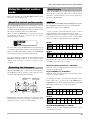
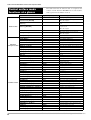
Banks available with HD8
Controls
1
2
3
4
5
6
7/8
[RHYTHM]
Bank 1
Tr. 1
Tr. 2
Tr. 3
Tr. 4
Tr. 5
Tr. 6
Tr. 7
Tr. 8
Bank 2
Tr. 9
Tr. 10
Tr. 11
Tr. 12
Tr. 13
Tr. 14
Tr. 15
Tr. 16
Bank 3
Tr. 17
Tr. 18
Tr. 19
Tr. 20
Tr. 21
Tr. 22
Tr. 23
Tr. 24
Bank 4
Tr. 25
Tr. 26
Tr. 27
Tr. 28
Tr. 29
Tr. 30
Tr. 31
Tr. 32
Selecting a function to control with the
status keys
By using the status keys of the HD8/HD16, Mute, Rec
(recording standby), and Solo on/off for the respective track in
Cubase LE can be controlled. To select which of these
functions is controlled by the status key, proceed as follows.
Banks available with HD16
Controls
1
2
3
4
5
6
Bank 1
Tr. 1
Tr. 2
Tr. 3
Tr. 4
Tr. 5
Tr. 6
Bank 2
Tr. 13
Tr. 14
Tr. 15
Tr. 16
Tr. 17
Tr. 18
Bank 3
Tr. 25
Tr. 26
Tr. 27
Tr. 28
Tr. 29
Tr. 30
15/16
Controls
7
8
9/10
11/12
13/14
Bank 1
Tr. 7
Tr. 8
Tr. 9
Tr. 10
Tr. 11
Tr. 12
Bank 2
Tr. 19
Tr. 20
Tr. 21
Tr. 22
Tr. 23
Tr. 24
Bank 3
Tr. 31
Tr. 32
Tr. 33
Tr. 34
Tr. 35
Tr. 36
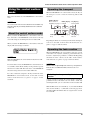
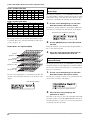
For example, when bank 1 is selected with the HD8, tracks 1 8 of Cubase LE can be controlled. Switching to bank 2 gives
access to tracks 9 - 16.
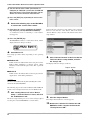
● How banks are organized (HD8)
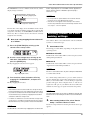
1.
Use the cursor left/right keys to select the
bank that includes the track to control.
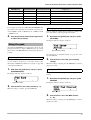
The function currently assigned to the status key (Mute, Rec,
Solo) is shown on the left side of the first line of the display.
On/off function assigned to status key
Stat:Mute Bank:3
EQ1:Freq
2.
Use the [SELECT] key to select the desired
function.
Each push of the key cycles the status key through the Mute →
Rec → Solo function in turn.
3.
Bank 1
(Tracks 1 – 8)
Bank 2
(Tracks 9 – 16)
Press the status key for the target track to
switch the selected function on or off.
Selecting a function to control with the
parameter knob
Bank 3
(Tracks 17 – 24)
By using the parameter knobs of the HD8/HD16, panning, EQ,
and effect send level can be adjusted for each track of Cubase
LE. To select which of these functions is controlled by the
knob, proceed as follows.
Bank 4
(Tracks 25 – 32)
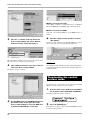
1.
Use the cursor left/right keys to switch between banks. The
currently selected bank is indicated on the first line of the
display.
Use the cursor left/right keys to select the
bank that includes the track to control.
The function currently assigned to the parameter knob is
shown on the second line of the display.
Current bank number
Stat:Mute Bank:1
EQ1:Freq
Stat:Mute Bank:3
EQ1:Freq
Function assigned to parameter knob
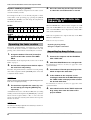
2.
Press the key corresponding to the
parameter to adjust.
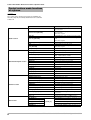
The table on the next page shows the adjustable Cubase LE
parameters and the corresponding HD8/HD16 keys. Except for
the PAN parameter, you select one of several parameters by
pressing the same key repeatedly.
6
Cubase LE Installation Guide/Control Surface Operation Guide